
Introduction
The Dynastar UBP-X700U Region Free 4K UHD Blu-ray Player is designed to provide a versatile and high-quality home entertainment experience. This player supports Ultra HD 4K discs from any region, Blu-ray discs from Regions A, B, and C, and DVDs from all Regions 0 through 8. It features 4K upscaling for standard definition content, 3D Blu-ray playback, and exceptional audio quality with support for DTS Dolby True HD and Dolby Atmos.
This manual provides essential information for setting up, operating, and maintaining your player to ensure optimal performance and longevity.
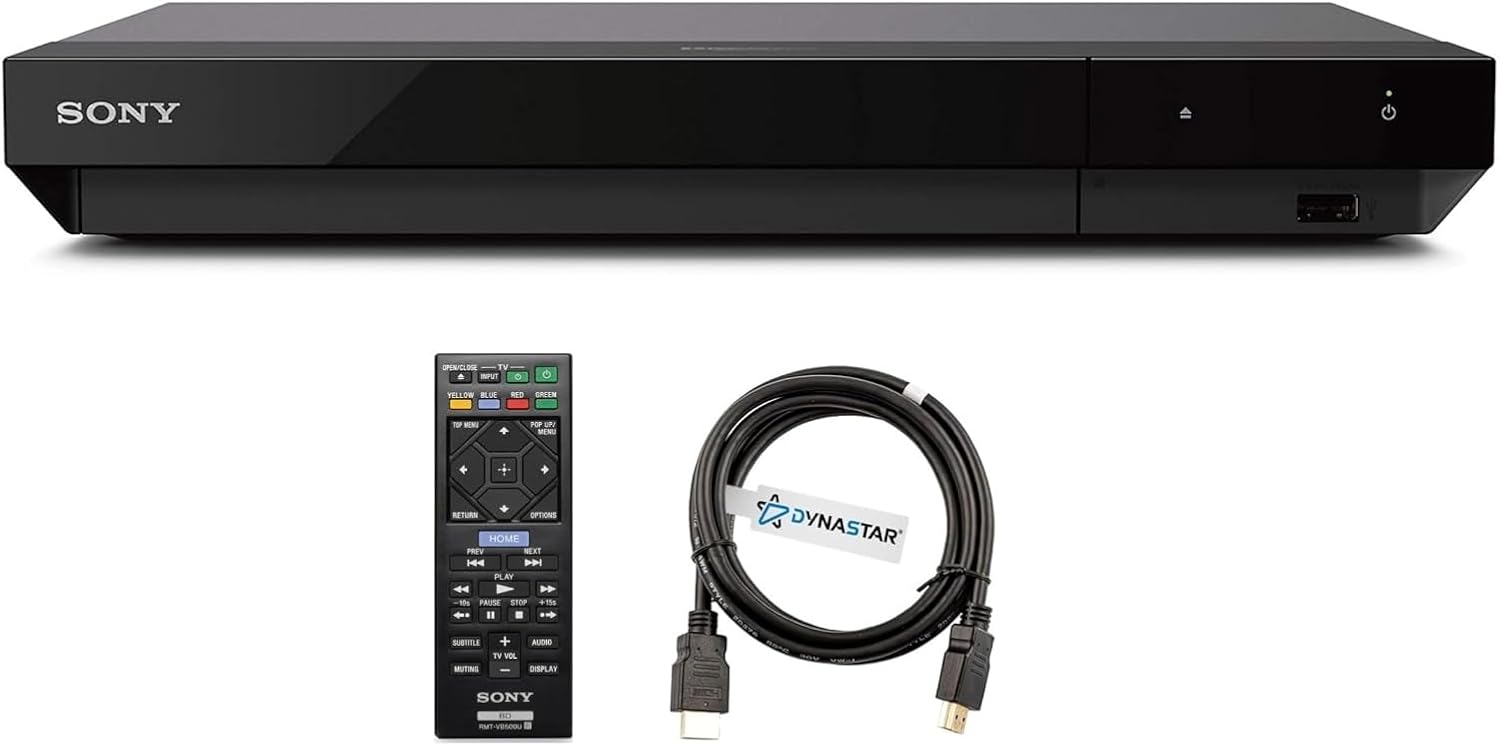
Image: The Dynastar UBP-X700U 4K UHD Blu-ray Player, accompanied by its remote control and a Dynastar 6FT 4K HDMI cable.
Setup
- Unpacking: Carefully remove all components from the packaging. Ensure all included items are present: the UBP-X700U player, remote control, 2 AAA batteries, USA power supply, Dynastar 6FT 4K HDMI cable, and region-switching instructions.
- Power Connection: Connect the USA power supply to the player's power input and then to a wall outlet.
- HDMI Connection: Connect one end of the Dynastar 6FT 4K HDMI cable to the HDMI OUT port on the player and the other end to an available HDMI IN port on your 4K TV or AV receiver.
- Network Connection (Optional): For streaming services and firmware updates, connect the player to your home network via Wi-Fi or an Ethernet cable to the LAN port.
- Remote Control Setup: Insert the 2 AAA batteries into the remote control.
- Initial Power On: Power on your TV and select the correct HDMI input. Then, power on the Blu-ray player. Follow any on-screen prompts for initial setup.
Operating Instructions
Disc Playback
- Inserting a Disc: Press the OPEN/CLOSE button on the player or remote control to open the disc tray. Place a disc gently onto the tray with the label side facing up. Press OPEN/CLOSE again to close the tray.
- Starting Playback: The player will automatically detect the disc and begin playback. If a menu appears, use the remote control's arrow keys and ENTER button to navigate and select your desired option.
- Region-Free Playback:
- DVDs: Standard DVD Regions 0-8 (region-free Code Free) are set to automatic. Just insert the disc and press play.
- Blu-ray Discs: Blu-ray Regions (Zone A, B, C) are changed manually with the remote.
- Turn the player ON and OPEN the disc tray.
- Once the tray is completely open, press the corresponding color button on the remote to select the region:
- Zone A: Press the YELLOW button on the remote control.
- Zone B: Press the BLUE button on the remote control.
- Zone C: Press the RED button on the remote control.
- You can now put your disc in the tray and then close the tray.

Image: A visual guide to the multi-region playback capabilities of the UBP-X700U, showing compatibility with Blu-ray Zones A, B, C and DVD Regions 0-8.
Streaming Services
Once connected to the internet, you can access various streaming services. Use the remote control to navigate to the "Home" menu and select your desired streaming application (e.g., Netflix, YouTube). Ensure a stable internet connection for optimal streaming quality.
USB Playback
The player supports USB playback for various media files. Insert a USB drive into the USB port on the front of the player. Navigate to the USB input option in the player's menu to browse and play your content. External HDD playback is also supported.
Maintenance
- Cleaning the Player: Use a soft, dry cloth to wipe the exterior of the player. Do not use liquid or aerosol cleaners, as they may damage the finish.
- Disc Care: Handle discs by their edges to avoid fingerprints and scratches. Store discs in their cases when not in use. Clean discs with a soft, lint-free cloth, wiping from the center outwards.
- Ventilation: Ensure the player has adequate ventilation. Do not block any ventilation openings on the unit. Avoid placing the player in an enclosed cabinet without proper airflow.
- Firmware Updates: Periodically check for firmware updates via the internet connection to ensure optimal performance and compatibility with new media formats. Go to the home menu, then setup menu, and then go to Software update. Click on Update Via Internet. Do not turn the player off while it is updating.
Troubleshooting
- Disc Does Not Play:
- Ensure the disc is clean and free of scratches.
- Verify the disc is inserted correctly with the label side up.
- If it's a Blu-ray disc, confirm the correct region is selected using the remote control (refer to "Region-Free Playback" section).
- If the player remembers a region code error message, you may need to reset the player. Press the HOME button on the remote with no disc inside to go to the home screen. Use arrow buttons to go to the upper right corner where it says Setup and press Enter. Scroll down to Resetting on the bottom of the menu. Select Reset to Factory Default Settings. Scroll down and select ALL SETTINGS and press Enter. Press Start Enter -> Close Enter. Turn the player off and then on again after 30 seconds. Select Language English and then select quick start mode OFF. You may need to activate network settings again.
- No Picture/Sound:
- Check all HDMI cable connections to ensure they are secure.
- Verify your TV is set to the correct HDMI input source.
- Ensure the player is powered on.
- Remote Control Not Responding:
- Check if the batteries are correctly inserted and not depleted. Replace if necessary.
- Ensure there are no obstructions between the remote and the player's sensor.
- Player Not Powering On:
- Verify the power cable is securely connected to both the player and a working power outlet.
Specifications
| Brand: | Dynastar |
| Model Name: | UBP-X700U |
| Special Feature: | Region Free |
| Media Type: | Blu-Ray Disc, DVD, SACD, UHD / 4K Disc |
| Resolution: | 3840x2160 (4K Ultra HD) |
| Connectivity Technology: | HDMI |
| Connector Type: | HDMI |
| Item Weight: | 4 pounds |
| Package Dimensions: | 15 x 12 x 4 inches |
| Batteries: | 2 AAA batteries required (included) |
| Voltage Support: | 110-240 volts (PAL and NTSC compatible) |

Image: The player supports worldwide voltage (110-240V) and is compatible with both PAL and NTSC video systems.
What's in the Box
- Dynastar UBP-X700U Region-free Version 4K UHD Blu-ray Player
- Dynastar 6FT 4K HDMI cable
- Remote control
- 2 AAA batteries
- USA power supply
- Region-switching instructions
Warranty and Support
For warranty information and technical support, please refer to the documentation included with your product or visit the official Dynastar website. Keep your purchase receipt for warranty claims.