1. Introduction
This user manual provides comprehensive instructions for the Brondi MAXY Flipper Dual SIM mobile phone. Please read this manual carefully before using your device to ensure proper operation and to maximize its features. Keep this manual for future reference.
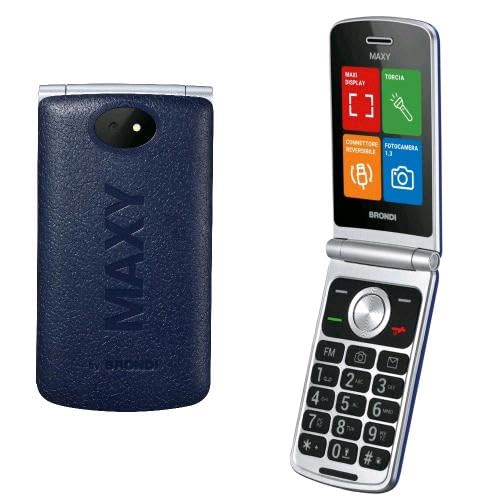
Image 1.1: Brondi MAXY Flipper Dual SIM Phone. This image shows the front view of the Brondi MAXY Flipper phone, highlighting its compact design and physical keypad.
2. Package Contents
Ensure all items are present in the package:
- Brondi MAXY Flipper Mobile Phone
- Type-C Charger
- Battery
- User Manual
3. Setup
3.1. Installing the Battery
- Remove the back cover of the phone by gently prying it open from the notch.
- Align the battery contacts with the terminals inside the phone.
- Press the battery down until it is securely in place.
- Replace the back cover, ensuring it clicks into position.
3.2. Inserting SIM Cards
The Brondi MAXY Flipper supports Dual SIM functionality.
- With the battery removed, locate the SIM card slots.
- Insert your SIM cards into the designated slots, ensuring the gold contacts face downwards and the cut corner aligns correctly.
- Reinstall the battery and back cover.
3.3. Charging the Battery
- Connect the Type-C charger to the charging port at the bottom of the phone.
- Plug the charger into a power outlet.
- The charging indicator will appear on the screen. Allow the phone to charge fully before first use.
4. Operating Instructions
4.1. Power On/Off
- To power on: Press and hold the Power/End Call button until the screen lights up.
- To power off: Press and hold the Power/End Call button, then select "Power off" from the options.
4.2. Making Calls
- Enter the phone number using the keypad.
- Press the Call button (usually green) to initiate the call.
- To end a call, press the End Call button (usually red).
4.3. Answering Calls
When an incoming call rings, press the Call button to answer. To reject a call, press the End Call button.
4.4. Speed Dial
The phone supports direct memories for speed dial from 2 to 9.
- Go to Menu > Contacts > Speed Dial.
- Select a number (2-9) and assign a contact from your phonebook.
- To use, press and hold the assigned number key on the keypad.
4.5. Messaging
To send and receive SMS messages:
- Go to Menu > Messages > Write Message.
- Enter your message using the keypad.
- Enter the recipient's number or select from contacts.
- Select "Send".
4.6. Camera
The phone features a 1.3 MP camera with flash.
- To access the camera, go to Menu > Camera.
- Use the navigation keys to adjust settings.
- Press the Center/OK button to take a photo.
4.7. Bluetooth
To connect to other Bluetooth devices:
- Go to Menu > Settings > Connectivity > Bluetooth.
- Turn Bluetooth On.
- Select "Search for devices" to find available devices.
- Select the desired device and pair using the provided passkey if required.
5. Maintenance
5.1. Cleaning the Device
Use a soft, dry cloth to clean the phone's screen and body. Avoid using liquid cleaners or abrasive materials.
5.2. Battery Care
- Do not expose the battery to extreme temperatures.
- Use only the original Brondi charger.
- If the phone will not be used for an extended period, charge the battery to about 50% and store it in a cool, dry place.
5.3. Software Updates
Check for available software updates periodically through the phone's settings menu to ensure optimal performance and security. (Note: Software updates are not guaranteed for this model.)
6. Troubleshooting
| Problem | Possible Cause | Solution |
|---|---|---|
| Phone does not power on | Low battery; Battery not installed correctly | Charge the battery; Reinstall the battery correctly |
| Cannot make or receive calls | No SIM card; SIM card not inserted correctly; No network signal | Insert SIM card; Reinsert SIM card; Move to an area with better signal |
| Poor call quality | Weak network signal; Obstructions | Move to an open area; Avoid using in enclosed spaces |
| Battery drains quickly | Many applications running; High screen brightness; Old battery | Close unused applications; Reduce screen brightness; Consider replacing battery |
| Bluetooth not connecting | Bluetooth off; Device out of range; Pairing issue | Ensure Bluetooth is on; Move devices closer; Re-pair the devices |
7. Specifications
| Feature | Detail |
|---|---|
| Brand | Brondi |
| Model Name | Flipper |
| Item Weight | 200 grams |
| Battery | 1 Non-standard battery (included) |
| Memory Capacity | 1 GB |
| Installed Flash Memory Size | 8 GB |
| Digital Storage Capacity | 8 GB |
| Operating System | Proprietary |
| Additional Features | Dual SIM, Backlit Keys, Speakerphone, Vibration |
| Included Components | Flipper Mobile Phone, Type-C Charger, Battery, User Manual |
| Number of Items | 1 |
| Display | LCD |
| Optical Sensor Resolution | 1.3 MP |
| Batteries Included? | Yes |
| Battery Power Rating | 800 Milliamper-hours (mAh) |
| Cellular Technology | 2G |
| Connector Type | Bluetooth |
| Human Interface Input | Alphanumeric Keypad |
| Form Factor | Slider |
| Wireless Provider | All carriers |
| Wireless Network Technology | GSM |
| Number of SIM Card Slots | Dual SIM |
8. Warranty and Support
For warranty information and customer support, please refer to the documentation included in your product package or visit the official Brondi website. Keep your proof of purchase for warranty claims.
Note: The product was available on Amazon.it starting October 13, 2025. Software updates are not guaranteed for this model.


