
Sweetcrispy C-3789-BK
Sweetcrispy Ergonomic Mesh Office Chair Instruction Manual
Model: C-3789-BK | Brand: Sweetcrispy
Introduction
This manual provides comprehensive instructions for the assembly, operation, and maintenance of your Sweetcrispy Ergonomic Mesh Office Chair. Please read this manual thoroughly before use to ensure proper function and safety.
Important Safety Information
Warning: Do not exceed the maximum weight capacity of 300 pounds. Ensure all adjustable components are properly secured before use. Use the chair on a stable, flat surface to prevent tipping. Follow assembly instructions carefully to maintain stability and safety.
Setup and Assembly
The Sweetcrispy Ergonomic Mesh Office Chair is designed for straightforward assembly. All necessary tools are included. Please follow the visual instructions provided in the assembly guide and accompanying video for a smooth setup process.
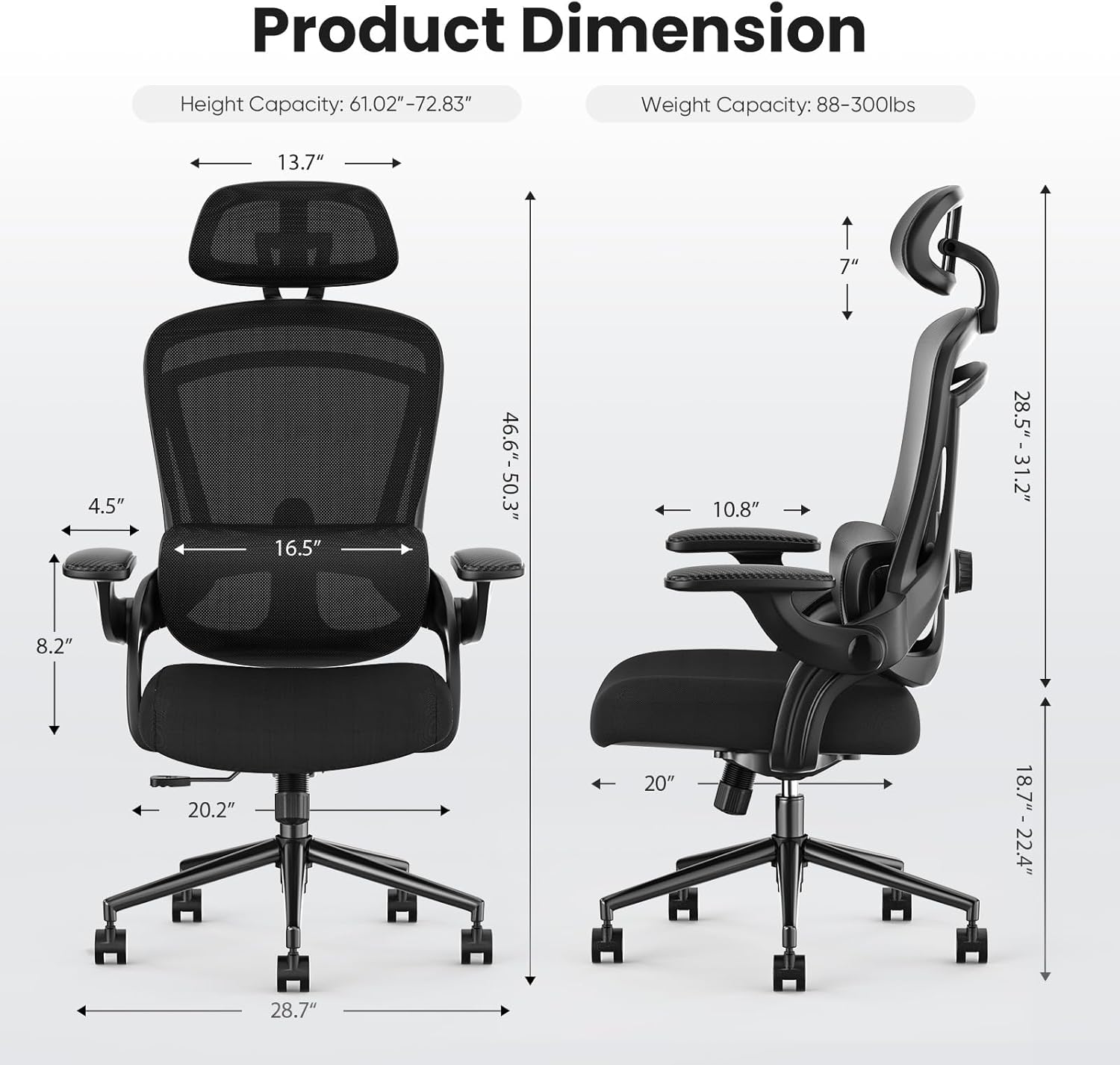
Image: Product dimensions and weight capacity for the Sweetcrispy Ergonomic Mesh Office Chair.
Assembly Steps Overview:
- Unpack all components and verify against the parts list.
- Attach the casters to the chair base.
- Insert the gas lift cylinder into the base.
- Assemble the seat and backrest components.
- Attach the assembled seat and backrest to the gas lift cylinder.
- Secure all screws and ensure stability.
Video: A visual guide to assembling the Sweetcrispy Ergonomic Office Desk Chair with 2D Headrest. This video demonstrates the step-by-step process of putting the chair together, including attaching the base, gas lift, seat, backrest, and headrest.
Operating Your Chair
Your Sweetcrispy Ergonomic Mesh Office Chair offers multiple adjustment features to customize your seating experience for optimal comfort and support.
1. Seat Height Adjustment
To adjust the seat height, locate the lever on the right side beneath the seat. While seated, pull the lever upwards to lower the seat. To raise the seat, stand up slightly and pull the lever upwards. Release the lever to lock the height.

Image: A user seated comfortably in the Sweetcrispy Ergonomic Mesh Office Chair, illustrating the chair's ergonomic design in an office setting.
2. 2D Headrest Adjustment
The headrest can be adjusted in two dimensions: height and angle. To adjust the height, gently pull the headrest up or push it down. To adjust the angle, tilt the headrest forward or backward to find your preferred neck support. The headrest can rotate up to 42 degrees and adjust vertically by 2.4 inches.

Image: Detailed view of the adjustable headrest, highlighting its 2.4-inch vertical adjustment and 42-degree rotational capability for optimal neck support.
3. Lumbar Support Adjustment
The lumbar support is designed to provide optimal lower back comfort. It can be adjusted vertically by 2.36 inches to fit the natural curve of your spine. Use the knob on the side of the backrest to move the lumbar support up or down.

Image: The adjustable lumbar support mechanism, demonstrating its vertical movement to conform to individual back contours.
4. Flip-up Armrests
The armrests can be flipped up by 90 degrees to save space or allow the chair to be pushed closer to a desk. Simply lift the armrests upwards until they lock into the vertical position. Push them down to return to the horizontal position.

Image: The chair's flip-up armrests, illustrating their 90-degree rotation for space-saving and versatility.
5. Rocking Mode
The chair features a 120° rocking mode for relaxation. To activate, pull out the lever on the left side beneath the seat. Push the lever back in to lock the chair in an upright position. The tension of the rocking motion can be adjusted using the round knob located beneath the seat.

Image: Visual representation of the chair's 120-degree rocking function and the lever for height adjustment.
Video: Demonstration of the Sweetcrispy Ergonomic Mesh Office Chair's various features, including seat height, headrest, lumbar support, and rocking function.
Maintenance
To ensure the longevity and optimal performance of your Sweetcrispy Ergonomic Mesh Office Chair, regular maintenance is recommended:
- Cleaning: Wipe clean with a damp cloth. Avoid harsh chemicals that may damage the mesh or fabric.
- Fasteners: Periodically check all bolts and screws to ensure they are fully tightened. Lubricate moving parts if necessary, approximately every 6 months or as needed.
- Casters: Keep casters free of debris (hair, dust, etc.) to ensure smooth movement.
Troubleshooting
If you encounter any issues with your chair, please refer to the following common solutions:
- Chair not adjusting height: Ensure the gas lift lever is fully engaged and not stuck. Check for any obstructions around the gas lift cylinder.
- Casters not rolling smoothly: Inspect casters for trapped debris (hair, lint) and clean them thoroughly.
- Chair feels unstable: Verify that all assembly screws are securely tightened. Ensure the chair is on a flat, even surface.
- Squeaking noises: Apply a small amount of lubricant to moving parts, especially around the base and adjustment mechanisms.
For persistent issues, please contact Sweetcrispy customer support.
Specifications
| Feature | Detail |
|---|---|
| Brand | Sweetcrispy |
| Model Name | Ergonomic Office Chair |
| Model Number | C-3789-BK |
| Color | Dark Black |
| Product Dimensions | 20.04"D x 20.24"W x 50.3"H |
| Maximum Weight Recommendation | 300 Pounds |
| Back Style | Adjustable knob, Double backrest, Split backrest |
| Special Features | Adjustable Backrest, Adjustable Headrest, Adjustable Lumbar, Back Support, Ergonomic |
| Fill Material | High elastic sponge |
| UPC | 751074062165 |
| Assembly Required | Yes |
| Product Care Instructions | Wipe Clean |
Warranty and Support
For warranty information or technical support, please refer to the product packaging or contact Sweetcrispy customer service directly. Contact details are typically provided with your purchase documentation.
You may also visit the official Sweetcrispy store for more information: Sweetcrispy Store
Ask a question about this manual
Ask about setup, troubleshooting, compatibility, parts, safety, or missing instructions. Manuals+ will review the question and use this page’s manual context to help answer it.