
Introduction
This manual provides detailed instructions for the installation, operation, and maintenance of your JAIOTlink Y03-W 2MP Security Camera. Please read this manual carefully before using the product to ensure proper setup and functionality. This camera is designed for both indoor and outdoor surveillance, offering features such as dual-band Wi-Fi connectivity, night vision, two-way audio, and motion detection.
What's in the Box
Verify that all components are present in the package:
- Pet Camera body
- Type-C Cable
- Mounting Screw set
- Installation Guide (this manual)
Setup
1. Physical Installation
The JAIOTlink Y03-W camera is designed for wall mounting. Choose a location that provides the desired viewing angle and is within reach of a power outlet.
- Select Mounting Location: Identify a suitable indoor or outdoor wall location. Ensure the camera has a clear line of sight to the area you wish to monitor.
- Mark Drill Holes: Use the camera's base as a template to mark the positions for the mounting screws on the wall.
- Drill Holes: Drill pilot holes at the marked positions. Insert wall anchors if necessary for secure mounting.
- Mount the Camera: Secure the camera base to the wall using the provided mounting screws.
- Connect Power: Connect the Type-C cable to the camera and plug the other end into a compatible power adapter (not included) and then into a power outlet. The camera will power on.
2. App Installation and Wi-Fi Connection
The camera operates with the EseeCloud app, supporting both 2.4G and 5G Wi-Fi networks for stronger signals and faster connections.
- Download EseeCloud App: Search for "EseeCloud" in your smartphone's app store (iOS or Android) and download the application.
- Create Account: Open the EseeCloud app and follow the on-screen instructions to create a new user account or log in if you already have one.
- Add Device: In the app, tap the "+" icon to add a new device. Select your camera model or scan the QR code usually found on the camera or its packaging.
- Connect to Wi-Fi: Follow the app's prompts to connect the camera to your home Wi-Fi network. Ensure your smartphone is connected to the same Wi-Fi network during the setup process. The camera supports both 2.4GHz and 5GHz bands.
- Complete Setup: Once connected, the camera will appear in your device list within the EseeCloud app. You can now view the live stream and configure settings.
3. Alexa Integration
The JAIOTlink Y03-W camera is compatible with Amazon Alexa, allowing for voice control and live stream viewing on compatible Alexa devices.
- Open Alexa App: Ensure your Amazon Alexa device is set up and connected to your Amazon account.
- Enable Skill: In the Alexa app, go to "Skills & Games" and search for the "EseeCloud" skill. Enable the skill.
- Link Accounts: You will be prompted to link your EseeCloud account with your Amazon account. Enter your EseeCloud login credentials.
- Discover Devices: After linking, ask Alexa to "Discover devices" or manually initiate device discovery in the Alexa app. Your JAIOTlink camera should be detected.
- Voice Commands: You can now use voice commands such as "Alexa, show me the [camera name]" to view the live feed on compatible Alexa devices (e.g., Echo Show).
Operating Instructions
1. Night Vision and Two-Way Audio
The camera features advanced night vision capabilities and two-way audio communication.
- Night Vision: The camera automatically switches between infrared, color full, and smart night vision modes to provide clear images up to 33 feet in low-light conditions. You can adjust night vision settings within the EseeCloud app.
- Two-Way Audio: Utilize the built-in microphone and speaker via the EseeCloud app to communicate with individuals near the camera. Tap the microphone icon in the live view to speak, and listen through the speaker.
2. Real-Time Motion Detection Alerts
The camera is equipped with motion detection to alert you to activity in its field of view.

Figure 1: Motion Detection Alert on Smartphone. This image illustrates how the EseeCloud app notifies users of detected motion, showing a live screen view and options for siren and microphone activation.
- Alerts: When motion is detected, the camera will automatically record a 10-15 second alert video to the cloud (kept for 24 hours) and send a notification to your EseeCloud app.
- Customization: You can adjust motion detection sensitivity and set specific detection zones within the app to minimize false alarms.
3. Pan/Tilt Control
Control the camera's viewing angle remotely through the EseeCloud app.
- 360° Horizontal Pan: The camera can rotate horizontally up to 360 degrees.
- 110° Vertical Tilt: The camera can tilt vertically up to 110 degrees.
- App Control: Use the directional controls within the EseeCloud app's live view to adjust the camera's pan and tilt to monitor different areas of your room.
4. Storage Options
The camera offers flexible storage solutions for your recordings.
- Local Storage (SD Card): The camera supports a Micro SD card (up to 256GB, not included) for 24/7 continuous recording. Insert the SD card into the designated slot on the camera.
- Cloud Storage: Optional cloud storage is available for alert videos and continuous recording. Refer to the EseeCloud app for subscription details and options.
5. Multi-Device Management
Expand your surveillance coverage by connecting and managing multiple JAIOTlink cameras through the EseeCloud app.
- Add Multiple Cameras: Repeat the device setup process for each additional camera you wish to add.
- Unified View: The EseeCloud app allows you to view and manage all your connected cameras from a single interface, providing comprehensive property protection.
Maintenance
Regular maintenance ensures optimal performance and longevity of your security camera.
- Cleaning: Gently wipe the camera lens and body with a soft, dry cloth to remove dust and smudges. Do not use harsh chemicals or abrasive cleaners.
- Firmware Updates: Periodically check the EseeCloud app for available firmware updates. Keeping your camera's firmware updated ensures you have the latest features and security enhancements.
- Power Cycle: If the camera experiences connectivity issues or unresponsiveness, try unplugging it from the power source for 10 seconds and then plugging it back in.
Troubleshooting
If you encounter issues with your JAIOTlink Y03-W camera, refer to the following common solutions:
| Problem | Possible Solution |
|---|---|
| Camera not connecting to Wi-Fi |
|
| No motion detection alerts |
|
| Poor image quality |
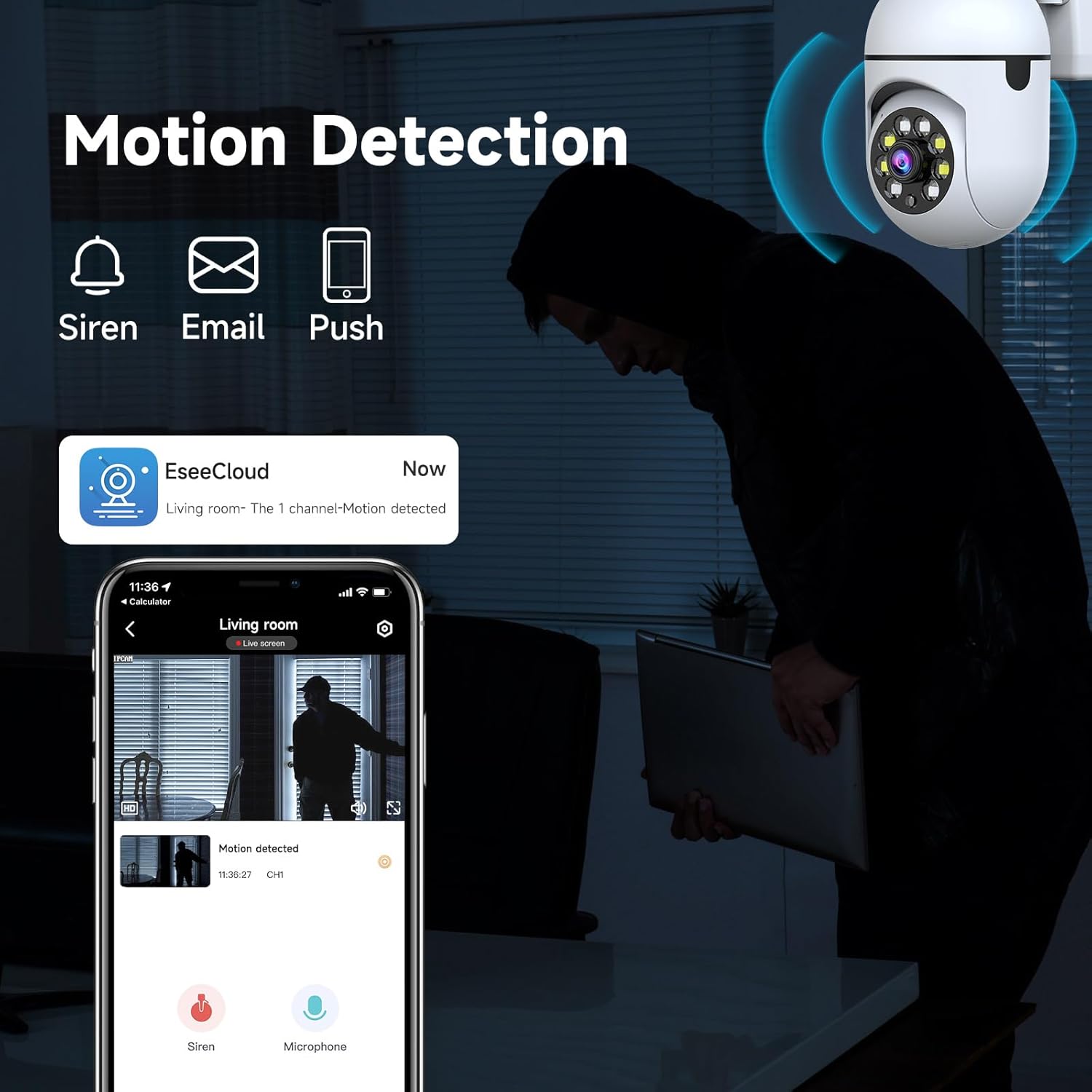 Figure 2: Resolution Comparison. This image demonstrates the difference in detail between 720p and 1080p video, highlighting the improved clarity at higher resolutions. |
| Two-way audio not working |
|
Specifications
Technical details for the JAIOTlink Y03-W 2MP Security Camera:
- Model: Y03-W
- Effective Still Resolution: 2 MP
- Video Capture Resolution: 3MP (for video processing, effective still is 2MP)
- Indoor/Outdoor Usage: Indoor, Outdoor
- Connectivity Protocol: Wi-Fi (2.4G/5G Dual-Band)
- Power Source: Corded Electric (5 Volts)
- Mounting Type: Wall Mount
- Form Factor: Dome
- Viewing Angle: 360 Degrees (Pan/Tilt control)
- Night Vision Range: 33 Feet
- Flash Memory Type: SD (up to 256 GB, not included)
- Compatible Devices: Smartphone, Amazon Alexa
- Special Features: 2-Way Audio, Local Recording, Motion Sensor, PTZ Technology, Color Night Vision
- Item Dimensions (L x W x H): 1 x 2 x 0.5 inches
- Item Weight: 4.8 ounces
Warranty and Support
Your JAIOTlink Y03-W 2MP Security Camera comes with a reliable warranty and dedicated support.
- Warranty: This product includes a 12-Month Reliable Warranty from the date of purchase.
- Customer Support: For technical assistance, warranty claims, or any product-related inquiries, please contact our support team at E-Mingxun@outlook.com.