
1. Introduction
Thank you for choosing the Jesverty SPS-6020N DC Power Supply. This manual provides essential information for the safe and efficient operation, setup, and maintenance of your device. Please read it thoroughly before use and retain it for future reference.
Safety Warnings
- Always ensure the power supply is connected to a properly grounded outlet.
- Do not operate the unit in wet or damp conditions.
- Ensure adequate ventilation around the unit to prevent overheating. The internal fan is temperature-controlled.
- Verify correct voltage and current settings before connecting any load to prevent damage to the power supply or the connected device.
- This model does NOT have a 115V/230V input selectable switch. The power cords and AC input settings are factory-configured based on the destination. Do not attempt to change the input voltage.
- Avoid touching output terminals when the unit is powered on.
2. Product Overview
The Jesverty SPS-6020N is a variable DC regulated bench power supply designed for precision and reliability. It features encoder adjustment knobs for fine control, a 4-digit LED display, and automatic Constant Voltage (CV) and Constant Current (CC) modes.
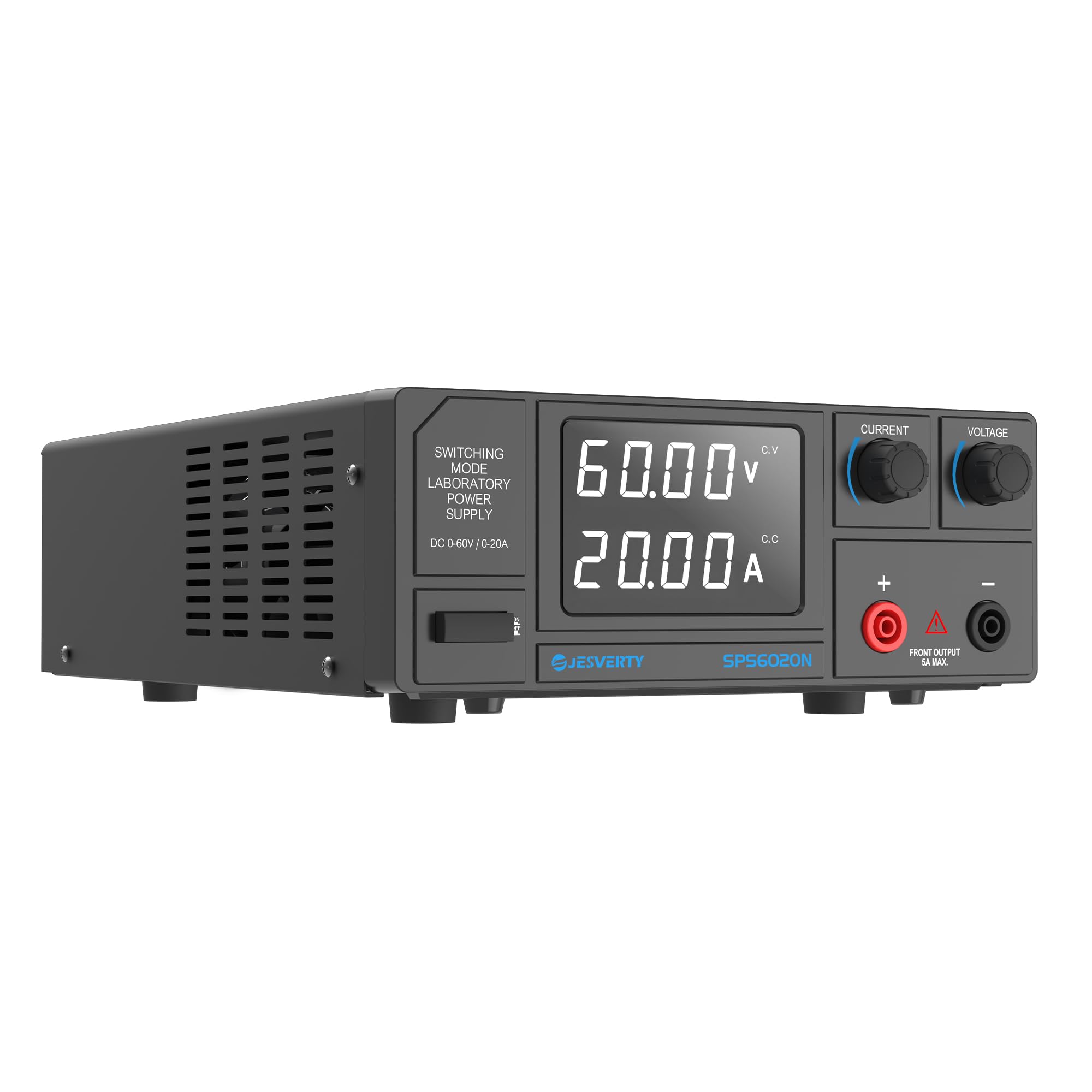
Figure 2.1: Front view of the Jesverty SPS-6020N DC Power Supply, showing the display and control knobs.
Front Panel Controls and Display
- 4-Digit LED Display: Shows real-time voltage (V) and current (A) values with high precision (0.01V, 0.001A resolution).
- Voltage Adjustment Knob: Encoder knob for precise voltage setting. Press to select digit, rotate to adjust.
- Current Adjustment Knob: Encoder knob for precise current setting. Press to select digit, rotate to adjust.
- Output Terminals: Positive (+) and Negative (-) terminals for connecting the load.
- Front Output (5A MAX): Auxiliary output terminal for lower current applications.
Rear Panel Features

Figure 2.2: Rear view of the power supply, highlighting the intelligent cooling fan, AC input, and fuse.
- Intelligent Cooling Fan: Activates automatically based on internal temperature to maintain optimal operating conditions.
- AC Input: Power cord connection point.
- FUSE: Overcurrent protection for the unit.
- Output Terminal: Main output terminals for connecting the load (Red positive; Black negative).
3. Setup
Unpacking and Inspection
- Carefully remove the power supply from its packaging.
- Inspect the unit for any signs of physical damage that may have occurred during transit. If damage is found, contact customer service immediately.
- Confirm all accessories are present: 1 x SPS Unit, 1 x Power Cord, 1 x Instruction Manual.
Placement
- Place the power supply on a stable, level surface.
- Ensure there is sufficient space around the unit, especially at the rear where the cooling fan is located, to allow for proper airflow and heat dissipation.
- Avoid placing the unit near heat sources or in direct sunlight.
Connecting Power
- Connect the provided power cord to the AC input socket on the rear panel of the power supply.
- Plug the other end of the power cord into a suitable grounded electrical outlet. Ensure the outlet voltage matches the power supply's input voltage (as specified on the unit's label).
Connecting the Load
- Use appropriate banana plug cables (not included) to connect your load to the output terminals.
- Connect the positive (+) terminal of the power supply (red) to the positive terminal of your load.
- Connect the negative (-) terminal of the power supply (black) to the negative terminal of your load.
- For lower current applications (up to 5A), you may use the front auxiliary output terminal.
4. Operating Instructions
Powering On/Off
Press the power switch located on the front panel to turn the unit on or off. The LED display will illuminate upon power-on.
Setting Voltage and Current

Figure 4.1: Illustration of the encoder knob operation for setting voltage and current values.
- Voltage Adjustment: Rotate the 'VOLTAGE' encoder knob to adjust the output voltage. Press the knob to cycle through the digits, allowing for precise adjustment of each decimal place. The resolution is 0.01V.
- Current Adjustment: Rotate the 'CURRENT' encoder knob to adjust the output current limit. Press the knob to cycle through the digits, enabling precise adjustment. The resolution is 0.001A.
- Always set the desired voltage and current limit before connecting your load or turning on the output.
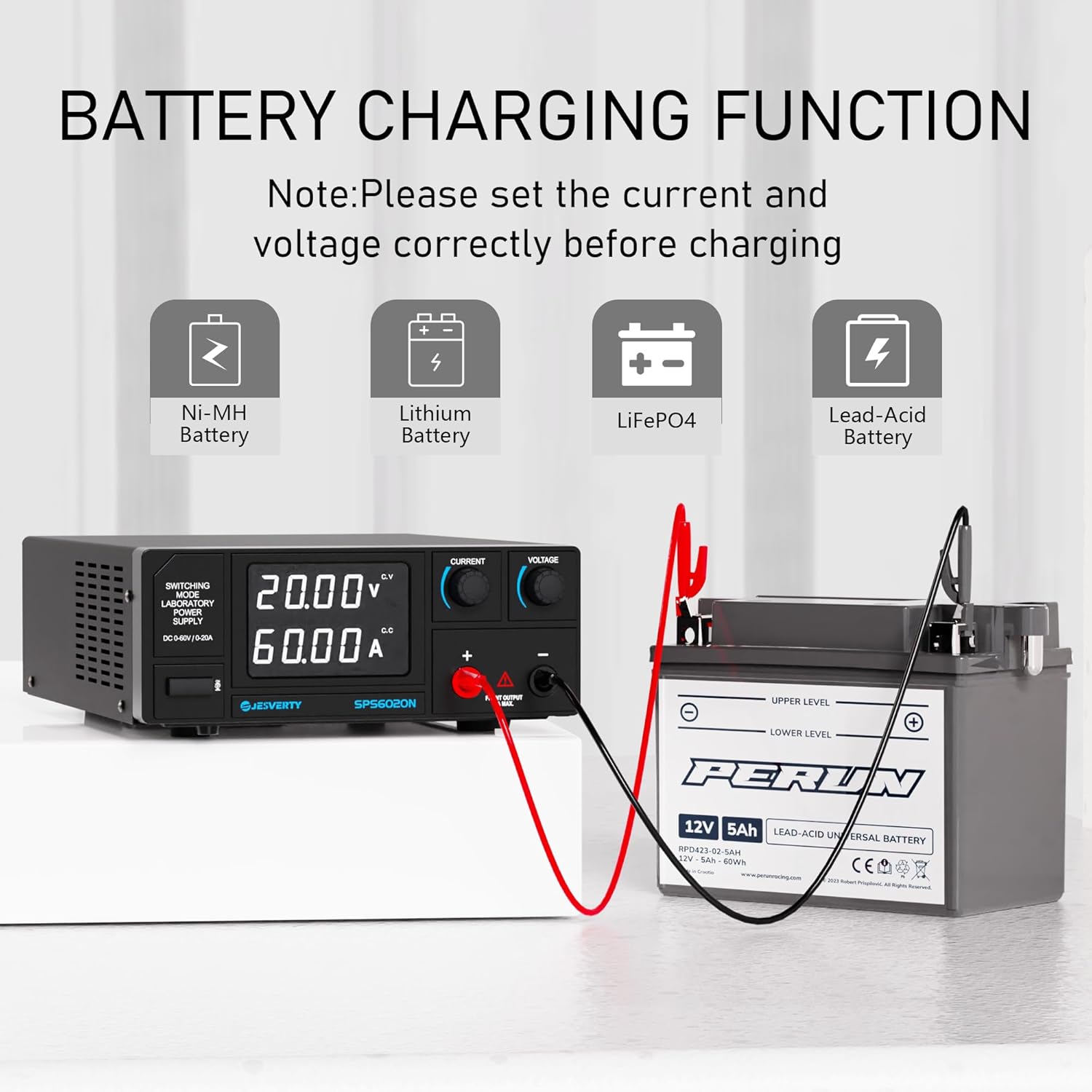
Figure 4.2: The 4-digit LED display provides accurate real-time readings of voltage and current.
Constant Voltage (C.V.) and Constant Current (C.C.) Modes
- The SPS-6020N automatically switches between Constant Voltage (C.V.) and Constant Current (C.C.) modes depending on the load conditions.
- In C.V. mode, the output voltage remains constant at the set value, while the current varies according to the load.
- In C.C. mode, the output current remains constant at the set limit, and the voltage varies. This typically occurs when the load resistance is too low for the set voltage, causing the current to reach its limit.
- The voltage and current settings you establish act as the crossover point at which the mode switches.
5. Applications
The Jesverty SPS-6020N DC Power Supply is versatile and suitable for a wide range of applications:
Battery Charging Function

Figure 5.1: The power supply can be used for charging various battery types, including Ni-MH, Lithium, LiFePO4, and Lead-Acid batteries.
This power supply can be used to charge various battery types, including Ni-MH, Lithium, LiFePO4, and Lead-Acid batteries. Note: Always set the correct voltage and current limits specific to the battery type and its charging requirements before connecting. Incorrect settings can damage the battery or pose a safety risk.
Other Common Uses

Figure 5.2: The power supply is suitable for a variety of settings, from DIY projects to professional laboratories and auto repair.
- Electronic Laboratories: Ideal for research, development, and testing of electronic circuits and components.
- Auto Repair Shops: Useful for testing automotive electrical systems and components.
- DIY Projects: Provides a stable and adjustable power source for hobbyists and makers.
- Educational Settings: Suitable for teaching and practical experiments in schools and universities.
6. Maintenance
Cleaning
- Regularly clean the exterior of the unit with a soft, dry cloth.
- Do not use abrasive cleaners or solvents, as these can damage the casing.
- Ensure the ventilation openings and the cooling fan at the rear are free from dust and obstructions to maintain proper airflow. Use a soft brush or compressed air to gently clear any debris.
Fuse Replacement
The unit is equipped with a fuse for protection. If the unit fails to power on, check the fuse located near the AC input on the rear panel. Ensure the power supply is disconnected from the mains before inspecting or replacing the fuse. Replace with a fuse of the same type and rating only.
7. Troubleshooting
If you encounter issues with your Jesverty SPS-6020N, refer to the following common problems and solutions:
- No Power:
- Check if the power cord is securely connected to both the unit and the wall outlet.
- Verify that the wall outlet is functional.
- Check the fuse on the rear panel and replace if blown (ensure power is disconnected first).
- No Output Voltage/Current:
- Ensure the output is enabled (if applicable, though this model typically outputs once settings are made).
- Check if the voltage and current limits are set above zero.
- Verify that the load is correctly connected and not short-circuited.
- If the unit is in Constant Current (C.C.) mode, the voltage may drop if the load resistance is too low.
- Overload Protection Activated:
- The unit may enter overload protection if the output current exceeds the set limit or if there is a short circuit.
- Disconnect the load, reduce the current limit, or increase the load resistance, then re-enable the output.
- Unusual Odor:
- Some new electronic devices may emit a slight odor during initial use. Ensure the unit is in a well-ventilated area.
- If the odor persists, is strong, or is accompanied by smoke or unusual noises, immediately disconnect power and contact customer service.
If these steps do not resolve the issue, please contact Jesverty Customer Service for further assistance.
8. Specifications
Detailed technical specifications for the Jesverty SPS-6020N DC Power Supply:

Figure 8.1: Physical dimensions and weight of the Jesverty SPS-6020N.
| Feature | Specification |
|---|---|
| Model Number | SPS-6020N |
| Output Voltage | 0-60 V |
| Output Current | 0-20 A |
| Output Power | 1200 W |
| Display Type | 4-Digit LED Display (White LED) |
| Voltage Display Resolution | 0.01 V |
| Current Display Resolution | 0.001 A |
| Adjustment Method | Encoder Knobs |
| Operating Modes | Constant Voltage (C.V.), Constant Current (C.C.) |
| Dimensions (L x W x H) | 11.4 x 3.5 x 8.3 inches (290 x 89 x 211 mm) |
| Weight | Approx. 3.4 kg (7.5 lbs) |
| Material | Plastic, Polycarbonate (PC) |
| Connector Type | Banana Plug |
| Certifications | FCC, UL, RoHS, CE |
| Cooling | Temperature Controlled Fan |
| Auxiliary Output | Yes (Front, 5A MAX) |
9. Warranty and Support
Jesverty provides professional technical support for its products. Should you encounter any problems or have questions regarding your SPS-6020N DC Power Supply, please do not hesitate to contact Jesverty Customer Service.
- Contact Method: You can reach Jesverty Customer Service via Amazon's messaging system or through the email address provided in your product packaging.
- Please have your product model (SPS-6020N) and purchase details ready when contacting support to ensure efficient service.


