
1. Introduction
Thank you for choosing PUJIMAX Rechargeable AA and AAA Lithium Batteries with USB C Fast Charger. This manual provides essential information for the safe and efficient use of your new rechargeable battery system. Please read it thoroughly before use and retain it for future reference.
2. Safety Information
To ensure safe operation and prevent damage, please observe the following precautions:
- Do not disassemble, crush, puncture, or short-circuit the batteries or charger.
- Do not expose batteries or charger to water, fire, or high temperatures (above 60°C/140°F).
- Keep batteries and charger away from children and pets.
- Use only the provided charger or a compatible USB-C power source for charging.
- Do not mix different types of batteries (e.g., lithium with NiMH or alkaline) in the same device or charger.
- If a battery shows signs of leakage, swelling, or damage, discontinue use immediately and dispose of it properly.
- Ensure correct polarity (+/-) when inserting batteries into devices or the charger.
3. Package Contents
Verify that all items are present in your package:
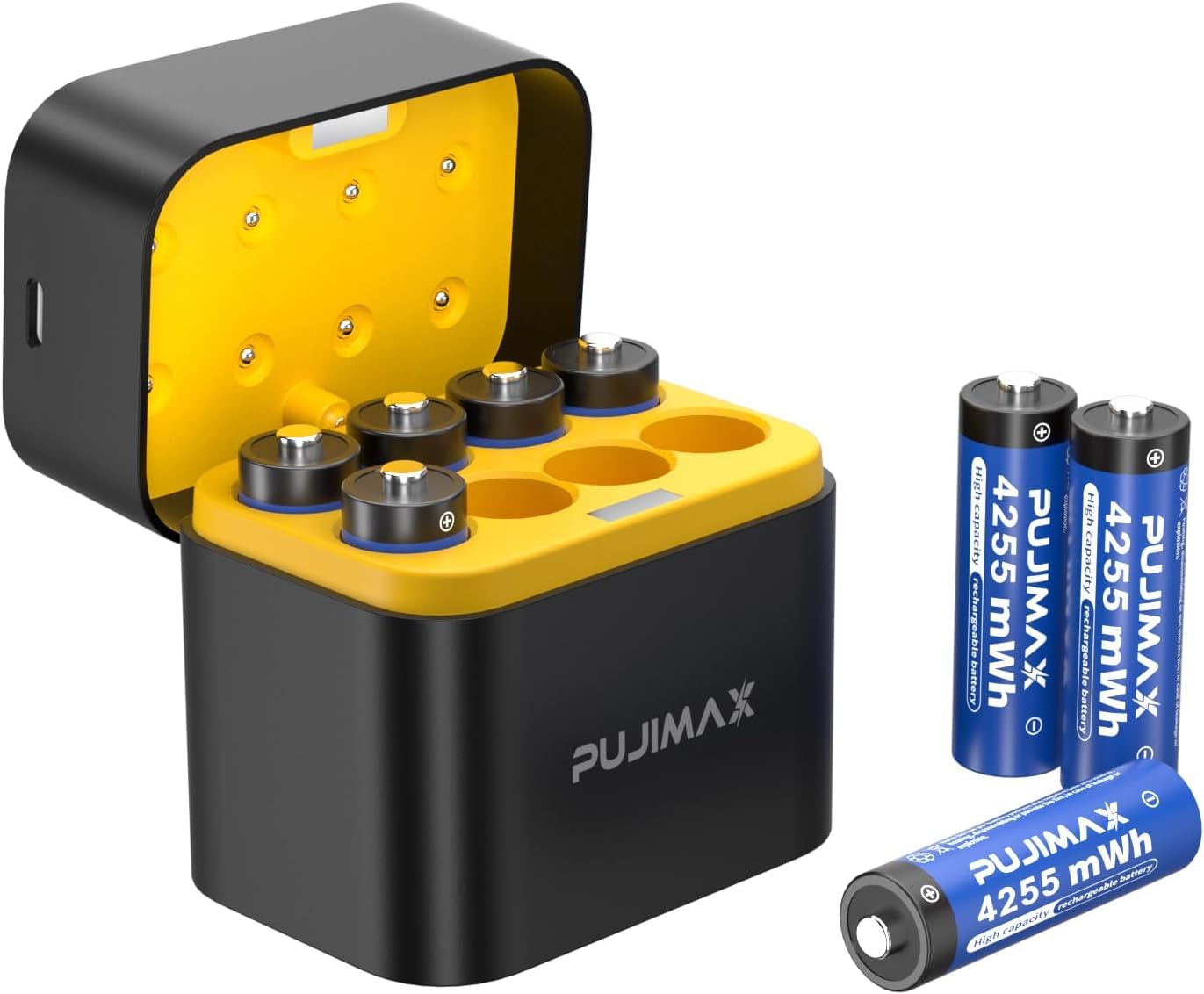
- PUJIMAX USB C Fast Charger
- PUJIMAX Rechargeable AA Lithium Batteries (Quantity as purchased, e.g., 8 PCS)
- PUJIMAX Rechargeable AAA Lithium Batteries (Quantity as purchased, e.g., 8 PCS)
- USB-C Charging Cable
- User Manual (this document)
4. Setup
Follow these steps to set up your PUJIMAX battery system:
- Unpack the Components: Carefully remove all items from the packaging.
- Connect the Charger: Plug the provided USB-C charging cable into the USB-C port on the charger. Connect the other end of the cable to a compatible USB power adapter (not included) or a USB port on a computer.
- Insert Batteries: Insert the PUJIMAX AA or AAA lithium batteries into the corresponding slots in the charger. Ensure the positive (+) and negative (-) terminals of the batteries match the polarity markings in the charger slots. The charger is designed to accommodate both AA and AAA batteries.

5. Operating Instructions
5.1 Charging the Batteries
Once batteries are correctly inserted and the charger is connected to power, the charging process begins automatically. The charger features indicator lights to show the charging status:
- Green Light: Indicates normal charging.
- Red Light: Indicates an error. Check battery insertion or if the battery is damaged.
- Solid Green Light (after charging): Indicates the battery is fully charged.
A full charge typically takes approximately 2.5 hours. Once fully charged, remove the batteries from the charger.

5.2 Using the Batteries
PUJIMAX lithium batteries provide a constant 1.5V output, ensuring stable power for your devices. This is particularly beneficial for high-drain electronics that require consistent voltage.
- Insert the charged batteries into your electronic devices (e.g., cameras, flashlights, wireless mice, shavers, toy cars) according to the device's polarity markings.
- These batteries are designed for long-lasting performance and can be recharged over 2000 times, offering significant value and reducing waste compared to disposable batteries.


6. Maintenance
6.1 Cleaning
Wipe the charger and batteries with a dry, soft cloth. Do not use abrasive cleaners or immerse in water.
6.2 Storage
Store batteries in a cool, dry place away from direct sunlight and extreme temperatures. For long-term storage, it is recommended to charge batteries to about 50% capacity. Keep them in their original packaging or a dedicated battery case to prevent short circuits.
6.3 Disposal
Do not dispose of batteries in household waste. Lithium batteries should be recycled at designated collection points. Consult your local regulations for proper battery disposal.

7. Troubleshooting
- Batteries not charging (Red indicator light):
- Ensure batteries are inserted with correct polarity.
- Check if the USB-C cable is securely connected to both the charger and the power source.
- Try a different USB power adapter or port.
- The battery might be damaged; discontinue use if issues persist. - Batteries not powering device:
- Ensure batteries are fully charged.
- Check battery polarity in the device.
- Clean battery contacts on both the battery and the device.
- The device might be incompatible or require a different battery type. - Charger not turning on:
- Verify the USB-C cable connection and power source.
- Try a different USB-C cable.
8. Specifications
- Battery Type: Lithium-ion (Li-ion)
- Battery Sizes: AA, AAA
- AA Battery Capacity: 4255mWh (approx. 2837mAh at 1.5V)
- AAA Battery Capacity: 1512mWh (approx. 1008mAh at 1.5V)
- Output Voltage: 1.5V Constant
- Recharge Cycles: 2000+
- Charging Time: Approximately 2.5 hours (for full charge)
- Charger Input: USB-C
- Charger Dimensions: Approximately 72mm (L) x 52mm (W) x 71mm (H) / 2.83in (L) x 2.05in (W) x 2.81in (H)
- ASIN: B0FVWNKJJX
- Date First Available: April 10, 2025
9. Warranty and Support
PUJIMAX products are designed for reliability and performance. For warranty information, technical support, or customer service inquiries, please refer to the contact information provided with your purchase or visit the official PUJIMAX website. Please have your product model and ASIN (B0FVWNKJJX) ready when contacting support.


