
Introduction
This manual provides essential instructions for setting up, operating, and maintaining your Motorola Moto g06 Power smartphone. Please read this guide thoroughly to ensure proper use and to maximize your device's capabilities. The Moto g06 Power is designed for reliable performance with a long-lasting 5000 mAh battery, a large HD+ display, and a 50MP camera.
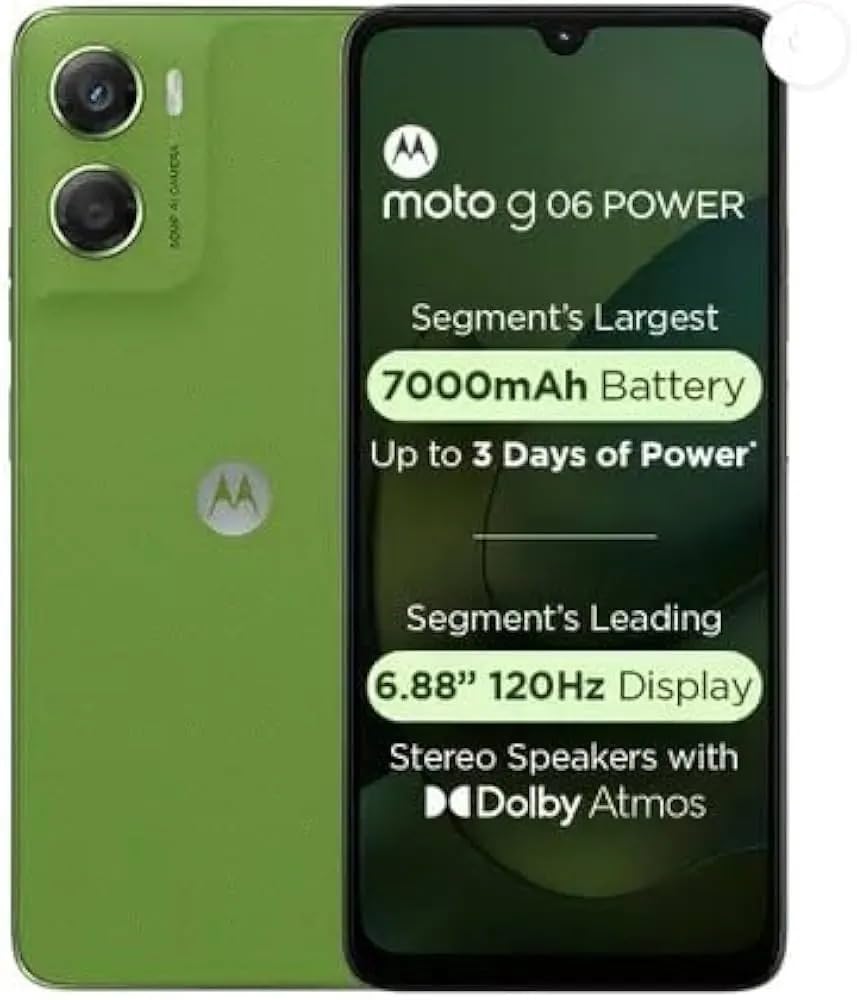
Image: Front view of the Motorola Moto g06 Power smartphone.
Setup
1. Unboxing and Package Contents
Carefully unpack your device and verify all contents. The standard package includes:
- Motorola Moto g06 Power Smartphone
Image: Motorola Moto g06 Power smartphone with typical package contents.
2. SIM Card and microSD Card Installation
To install your SIM card(s) and an optional microSD card for expanded storage:
- Locate the SIM tray on the side of your device.
- Insert the SIM ejector tool (if available) into the small hole on the SIM tray to open it.
- Place your Nano-SIM card(s) and/or microSD card into the tray with the gold contacts facing down, ensuring they are correctly oriented.
- Gently push the tray back into the slot until it clicks into place.
Image: Illustration of SIM and microSD card insertion.
3. Initial Power On and Setup
To power on your device for the first time:
- Press and hold the Power button (usually on the right side) until the Motorola logo appears.
- Follow the on-screen prompts to select your language, connect to a Wi-Fi network, sign in with your Google account, and set up security features like the fingerprint sensor.
- Ensure your device is sufficiently charged before starting the setup process.
Operating Your Device
1. Basic Navigation
Your Moto g06 Power features a responsive touchscreen for interaction:
- Tap: Select items or open applications.
- Swipe: Navigate through screens, menus, or web pages.
- Pinch-to-Zoom: Enlarge or reduce images and web content.
- Fingerprint Sensor: Use the integrated fingerprint sensor for secure and quick unlocking.
2. Making Calls and Messaging
To make a call, tap the Phone icon, enter the number, and tap the call button. For messaging, open the Messages app, select a contact or start a new conversation, and type your message.
3. Camera Usage
The device is equipped with a 50MP main camera. To capture photos or videos:
- Open the Camera app.
- Select your desired mode (Photo, Video, Portrait, etc.).
- Tap the Shutter button to take a picture or start/stop video recording.
Image: Example of the camera application interface.
4. Connectivity
Your Moto g06 Power supports various connectivity options:
- Wi-Fi: Connect to wireless networks for internet access. Go to Settings > Network & internet > Wi-Fi.
- Bluetooth: Pair with wireless headphones, speakers, or other devices. Go to Settings > Connected devices > Bluetooth.
- Mobile Data (5G): Access the internet using your cellular network. Ensure your SIM card supports 5G and your plan includes data. Go to Settings > Network & internet > Mobile network.
5. Battery Management
The 5000 mAh battery provides extended usage. To optimize battery life:
- Reduce screen brightness.
- Disable Wi-Fi, Bluetooth, and GPS when not in use.
- Close unused applications running in the background.
- Enable Battery Saver mode from Settings > Battery.
Maintenance
1. Cleaning Your Device
To keep your phone clean and functional:
- Use a soft, lint-free cloth to wipe the screen and body.
- Avoid harsh chemicals, abrasive cleaners, or aerosol sprays.
- Do not immerse the device in water.
2. Software Updates
Regular software updates provide new features, security enhancements, and bug fixes. To check for updates:
- Go to Settings > System > System updates.
- Follow the on-screen instructions to download and install any available updates.
3. Storage Management
Your device comes with 64GB of internal storage. To manage storage effectively:
- Regularly delete unnecessary files, photos, and videos.
- Uninstall apps you no longer use.
- Move large files to a microSD card.
- Clear cache data for apps from Settings > Apps > See all apps > [App Name] > Storage & cache.
Troubleshooting
Here are solutions to common issues you might encounter:
Device Not Turning On
- Ensure the battery is charged. Connect the device to a charger for at least 15 minutes.
- Press and hold the Power button for 10-15 seconds to perform a forced restart.
Network Connectivity Issues
- Check if Airplane mode is off.
- Restart your device.
- Verify your SIM card is correctly inserted and active.
- Reset network settings: Settings > System > Reset options > Reset Wi-Fi, mobile & Bluetooth.
Battery Draining Quickly
- Review the Battery Management section for optimization tips.
- Identify and close power-intensive apps running in the background.
- Check for recent app installations that might be causing excessive drain.
Specifications
Detailed technical specifications for the Motorola Moto g06 Power (Model: PB9X0003IN):
| Feature | Specification |
|---|---|
| Model Number | PB9X0003IN |
| Operating System | Android |
| Product Dimensions | 17.14 x 7.75 x 0.88 cm |
| Item Weight | 190 g |
| Battery Capacity | 5000 Milliamp Hours |
| RAM Memory | 4 GB |
| Internal Storage | 64 GB |
| CPU Model | Snapdragon |
| CPU Speed | 2 GHz |
| Connectivity Technologies | 5G |
| Special Features | Dual SIM, Touchscreen |
| Colour | Pantone Tendril |
Warranty and Support
For warranty information, technical support, or service inquiries, please refer to the official Motorola website or contact their customer service. Keep your proof of purchase for warranty claims.
Official Motorola Support: https://www.motorola.in/support