
1. Safety Information
Read all instructions carefully before using the ZENBON Electric Wheelchair 633A. Failure to follow safety guidelines may result in injury or damage to the product.
- Always ensure the wheelchair is fully charged before use to avoid unexpected power loss.
- Engage the electromagnetic brake when parking or transferring to prevent unintended movement.
- Do not exceed the maximum weight capacity of 300 lbs (136 kg).
- Avoid operating the wheelchair on excessively steep slopes or uneven terrain beyond its specified capabilities.
- Regularly inspect tires, brakes, and all moving parts for wear or damage.
- Keep hands and clothing clear of moving parts during operation.
- Use caution when operating near traffic or in crowded areas.
- Ensure anti-tip wheels are properly deployed for added stability, especially on inclines.

2. Product Overview
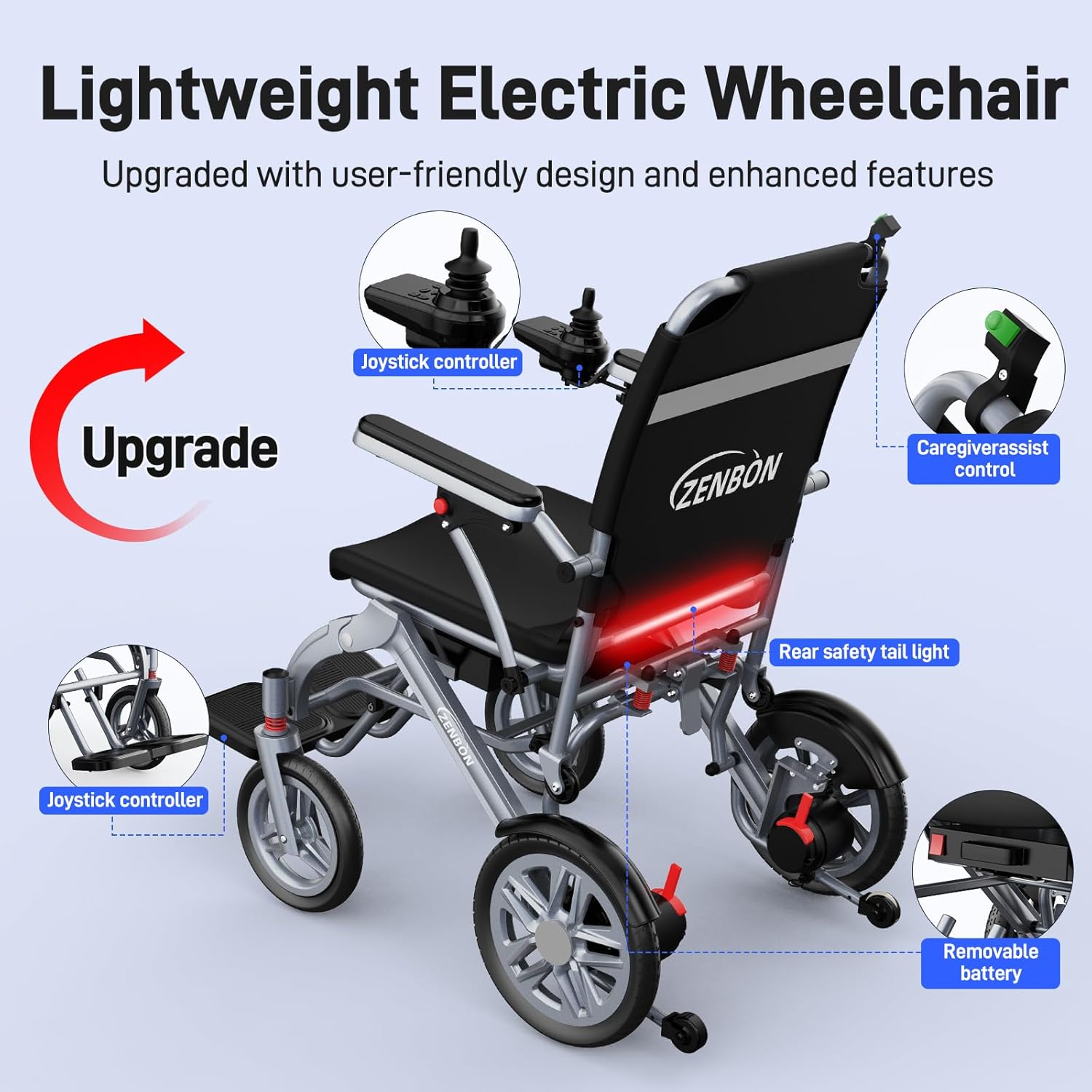
The ZENBON Electric Wheelchair 633A is designed for mobility and convenience, featuring a lightweight, foldable frame and intelligent controls. It offers a comfortable and reliable travel experience for adults.
Key Features:
- Powerful Dual Motors: Equipped with high-performance 200W dual motors for stable movement across various terrains.
- Long Cruise Range: A 12Ah large-capacity battery provides up to 16 miles of travel on a single charge.
- Comfortable Design: Ergonomic, breathable seat with adjustable armrests and footrests.
- Advanced Safety: Features an electromagnetic brake system, sturdy frame, high-quality tires, and intelligent anti-collision function.
- Easy Operation: Intuitive joystick control panel with adjustable speed settings.
- Portable & Foldable: Lightweight design allows for easy folding, transport, and storage.

3. Setup
3.1 Unfolding the Wheelchair
- Place the folded wheelchair on a flat, stable surface.
- Gently pull the backrest upwards until the frame locks into place.
- Unfold the footrests and adjust them to a comfortable position.
- Ensure all locking mechanisms are securely engaged before use.

3.2 Initial Battery Charging
Before first use, fully charge the wheelchair battery. The battery can be charged while installed in the wheelchair or removed for individual charging.
- Locate the charging port on the joystick controller or the battery itself.
- Connect the charger to the charging port and then plug it into a standard electrical outlet.
- The battery indicator lights will show the charging status. Charge until the indicator shows a full charge (approximately 4-5 hours).
- Disconnect the charger once charging is complete.

4. Operating Instructions
4.1 Joystick Control
The wheelchair is controlled using an intuitive 360-degree joystick. Ensure the power is on before operating.
- Power Button: Press to turn the wheelchair on or off.
- Joystick: Push forward to move forward, pull back to move backward, and move left or right to steer. Releasing the joystick will automatically engage the electromagnetic brake.
- Speed Adjustment: Use the '+' and '-' buttons to increase or decrease the speed.
- Horn: Press the horn button to alert others.
- Battery Level Indicator: Displays the current battery charge.
- Front Light: Activates the front light for visibility.

4.2 Electric/Manual Mode Switching
The wheelchair can be switched between electric and manual modes for flexibility.
- Electric Mode: Ensure the red levers on the rear wheels are pushed up. This engages the motors for powered operation.
- Manual Mode: Pull the red levers on the rear wheels down. This disengages the motors, allowing the wheelchair to be pushed manually by a caregiver.

4.3 Electromagnetic Brake System
The ZENBON 633A features an advanced electromagnetic brake system for safety and convenience.
- Automatic Braking: The wheelchair stops instantly when the joystick is released, preventing unwanted movement.
- Fast Response: Provides quick and reliable braking for enhanced safety.
- Hill Hold Function: Automatically locks the wheels on slopes to keep you secure.
- Silent Operation: Ensures smooth, noise-free braking for a comfortable experience.

5. Maintenance
5.1 Battery Care
- Charge the battery fully after each use, even if only partially discharged.
- Avoid completely draining the battery, as this can reduce its lifespan.
- If storing the wheelchair for an extended period, charge the battery at least once a month.
- Store the battery in a cool, dry place away from direct sunlight and extreme temperatures.
- Only use the charger provided by ZENBON.

5.2 Cleaning and General Care
- Wipe down the frame and seat with a damp cloth and mild detergent. Avoid harsh chemicals.
- Ensure no moisture enters the electrical components, especially the joystick and motor areas.
- Regularly check tire pressure and inflate as needed (if applicable to specific tire type).
- Inspect all bolts and fasteners periodically and tighten if loose.
- Keep the wheels free of debris to ensure smooth operation.
6. Troubleshooting
This section addresses common issues you might encounter with your ZENBON Electric Wheelchair 633A.
| Problem | Possible Cause | Solution |
|---|---|---|
| Wheelchair does not power on. | Battery is low or not connected. Power button not pressed. | Charge the battery. Ensure battery is securely installed. Press the power button firmly. |
| Wheelchair does not move when joystick is pushed. | Wheelchair is in manual mode. Motors are disengaged. | Switch to electric mode by pushing the red levers on the rear wheels up. |
| Unusual noises during operation. | Loose components or debris in wheels. | Inspect wheels for debris. Check and tighten any loose bolts or fasteners. If noise persists, contact support. |
| Battery indicator shows low charge quickly. | Battery not fully charged. Battery degradation. | Ensure battery is fully charged before use. If battery life has significantly decreased, consider battery replacement. |
7. Specifications
Detailed technical specifications for the ZENBON Electric Wheelchair 633A.
| Feature | Detail |
|---|---|
| Model | 633A |
| Material | Aerospace Aluminum Alloy Frame |
| Electric Wheelchair Weight | 18.2 kg (40.1 lbs) |
| Battery Weight | 2.7 kg (6 lbs) |
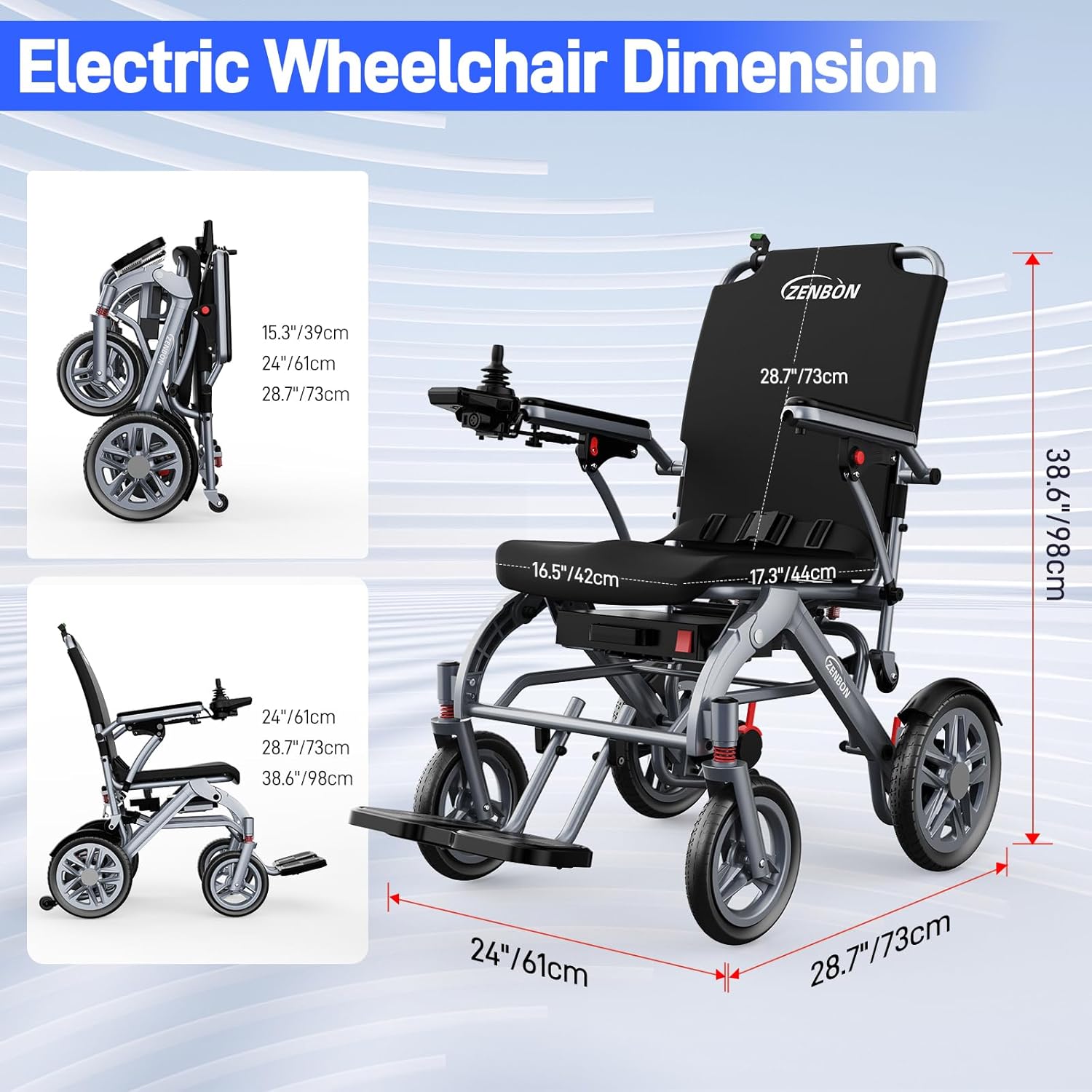
| Unfolded Dimensions (L×W×H) | 28.7 x 24 x 38.6 inches (73 x 61 x 98 cm) |
| Folded Size | 15.3 x 24 x 28.7 inches (39 x 61 x 73 cm) |
| Seat Width | 16.5 inches (42 cm) |
| Max Load-bearing | 300 lbs (136 kg) |
| Battery Type | Lithium Battery |
| Battery Capacity | 12Ah |
| Battery Charging Time | 4-5 hours |
| Total Travel Range | Up to 16 miles (24 km) |
| Max Climbing Angle | 12 degrees |
| Brake Style | Electromagnetic |
| Handle Type | Joystick Controller |
| Power Source | Battery Powered |
| Wheel Type | Mag Wheel, Spoke Wheel |
8. Warranty & Support
ZENBON provides a standard manufacturer's warranty for the Electric Wheelchair 633A. Please refer to the warranty card included with your purchase for specific terms and conditions.
For technical support, service, or warranty claims, please contact ZENBON customer service through the retailer where the product was purchased or visit the official ZENBON website for contact information.
When contacting support, please have your model number (633A) and purchase date available.