
Introduction
This manual provides detailed instructions for the assembly, operation, and maintenance of your Dingdongwu 3-in-1 Robot Dog with Wheels Kit. Please read this manual thoroughly before use to ensure proper function and safety. This versatile robot offers three exciting modes: a standard agile robot dog, a powerful battle bot with a cannon, and a rugged rover with a functional claw attachment. It features over 30 pre-programmed bionic actions, omnidirectional wheel drive, and multiple control methods including voice, remote, and programming.
What's in the Box
- Robot Dog
- Remote Control
- USB Charging Cable
- Water Bomb Cannon Attachment
- Claw Attachment
- Soft Water Bombs
- Screwdriver
- Instruction Manual
Setup
- Unboxing: Carefully remove all components from the packaging.
- Battery Installation (Remote Control): The remote control requires 3 AAA batteries (not included). Open the battery compartment on the back of the remote and insert the batteries, ensuring correct polarity.
- Charging the Robot Dog: The robot dog has a built-in rechargeable lithium battery (3.7V, 1200mAh). Connect the robot dog to the included USB charging cable. A full charge takes approximately 1.5 hours and provides up to 50 minutes of continuous play. Ensure the battery is properly connected and charged for optimal performance.

Image: The robot dog connected to its 3.7V Li-ion rechargeable battery via a charging cable.
- Attaching Accessories: Depending on the desired play mode, attach the water bomb cannon or claw attachment to the robot dog. These are removable and can be switched as needed.
Modes & Features
The Dingdongwu Robot Dog offers versatile play with its 3-in-1 transforming capabilities and dynamic actions.
- 3-in-1 Transformation: Easily switch between standard robot dog, battle bot with cannon, or rover with claw.

Image: The robot dog shown in its three configurations: standard, with a water bomb cannon, and with a gripping claw.
- Dynamic Bionic Actions: Over 30 pre-programmed actions including crawling, handshaking, dancing, push-ups, and more.
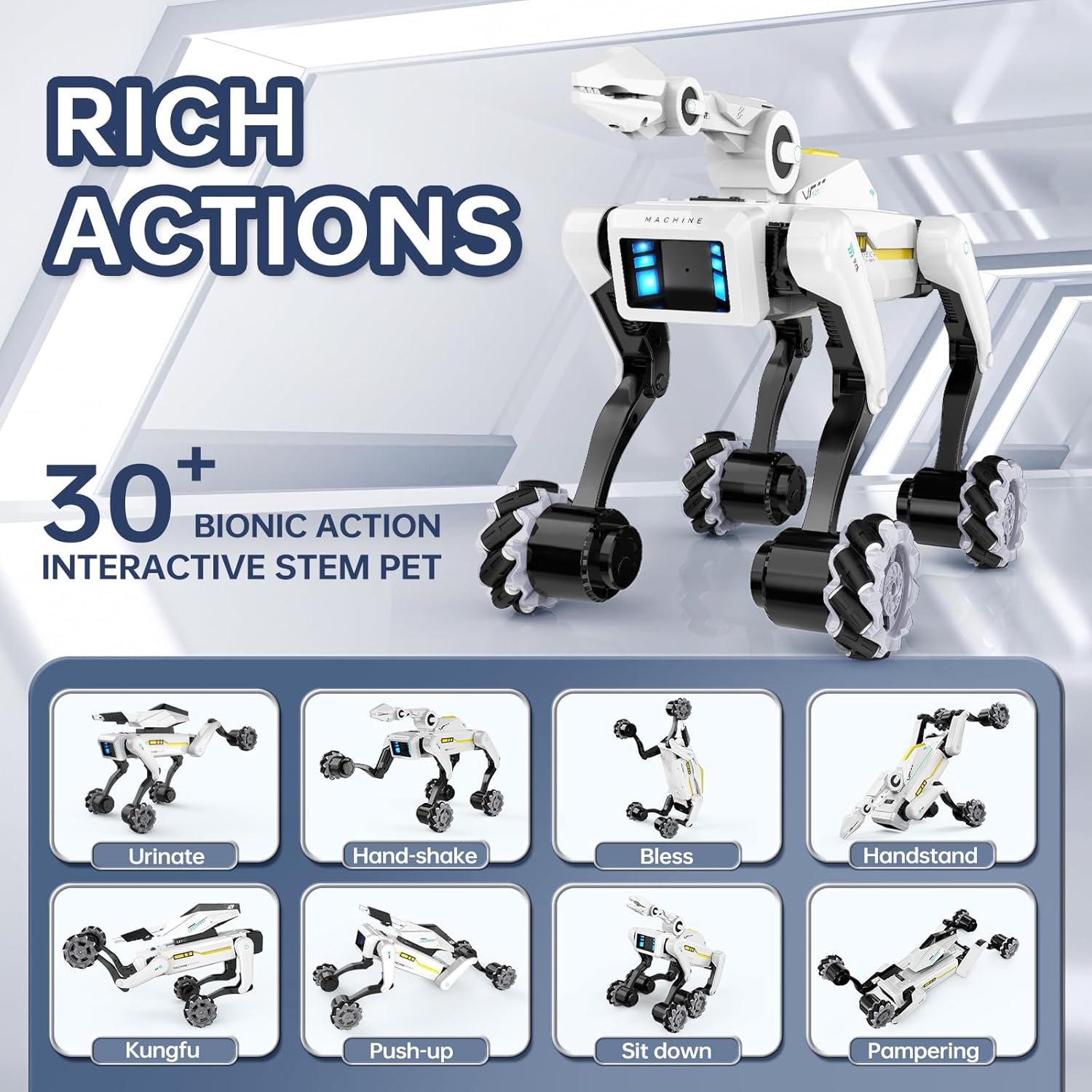
Image: A collage demonstrating various bionic actions the robot dog can perform, such as hand-shake, kungfu, and sit down.
- Omnidirectional Wheel Drive: Advanced four-wheel Mecanum drive system for smooth movement in any direction (forwards, backwards, sideways, 360-degree spins).
- LED Effects: Dynamic blue LED lights on the eyes and body enhance the futuristic play experience.
Operating Instructions
The robot dog can be controlled using three methods: voice commands, the 2.4GHz remote control, or custom programming via an app.
1. Remote Control Operation
Use the included 2.4GHz remote control to operate the robot dog. The remote features various buttons for different actions and movements.
- Movement: Use the directional controls to move the robot forwards, backwards, and sideways.
- Bionic Actions: Press specific buttons on the remote to trigger pre-programmed actions like "Hand-shake", "Sit down", "Push-up", "Dance", "Music", and "Swimming".
- Attack Mode (with cannon): Load the soft water bombs into the cannon. Press the "Attack" button on the remote to fire.

Image: A child loading soft water bombs into the robot dog's cannon attachment.
- Gripping Mode (with claw): Use the remote to control the claw to pick up small objects.
Video: A demonstration of the robot dog with the arm attachment, showcasing its functionality.
Video: The robot dog demonstrating its shooting capabilities with the cannon attachment.
2. Voice Control
The robot dog responds to simple voice commands for hands-free operation. Refer to the specific voice commands listed in the quick start guide for a full list of recognized phrases.
Video: A demonstration of the robot dog responding to voice commands.
3. Programmable Moves (App Control)
For advanced play and early STEM education, download the dedicated app to program custom action sequences. This allows you to create and execute unique movements and routines for the robot dog.

Image: The programming interface for the robot dog, illustrating how to design movement sequences.
Video: A guide on how to download the companion app for the robot dog.
Maintenance
- Cleaning: Wipe the robot dog with a dry, soft cloth. Do not immerse in water.
- Battery Care: Recharge the battery when low. Avoid overcharging or completely draining the battery to prolong its lifespan.
- Storage: Store the robot dog and its accessories in a cool, dry place away from direct sunlight when not in use.
- Robotic Arm Precautions: When opening and closing the robotic arm (for claw or cannon), be careful not to stretch your hands or large objects over it to avoid injury.
- Water Bomb Precautions: Before using water bombs, they should be soaked in water to a size of about 7-8mm. Do not aim at people or animals for shooting.
Troubleshooting
- Robot does not respond when turned on: Please check that the battery is properly connected, or that the charge is sufficient.
- Remote control not working: Ensure the remote control has fresh AAA batteries and is within range of the robot dog.
- Robot dog falls over during actions: Ensure the robot is on a flat, stable surface. Some complex bionic actions may require a smooth surface for optimal performance.
Specifications
| Model Number | 8022-06-08 |
| Product Dimensions | 13.1 x 6.1 x 10 inches |
| Item Weight | 4 pounds |
| Recommended Age | 6 - 18 years |
| Battery (Robot) | 1 x 3.7V 1200mAh Rechargeable Lithium Battery (included) |
| Battery (Remote) | 3 x AAA batteries (not included) |
| Charging Time | Approx. 1.5 hours |
| Play Time | Up to 50 minutes |
Warranty & Support
Information regarding product warranty and customer support was not provided in the product details. Please refer to the product packaging or contact the manufacturer directly for assistance.


