Introduction and Safety Information
This manual provides essential instructions for the safe and effective use of your Generic 68V-GN670 5-in-1 Brushless Power Tool Kit. This kit includes a brushless drill/driver, impact wrench, hammer drill, angle grinder, and circular saw, all powered by a high-capacity 68V lithium-ion battery system. Please read this manual thoroughly before operating any tool in the kit to prevent injury and ensure optimal performance.
General Safety Warnings
- Always wear appropriate personal protective equipment (PPE) such as safety glasses, hearing protection, and gloves.
- Keep your work area clean and well-lit. Cluttered or dark areas invite accidents.
- Do not operate power tools in explosive atmospheres, such as in the presence of flammable liquids, gases, or dust.
- Keep children and bystanders away while operating a power tool. Distractions can cause you to lose control.
- Avoid accidental starting. Ensure the switch is in the off-position before connecting to battery pack, picking up or carrying the tool.
- Use the correct tool for your application. Do not force a tool to do a job for which it was not designed.
- Maintain tools with care. Check for misalignment or binding of moving parts, breakage of parts, and any other condition that may affect the tool's operation.
- Disconnect the battery pack from the tool before making any adjustments, changing accessories, or storing power tools.
Product Overview
The Generic 68V-GN670 kit is a versatile 5-in-1 brushless power tool system designed for a wide range of professional and DIY applications. It features high-efficiency brushless motors for extended tool life and powerful performance, coupled with long-lasting 68V lithium-ion batteries.
Included Components:
- 1 x Brushless Drill/Driver
- 1 x Brushless Impact Wrench
- 1 x Brushless Angle Grinder
- 1 x Cordless Hammer Drill
- 1 x Cordless Circular Saw
- 3 x 68V Lithium-Ion Batteries (2000mAh)
- 1 x Battery Charger (110V-240V / 50-60 Hz)
- 1 x Transport/Organization Case
- Various accessories (sockets, drill bits, grinding disc, saw blade, etc.)

Image: The complete 5-in-1 Brushless Power Tool Kit, including the drill, impact wrench, angle grinder, hammer drill, circular saw, batteries, charger, and carrying case.
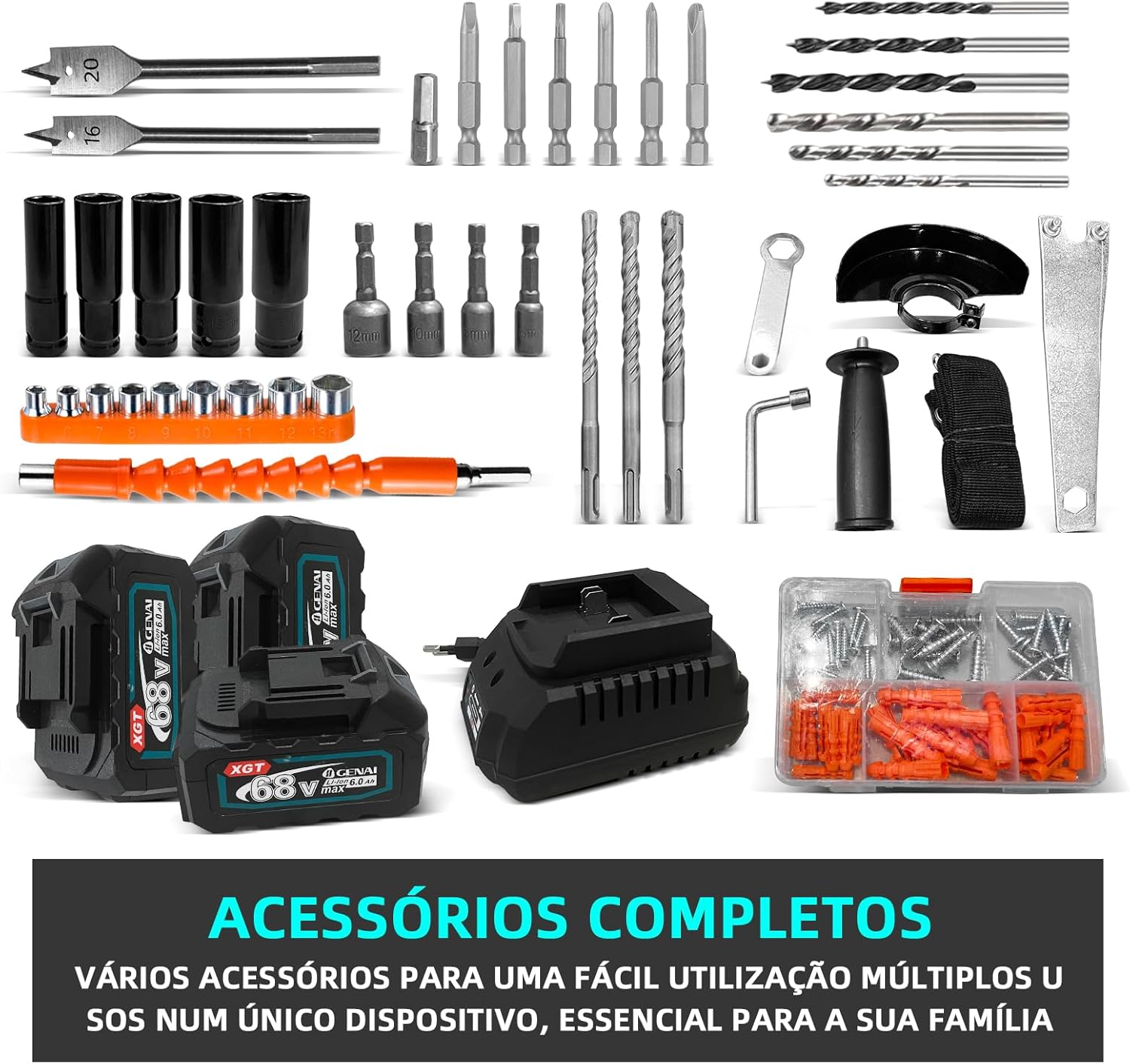
Image: A variety of accessories included with the kit, such as drill bits, screwdriver bits, sockets, grinding disc, and fasteners.
Setup
1. Battery Charging
- Connect the charger to a standard 110V-240V / 50-60 Hz power outlet.
- Insert the 68V lithium-ion battery into the charger. Ensure it clicks securely into place.
- Allow the battery to charge fully. The charger typically has an indicator light that changes color or turns off when charging is complete.
- Do not overcharge batteries. Unplug the charger once the battery is fully charged.
2. Attaching and Detaching Batteries
- To attach: Align the battery with the tool's battery slot and slide it in until it clicks into place. Ensure it is firmly seated.
- To detach: Press the battery release button (usually located on the battery itself) and slide the battery out of the tool.
3. Accessory Installation (General Guidelines)
- Always ensure the battery is removed from the tool before installing or changing accessories.
- For drills: Open the chuck jaws by rotating the chuck collar. Insert the drill bit or screwdriver bit and tighten the chuck firmly.
- For impact wrenches: Select the appropriate socket. Push the socket onto the square drive anvil until it locks.
- For angle grinders: Refer to the specific instructions for mounting grinding or cutting discs, ensuring the correct flanges and tightening nut are used.
- For circular saws: Follow instructions for mounting the saw blade, ensuring the blade is oriented correctly for cutting direction and the arbor nut is securely tightened.
Operating Instructions
1. Brushless Drill/Driver

Image: The Brushless Drill/Driver, showing its chuck, torque settings, and battery attachment.
- Function: Drilling holes and driving screws.
- Speed Control: The trigger controls the speed. Pressing further increases speed.
- Direction Switch: Located near the trigger, allows for forward (drilling/driving) and reverse (removing screws) operation.
- Torque Settings: Adjust the collar behind the chuck to select the desired torque for driving screws. Higher numbers provide more torque. Use the drill symbol for drilling.
- Operation: Select appropriate bit, adjust torque/mode, hold firmly, and press the trigger. Apply steady pressure.
2. Brushless Impact Wrench
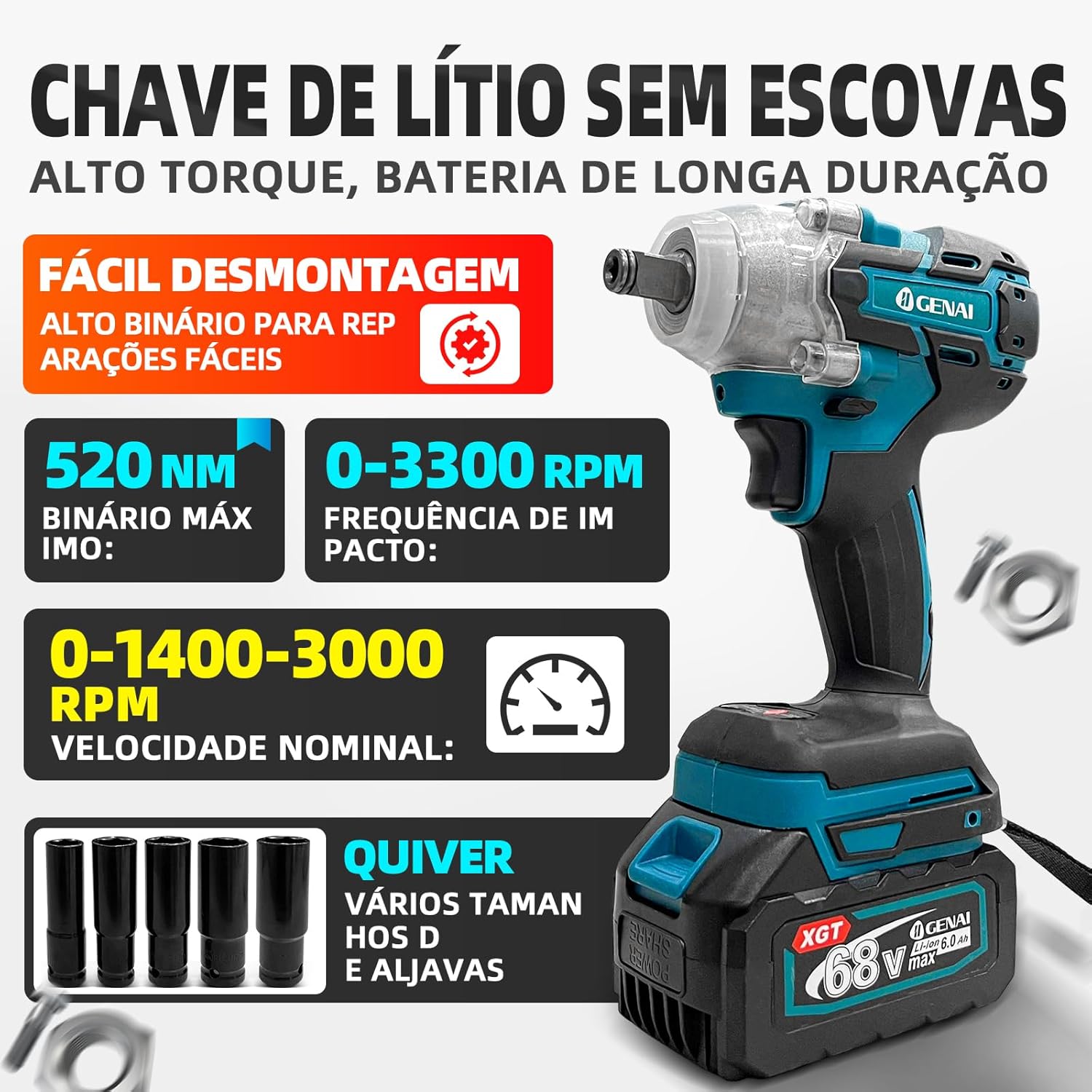
Image: The Brushless Impact Wrench, featuring its square drive anvil and battery connection. Sockets are shown alongside.
- Function: Driving and removing large fasteners, nuts, and bolts with high torque.
- Speed/Impact Control: The trigger controls the speed and impact frequency. Some models may have mode selectors for different torque levels.
- Direction Switch: Use the switch near the trigger for forward (tightening) and reverse (loosening).
- Operation: Attach the correct socket. Hold the tool firmly against the fastener. Press the trigger to operate.
3. Brushless Angle Grinder

Image: The Brushless Angle Grinder, showing its disc guard, side handle attachment point, and battery.
- Function: Cutting, grinding, and polishing various materials (metal, stone, tile).
- Disc Installation: Ensure the correct disc type and size (125mm) is used. Always use the disc guard.
- Side Handle: Attach the side handle for better control and safety.
- Operation: Hold the grinder firmly with both hands. Allow the disc to reach full speed before contacting the workpiece. Apply light, even pressure.
- Safety: Always wear eye protection, hearing protection, and heavy-duty gloves. Be aware of sparks and debris.
4. Cordless Hammer Drill

Image: The Cordless Hammer Drill, highlighting its robust chuck and mode selector for drilling and hammer drilling.
- Function: Drilling into masonry, concrete, and other hard materials with a hammering action, as well as standard drilling.
- Mode Selector: Switch between drill mode (for wood, metal) and hammer drill mode (for masonry).
- Bit Installation: Use appropriate masonry bits for hammer drilling.
- Operation: Select the correct mode. Hold the tool firmly. Apply steady, forward pressure while drilling.
5. Cordless Circular Saw

Image: The Cordless Circular Saw, showing its blade guard, base plate, and battery connection.
- Function: Making straight cuts in wood, plastic, and other sheet materials.
- Blade Installation: Ensure the correct 150mm blade is installed with teeth pointing in the direction of rotation.
- Depth Adjustment: Adjust the cutting depth according to the material thickness.
- Bevel Adjustment: The base plate can be angled for bevel cuts (0-45°).
- Operation: Support the workpiece securely. Hold the saw firmly with both hands. Allow the blade to reach full speed before starting the cut. Guide the saw smoothly along the cutting line.
- Safety: Always keep hands clear of the blade. Ensure the blade guard operates freely.
Maintenance
- Cleaning: Regularly clean the tools with a soft, damp cloth. Do not use harsh chemicals or abrasive cleaners. Keep ventilation openings clear of dust and debris.
- Battery Care: Store batteries in a cool, dry place away from direct sunlight and extreme temperatures. Do not store fully discharged batteries for extended periods. Charge them periodically if not in use.
- Brushless Motors: The brushless design reduces maintenance requirements compared to brushed motors, as there are no carbon brushes to replace.
- Accessory Inspection: Regularly inspect drill bits, saw blades, grinding discs, and sockets for wear or damage. Replace worn accessories promptly.
- Storage: Store the tools and accessories in the provided carrying case in a dry, secure location, out of reach of children.
Troubleshooting
| Problem | Possible Cause | Solution |
|---|---|---|
| Tool does not start. | Battery not charged or not properly inserted. | Ensure battery is fully charged and securely attached. |
| Reduced power or performance. | Low battery charge; worn or dull accessory. | Recharge battery. Replace or sharpen accessory. |
| Battery not charging. | Charger not connected; faulty battery or charger. | Check power connection. Try a different outlet. If problem persists, contact support. |
| Excessive vibration or noise. | Loose accessory; damaged tool component. | Ensure accessories are securely fastened. Inspect tool for damage. Discontinue use if damage is suspected. |
Specifications
| Feature | Specification |
|---|---|
| Model | GN-670 |
| Technology | Brushless Motor |
| Battery Type | 68V Lithium-Ion |
| Battery Capacity | 2000 mAh |
| Charger Input | 110V-240V / 50-60 Hz |
| Brushless Drill/Driver | |
| Max Torque | 45 Nm |
| Max Drill Diameter | 10 mm |
| No-Load Speed | 0-1850 RPM |
| Brushless Impact Wrench | |
| Max Torque | 520 Nm |
| Rated Speed | 0-1400-3000 RPM |
| Impact Frequency | 0-3300 RPM (Impacts Per Minute) |
| Brushless Angle Grinder | |
| Disc Diameter | 125 mm |
| No-Load Speed | 9000 RPM |
| Cordless Hammer Drill | |
| Max Drill Diameter | 26 mm |
| No-Load Speed | 900 RPM |
| Impact Frequency | 5900 BPM (Blows Per Minute) |
| Cordless Circular Saw | |
| Blade Diameter | 150 mm |
| Rated Speed | 7000 RPM |
| Adjustable Angle | 0-45° |
| Product Dimensions | 65 x 64 x 20 cm |
| Product Weight | 15 kg |
Warranty and Support
Specific warranty terms and conditions for the Generic 68V-GN670 5-in-1 Brushless Power Tool Kit may vary by region and retailer. Please refer to the warranty card included with your purchase or contact your point of sale for detailed information regarding warranty coverage and claims.
For technical support, spare parts, or service inquiries, please contact the retailer where you purchased this product. They will be able to provide assistance or direct you to the appropriate service center.


