
1. Introduction
This manual provides detailed instructions for the assembly, operation, and maintenance of your YISUFO 70-inch Fireplace TV Stand. Please read all instructions carefully before assembly and use to ensure proper function and safety. Keep this manual for future reference.

Image 1.1: Overview of the YISUFO 70-inch Fireplace TV Stand.
2. Safety Information
- Ensure all parts are present and undamaged before assembly. Do not use if any parts are missing or broken.
- Assembly requires two people. Follow the instructions carefully to prevent injury or damage.
- Place the TV stand on a flat, stable surface.
- Do not overload the shelves. Refer to specifications for weight limits.
- Keep flammable materials away from the electric fireplace.
- Ensure the power cord is not pinched or damaged. Plug the fireplace directly into a wall outlet; do not use extension cords.
- Do not block the air vents of the electric fireplace.
- Unplug the fireplace before cleaning or maintenance.
3. Package Contents
The YISUFO Fireplace TV Stand is shipped in two separate boxes. Please ensure you have received both boxes and all components before beginning assembly.

Image 3.1: Product packaging indicating two boxes.
Verify that all numbered parts and hardware are present according to the included assembly guide. If any parts are missing or damaged, contact customer support.
4. Assembly Instructions
Assembly typically takes 1-2 hours with two people. All parts are pre-drilled and numbered for ease of assembly. Follow the step-by-step illustrated instructions provided in the separate assembly guide.
4.1 Key Assembly Features
- Stainless Steel Supports: The upper tier is supported by 8 stainless steel brackets, designed for enhanced stability and carrying capacity.
- Adjustable Shelves: The storage cabinets include adjustable partitions, allowing customization of storage space.
- Cable Management: Integrated cable management holes help keep wires organized and out of sight.

Image 4.1: Product dimensions for reference during assembly.
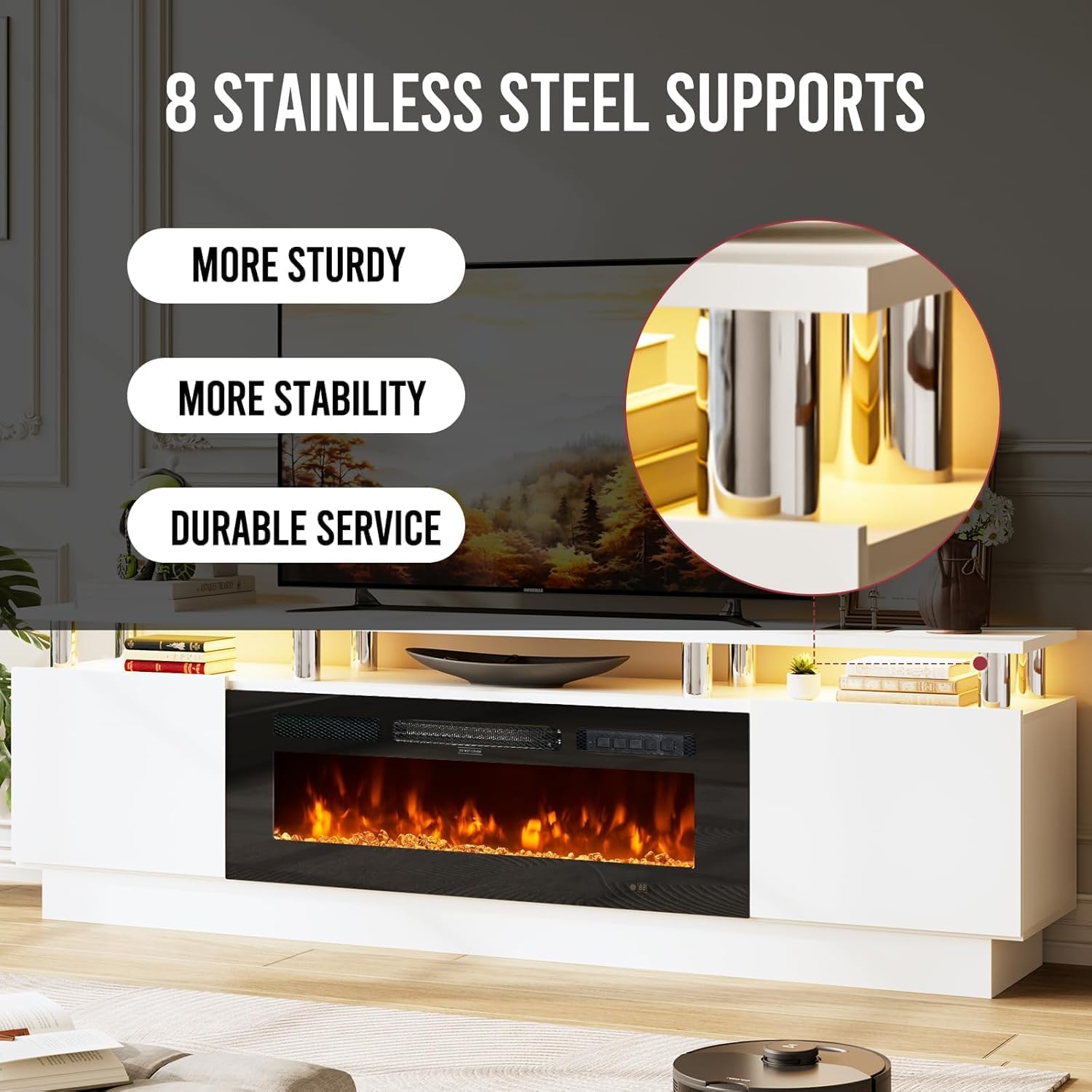
Image 4.2: Stainless steel supports for the upper tier.

Image 4.3: Details on cable management and adjustable shelving.
5. Operating Instructions
5.1 Electric Fireplace Operation
The integrated 36-inch electric fireplace can be controlled via the physical control panel on the unit or the included remote control.
Video 5.1: Demonstration of the YISUFO Fireplace TV Stand's features, including the electric fireplace's flame effects, LED lighting, control panel, remote operation, and storage compartments. This video provides a visual guide to the YISUFO Fireplace TV Stand's functionalities. It showcases the various flame colors and brightness levels of the electric fireplace, the customizable LED ambient lighting, the physical control panel, and the convenience of remote control operation. Additionally, it highlights the storage display cabinets and the adjustable partitions, offering a comprehensive overview of the product's design and utility.
- Power On/Off: Use the power button on the control panel or remote to turn the fireplace on or off.
- Flame Effects: The fireplace features realistic flame effects with 12 color options and 5 brightness/speed levels. Adjust these settings using the flame button on the control panel or remote. Long press the flame button for 3 seconds to adjust brightness.
- Heat Settings: The fireplace offers 750W/1500W dual power modes. Temperature can be adjusted from 62°F to 82°F. It effectively heats areas up to 400 sq. ft.
- Timer Function: Set a timer for automatic shut-off, typically ranging from 0 to 8 hours.

Image 5.1: Remote control for the electric fireplace.

Image 5.2: Various flame color options.
5.2 LED Lighting Operation
The TV stand features a customizable 12-color LED light strip to enhance ambiance.
- Color Selection: Use the remote control to cycle through the 12 available LED colors.
- Brightness Adjustment: Adjust the brightness levels of the LED lights to suit your preference.

Image 5.3: LED lighting in operation.
6. Maintenance
The TV stand is constructed from scratch-resistant engineered wood panels that are easy to clean.
- Cleaning: Wipe surfaces with a soft, damp cloth. Avoid abrasive cleaners or harsh chemicals that may damage the finish.
- Dusting: Regularly dust the unit to maintain its appearance.
- Fireplace Care: Ensure the fireplace is unplugged and cool before cleaning. Refer to the fireplace's specific manual for detailed cleaning instructions.

Image 6.1: Close-up of the durable surface material.
7. Troubleshooting
If you encounter any issues with your YISUFO Fireplace TV Stand, refer to the following common solutions:
- Fireplace Not Turning On: Check if the power cord is securely plugged into a working outlet. Ensure the main power switch on the fireplace unit is in the 'On' position.
- No Heat Output: Verify that the heat function is activated and the temperature setting is above the current room temperature. Check if the air vents are unobstructed.
- LED Lights Not Working: Ensure the LED strip is properly connected and the remote control batteries are functional.
- Remote Control Not Responding: Replace the batteries in the remote control. Ensure there are no obstructions between the remote and the unit's sensor.
For persistent issues or further assistance, please contact YISUFO customer support.
8. Specifications
| Feature | Detail |
|---|---|
| Brand | YISUFO |
| Model Name | H21014-70WHBK |
| Product Dimensions | 13.8"D x 70"W x 23.6"H |
| Material | Engineered Wood |
| Finish Type | Polished |
| Power Source | Corded Electric |
| Heat Output | 1500W (750W/1500W dual modes) |
| Heating Coverage | Up to 400 sq ft |
| Fireplace Size | 36 inches |
| Special Feature | Electric Fireplace, 12-Color LED Lights |
| Maximum TV Size Supported | Up to 80 inches |
| Item Weight | 99.2 pounds |
| UPC | 724156225710 |
9. Warranty and Support
This product comes with a Limited Warranty. For specific warranty terms and conditions, please refer to the documentation included with your purchase or contact YISUFO customer support.
For any questions, technical assistance, or warranty claims, please contact YISUFO customer service through their official channels. Provide your model number (H21014-70WHBK) and purchase details for efficient support.