
Introduction
This manual provides detailed instructions for the InfratexRC YKF423-007 YKF423-003 Philips TV Remote Control. This remote is designed as a compatible replacement for various Philips TV models, including 43PUS7303/12, 49PUS7503/12, 49PUS8303/12, 49PUS8503/12, 55PUS7503/12, 55PUS8303/12, and 65OLED803/12. For correct functionality, it is essential to pair the remote control with your television. All standard functions, such as channel settings and menu navigation, are available after battery insertion and pairing.
Setup
1. Battery Installation
The remote control requires batteries for operation. Batteries are not included with the product. Please use alkaline batteries for optimal performance.
- Locate the battery compartment cover on the back of the remote control.
- Slide the cover open in the direction indicated by the arrow.
- Insert the required number of alkaline batteries, ensuring the positive (+) and negative (-) terminals align correctly with the markings inside the compartment.
- Close the battery compartment cover securely.
2. Pairing the Remote Control
For proper functionality, the remote control must be paired with your Philips television. This remote control does not require additional programming beyond the pairing process.
General Pairing Steps (may vary slightly by TV model):
- Ensure your Philips TV is powered on.
- Point the remote control towards the TV.
- Press and hold the PAIR button (or a similar button, often located in the battery compartment or on the side of the remote) for a few seconds until a pairing message appears on your TV screen.
- Follow any on-screen prompts to complete the pairing process.
- Once successfully paired, a confirmation message will appear on the TV screen, and the remote control will be ready for use.
If you encounter difficulties, refer to your Philips TV's user manual for specific pairing instructions for your model.
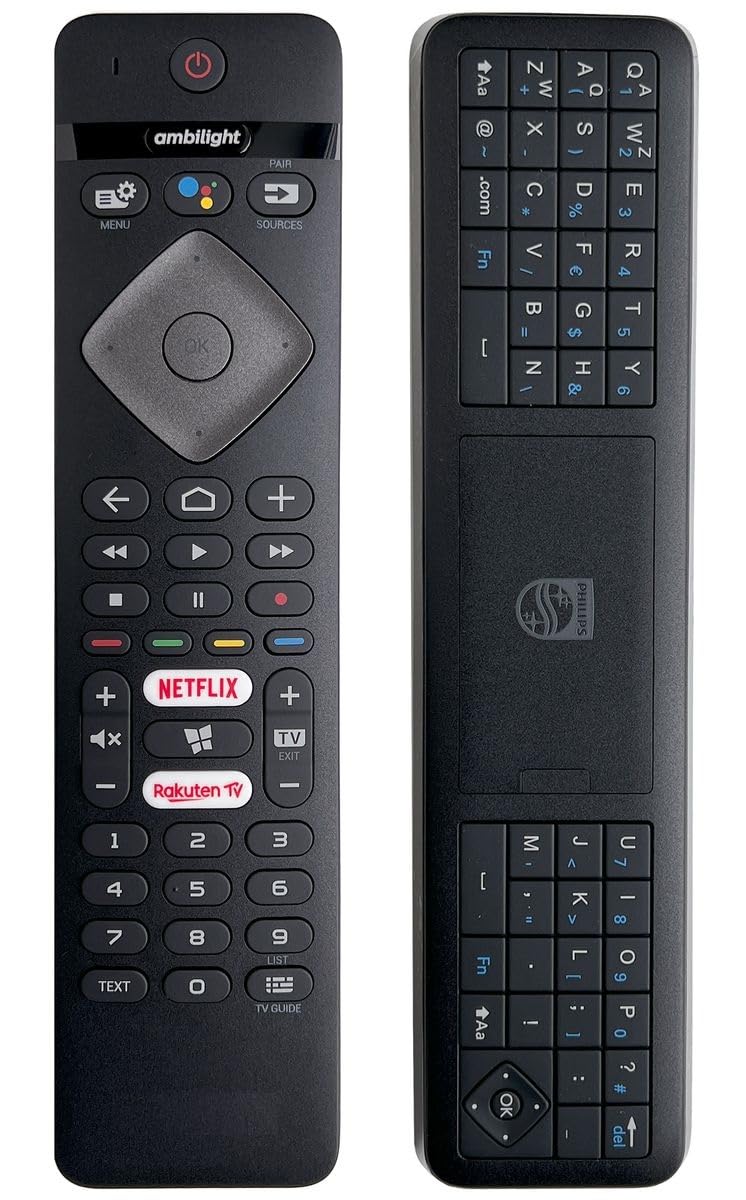
Image: The InfratexRC YKF423-007 YKF423-003 Philips TV Remote Control, showing its button layout and design.
Operating Instructions
Once paired, the remote control provides full functionality for your Philips TV. It operates via Bluetooth connectivity, offering a reliable connection.
Key Functions:
- Power Button: Turns the TV on or off.
- Navigation Pad (OK button): Use the directional arrows to navigate menus and the OK button to confirm selections.
- Volume Up/Down: Adjusts the TV's volume.
- Channel Up/Down: Changes TV channels.
- Menu Button: Accesses the TV's main menu.
- Sources Button: Selects input sources (HDMI, AV, etc.).
- App Shortcut Buttons: Dedicated buttons for quick access to popular streaming services like Prime Video, Netflix, YouTube, Ambilight, and Rakuten TV.
- Text/TV Guide: Accesses teletext or the electronic program guide.
Video: Demonstration of the InfratexRC Philips TV remote control's features, including quick access buttons for streaming services and general navigation.
Maintenance
Battery Replacement:
When the remote control's performance degrades or it stops responding, it is likely time to replace the batteries. Follow the battery installation steps outlined in the "Setup" section.
Cleaning:
To clean the remote control, use a soft, dry cloth. For stubborn dirt, slightly dampen the cloth with water. Avoid using harsh chemicals or abrasive cleaners, as these can damage the remote's surface or internal components.
Troubleshooting
- Remote not responding:
- Check if the batteries are correctly inserted and have sufficient charge. Replace them if necessary.
- Ensure there are no obstructions between the remote control and the TV.
- Re-attempt the pairing process as described in the "Setup" section.
- Buttons not working:
- Clean the remote control, especially around the unresponsive buttons, to remove any dirt or debris.
- If only specific buttons are not working, and the remote is otherwise functional, it might indicate a hardware issue.
- Intermittent connection:
- Ensure the remote is within the effective operating range (typically up to 26 feet, as suggested by the video).
- Minimize interference from other Bluetooth devices or electronic equipment.
- Re-pair the remote control with the TV.
Specifications
| Feature | Detail |
|---|---|
| Brand | InfratexRC |
| Model Numbers | YKF423-007, YKF423-003, YKF463-003 |
| Compatible Devices | Philips Televisions (e.g., 43PUS7303/12, 49PUS7503/12, 49PUS8303/12, 49PUS8503/12, 55PUS7503/12, 55PUS8303/12, 65OLED803/12) |
| Connectivity Technology | Bluetooth |
| Battery Type | Alkaline (not included) |
| Special Feature | No programming required (after initial pairing) |
| Dimensions (Package) | 19.8 x 6.2 x 2.4 cm |
| Item Weight | 110 grams |