
Introduction
The Relxhome NE40 Translation Earbuds are designed to facilitate real-time communication across language barriers. These earbuds integrate voice transmission, real-time translation for 134 languages, and high-quality audio playback. Featuring Bluetooth 6.0 connectivity and an intuitive LCD smart screen, the NE40 earbuds are suitable for various applications including business meetings, international travel, and language learning.

Image: The Relxhome NE40 Translation Earbuds and their charging case, illustrating support for 134 languages with greetings in different scripts.
What's in the Box
Verify that all components are present in the package:
- Headphones charging case
- NE40 Translation Earbuds (Left and Right)
- Instructions Manual (this document)
- Type-C charging cable
Setup
1. App Download
To utilize the full translation capabilities, download the dedicated application. Scan the QR code below or visit the provided link:

Image: Visual guide for app download, Bluetooth connection, and in-app earbud connection.
Download Link: https://download.smilefaceai.com/?code=auraintelli
2. Bluetooth Pairing
- Ensure the earbuds are charged.
- Open the charging case. The earbuds will automatically enter pairing mode.
- On your smartphone or tablet, navigate to the Bluetooth settings.
- Search for available devices and select "NE40" to connect.
3. Connecting Earbuds to the App
After pairing via Bluetooth:
- Launch the downloaded translation application.
- Follow the in-app instructions to connect the NE40 earbuds. This typically involves confirming the connection within the app interface.

Image: Screenshots of the AuralIntelli application, showing login, device connection, and various settings.
Operating Instructions
Power On/Off
- Power On: Open the charging case. The earbuds will power on automatically.
- Power Off: Place the earbuds back into the charging case and close the lid. They will power off and begin charging.
Wearing the Earbuds
Gently insert the earbuds into your ears, ensuring a comfortable and secure fit. Adjust as needed for optimal sound and microphone performance.

Image: A person wearing one of the NE40 earbuds, demonstrating the in-ear fit.
Translation Modes
The NE40 earbuds offer multiple translation modes to suit different communication scenarios:

Image: Two individuals engaging in a conversation facilitated by the translation earbuds and a smartphone app.
- Conversation Mode: For natural, flowing dialogues between two or more people. The translation occurs in real-time as you speak.
- Travel Assistant Mode: Designed for quick translations of signs, menus, or asking for directions. Tap the button to initiate translation of your surroundings.
- Learning Partner Mode: Practice foreign languages by engaging in authentic dialogues.
- Meeting Mode: Automatic speaker recognition for multilingual discussions, providing a conference interpreter experience.
- Translator Machine Mode: Translate recognized language into the desired language and output it through the phone's speaker, enabling multi-person cross-language communication.
- Headphone + Phone Mode: Mobile input, headphone output; headphone input, mobile output. Achieves one-to-many cross-language communication.
- Free Talk Mode: Each person wears one earpiece. Pressing the button on the phone activates speech recognition, and the translated content is transmitted in real-time to the earpiece.
- Dual-Ear Click Mode: Each person wears one earbud. Tap the earbud to start a conversation. Translated content is transmitted directly to the other person's earbud.
- Instant Photo Translation: Use your phone's camera through the app to translate text from menus, road signs, or documents.

Image: Two travelers using the 'Translator Machine Mode' to communicate, with translation output via the phone's speaker.

Image: A classroom setting demonstrating 'Headphone + Phone Mode' for multi-person language interaction.

Image: Two business professionals using the 'Free Talk Mode' with earbuds for real-time translated conversation.

Image: Two women communicating using the 'Dual-Ear Click Mode' of the translation earbuds.

Image: A person using their smartphone to perform instant photo translation on a road sign, with examples of menu and document translation.
LCD Smart Screen Functions
The charging case features an LCD touch screen for direct control of various functions:
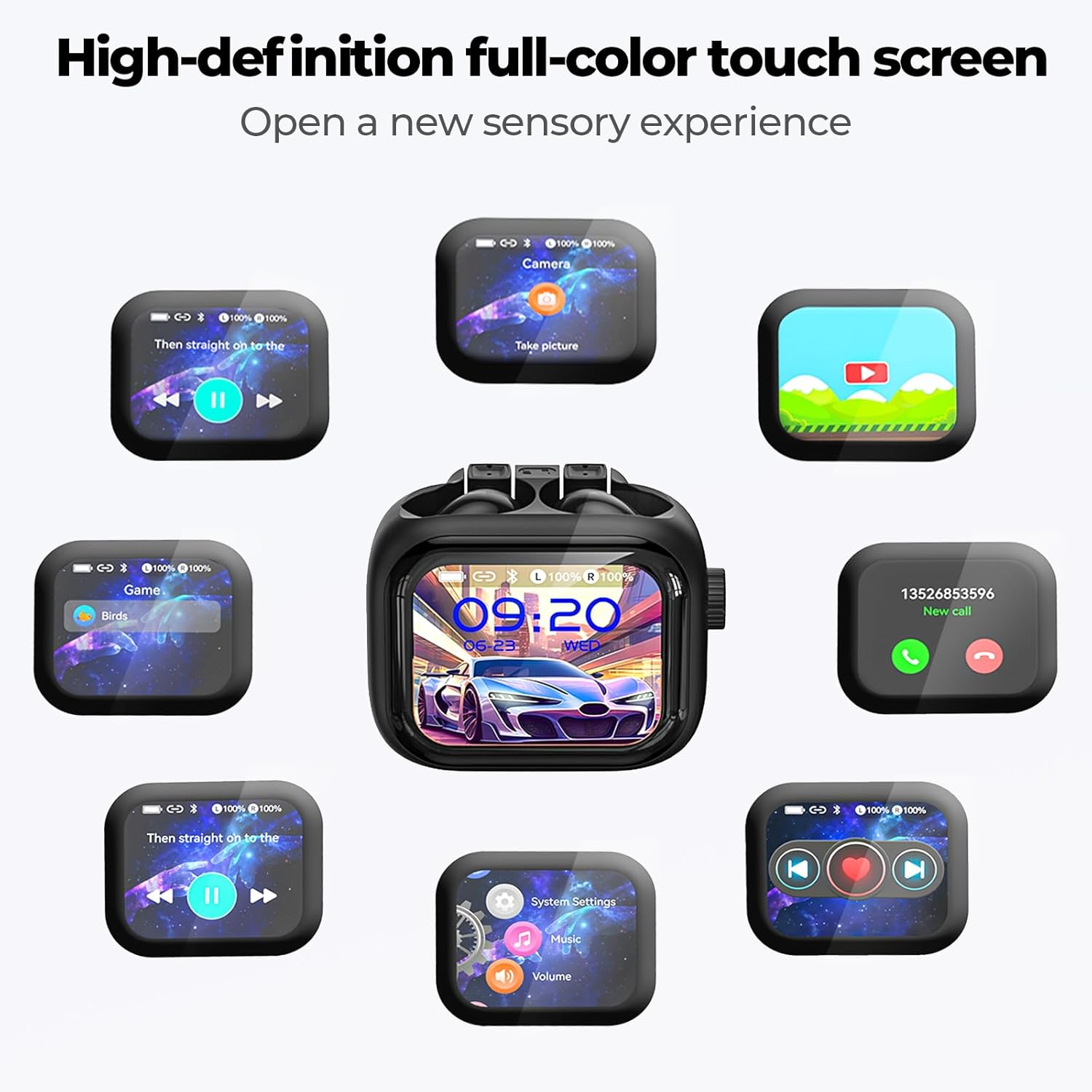
Image: The NE40 charging case's LCD smart screen showing a grid of icons for different functions like music, camera, and system settings.
- Music Playback: Control play/pause, skip tracks.
- Sound Settings: Adjust equalizer and other audio preferences.
- Language Switching: Select desired translation languages.
- Background Image Switching: Customize the screen's appearance.
- Headphone Search: Locate misplaced earbuds.
- Mode Switching: Change between different translation or audio modes.
- Other Functions: Access camera, make calls, adjust brightness, and more.

Image: A comprehensive display of the LCD smart screen's interface, showing icons for power, language, translation, music, volume, and other controls.
Multi-function Control Knob
The side knob on the charging case provides quick access to several controls without touching the screen:

Image: A hand demonstrating the use of the multi-function control knob on the NE40 charging case, with corresponding screen changes.
- Adjust Volume: Rotate the knob to increase or decrease audio volume.
- Scroll Videos: Navigate through video content (e.g., TikTok).
- Switch Functions: Rotate to browse through different features and settings.
- Play Music: Control music playback seamlessly.

Image: A visual representation of the multi-function control knob's capabilities, including volume adjustment, video scrolling, music playback, and feature selection.
Noise Control
The earbuds feature Environmental Noise Cancellation (ENC) for clear audio in noisy environments. You can switch between noise reduction and transparency modes via the app or LCD screen to suit your surroundings.

Image: Two scenarios depicting the use of noise cancellation: a person working in an office and another walking on a busy street.
Music and Video Playback
The NE40 earbuds deliver excellent sound quality for music. The LCD screen and control knob allow for convenient control of media playback, including video scrolling.
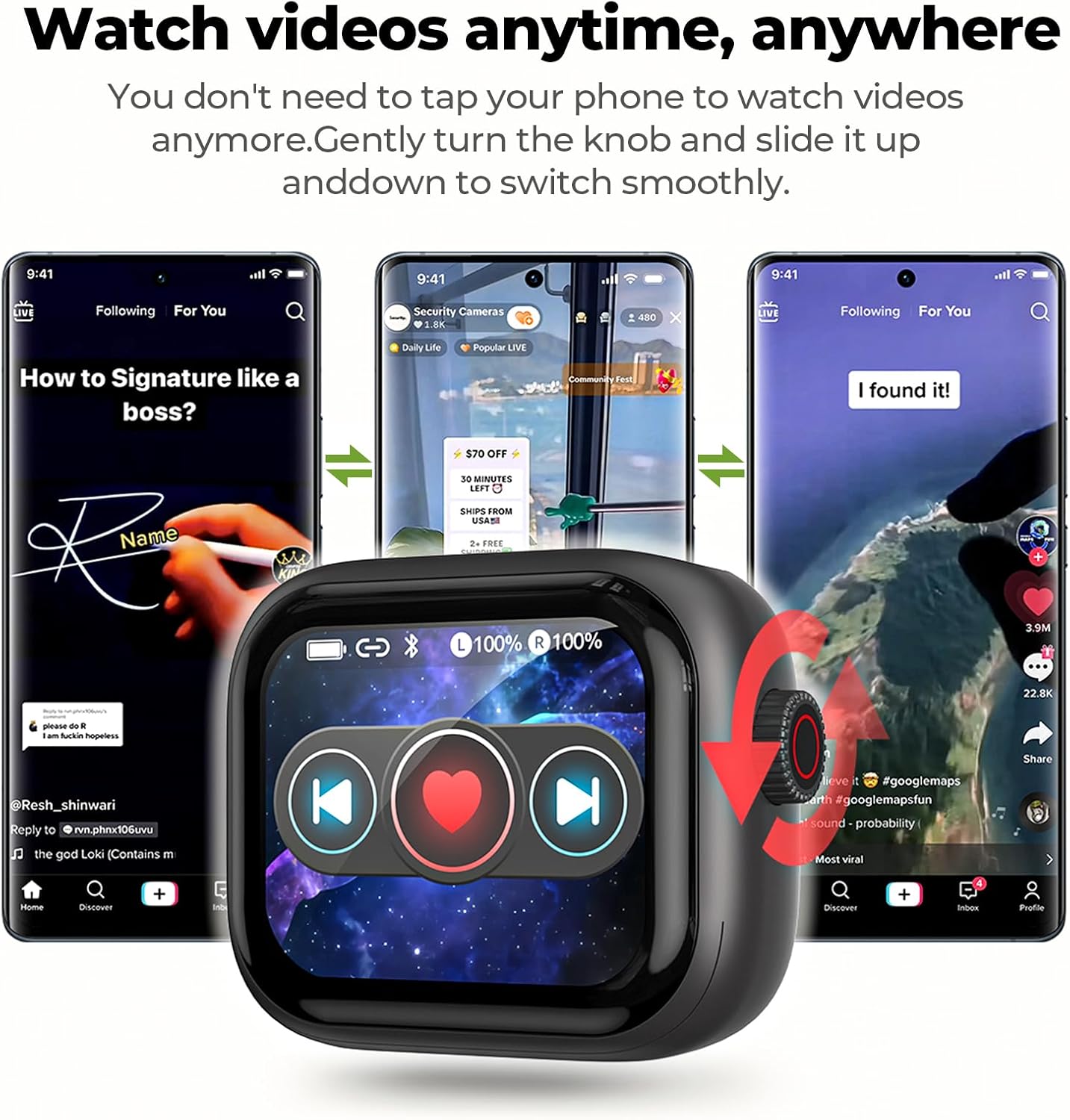
Image: The NE40 charging case's screen displaying media controls, interacting with a smartphone showing video content.
Battery and Charging
The NE40 earbuds are designed for extended use with efficient charging capabilities.
- Battery Life: Up to 6-8 hours of single use, and up to 48 hours total playtime with the charging case.
- Fast Charging: A 10-minute charge provides approximately 3 hours of usage time.
- Full Charge Time: Approximately 1.5 hours for a full charge of the earbuds and case.
Charging Procedure
- Place the earbuds securely into their respective slots in the charging case.
- Connect the provided Type-C charging cable to the charging port on the case.
- Connect the other end of the cable to a compatible USB power source (e.g., wall adapter, computer USB port).
- The LCD screen will indicate the charging status.

Image: The NE40 charging case being charged via a Type-C cable, highlighting its 48-hour battery life and fast charging capability.

Image: A graphic detailing the battery performance of the NE40 earbuds, including single-use duration, total playtime with the case, and fast charging benefits.
Specifications
| Feature | Detail |
|---|---|
| Model Name | NE40 |
| Connectivity Technology | Wireless (Bluetooth 6.0) |
| Translation Languages | 134 Languages |
| Noise Control | Environmental Noise Cancellation |
| Control Method | Touch, Multi-function Knob |
| Ear Placement | In Ear |
| Battery Life (Earbuds) | 6-8 Hours (single use) |
| Battery Life (with Case) | Up to 48 Hours |
| Charging Time | 10 minutes for 3 hours use; 1.5 hours for full charge |
| Compatible Devices | Smartphones, Tablets, Smartwatches (iOS & Android) |
| Included Components | Headphones charging case, Instructions, Type-C charging cable |
| Material | Plastic |
| Item Weight | 5.6 ounces |
| Manufacturer | Relxhome |

Image: A comprehensive list of the 134 languages supported by the NE40 translation headphones, accompanied by national flags.

Image: An illustration highlighting the benefits of Bluetooth 6.0 technology in the earbuds, including stable connection, low latency, low power consumption, and extended transmission range.
Maintenance
- Cleaning: Regularly clean the earbuds and charging case with a soft, dry, lint-free cloth. Avoid using abrasive materials or harsh chemicals.
- Storage: When not in use, store the earbuds in their charging case to protect them from dust and damage. Store in a cool, dry place.
- Avoid Moisture: Do not expose the earbuds or charging case to water or excessive moisture.
Troubleshooting
Earbuds Not Connecting/Pairing
- Ensure earbuds are charged.
- Turn off and on your device's Bluetooth.
- Forget "NE40" in your device's Bluetooth settings and attempt to re-pair.
- Restart your smartphone/tablet.
Translation Issues
- Verify a stable internet connection on your paired device, as translation often requires online processing.
- Ensure the correct source and target languages are selected in the app.
- Speak clearly and at a moderate pace.
- Check microphone settings and permissions for the app on your device.
Charging Problems
- Ensure the charging cable is securely connected to both the case and the power source.
- Try a different Type-C cable or USB power adapter.
- Clean the charging contacts on the earbuds and inside the case with a dry cotton swab.
Audio Quality Issues
- Ensure earbuds are properly seated in your ears.
- Check for debris in the earbud nozzles and clean if necessary.
- Adjust volume on both the earbuds (via knob/screen) and your connected device.
Warranty and Support
For warranty information and technical support, please refer to the official Relxhome website or contact their customer service directly. Keep your purchase receipt for warranty claims.