
1. Introduction
Thank you for purchasing the dotn Portable Bluetooth Speaker M17B. This manual provides important information regarding the setup, operation, and maintenance of your speaker. Please read it thoroughly before use to ensure optimal performance and longevity of the product.
2. Package Contents
Verify that all items are present in your package:
- Bluetooth Speaker x 1
- Type-C Charging Cable x 1
- Instruction Manual x 1
3. Product Overview
3.1 Key Features
- 360° Hi-Fi Stereo Sound: 20W total output power with enhanced bass and clear high/mid frequencies.
- Bluetooth 5.4: Ensures fast pairing and stable connection.
- Long Playtime: Up to 20 hours of playback at 50% volume.
- EQ Modes: Three sound modes (Bass Boost, Hi-Res Audio, Stereo) for personalized listening.
- RGB Colorful Light: Eight types of looping LED light effects.
- IP7 Waterproof: Designed to withstand rough handling and harsh weather conditions.
- True Wireless Stereo (TWS): Pair two speakers for an immersive stereo experience.
- Built-in Microphone: For hands-free calling.
- Multiple Playback Options: Supports AUX, TF Card, and USB input.
3.2 Speaker Components and Controls
Refer to the image below for an overview of the speaker's buttons and ports.

Image: Front view of the dotn M17B speaker showing power, play/pause, volume, EQ, and input ports (USB, TF, DC5V, AUX).
- Power Button: Press and hold to turn on/off. Short press to change LED light mode.
- Play/Pause Button: Play or pause music. Answer/end calls.
- Volume Up/Next Track: Short press for volume up, long press for next track.
- Volume Down/Previous Track: Short press for volume down, long press for previous track.
- EQ Button: Cycle through available EQ sound modes.
- Input Ports: USB, TF Card slot, DC5V (charging), AUX.
4. Setup
4.1 Charging the Speaker
Before first use, fully charge the speaker. Connect the provided Type-C charging cable to the DC5V port on the speaker and the other end to a USB power adapter (not included).
- The charging indicator light will illuminate during charging.
- The light will turn off or change color when fully charged.
4.2 Powering On/Off
To power on the speaker, press and hold the Power Button until you hear an audible prompt and the LED lights activate. To power off, press and hold the Power Button again.
5. Operating Instructions
5.1 Bluetooth Pairing
- Ensure the speaker is powered on and in Bluetooth pairing mode (indicated by a flashing blue LED).
- On your device (smartphone, tablet, laptop), enable Bluetooth and search for available devices.
- Select "M17" from the list of devices.
- Once paired, the speaker will emit an audible confirmation, and the blue LED will stop flashing.

Image: A smartphone screen displaying "M17 Connected" under Bluetooth settings, next to the dotn M17B speaker.
5.2 True Wireless Stereo (TWS) Pairing
To achieve an immersive stereo sound experience, you can pair two dotn M17B speakers together.
- Ensure both speakers are powered on and not connected to any other Bluetooth device.
- On one speaker (this will be the primary speaker), double-press the Play/Pause Button. The speaker will enter TWS pairing mode.
- The two speakers will automatically connect to each other. You will hear a confirmation tone once connected.
- Now, connect your device to the primary speaker via Bluetooth as described in section 5.1.

Image: Two dotn M17B speakers wirelessly connected to a smartphone, illustrating the True Wireless Stereo feature.
5.3 EQ Modes
The speaker features three Equalizer (EQ) modes to optimize your listening experience. Press the EQ Button to cycle through the modes:
- Bass Boost: Enhances low frequencies for a deeper bass sound.
- Hi-Res Audio: Provides a balanced sound profile for high-fidelity audio.
- Stereo: Optimized for a wide soundstage, especially when using TWS pairing.

Image: A hand interacting with the EQ button on the speaker, with a smartphone showing a music player interface in the background.
5.4 LED Lights
The speaker features colorful LED lights that can be customized. Short press the Power Button to cycle through the eight available lighting effects or to turn them off.

Image: A close-up view of the speaker's top, showcasing different LED light patterns and colors.
5.5 Hands-free Calling
When connected to your smartphone via Bluetooth, the built-in microphone allows for hands-free calls.
- Answer Call: Short press the Play/Pause Button.
- End Call: Short press the Play/Pause Button during a call.
- Reject Call: Long press the Play/Pause Button when an incoming call rings.

Image: A hand pressing the call icon button on the speaker, indicating the hands-free calling feature.
5.6 Other Playback Modes (AUX, TF Card, USB)
The speaker supports playback from various sources:
- AUX Input: Connect an audio device using a 3.5mm AUX cable (not included) to the AUX port. The speaker will automatically switch to AUX mode.
- TF Card Playback: Insert a TF (microSD) card with audio files into the TF card slot. The speaker will automatically play music from the card.
- USB Playback: Insert a USB flash drive with audio files into the USB port. The speaker will automatically play music from the drive.
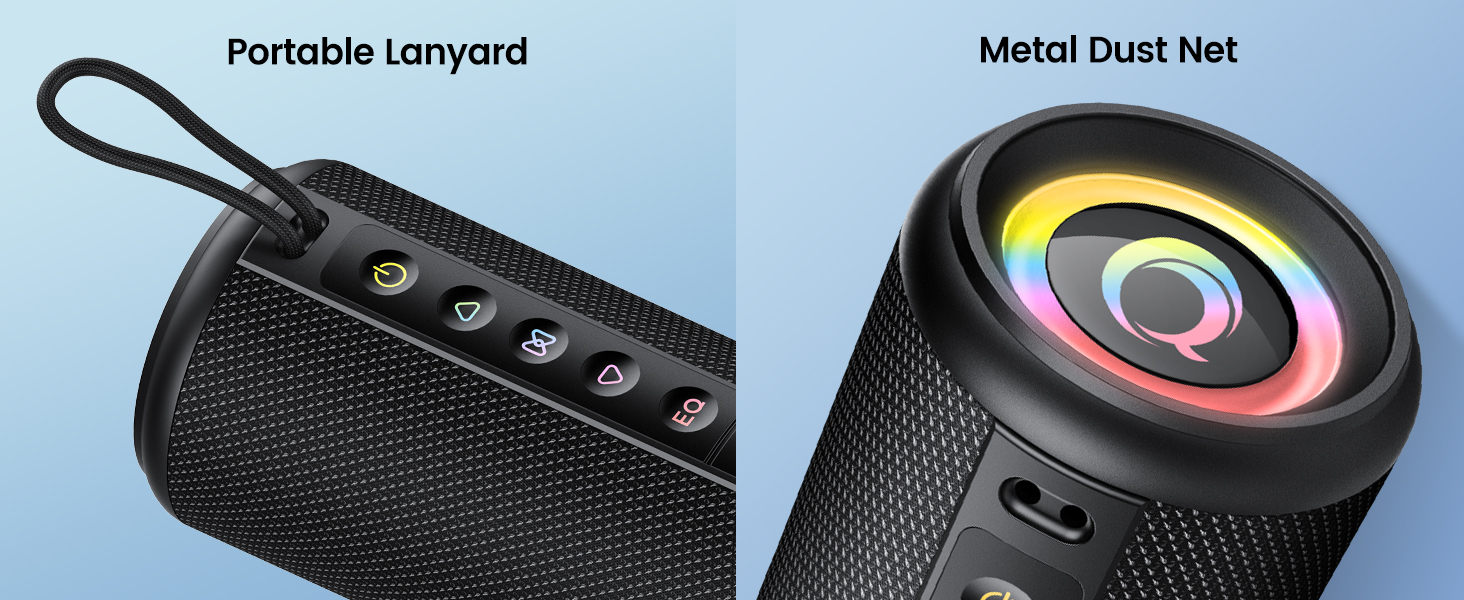
Image: Icons representing AUX, TF Card, Bluetooth, and USB connection options, highlighting the speaker's versatility.
6. Maintenance
- Clean the speaker with a soft, dry cloth. Do not use abrasive cleaners or solvents.
- While the speaker is IP7 waterproof, avoid prolonged immersion in water. Ensure the charging port cover is securely closed when near water.
- Store the speaker in a cool, dry place when not in use.
- Avoid exposing the speaker to extreme temperatures or direct sunlight for extended periods.

Image: The dotn M17B speaker with water splashing on it, illustrating its IP7 waterproof feature. Note: Do not immerse in water.
7. Troubleshooting
| Problem | Possible Cause | Solution |
|---|---|---|
| Speaker does not turn on. | Low battery. | Charge the speaker fully. |
| Cannot pair via Bluetooth. | Speaker not in pairing mode; device Bluetooth off; too far from device. | Ensure speaker is in pairing mode. Turn device Bluetooth off and on. Move speaker closer to device. |
| No sound. | Volume too low; incorrect input mode; device not playing. | Increase speaker and device volume. Check input mode (Bluetooth, AUX, TF, USB). Ensure music is playing on the connected device. |
| Sound distortion. | Volume too high; low battery; poor audio source. | Reduce volume. Charge the speaker. Try a different audio source. |
| TWS pairing fails. | Speakers too far apart; already connected to another device. | Ensure speakers are close to each other. Disconnect speakers from any other Bluetooth devices before TWS pairing. |
8. Specifications
| Feature | Detail |
|---|---|
| Model Name | M17B |
| Speaker Type | Portable Speaker |
| Material | Plastic |
| Connectivity Technology | Bluetooth 5.4 |
| Wireless Communication Range | Up to 98 Feet (30 meters) |
| Speaker Maximum Output Power | 20 Watts |
| Frequency Response | 16 KHz |
| Playtime | Up to 20 hours (at 50% volume) |
| Water Resistance Level | IP7 Waterproof |
| Product Dimensions | 3.15"D x 3.15"W x 7.4"H (8cm x 8cm x 19cm) |
| Item Weight | 1.23 Pounds (555g) |
| Batteries | 1 A battery required (included) |
| Special Features | True Wireless Stereo, Bass Boost, AUX, Hi-Res Audio, 3 EQ Modes, LED Lights, TF Card Port, Hands-free, Shockproof |

Image: A diagram illustrating the size parameters (height, diameter) and weight of the dotn M17B speaker.
9. Warranty and Support
For warranty information or technical support, please refer to the contact details provided with your purchase or visit the official dotn website. Keep your purchase receipt for warranty claims.