
1. Introduction
This manual provides essential information for the safe and effective operation, setup, maintenance, and troubleshooting of your AZZUNO ACDC-200F AC/DC TIG Welder. Please read this manual thoroughly before operating the machine to ensure proper usage and to prevent injury or damage.
The AZZUNO ACDC-200F is a versatile multi-process welding machine designed for both professional and hobbyist use. It offers 6-in-1 functionality, including AC TIG, AC Pulsed TIG, DC TIG, DC Pulsed TIG, Spot TIG, and Stick welding, suitable for various materials such as aluminum, stainless steel, carbon steel, and iron.
2. Safety Information
WARNING: Welding can be dangerous. Always follow safety precautions to prevent serious injury or death.
- Always wear appropriate personal protective equipment (PPE), including a welding helmet with proper shade, flame-resistant clothing, welding gloves, and safety shoes.
- Ensure adequate ventilation to avoid inhaling welding fumes.
- Protect bystanders from arc rays and hot metal.
- Never weld near flammable materials.
- Ensure the welding machine is properly grounded.
- Disconnect power before performing any maintenance or service.
- Do not touch live electrical parts.
- Keep children and unauthorized personnel away from the welding area.

The AZZUNO ACDC-200F features a powerful fan and an overheat protective system for enhanced safety during operation.
3. Product Overview and Features
The AZZUNO ACDC-200F is equipped with advanced features for superior welding performance:
- 6-in-1 Multi-Process Functionality: Offers AC TIG, AC Pulsed TIG, DC TIG, DC Pulsed TIG, Spot TIG, and Stick welding modes.
- Advanced Pulse TIG Control: Provides precise control for cleaner, more precise welds, especially beneficial for aluminum. Includes 2T, 4T, and SPOT TIG modes.
- Precision Parameter Settings: MCU Digital control system allows adjustment of Pre-flow, Initial current, Slope-up, Peak current, Base current, Slope-down, Crater current, Post-flow, Pulse duty, AC frequency, AC balance, and Pulse frequency.
- Seamless Parameter Persistence: Automatic save function restores previous welding parameters for uninterrupted operation.
- Dual Voltage Capability: Operates on both 110V and 220V power supplies.
- MCU & IGBT Technology: Ensures stable welding performance and versatile functionality.

The AZZUNO ACDC-200F supports multiple welding processes, including various TIG and Stick welding modes.
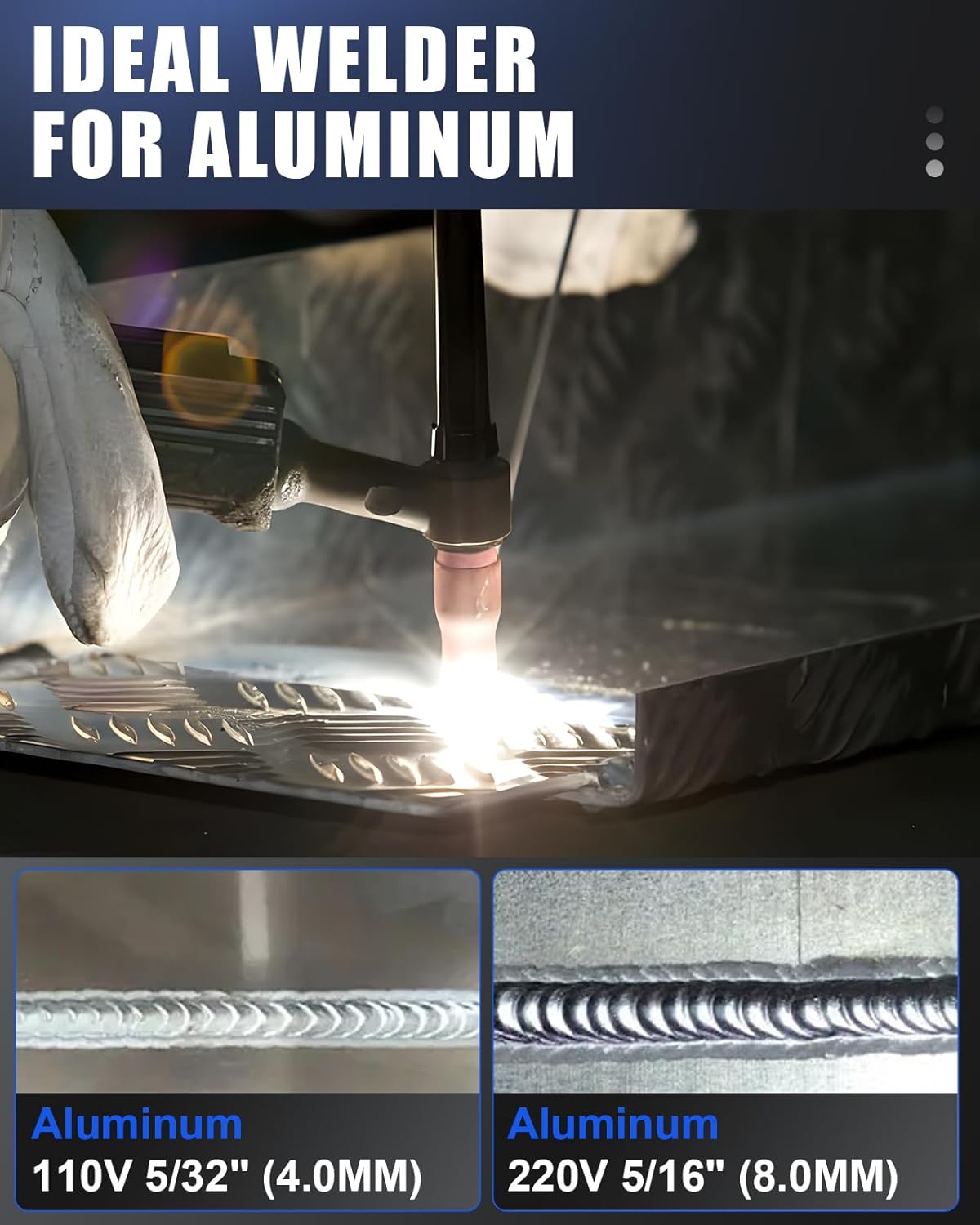
The ACDC-200F is optimized for welding aluminum, producing clean and strong welds.

Integrated MCU and IGBT technology ensures stable and versatile welding performance.
4. Package Contents and Accessories
The AZZUNO ACDC-200F TIG Welder comes with the following accessories:
- TIG Torch (WP-26)
- Electrode Holder
- Ground Clamp
- Brush/Hammer
- 110V/220V Adapter Cord
- Argon Gas Regulator and Hose
- Nozzle (3 pieces)
- Collet (3 pieces)
- Tungsten Electrode (3 pieces)

All included accessories for the AZZUNO ACDC-200F welder.

Detailed view of the accessories included with the welder.
5. Control Panel Introduction
Familiarize yourself with the control panel components for efficient operation:
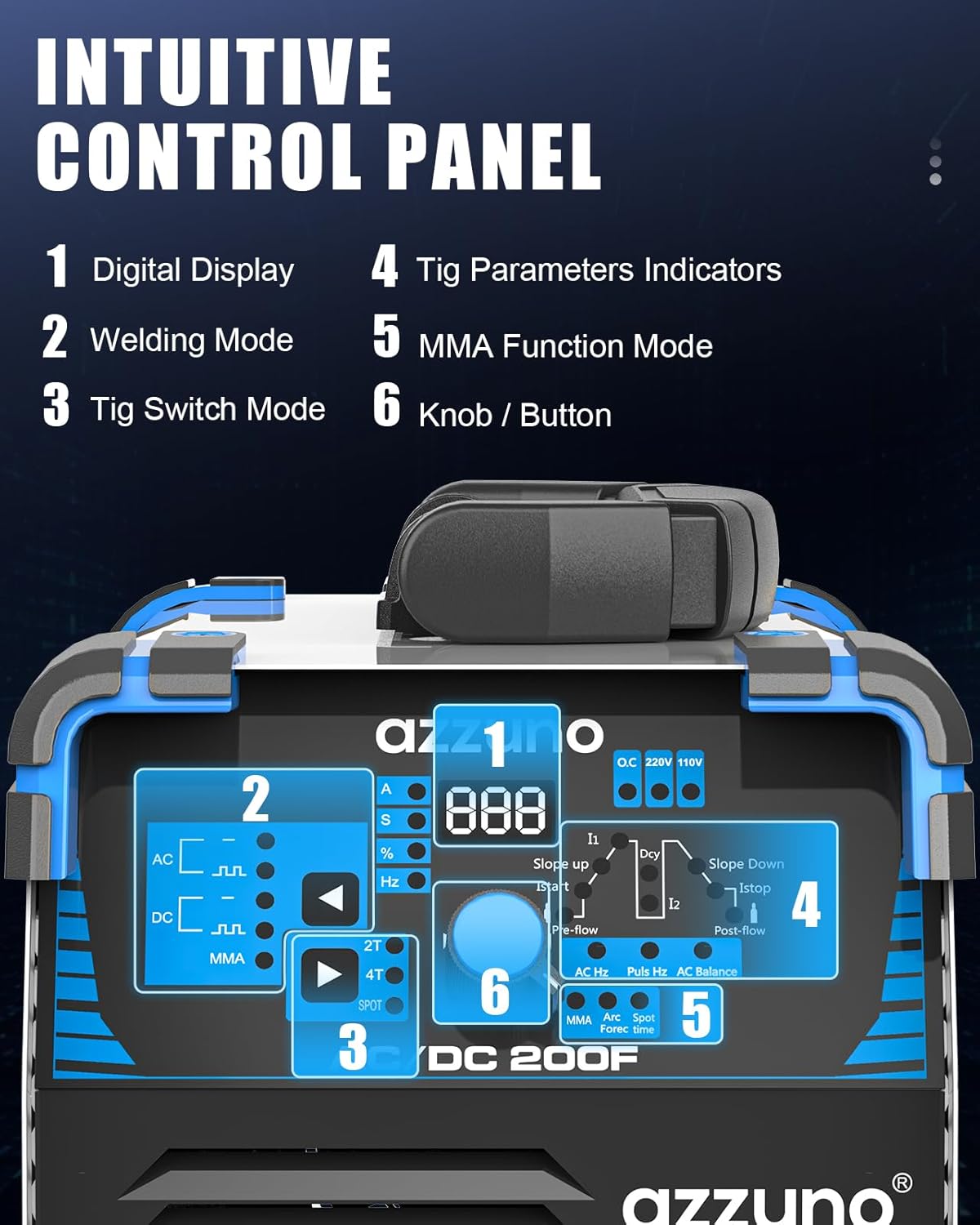
Intuitive control panel layout.

Detailed panel introduction with numbered components.
- Digital Display: Shows current welding parameters.
- Operation Indicators: Lights indicating active modes or warnings.
- Knob/Button: Used for parameter adjustment and selection.
- "-" Terminal: Negative output terminal.
- TIG Torch Socket: Connection point for the TIG torch.
- Control Terminal: For connecting remote controls or foot pedals (if applicable).
- "+" Terminal: Positive output terminal.
- Foot Pedal Terminal: Dedicated connection for a foot pedal (not included).
6. Setup
Follow these steps to set up your AZZUNO ACDC-200F welder:
- Power Connection: Connect the welder to a suitable 110V or 220V power outlet using the provided adapter cord. Ensure the power source matches the machine's requirements.
- Gas Connection (TIG Welding): Attach the argon gas regulator to your argon gas cylinder. Connect the argon gas hose from the regulator to the gas inlet on the back of the welder. Ensure all connections are tight to prevent leaks.
- TIG Torch Connection: Connect the WP-26 TIG torch to the TIG Torch Socket on the front panel. Ensure the control cable is also connected to the Control Terminal.
- Ground Clamp Connection: Connect the ground clamp cable to the appropriate terminal (usually the "+" terminal for DC TIG, or as indicated for AC TIG) and securely attach the clamp to the workpiece.
- Electrode Holder Connection (Stick Welding): For Stick welding, connect the electrode holder cable to the appropriate terminal (usually the "+" terminal for DC Stick) and the ground clamp to the "-" terminal.

The welder supports both 110V and 220V power inputs.

Connection diagrams for TIG and Stick welding modes.
7. Operating Instructions
The AZZUNO ACDC-200F offers various welding modes. Select the appropriate mode and adjust parameters according to your material and desired weld.
7.1. Mode Selection
Use the Welding Mode selector on the control panel to choose between TIG and Stick (MMA) welding. For TIG welding, further select AC, DC, or Pulse modes.

Available TIG and MMA welding waveforms.

TIG welding multi-process options.

Stick welding multi-process options.
7.2. Parameter Adjustment
The digital control system allows precise adjustment of welding parameters. Use the knob/button to navigate and modify settings such as:
- Pre-flow: Time gas flows before arc ignition.
- Initial Current (Istart): Current at the beginning of the weld.
- Slope-up: Time for current to rise from initial to peak.
- Peak Current (I1): Maximum welding current.
- Base Current (I2): Minimum current during pulse (for pulsed TIG).
- Slope-down: Time for current to fall from peak to crater.
- Crater Current (Istop): Current at the end of the weld.
- Post-flow: Time gas flows after arc extinction to protect the weld puddle.
- Pulse Duty (Dcy): Percentage of time at peak current during pulse.
- AC Frequency (AC Hz): Frequency of the AC waveform (for AC TIG).
- AC Balance (AC Balance): Controls cleaning action vs. penetration (for AC TIG).
- Pulse Frequency (Puls Hz): Number of pulses per second (for pulsed TIG).

Visual representation of TIG welding parameters.

Multi-function welding parameter set for precise control.
The machine's intelligent automatic save function will restore your last used parameters, allowing you to resume work efficiently.

Examples of perfect welding effects achievable with the ACDC-200F.
8. Maintenance
Regular maintenance ensures the longevity and optimal performance of your welder:
- Cleaning: Periodically clean the machine's exterior and ventilation openings to prevent dust and debris buildup. Use compressed air to clear internal components if necessary, ensuring the machine is unplugged.
- Cable Inspection: Regularly inspect all welding cables, torch, and ground clamp for damage, cuts, or loose connections. Replace damaged components immediately.
- Gas System Check: For TIG welding, check gas hoses and connections for leaks. Ensure the gas regulator is functioning correctly.
- Consumables: Replace TIG torch consumables (tungsten electrodes, collets, nozzles) as they wear out to maintain weld quality.
- Storage: Store the welder in a clean, dry environment when not in use.
9. Troubleshooting
If you encounter issues with your welder, refer to the following common problems and solutions:
| Problem | Possible Cause | Solution |
|---|---|---|
| No power to the machine | Power cord unplugged, circuit breaker tripped, faulty power switch. | Check power cord connection, reset circuit breaker, contact support if switch is faulty. |
| No arc / Weak arc | Poor ground connection, incorrect current setting, worn electrode/tungsten, gas flow issue (TIG). | Ensure ground clamp is secure, adjust current, replace electrode/tungsten, check gas supply and flow. |
| Overheat warning light on | Exceeded duty cycle, blocked ventilation, high ambient temperature. | Allow machine to cool down, clear ventilation openings, operate in a cooler environment. |
| Poor weld quality | Incorrect parameters, improper technique, contaminated material, wrong gas/electrode. | Adjust parameters, practice technique, clean workpiece, use correct consumables. |
10. Specifications
Key technical specifications for the AZZUNO ACDC-200F welder:
| Specification | Value |
|---|---|
| Model Number | ACDC-200F-2 |
| Input Voltage | 110V/220V Dual Voltage |
| Welding Processes | AC TIG, AC Pulsed TIG, DC TIG, DC Pulsed TIG, Spot TIG, Stick |
| Item Weight | 27.2 pounds |
| Package Dimensions | 17.25 x 14 x 13.5 inches |
| Manufacturer | AZZUNO |

Detailed electrical specifications for the ACDC-200F.
11. Warranty and Support
For warranty information and technical support, please refer to the documentation included with your product or visit the official AZZUNO website. Keep your purchase receipt as proof of purchase for warranty claims.
If you require assistance with setup, operation, or troubleshooting beyond what is covered in this manual, please contact AZZUNO customer service.


