
1. Introduction
Thank you for purchasing the Vagusicc Nightstand with Charging Station. This manual provides detailed instructions for assembly, operation, maintenance, and troubleshooting to ensure safe and efficient use of your new nightstand. This versatile piece of furniture is designed to enhance your bedroom, living room, or dorm space with convenient storage and integrated charging capabilities.
2. Safety Information
Please read all instructions carefully before assembly and use. Keep this manual for future reference.
- Ensure all parts are present and undamaged before beginning assembly.
- Assemble on a soft, clean surface to prevent scratches.
- Do not overtighten screws during assembly.
- Keep small parts away from children.
- Do not exceed the weight capacity of the shelves or tabletop.
- For the charging station, ensure the power cord is fully inserted into a wall outlet. Do not overload the outlets.
- Avoid exposing the nightstand to excessive moisture or direct sunlight.
- Use only as intended for indoor furniture.
3. Package Contents
Verify that all components listed below are included in your package:
- Tabletop with integrated charging station
- Metal frame components
- Fabric drawer
- Bottom shelf
- Adjustable feet pads (4x)
- Assembly hardware (screws, bolts, etc.)
- Assembly tools (Allen Key, Screw Driver, Wrench)
- Instruction Manual
4. Assembly Instructions
Follow these steps for proper assembly. It is recommended to have two people for easier assembly.
Step 1: Prepare Components
Unpack all components and lay them out on a clean, soft surface. Identify each part using the provided parts list in your package.
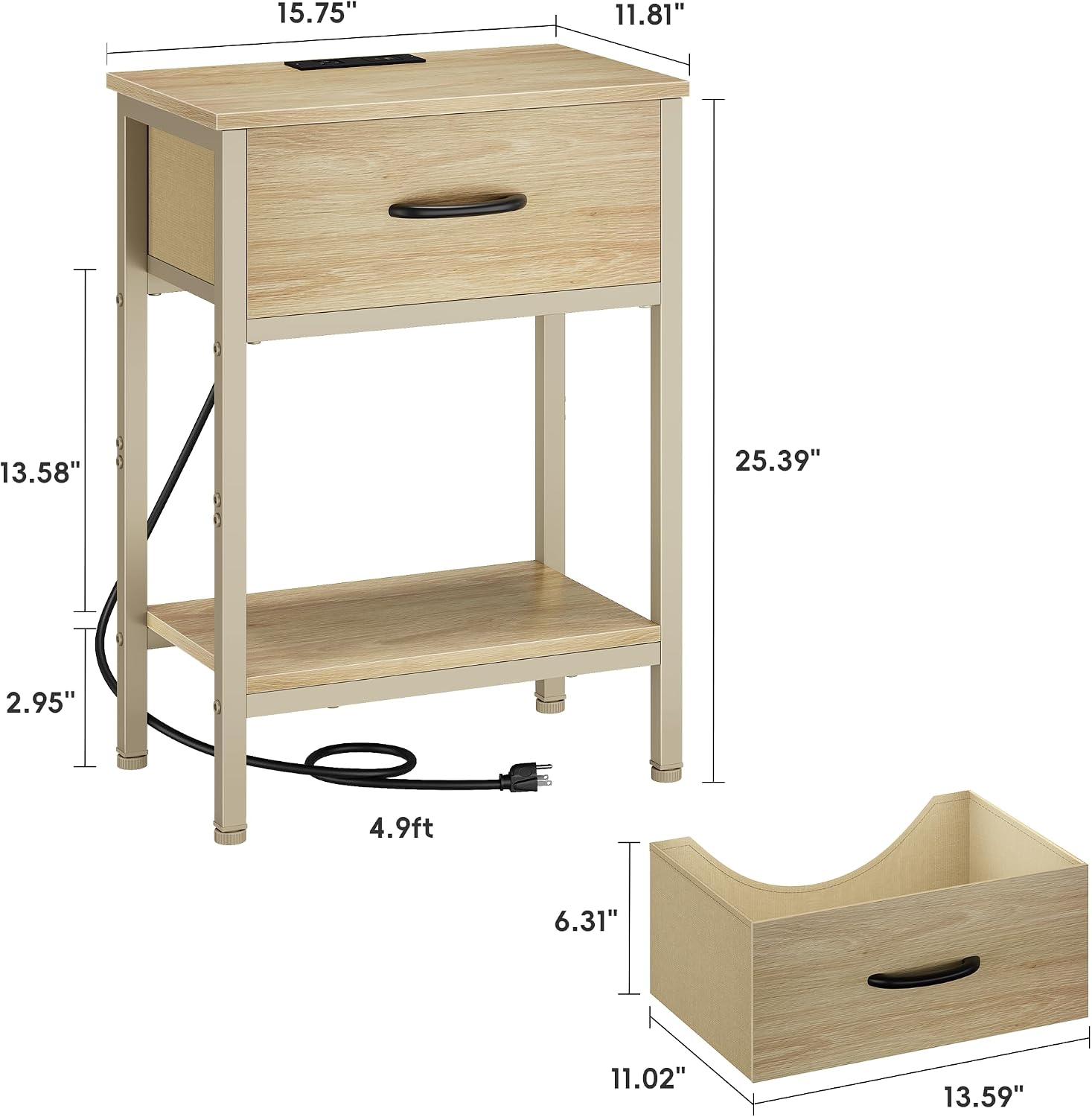
Image: All components of the nightstand laid out on a floor, ready for assembly.
Step 2: Assemble the Frame
Attach the metal frame components together using the provided screws and tools. Ensure all connections are secure but do not fully tighten until the entire frame is assembled.

Image: Close-up of a person assembling the metal frame of the nightstand, showing screw attachment points.
Step 3: Attach Shelves and Drawer Supports
Secure the bottom shelf to the frame. Install the drawer supports as indicated in the manual. Once all structural components are in place, fully tighten all screws.

Image: Diagram showing the attachment of the bottom shelf and drawer supports to the nightstand frame.
Step 4: Install the Tabletop and Charging Station
Place the tabletop onto the assembled frame and secure it. The charging station is pre-installed in the tabletop. Ensure the power cord is routed correctly and not pinched.

Image: Illustration of the tabletop being placed onto the nightstand frame, highlighting the integrated charging station.
Step 5: Insert the Fabric Drawer
Unfold the fabric drawer and insert the bottom panel to give it shape. Slide the assembled drawer into its designated slot in the nightstand frame.

Image: A fabric drawer being slid into the nightstand, showing its placement within the frame.
Step 6: Adjust Feet Pads
Screw the adjustable feet pads into the bottom of the nightstand legs. Adjust them as needed to ensure the nightstand is stable and level on uneven surfaces, protecting your floor from scratches.

Image: Close-up of the adjustable feet pads at the bottom of the nightstand legs, demonstrating their function for leveling.
5. Operating Instructions
Using the Charging Station
The Vagusicc Nightstand is equipped with a convenient charging station. To use it:
- Plug the nightstand's main power cord (4.9 ft) into a standard wall outlet.
- Utilize the two 125V/12A AC outlets for larger electronics.
- Use the 5V/2A USB and Type-C ports for charging mobile devices, smartwatches, and other USB-powered gadgets.

Image: A close-up view of the nightstand's tabletop, showing the integrated charging station with two AC outlets, two USB ports, and a Type-C port, with various devices connected and charging.
Note: Avoid overloading the charging station. Refer to the specifications for maximum power output.
Using the Fabric Drawer
The fabric drawer provides enclosed storage for personal items. Simply pull the handle to open and push to close. The non-woven fabric is breathable and dust-resistant, ideal for keeping items tidy.
Image: A fabric drawer being slid into the nightstand, showing its placement within the frame.
Using the Open Storage Shelf
The lower open shelf is suitable for storing books, magazines, decorative items, or other frequently accessed necessities.

Image: The Vagusicc nightstand positioned between two armchairs in a living room, displaying a coffee cup and phone on the top, and a plant and books on the lower shelf.
6. Maintenance
- Cleaning: Wipe surfaces with a soft, damp cloth. Avoid harsh chemicals or abrasive cleaners.
- Dusting: Regularly dust the nightstand to prevent buildup.
- Fabric Drawer Care: The non-woven fabric drawer can be spot cleaned with a mild detergent and water. Allow to air dry completely. Do not machine wash.
- Inspections: Periodically check all screws and connections to ensure they remain tight. Retighten if necessary.
- Charging Station: Keep the charging ports free of dust and debris. Do not attempt to disassemble the charging unit.
7. Troubleshooting
| Problem | Possible Cause | Solution |
|---|---|---|
| Nightstand is wobbly. | Uneven floor or loose connections. | Adjust the feet pads until stable. Tighten all assembly screws. |
| Charging station not working. | Power cord not plugged in, wall outlet not active, or device issue. | Ensure the nightstand's power cord is securely plugged into a live wall outlet. Test the wall outlet with another device. Check device's charging cable. |
| Drawer does not slide smoothly. | Drawer not assembled correctly or obstruction. | Ensure the fabric drawer is fully unfolded and the bottom panel is correctly inserted. Check for any items obstructing the drawer's path. |
| Missing parts. | Packaging error. | Contact Vagusicc customer support for assistance. Refer to the "Warranty & Support" section. |
8. Specifications
| Feature | Detail |
|---|---|
| Model | B0FVL2419M |
| Brand | Vagusicc |
| Product Dimensions (D x W x H) | 15.75" x 11.81" x 25.39" |
| Item Weight | 9.2 Pounds |
| Frame Material | Alloy Steel |
| Top Material | Premium Wood |
| Drawer Material | Non-woven Fabric |
| Color | Natural |
| Charging Station | 2x 125V/12A AC Outlets, 2x 5V/2A USB Ports, 1x Type-C Port |
| Power Cord Length | 4.9 feet |
| Assembly Required | Yes |
9. Warranty and Support
Vagusicc offers a 12-Month Quality Guarantee for this product. If you encounter any quality problems, missing parts, or require an electronic manual, please contact our customer support team for assistance. We are committed to providing free parts or a new item for replacement if necessary.
For support, please refer to the contact information provided with your purchase or visit the official Vagusicc store on Amazon: Vagusicc Store