
ZZH B0FVF72X84
ZZH Ergonomic Office Chair User Manual
Model: B0FVF72X84
1. Introduction
Thank you for choosing the ZZH Ergonomic Office Chair. This manual provides essential information for the proper assembly, operation, and maintenance of your new chair. Please read it thoroughly before use and retain it for future reference.
Safety Information
- Ensure all components are present and undamaged before assembly.
- Follow assembly instructions carefully. Do not overtighten screws.
- Do not stand on the chair.
- Do not use the chair if any parts are missing or damaged.
- Keep children away from moving parts during adjustment.
- Maximum weight capacity: 181 kg (400 lbs).
2. Product Overview
The ZZH Ergonomic Office Chair is designed for comfort and support during extended periods of sitting. It features multiple adjustable components to customize your seating experience.

Image 2.1: ZZH Ergonomic Office Chair. This image displays the full chair from a front-side angle within an office environment, highlighting its design and presence.
Key Features
- 4D Adjustable Armrests: Flip up 90°, slide 3 cm (1.2") forward/back, 5 cm (2") height adjustment, and 360° rotation for versatile arm support.
- 3D Adjustable Headrest: 10 cm (3.9") height adjustment, 90°/45° tilt for neck and head support.
- 2D Adjustable Lumbar Support: Moves 5 cm (2") up/down and 3 cm (1.2") forward/back to support the natural curve of your spine.
- Multi-Angle Reclining: Smooth 90°-135° tilt range with three locking positions (90°, 115°, 135°).
- Spacious Seat Cushion: 52 cm x 53 cm (20.47" x 20.87") seat with 10 cm (3.93") high-density foam for comfort and pressure dispersion.
- Superior Mobility & Stability: Durable 360° swivel casters and an ultra-sturdy 5-point metal base.
- Rear Clothes Hook: A practical hook for organizing essentials.
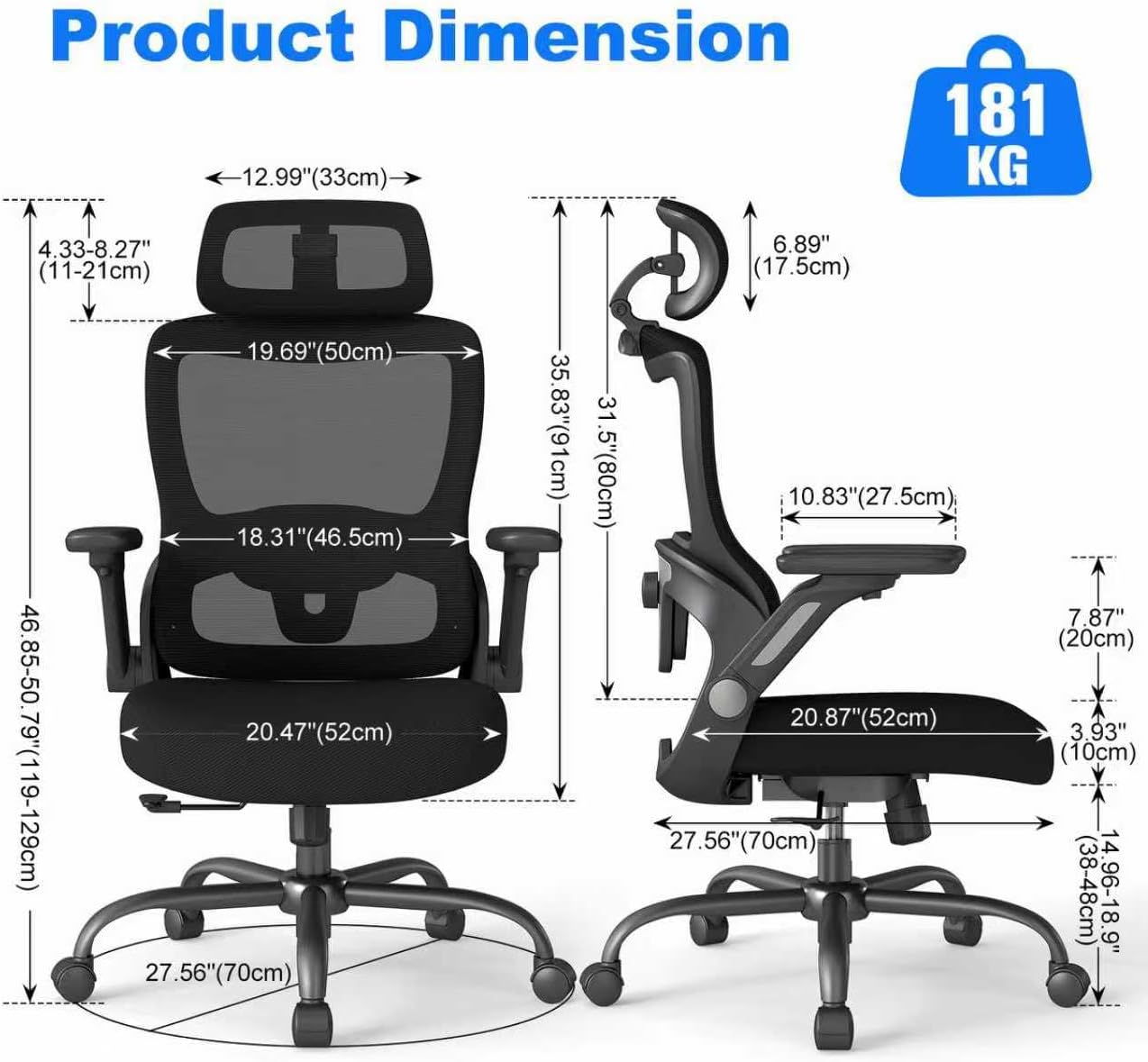
Image 2.2: Product Dimensions. This diagram illustrates the various measurements of the chair, including height, width, depth, and seat cushion dimensions, along with the 181 kg weight capacity.
3. Setup and Assembly
Assembly of the ZZH Ergonomic Office Chair is designed to be straightforward. Please follow the included pictorial instructions carefully. Ensure you have ample space and all parts are accounted for before beginning.
General Assembly Steps (Refer to separate assembly guide for detailed diagrams):
- Attach the casters to the 5-star metal base.
- Insert the gas lift cylinder into the center hole of the base.
- Secure the seat mechanism to the underside of the seat cushion using the provided screws.
- Place the assembled seat onto the gas lift cylinder.
- Attach the backrest to the seat mechanism using the designated screws.
- Install the armrests to the sides of the seat, ensuring they are securely fastened.
- Mount the headrest onto the top of the backrest.
Verify all connections are secure before using the chair.
4. Operating Instructions and Adjustments
Your ZZH Ergonomic Office Chair offers various adjustments to optimize your comfort and support.
4.1. Seat Height Adjustment
- To raise the seat: Lift the lever located under the right side of the seat while taking your weight off the chair. Release the lever at the desired height.
- To lower the seat: Lift the lever while seated. Release the lever at the desired height.

Image 4.1: Multi-Angle Adjustment Function. This image demonstrates the chair's height adjustment and tilt range from 90° to 135°, including the tilt tension knob.
4.2. Backrest Tilt and Lock
- To recline: Pull the lever on the left side of the seat outwards. Lean back to the desired angle (between 90° and 135°).
- To lock the tilt: Push the lever inwards at one of the three preset positions (90°, 115°, 135°).
- To adjust tilt tension: Rotate the round knob located under the seat. Turn clockwise to increase tension (harder to recline), counter-clockwise to decrease tension (easier to recline).
4.3. 4D Adjustable Armrests
- Flip-Up Function: Lift the armrests upwards to a 90° vertical position to move the chair closer to your desk or for storage.
- Height Adjustment: Press the button on the side of the armrest and slide it up or down (5 cm / 2" range). Release the button to lock.
- Forward/Back Adjustment: Slide the armrest pad forward or backward (3 cm / 1.2" range).
- Rotation: Rotate the armrest pad 360° to find your preferred angle.
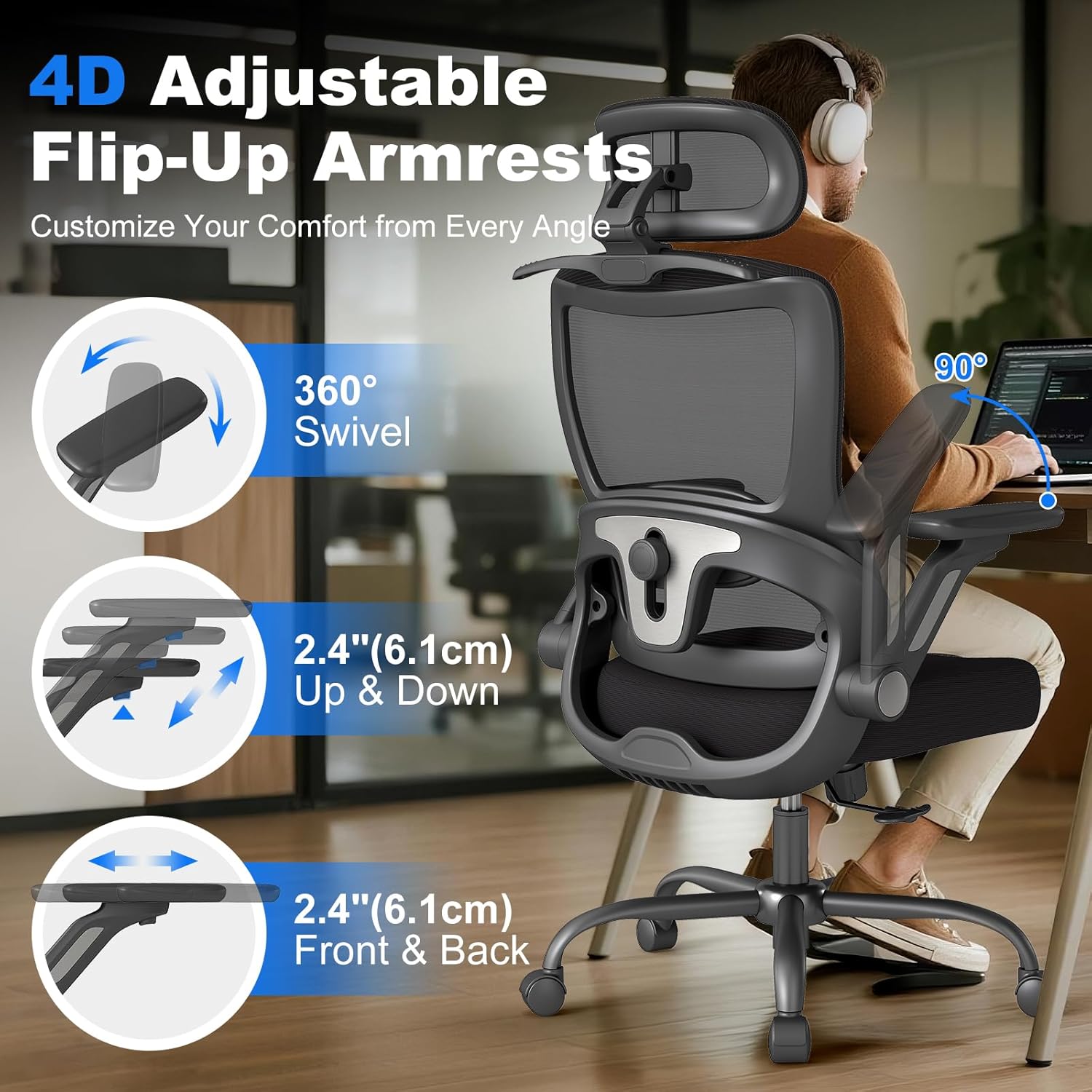
Image 4.2: 4D Adjustable Flip-Up Armrests. This diagram illustrates the various adjustments available for the armrests, including 360° swivel, up/down movement, and front/back slide.
4.4. 3D Adjustable Headrest
- Height Adjustment: Grasp the headrest and slide it up or down (10 cm / 3.9" range) to align with your neck.
- Tilt Adjustment: The headrest can tilt at 90° and 45° angles. Adjust by pressing the button and rotating.

Image 4.3: 3D Adjustable Headrest. This image shows the headrest's height adjustment (up/down) and tilt capabilities (90° and 45° rotation).
4.5. 2D Adjustable Lumbar Support
- Height Adjustment: Rotate the knob on the backrest to move the lumbar support up or down (5 cm / 2" range).
- Depth Adjustment: Push the lumbar support forward or pull it back (3 cm / 1.2" range) to achieve optimal spinal curve support.
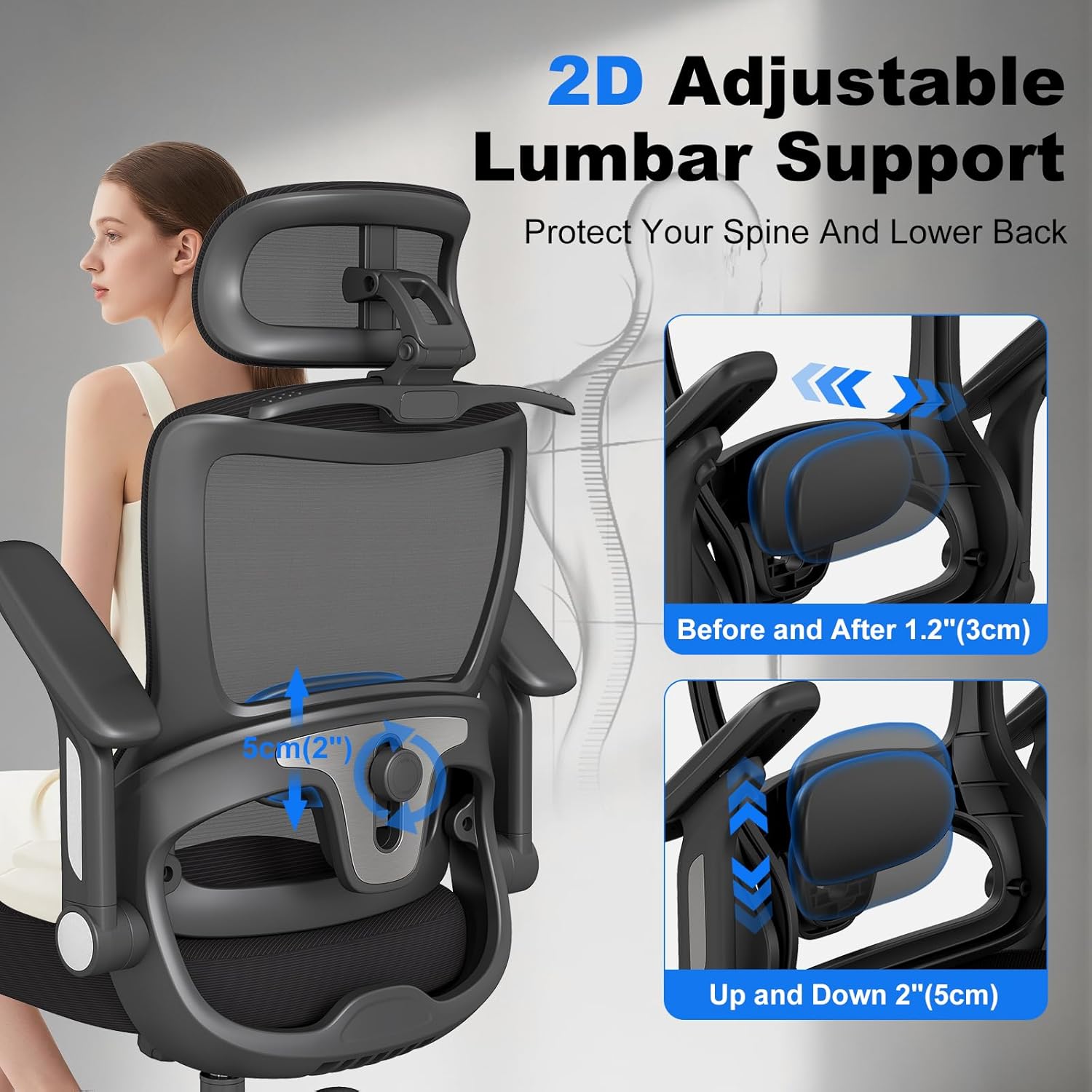
Image 4.4: 2D Adjustable Lumbar Support. This diagram illustrates how the lumbar support can be adjusted both vertically (up/down) and horizontally (forward/back) to fit individual needs.
4.6. Rear Clothes Hook
- Utilize the hook located on the back of the chair to hang light items such as jackets or bags, keeping your workspace tidy.

Image 4.5: Clothes Hanging Bracket. This image shows the utility of the rear clothes hook for hanging jackets or bags, contrasting with a chair without this feature.
5. Maintenance and Care
Proper maintenance ensures the longevity and optimal performance of your ZZH Ergonomic Office Chair.
- Cleaning: Wipe clean with a damp cloth. Avoid harsh chemicals or abrasive cleaners that may damage the mesh or other materials.
- Inspection: Periodically check all screws and bolts to ensure they are tight. Retighten if necessary.
- Casters: Keep casters free of debris (hair, dust) to ensure smooth rolling.
- Gas Lift: Do not attempt to disassemble the gas lift cylinder.
6. Troubleshooting
If you encounter issues with your ZZH Ergonomic Office Chair, refer to the following common solutions:
- Chair Squeaks: Check and tighten all assembly screws. A small amount of silicone lubricant can be applied to moving metal parts if the squeaking persists.
- Casters Not Rolling Smoothly: Inspect casters for trapped debris (hair, lint) and remove. Ensure the floor surface is clean.
- Armrests Feel Loose or Do Not Lock: Verify that the armrest attachment screws are securely tightened. For rotational looseness, while some swivel is inherent to the 4D design, excessive looseness may indicate a manufacturing variance.
- Chair Does Not Adjust Height: Ensure the gas lift lever is fully engaged or disengaged as required. If the gas lift is unresponsive, it may require replacement.
- Backrest Does Not Tilt or Lock: Check the tilt lock lever and tilt tension knob. Ensure they are correctly positioned and adjusted.
If problems persist after attempting these solutions, please contact customer support.
7. Specifications
| Feature | Detail |
|---|---|
| Brand | ZZH |
| Model | B0FVF72X84 |
| Colour | Black |
| Material | Mesh (Back), Foam (Seat) |
| Product Dimensions | 52D x 52W x 48H cm (20.47D x 20.47W x 18.9H inches) |
| Item Weight | 18.8 kg (41.4 lbs) |
| Maximum Weight Capacity | 181 kg (400 lbs) |
| Special Features | Adjustable Headrest, Adjustable Height, Adjustable Lumbar, Back Support, Ergonomic, Flip-Up Arms, Tilt Lock |
| Back Style | Solid Back (Mesh) |
| Recommended Uses | Computer, Gaming, Office |
| Product Care Instructions | Wipe Clean |

Image 7.1: Stable & Quiet Performance. This image highlights the 360° smooth and silent casters, the SGS Certified Class-4 Gas Lift, and the heavy-duty 5-star metal base.
8. Warranty and Support
For warranty information, please refer to the documentation provided with your purchase or contact ZZH customer service directly. If you require assistance with assembly, operation, or troubleshooting beyond the scope of this manual, please reach out to our support team.
Contact Information: Please refer to your purchase receipt or the ZZH official website for the most current customer support contact details.
Ask a question about this manual
Ask about setup, troubleshooting, compatibility, parts, safety, or missing instructions. Manuals+ will review the question and use this page’s manual context to help answer it.