
1. Introduction
Thank you for choosing the WOWOW Automatic Touchless Bathroom Sink Faucet. This manual provides essential information for the safe and efficient installation, operation, and maintenance of your new faucet. Please read these instructions thoroughly before installation and retain them for future reference.

Image 1.1: The WOWOW Automatic Touchless Bathroom Sink Faucet in Brushed Gold, demonstrating its hands-free operation.
2. Product Features
- Touchless Convenience: Equipped with an advanced smart sensor that activates water flow within 1 second upon hand detection. Water automatically ceases when hands are removed, providing a hygienic and convenient experience.
- Adjustable Water Temperature: Includes a temperature mixer and both hot and cold water hoses. Water temperature can be adjusted to your preferred level by manipulating the mixer valve, which is installed under the sink.
- Water-Saving & Efficient: Designed to deliver water only when necessary, reducing unnecessary water consumption and contributing to lower household costs while maintaining effective water pressure.
- Dual-Flow Aerator Included: Features a CEC-compliant 1.2 GPM aerator for daily water conservation. An optional 2.2 GPM aerator is also provided for situations requiring higher flow. The aerator softens the water stream for a comfortable feel.
- Easy Installation: Operates on 4 AA batteries (not included). A sensor indicator flashes when battery levels are low. All necessary mounting hardware is included. Designed to fit standard sink openings with a 35mm diameter and a deck thickness of up to 35mm.

Image 2.1: Internal components highlighting the multi-layered stainless steel and durable ceramic cartridge.
3. Package Contents
Before beginning installation, please verify that all components listed below are present in your package:
- One Automatic Sensor Bathroom Faucet
- Deck Plate (for 3-hole installations)
- Temperature Mixer Valve
- Hot Water Supply Hose
- Cold Water Supply Hose
- Control Box (Battery Box)
- Mounting Hardware (Gaskets, Nuts, Screws)
- User Manual
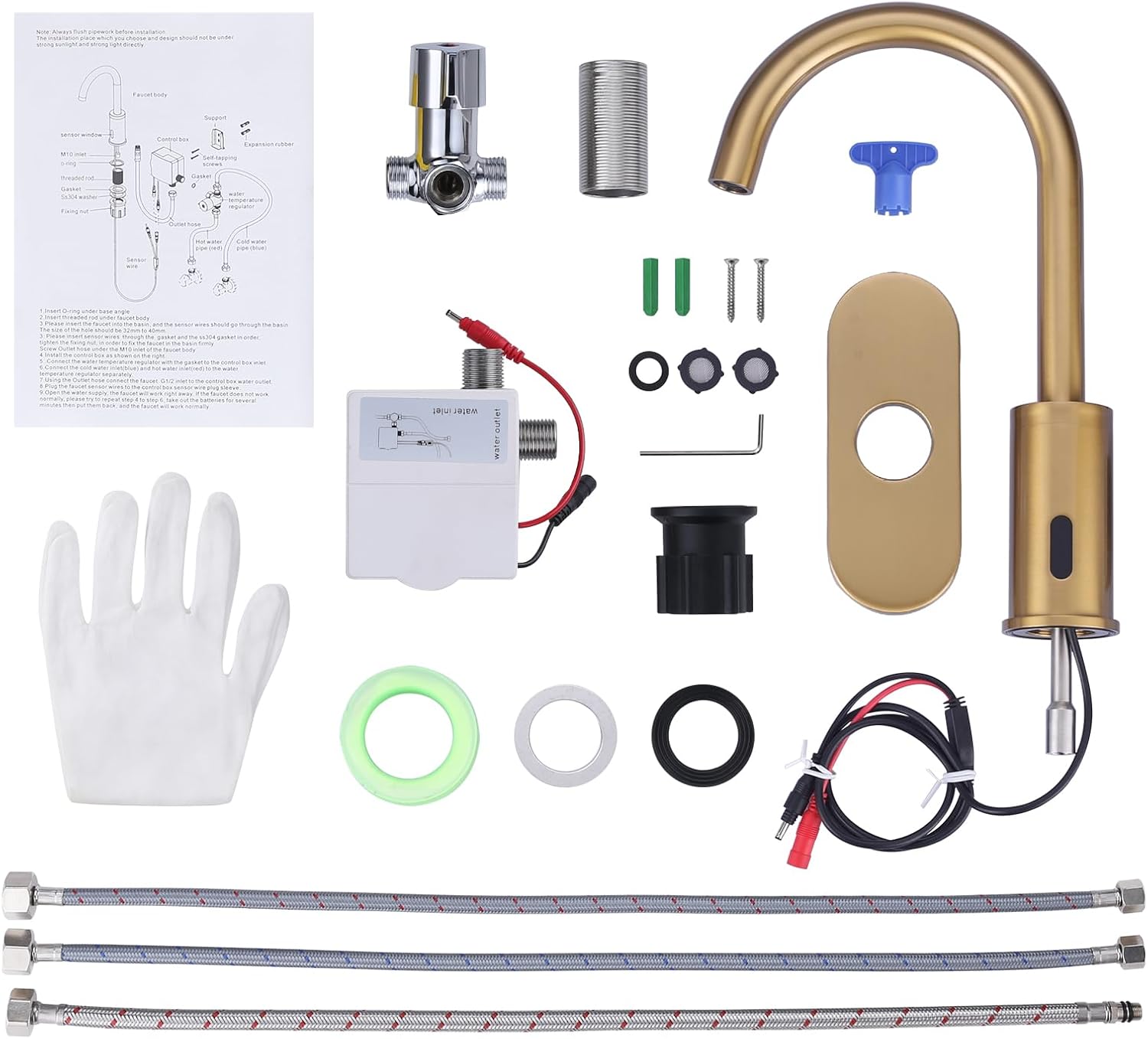
Image 3.1: Contents of the product package, including the faucet, deck plate, hoses, and control box.
4. Setup and Installation
This faucet is designed for either 1-hole or 3-hole installations. A deck plate is included for 3-hole sinks. Please follow these steps carefully:
- Prepare the Sink: Ensure the sink opening is clean and free of debris. For 3-hole sinks, place the deck plate over the holes.
- Install the Faucet: Insert the faucet body through the hole(s) in the sink or deck plate. Secure it from underneath with the provided mounting hardware (gasket, washer, and nut).
- Connect the Temperature Mixer: Screw the temperature mixer onto the appropriate water supply lines under the sink.
- Connect Water Hoses: Attach the hot and cold water supply hoses from the faucet to the temperature mixer. Ensure all connections are tight to prevent leaks.
- Connect the Water Outlet Hose: Connect the water outlet hose from the faucet to the control box.
- Connect the Wire: Connect the sensor wire from the faucet to the control box.
- Install Batteries: Open the battery compartment on the control box and insert 4 AA alkaline batteries (not included), ensuring correct polarity. Close the compartment securely.
- Test for Leaks: Turn on the main water supply and check all connections for leaks.

Image 4.1: Visual guide for faucet installation, detailing connections and component placement.

Image 4.2: Dimensional drawing of the faucet, providing key measurements for installation planning.
5. Operating Instructions
The WOWOW Automatic Touchless Bathroom Sink Faucet is designed for simple, hands-free operation.
- Activating Water Flow: Place your hands within the sensing range (approximately 3.38 - 4.72 inches) of the sensor located on the faucet body. The water will begin to flow automatically.
- Stopping Water Flow: Remove your hands from the sensing range. The water will automatically stop after a brief delay.
- Adjusting Water Temperature: The water temperature is controlled by the mixer valve installed under the sink. Turn the mixer valve left for hotter water or right for colder water to achieve your desired temperature. This setting will remain constant until manually adjusted again.
- Low Battery Indicator: The sensor indicator light will flash when the batteries are running low, signaling that they need to be replaced soon.
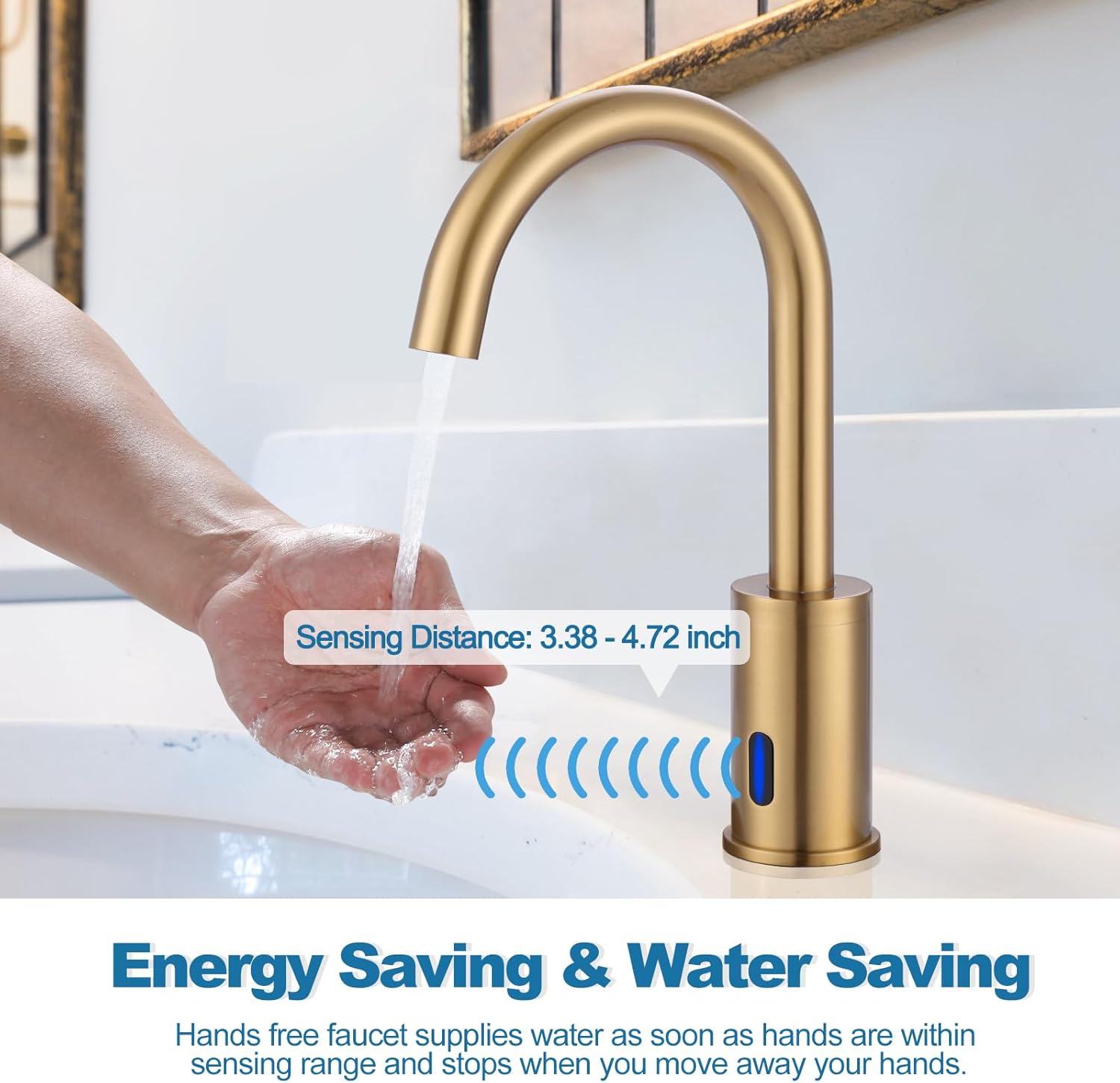
Image 5.1: Illustration of the faucet's sensing distance for optimal hands-free operation.
6. Maintenance
Regular maintenance will ensure the longevity and optimal performance of your faucet.
- Cleaning: Clean the faucet regularly with a soft cloth and mild soap. Avoid abrasive cleaners, harsh chemicals, or scouring pads, as these can damage the finish.
- Sensor Care: Keep the sensor window clean and free from obstructions. Do not spray cleaning agents directly onto the sensor.
- Aerator Maintenance: Periodically unscrew and clean the aerator to remove any mineral deposits or debris that may affect water flow.
- Battery Replacement: Replace the 4 AA batteries when the low battery indicator flashes. Always use new alkaline batteries.
7. Troubleshooting
If you encounter any issues with your faucet, please refer to the following troubleshooting guide:
| Problem | Possible Cause | Solution |
|---|---|---|
| No water flow | 1. Batteries are dead or incorrectly installed. 2. Water supply is off. 3. Sensor is obstructed or dirty. 4. Hoses are kinked or clogged. | 1. Replace batteries with new alkaline ones; check polarity. 2. Ensure hot and cold water supply valves are fully open. 3. Clean the sensor window. Remove any objects blocking the sensor. 4. Check and straighten hoses. Clean aerator if clogged. |
| Water does not stop flowing | 1. Sensor is dirty or continuously detecting an object. 2. Sensor malfunction. | 1. Clean the sensor window thoroughly. Ensure no objects are within the sensing range. 2. Contact customer support if the issue persists after cleaning. |
| Low water pressure | 1. Aerator is clogged. 2. Water supply valves are not fully open. 3. Hoses are kinked. | 1. Remove and clean the aerator. 2. Ensure both hot and cold water supply valves are fully open. 3. Check and straighten water supply hoses. |
| Incorrect water temperature | 1. Temperature mixer valve is set incorrectly. 2. Hot/cold water supply issues. | 1. Adjust the temperature mixer valve located under the sink. 2. Check if hot/cold water supply to the house is working correctly. |
8. Specifications
| Brand | WOWOW |
| Model Name | Touchless Bathroom Faucet (Model 2322301G) |
| Recommended Uses | Bathroom |
| Mounting Type | Deck Mount |
| Finish Type | Brushed Gold |
| Material | Stainless Steel |
| Number of Handles | 1 (for temperature mixer) |
| Hole Count | 1 or 3 (with included deck plate) |
| Installation Type | Single Hole |
| Power Source | 4 AA Batteries (not included) |
| Product Dimensions | 16.54"D x 11.02"W x 3.54"H |
| Item Weight | 4.41 pounds |
9. Warranty and Support
This WOWOW faucet comes with a limited warranty. Please refer to the warranty card included in your package for specific terms and conditions.
For technical assistance, troubleshooting beyond this manual, or warranty claims, please contact WOWOW customer support through the retailer where the product was purchased or visit the official WOWOW website for contact information.

