
Introduction
This manual provides detailed instructions for the H HIFIHEAR KZ AZ09 Bluetooth 5.2 IEM Adapter. Please read this manual carefully before using the product to ensure proper operation and to maximize your wireless audio experience. The KZ AZ09 transforms compatible wired In-Ear Monitors (IEMs) into wireless Bluetooth earphones, offering enhanced mobility and convenience.
Product Overview
The KZ AZ09 is a Bluetooth 5.2 module designed to convert specific KZ and CCA brand IEMs into wireless earphones. It features a portable design, long battery life, and high-fidelity audio transmission.
Key Features:
- High-Fidelity Sound: Utilizes Bluetooth 5.2 technology and AAC advanced audio coding for stable transmission and clear sound.
- Extended Battery Life: Each earbud provides 6 hours of playback, with the 800mAh charging case offering up to 42 hours of total music time.
- Bluetooth 5.2 Technology: Equipped with an RTL8753 chip for stable, high-performance, and low-power consumption wireless connectivity.
- 2PIN Pluggable Design: Features 0.75mm gold-plated pins for easy conversion of wired earphones to wireless.
- Lightweight & Ergonomic: Each ear hook weighs only 4.5g, ensuring a comfortable wearing experience.
- One-Key Operation: Multi-functional button for call management, music playback, and voice assistant activation.
Components:

The package includes two KZ AZ09 Bluetooth ear hooks (left and right) and a portable charging case. A USB charging cable is typically included for the charging case.
Setup Guide
1. Charging the Device
Before initial use, fully charge the KZ AZ09 ear hooks and the charging case.
- Place the ear hooks into their respective slots in the charging case.
- Connect the charging case to a power source using a compatible USB cable.
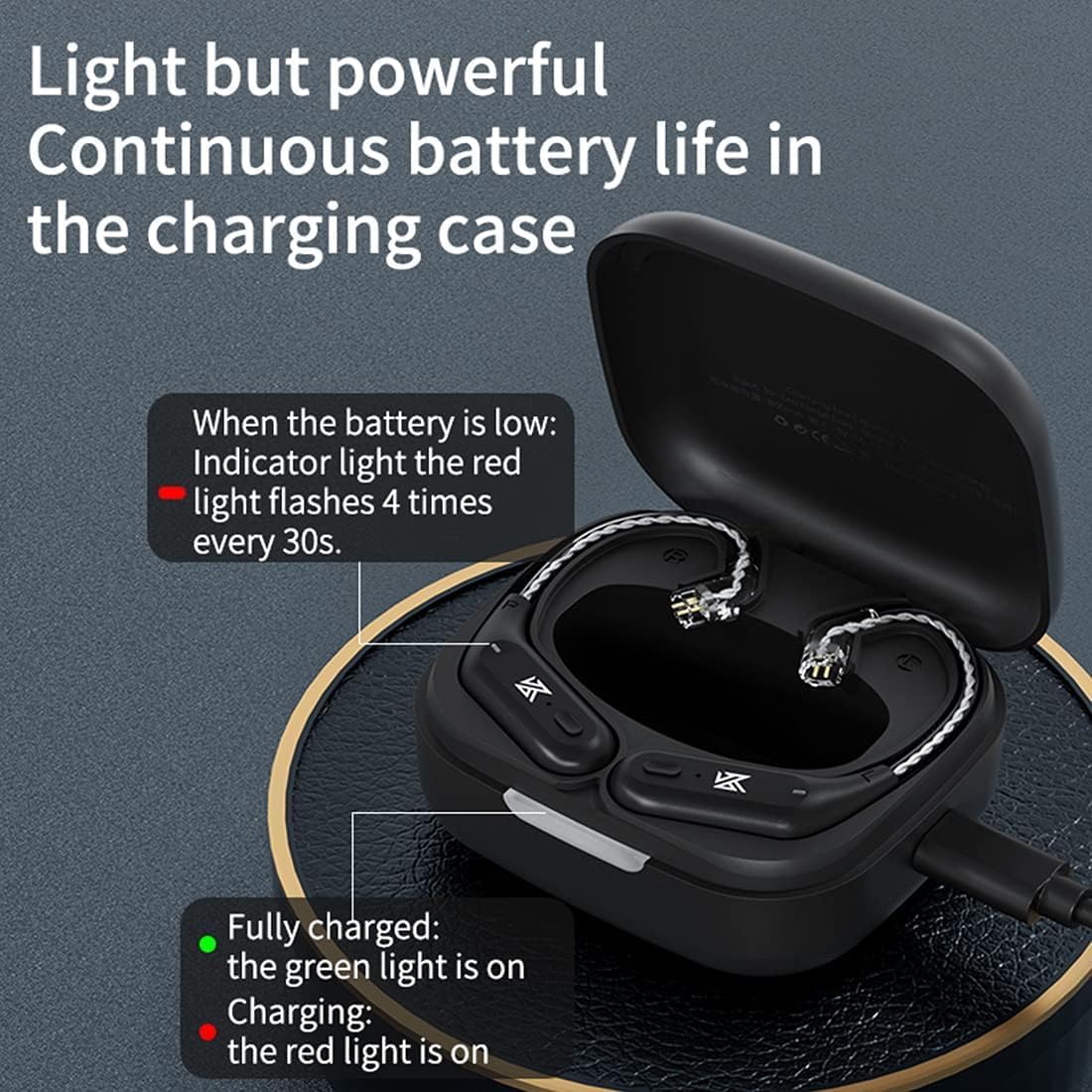
- The charging indicator light on the case will show charging status:
- Red light on: Charging.
- Green light on: Fully charged.
- Red light flashes 4 times every 30s: Low battery (for ear hooks).
- A full charge typically takes approximately 6 hours for the charging case.

2. Connecting to IEMs
The KZ AZ09 B-PIN version is compatible with various KZ and CCA IEMs. Ensure your IEMs have a B-PIN connector.
- Identify the left (L) and right (R) ear hooks and your IEMs.
- Carefully align the 0.75mm 2PIN connector on the ear hook with the corresponding port on your IEM.
- Gently push the ear hook connector into the IEM port until it is securely seated. Do not force the connection.
- Repeat for the other ear hook and IEM.
Compatible IEMs (B-PIN): KZ ZST, ZST-X, ZSTX, EDX, ZSR, ES4, AS10, ED12, ES3, AS06, BA10, CCA C10.
3. Bluetooth Pairing
After connecting the ear hooks to your IEMs, you can pair them with your Bluetooth-enabled device.
- Ensure the ear hooks are charged and powered on. They should automatically enter pairing mode when removed from the charging case.
- On your smartphone or other Bluetooth device, go to the Bluetooth settings.
- Search for available devices. You should see "AZ09" in the list.
- Select "AZ09" to connect. Once connected, a voice prompt will confirm successful pairing.
- If pairing fails, turn off the ear hooks, restart your device's Bluetooth, and repeat the steps.
Operation
1. Wearing the Ear Hooks
The KZ AZ09 ear hooks are designed for comfortable and secure wear.
- Gently place the IEM into your ear canal.
- Loop the ear hook over the top of your ear, ensuring it sits comfortably and securely behind your ear.
- Adjust the position for optimal sound and comfort.

2. Controls
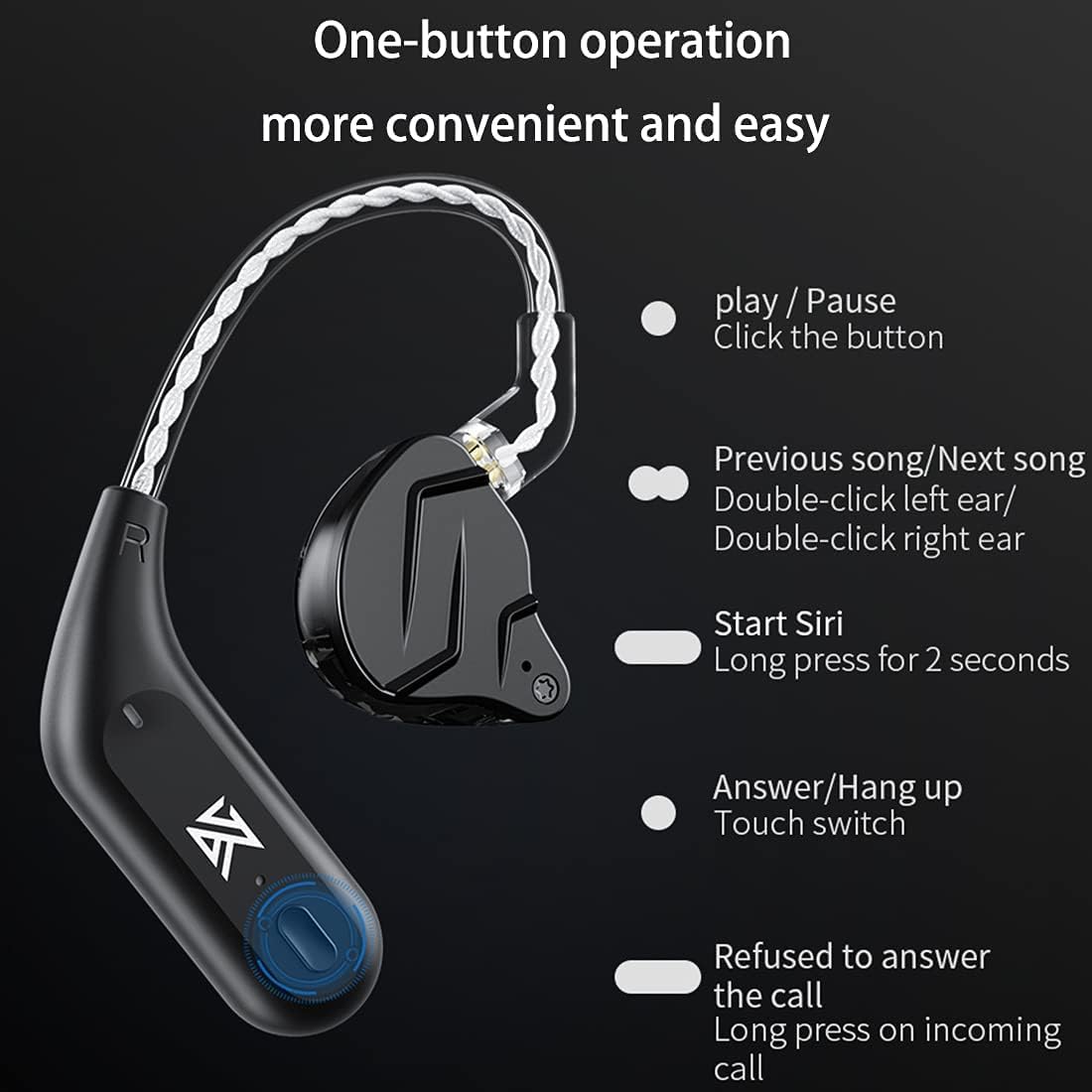
Each ear hook features a multi-functional button for easy control of music and calls.
| Action | Function |
|---|---|
| Click the button | Play / Pause music |
| Double-click left ear | Previous song |
| Double-click right ear | Next song |
| Long press for 2 seconds | Activate voice assistant (Siri, Google Assistant, etc.) |
| Touch switch (during incoming call) | Answer / Hang up call |
| Long press (during incoming call) | Refuse incoming call |
Maintenance
- Keep the device dry. Moisture can damage internal circuits.
- Avoid extreme temperatures. High temperatures can shorten the life of electronic devices, damage batteries, and warp plastic parts.
- Do not attempt to disassemble the device. Repairs should only be performed by authorized service personnel.
- Clean the ear hooks and charging case with a soft, dry cloth. Avoid using harsh chemicals or abrasive cleaners.
- Store the device in its charging case when not in use to protect it from dust and physical damage.
Troubleshooting
| Problem | Solution |
|---|---|
| Cannot power on | Ensure the ear hooks are charged. Place them in the charging case and connect to power. |
| Cannot pair with device | Make sure Bluetooth is enabled on your device. Ensure the ear hooks are in pairing mode. Try restarting both the ear hooks and your device's Bluetooth. |
| No sound or intermittent audio | Check if the ear hooks are properly connected to the IEMs. Ensure the device volume is not muted and is at an audible level. Re-pair the ear hooks with your device. |
| Poor sound quality | Ensure the ear hooks are within the effective range of your Bluetooth device (typically 10 meters). Avoid obstacles that may interfere with the signal. |
| Charging case not charging | Verify the USB cable and power adapter are working correctly. Ensure the charging cable is securely connected to both the case and the power source. |
Specifications
| Feature | Detail |
|---|---|
| Model | KZ AZ09 |
| Brand | H HIFIHEAR |
| Bluetooth Version | 5.2 |
| Bluetooth Chip | RTL8753 |
| Audio Coding | AAC |
| Ear Hook Weight | Approx. 4.5g (each) |
| Ear Hook Playback Time | Approx. 6 hours (single charge) |
| Charging Case Battery Capacity | 800mAh |
| Total Playback Time (with case) | Up to 42 hours |
| Charging Time | Approx. 6 hours (for case) |
| Connector Type | 0.75mm 2PIN (B-PIN) |
| Material | Plastic |
| Control Type | Media Control (Button) |
| Includes Rechargeable Battery | Yes |
| Item Weight | 0.13 Kilograms (total package) |
| Package Dimensions | 8.7 x 7.7 x 4.2 cm |

Warranty and Support
For warranty information, technical support, or service inquiries, please refer to the product packaging or contact the manufacturer, H HIFIHEAR, directly through their official channels or the retailer where the product was purchased. Keep your proof of purchase for warranty claims.