
Introduction
The TFA Dostmann TFA.me ID-08 Wi-Fi Weather Station provides professional weather forecasts for a five-day period via the wetter.com online weather service. This station offers detailed weather representation with 40 different weather symbol variations, local forecasts including daily maximum and minimum temperatures, rain probability, predicted rainfall, sunshine hours, UV index, wind speed, and wind direction. It also features a warning function for significant or potentially dangerous weather conditions.
The station displays indoor temperature and humidity, and wirelessly transmits outdoor temperature and humidity from up to five transmitters to the LCD screen. It acts as a gateway for the TFA.me system, allowing users to view data from up to 50 additional transmitters and various sensor types online via the free TFA.me portal. Weather forecasts are "Made in Germany," ensuring high quality standards. The display includes a backlight with four dimmable brightness levels, and the time display shows either the date or day of the week in six languages.
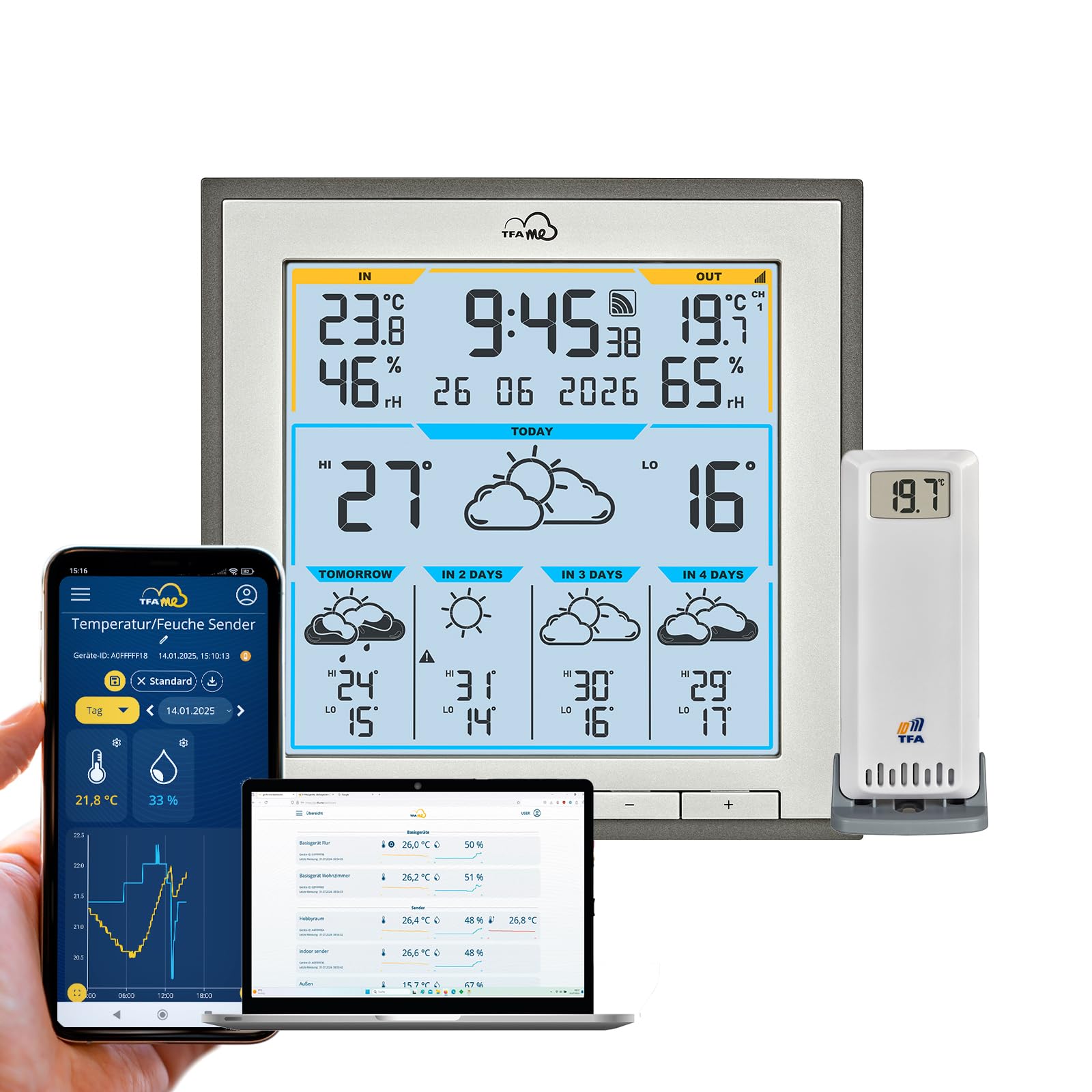
Image: The TFA Dostmann TFA.me ID-08 Wi-Fi Weather Station main unit, displaying current weather data and forecast.
Package Contents
Before you begin, please ensure all items are present:
- 1x TFA.me ID-08 Wi-Fi Weather Station (Base Unit)
- 1x Thermo-Hygro Transmitter (TFA 30.3900.02)
- 1x Power Adapter (EU plug)
- 1x Quick Start Guide (in 6 languages)
Note: Decoration and backup batteries (5 x 1.5 V AA) are not included and must be purchased separately.
Setup
1. Powering the Base Unit
- Connect the provided power adapter to the base unit's power input.
- Plug the power adapter into a suitable electrical outlet.
- (Optional) Insert 5 x 1.5 V AA batteries into the battery compartment for backup power.
2. Installing the Outdoor Transmitter
- Insert 2 x 1.5 V AA batteries into the thermo-hygro transmitter.
- Place the transmitter in a sheltered outdoor location, away from direct sunlight and rain, to ensure accurate readings. The maximum range is 100 meters (open field).
3. Wi-Fi Connection and TFA.me Portal Setup
The weather station connects to your Wi-Fi network (2.4 GHz, 802.11 b/g/n) to access professional weather forecasts from wetter.com and to integrate with the TFA.me online portal.
- Follow the on-screen instructions on the weather station display to connect to your Wi-Fi network. You may need to use the buttons on the unit (LIGHT, CHANNEL, SWITCH/SET, -, +) to navigate the menu.
- Once connected, the station will automatically retrieve weather forecasts.
- To access the TFA.me online portal, visit www.tfa.me on your PC, tablet, or smartphone.
- Register an account and follow the instructions to add your weather station as a gateway. This allows you to view measured values and manage up to 50 additional transmitters online.

Image: The weather station integrated into a home office environment, showing its display and the TFA.me online portal interface on a computer monitor.

Image: The TFA.me online portal interface shown across various devices including a laptop, desktop, tablet, and smartphone, demonstrating its accessibility.
Operating Instructions
Display Overview
The LCD display provides comprehensive weather information. Key areas include:
- Indoor/Outdoor Temperature and Humidity: Current readings for both indoor and outdoor environments.
- Time and Date: Displays current time, date, or day of the week.
- 5-Day Professional Forecast: Detailed weather predictions from wetter.com, updated hourly.
- Forecast Details: Includes daily max/min temperatures, rain probability, predicted rainfall, sunshine hours, UV index, wind speed, and wind direction.
- Warning Symbols: Alerts for severe weather conditions (e.g., storms, heavy rain, extreme heat, high UV index, black ice).

Image: A detailed view of the weather station's display, showing current indoor and outdoor conditions, time, and a multi-day weather forecast with various weather parameters.

Image: A close-up of the weather station's display, highlighting the detailed forecast for "Tomorrow" including temperature ranges, weather symbols, rain probability, sunshine hours, UV index, and wind information.
Button Functions
- LIGHT: Adjusts the display backlight brightness (4 levels).
- CHANNEL: Cycles through data from multiple outdoor transmitters (if more than one is connected).
- SWITCH/SET: Used to switch between display modes (e.g., date/day of week) and to enter settings menus.
- - / +: Used for adjusting values in settings or navigating menus.
Warning Function
The station features an alert system for specific weather conditions. When a significant or potentially dangerous weather event is predicted (e.g., storm, heavy rain, extreme heat, high UV index, black ice), a warning symbol will appear on the display. You can also configure email notifications via the TFA.me portal for customizable measurement value thresholds.
Maintenance
Cleaning
Wipe the weather station and transmitter with a soft, damp cloth. Do not use abrasive cleaners or solvents, as these can damage the display and casing.
Battery Replacement
Replace batteries in the outdoor transmitter and the base unit (if using backup batteries) when the low battery indicator appears on the display. Ensure correct polarity when inserting new batteries.
Firmware Updates
Periodically check the TFA.me portal or the manufacturer's website for any available firmware updates for your weather station to ensure optimal performance and access to new features.
Troubleshooting
- No Display / Power Issues:
- Ensure the power adapter is securely connected to both the station and the power outlet.
- If using backup batteries, check if they are inserted correctly and are not depleted.
- No Outdoor Data Displayed:
- Check the batteries in the outdoor thermo-hygro transmitter.
- Ensure the transmitter is within the 100m range of the base unit and there are no significant obstructions (e.g., thick walls, large metal objects) between them.
- Press the CHANNEL button on the base unit to ensure it is set to the correct channel for the transmitter.
- Wi-Fi Connection Problems:
- Verify your Wi-Fi network is operating on the 2.4 GHz band (802.11 b/g/n). The station does not support 5 GHz networks.
- Ensure the Wi-Fi password entered is correct.
- Restart your Wi-Fi router and the weather station.
- Check the signal strength indicator on the weather station. If weak, try moving the station closer to your router.
- If you encounter issues with the power adapter connection (e.g., incorrect plug type as mentioned in a review), ensure you are using the adapter supplied with the product. Contact customer support if the adapter is incorrect.
- Inaccurate Forecasts:
- Ensure the station has a stable Wi-Fi connection and is receiving updates from wetter.com.
- Verify the location settings on the TFA.me portal are correct for your area.
- TFA.me Portal Access Issues:
- Check your internet connection on the device you are using to access the portal.
- Ensure you are using the correct login credentials for your TFA.me account.
- Visit www.tfa.me directly to check for service announcements.
Specifications
| Model Number | 35.8105.10 |
| Dimensions (L x W x H) | 17.2 x 17.2 x 2.9 cm (Base Unit) |
| Weight | 351 grams |
| Material | Plastic |
| Indoor Temperature Range | 0 to +50 °C |
| Outdoor Temperature Range | -40 to +60 °C |
| Humidity Range | 10 to 99 % RH |
| Temperature Accuracy | ± 1 °C (0 to +50 °C), otherwise ± 1.5 °C |
| Humidity Accuracy | ± 5 % (at 25 °C, 30 to 80 % RH) |
| Wireless Transmission Frequency | 868 MHz |
| Maximum Range (Outdoor Sensor) | 100 m (open field) |
| Wi-Fi Frequency | 2.4 GHz (802.11 b/g/n) |
| Max. Number of Transmitters (Base Station) | 5 |
| Max. Number of Transmitters (TFA.me Portal) | 50 |
| Power Supply (Base Unit) | Power adapter, 3 x 1.5 V AA batteries (optional backup) |
| Power Supply (Transmitter) | 2 x 1.5 V AA batteries |
| Display Type | LCD with backlight and dimmer function (4 levels) |
| Special Features | Alarm, Customizable Alerts, Large Display, Clock, Adjustable Brightness, Wireless, TFA.me Portal Integration |

Image: Side profile of the weather station, showing its slim design and integrated stand.

Image: Rear view of the weather station, showing the battery compartment, wall-mounting holes, and product information label.
Warranty and Support
For warranty information and technical support, please refer to the documentation included with your product or visit the official TFA Dostmann website. You can also contact their customer service directly for assistance with product operation, troubleshooting, or parts replacement.
Official Website: www.tfa-dostmann.de


