
Fluest FL25-0982
Fluest Queen Bed Frame FL25-0982 User Manual
Model: FL25-0982 | Brand: Fluest
Introduction
This manual provides detailed instructions for the assembly, operation, and maintenance of your Fluest Queen Bed Frame with 2 Drawers, Upholstered Headboard, Charging Station, and LED Lights. Please read this manual thoroughly before assembly and use to ensure safe and correct operation.
Safety Information
Important Safety Instructions:
- Always follow the assembly instructions carefully to ensure stability.
- Be cautious around the sharp edges of the headboard to avoid injury during assembly and use.
- Ensure all connections are securely fastened before placing a mattress on the frame.
- Do not exceed the recommended weight capacity of the bed frame.
- Keep electrical components (charging station, LED lights) away from liquids.
Package Contents
Before beginning assembly, verify that all parts are present and undamaged. Refer to the included installation manual for a complete list of components and hardware.
- Bed Frame Components (metal frame, slats)
- Upholstered Headboard
- 2 Fabric Storage Drawers with Wheels
- LED Light Strip and Remote Control
- Charging Station Unit
- Assembly Hardware (screws, bolts, tools)
- Installation Manual
Setup and Assembly
Assembly of the Fluest Queen Bed Frame typically takes approximately 1 hour for an adult. It is recommended to assemble the bed frame in the room where it will be used. Please follow the step-by-step instructions provided in the separate Installation Manual included in your package.
- Unpack all components and lay them out on a clean, soft surface to prevent scratches.
- Identify all parts and hardware using the provided list in the Installation Manual.
- Begin by assembling the main bed frame structure, ensuring all bolts are tightened securely.
- Attach the upholstered headboard to the main frame.
- Install the wooden or metal slats onto the frame.
- Insert the fabric storage drawers into their designated spaces under the bed.
- Connect the LED light strip and charging station according to the electrical connection diagrams.

Figure 1: Product Dimensions and Component Overview. The diagram illustrates the overall length, width, and height of the bed frame, along with individual measurements for the headboard and storage drawers.
Operating Instructions
LED Lighting System
The integrated LED light strip offers customizable ambiance for your bedroom. Use the included remote control or a compatible mobile application to manage the lighting.
- Power On/Off: Press the power button on the remote or in the app.
- Color Selection: Choose from over 6,000 colors using the color wheel or preset buttons.
- Brightness Adjustment: Increase or decrease light intensity.
- Lighting Modes: Select various dynamic modes, music sync, or timing functions.

Figure 2: LED Lighting System Controls. This image displays the various functions available for the RGB LED strip lights, including timing, music mode, brightness, color adjustment, dynamic modes, and control via remote or mobile application.
Charging Station
The headboard features a built-in charging station for convenient device power. Ensure the bed frame is plugged into a functional wall outlet.
- AC Sockets: Two standard AC outlets for larger electronics.
- USB Port: One USB-A port for charging compatible devices.
- Type-C Port: One USB-C port for modern devices requiring faster charging.

Figure 3: Headboard with Charging Station and Storage. This image highlights the integrated charging station with AC, USB, and Type-C ports, along with the two-tier storage shelves on the headboard.
Storage Drawers
The two fabric storage drawers are designed for easy access and organization of personal items.
- Access: Gently pull the drawers out from under the bed using the integrated handles.
- Mobility: The drawers are equipped with wheels for smooth movement on various floor surfaces.
- Capacity: Utilize the spacious interior for storing bedding, clothing, or other items.
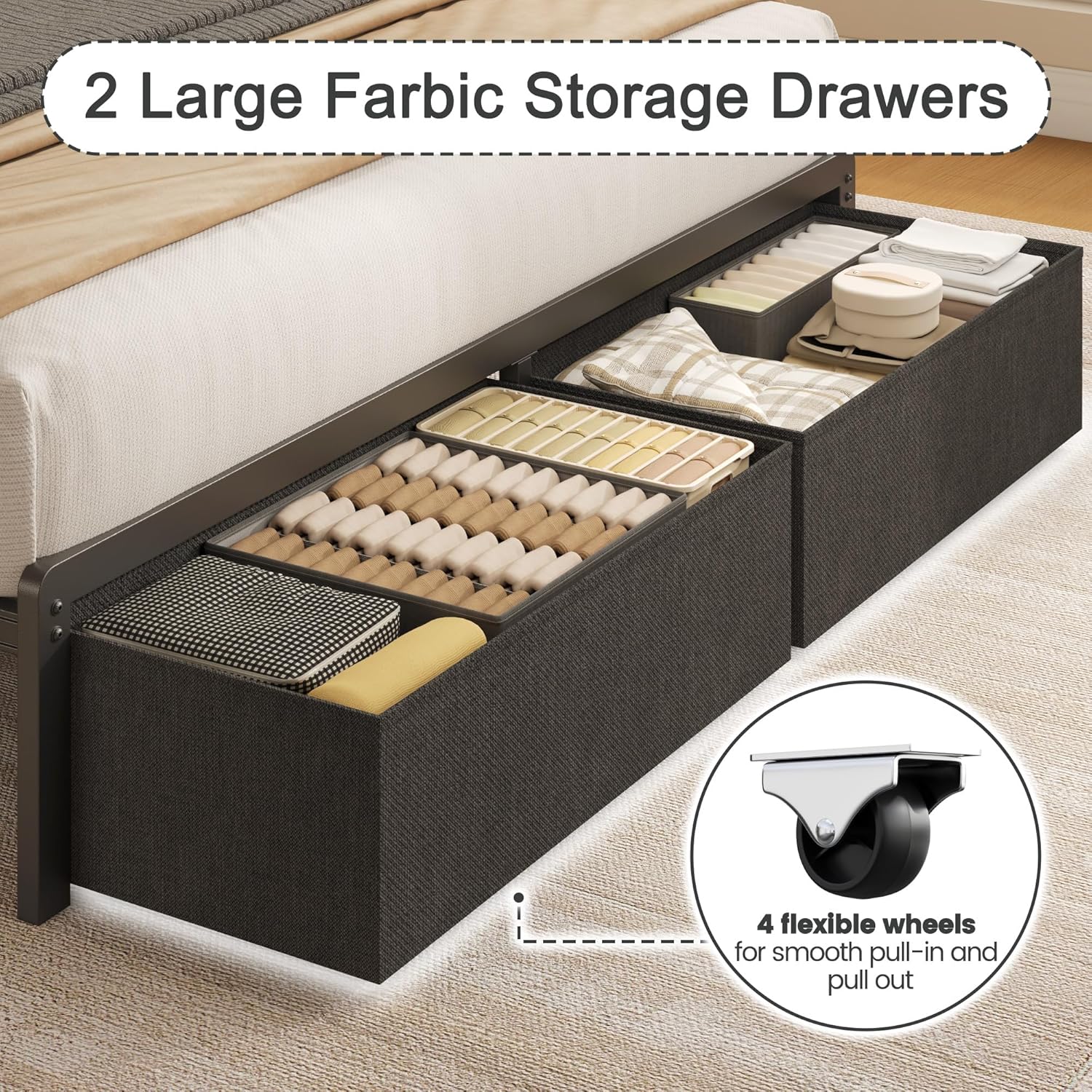
Figure 4: Fabric Storage Drawers. This image demonstrates the two large fabric drawers, highlighting their capacity and the flexible wheels designed for smooth pull-in and pull-out operation.
Maintenance
- Cleaning the Frame: Wipe metal and wooden parts with a damp cloth. Avoid harsh chemicals.
- Cleaning the Upholstery: Spot clean the fabric headboard with a mild fabric cleaner as needed. Test on an inconspicuous area first.
- Drawer Maintenance: Periodically check drawer wheels for debris and clean if necessary to ensure smooth operation.
- Electrical Components: Ensure all power cords are free from damage and securely plugged in. Do not attempt to repair electrical components yourself.
- Tightening Connections: Periodically check and retighten all bolts and screws to maintain the bed frame's stability and prevent squeaks.
Troubleshooting
| Problem | Possible Cause | Solution |
|---|---|---|
| Bed frame squeaks | Loose bolts or connections. | Check and tighten all assembly bolts and screws. Ensure slats are properly seated. |
| LED lights not working | Power cable disconnected; remote battery dead; LED strip damaged. | Ensure power cable is securely plugged in. Replace remote battery. Check LED strip for visible damage. |
| Charging station not working | Bed frame not plugged in; device cable faulty; charging station unit malfunction. | Verify the bed frame's main power cord is plugged into a live outlet. Try a different charging cable. |
| Drawers are difficult to pull out/push in | Obstruction under the bed; wheels are dirty or damaged; drawer overloaded. | Clear any obstructions. Clean or inspect drawer wheels. Reduce drawer contents. |
Specifications
| Model Number | FL25-0982 |
| Brand | Fluest |
| Size | Queen |
| Product Dimensions (L x W x H) | 82"L x 59"W x 40.8"H |
| Compatible Mattress Size | Queen |
| Item Weight | 50 pounds |
| Color | Grey |
| Headboard Material | Fabric (Upholstered) |
| Special Feature | Squeak Resistant, LED Lights, Charging Station, Storage Drawers |
| Assembly Required | Yes (Approx. 1 hour) |
Warranty and Support
For warranty information or technical support, please refer to the contact details provided in your original purchase documentation or contact Fluest customer service directly. Keep your purchase receipt for any warranty claims.
Related Documents - FL25-0982
 |
InfiRay FINDER Thermal Imaging Monocular Operating Manual This operating manual provides comprehensive instructions for the InfiRay FINDER series thermal imaging monoculars, including models FL25, FL25R, FH25, and FH25R. It covers product specifications, package contents, features, detailed operation, button functions, menu navigation, calibration procedures, photography and video recording, connectivity, maintenance, and troubleshooting. |
 |
Megamaster 720-0982 Gas Grill Assembly Instructions Comprehensive assembly guide for the Megamaster 720-0982 gas grill, detailing all parts, hardware, and step-by-step instructions for a safe and correct setup. |
 |
LENRUE Soundmate Wireless Speaker User Manual Comprehensive user manual for the LENRUE Soundmate Wireless Speaker, covering operation, true wireless pairing, Alexa connection, specifications, and FCC compliance. |
 |
hadewe Azuras CHROME 0982 User Manual Comprehensive user manual for the hadewe Azuras CHROME 0982 foot care unit, detailing operation, safety, maintenance, and technical specifications for professional podiatry and manicure use. Includes features like 40,000 RPM speed, spray function, and touch display. |
 |
GNS 480 (CNX80) Color GPS/NAV/COM Installation Manual This installation manual provides detailed procedures and specifications for installing the Garmin GNS 480 Color GPS/NAV/COM system in aircraft. It covers system interfaces, electrical and physical specifications, regulatory compliance, and troubleshooting. |
 |
Megamaster 720-0982 Outdoor Gas Grill Operating Instructions This document provides comprehensive operating instructions for the Megamaster 720-0982 outdoor gas grill. It covers essential information for safe assembly, proper use, maintenance, troubleshooting, and warranty details. Designed for outdoor use only. |
Ask a question about this manual
Ask about setup, troubleshooting, compatibility, parts, safety, or missing instructions. Manuals+ will review the question and use this page’s manual context to help answer it.