1. Introduction
The FeinTech AX341 HDMI 2.1 eARC Splitter Switch is designed to manage multiple HDMI sources and outputs in a home theater or gaming setup. This device allows you to connect up to four HDMI source devices (such as gaming consoles, Blu-ray players, streaming boxes, or PCs) to two display devices simultaneously. It also features an integrated audio extractor for eARC/ARC soundbars, optical TOSLINK, and 3.5mm analog audio outputs. The AX341 supports advanced HDMI 2.1 features, including 8K@60Hz and 4K@120Hz resolutions, HDR10+, Dolby Vision, VRR, ALLM, QMS, QFT, and SBTM.
2. Key Features
- 4 HDMI 2.1 Inputs & 2 HDMI Outputs: Connect up to four source devices to two displays concurrently, suitable for TV and video projector setups.
- eARC/ARC & Audio Extractor: Transmit audio to a soundbar via HDMI ARC/eARC, optical TOSLINK (stereo or Dolby Digital only), or 3.5mm analog jack (stereo only).
- Automatic Switching & CEC Functionality: Features automatic input selection, auto-power-on function, and control of source devices via TV remote or vice versa.
- Wide Compatibility:
- Audio: Supports Dolby Atmos, DTS:X, TrueHD, Dolby Digital, PCM5.1, and more.
- Video: Supports 8K@60Hz, 4K@120Hz, Dolby Vision, HDR10+, and more.
- Gaming: Supports VRR (Variable Refresh Rate), ALLM (Auto Low Latency Mode).
- 4K/60Hz + Downscaler: Enables simultaneous output to 4K and 1080p displays without resolution conflicts.
3. Package Contents
Please ensure all items are present in the package:
- FeinTech AX341 HDMI 2.1 eARC Splitter Switch Unit
- Power Adapter
- Remote Control (with 1 CR2032 battery included)
- User Manual (this document)
4. Device Layout

Image 1: Top view of the FeinTech AX341 unit. This image displays the front panel with power indicator, input indicators (IN 1-4), eARC audio indicators (TV1, TV2), and control buttons (SWITCH, AUTO, eARC). It also shows the EDID switch and SERVICE port.

Image 2: Angled view of the FeinTech AX341 unit. This perspective provides a clearer view of both the front panel controls and the rear panel connections, including HDMI inputs, HDMI outputs, and audio extraction ports.
Front Panel Controls and Indicators:
- Power Button/Indicator: Turns the device on/off and indicates power status.
- IN 1-4 Indicators: Light up to show which HDMI input is currently active.
- TV1/TV2 eARC Audio Indicators: Indicate which TV's eARC audio is being extracted.
- SWITCH Button: Manually cycles through HDMI inputs.
- AUTO Button: Activates/deactivates automatic input switching.
- eARC Button: Selects the eARC audio source (TV1 or TV2).
- EDID Switch: For advanced display compatibility settings.
- SERVICE Port: For firmware updates or technical service.
Rear Panel Ports:
- HDMI IN 1-4: Connect your source devices (e.g., gaming console, Blu-ray player).
- HDMI OUT 1 (TV1 eARC) & HDMI OUT 2 (TV2): Connect to your display devices (TVs, projectors). HDMI OUT 1 supports eARC/ARC for audio return.
- AUDIO OUT (Optical TOSLINK): Connect to soundbars or AV receivers for optical audio.
- AUDIO OUT (3.5mm Jack): Connect to stereo systems or headphones for analog audio.
- DC 5V Power Input: Connect the provided power adapter.
5. Setup and Connection
Follow these steps to set up your FeinTech AX341 HDMI Splitter Switch:
- Power Off Devices: Before making any connections, ensure all devices (source players, displays, sound systems) are powered off and unplugged.
- Connect Source Devices: Connect your HDMI source devices (e.g., gaming console, streaming box, Blu-ray player, PC) to the HDMI IN 1-4 ports on the AX341 using high-quality HDMI 2.1 cables.
- Connect Displays:
- Connect your primary display (e.g., TV with eARC/ARC support) to the HDMI OUT 1 (TV1 eARC) port.
- Connect your secondary display (e.g., projector) to the HDMI OUT 2 (TV2) port.
- Connect Audio System (Optional):
- For eARC/ARC soundbars: Ensure your soundbar is connected to the HDMI ARC/eARC port of your TV (connected to HDMI OUT 1). The AX341 will extract audio from this connection.
- For optical audio: Connect your soundbar or AV receiver to the AUDIO OUT (Optical TOSLINK) port.
- For analog stereo audio: Connect your stereo system or headphones to the AUDIO OUT (3.5mm Jack) port.
- Connect Power: Connect the provided power adapter to the DC 5V Power Input on the AX341, then plug it into a power outlet.
- Power On Devices: Power on the AX341, then your displays, and finally your source devices.
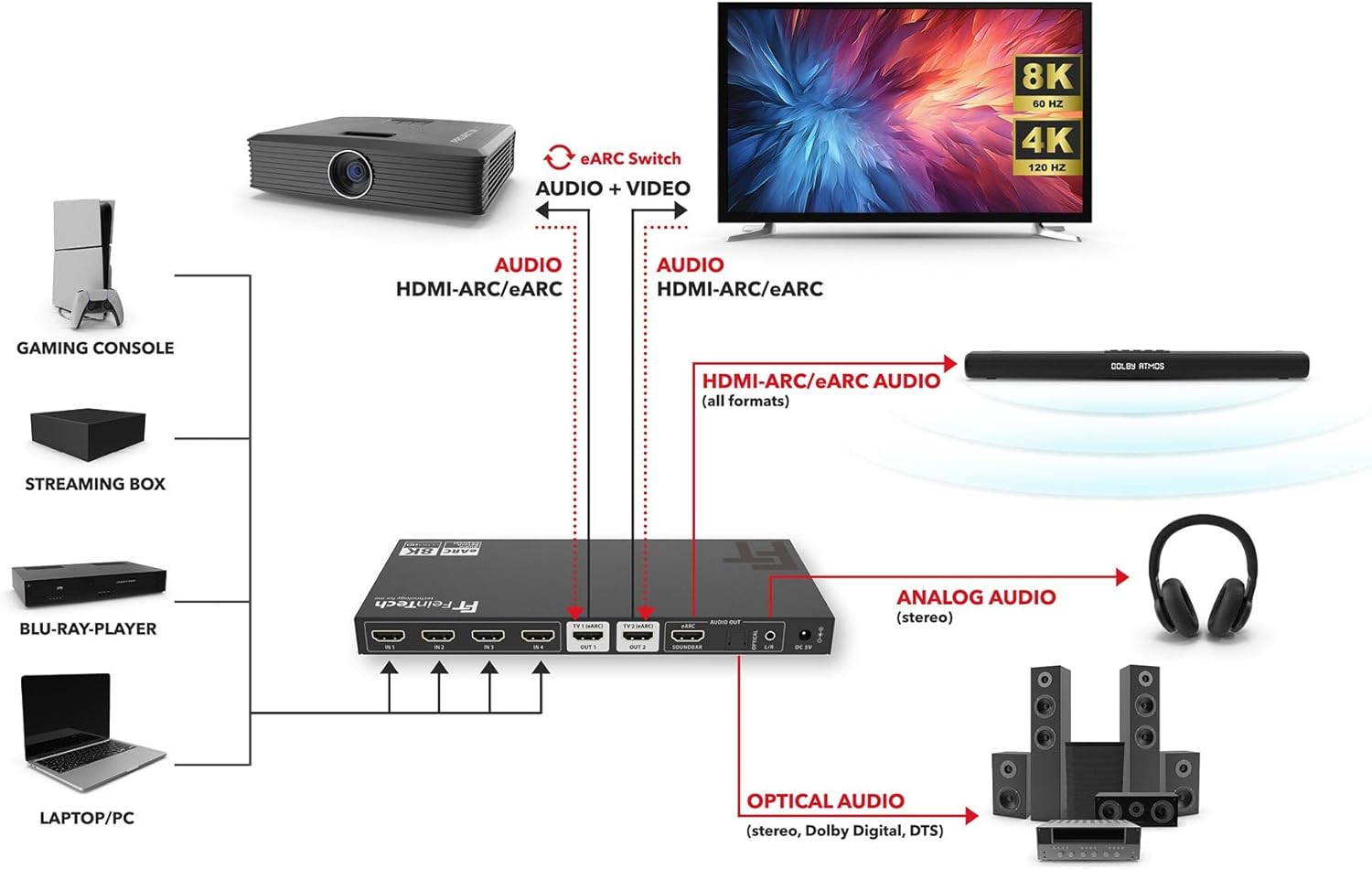
Image 3: Detailed connection diagram illustrating how to connect gaming consoles, streaming boxes, Blu-ray players, and PCs to the AX341, and how to connect the AX341 to TVs, projectors, soundbars, and other audio systems.
6. Operation
6.1. Input Switching
- Manual Switching: Press the SWITCH button on the front panel or the corresponding input button on the remote control to cycle through the HDMI inputs (IN 1-4). The active input indicator will light up.
- Automatic Switching: Press the AUTO button on the front panel or remote control to enable/disable automatic input switching. When enabled, the AX341 will automatically detect and switch to the most recently activated source device. Note: Automatic switching may not be fully compatible with all devices (e.g., Apple TV or Xbox).
6.2. eARC Audio Extraction
- The AX341 can extract eARC/ARC audio from either HDMI OUT 1 (TV1) or HDMI OUT 2 (TV2).
- Press the eARC button on the front panel or remote control to select which TV's audio return channel should be used for extraction. The corresponding TV1 or TV2 eARC Audio indicator will light up. This is particularly useful when switching between a TV and a projector.
- The extracted audio will be available on the HDMI OUT 1 (eARC/ARC), Optical TOSLINK, and 3.5mm analog audio outputs.
6.3. CEC Control
The AX341 supports CEC (Consumer Electronics Control), allowing for integrated control between compatible devices. This enables functions such as:
- Controlling the volume of your soundbar using your TV's remote control.
- Automatic power-on/off of connected devices (e.g., the AX341 powering on with your TV).
Ensure CEC is enabled on all connected devices (TV, soundbar, source players) for this functionality to work.
7. Specifications
| Feature | Detail |
|---|---|
| Model | AX341 |
| HDMI Version | HDMI 2.1 |
| HDMI Inputs | 4 |
| HDMI Outputs | 2 (1x eARC/ARC compatible) |
| Max Resolution | 8K@60Hz, 4K@120Hz |
| Bandwidth | 48 Gbps |
| HDR Support | HDR10+, Dolby Vision |
| Gaming Features | VRR, ALLM, QMS, QFT, SBTM |
| Audio Extraction | HDMI eARC/ARC, Optical TOSLINK, 3.5mm Analog Jack |
| Supported Audio Formats (HDMI eARC) | Dolby Atmos, Dolby TrueHD, DTS:X, Dolby MAT |
| Supported Audio Formats (HDMI ARC) | Dolby Digital, Dolby Digital Plus, DTS, PCM |
| Supported Audio Formats (TOSLINK) | DTS, Dolby Digital, PCM 2.0 |
| Supported Audio Formats (3.5mm Jack) | PCM 2.0 (Stereo) |
| Downscaler | Yes (4K to 1080p) |
| CEC Support | Yes |
| Dimensions (L x W x H) | 22 x 10 x 2 cm |
| Weight | 947 g |
| Power Supply | DC 5V (Adapter included) |
| Remote Control Battery | 1x CR2032 (included) |
8. Troubleshooting
If you encounter issues with your FeinTech AX341, please refer to the following common troubleshooting steps:
- No Video/Audio Output:
- Ensure all HDMI cables are securely connected to both the AX341 and your source/display devices.
- Verify that the correct input is selected on the AX341 (check input indicators).
- Confirm that your display is set to the correct HDMI input.
- Try different HDMI cables, as faulty cables can cause signal issues.
- Bypass the AX341 by connecting a source directly to a display to isolate the problem.
- Restart all connected devices, including the AX341, by unplugging them from power for 30 seconds and then reconnecting.
- Audio Issues (No Sound, Distorted Audio):
- Check audio connections to your soundbar or AV receiver (HDMI eARC/ARC, Optical, 3.5mm Jack).
- Ensure the correct audio input is selected on your sound system.
- If using eARC, verify that eARC is enabled on your TV and the AX341 is set to the correct TV's eARC audio (TV1 or TV2).
- Confirm that the audio format from your source device is supported by your sound system and the AX341's audio extraction ports (e.g., TOSLINK only supports stereo or Dolby Digital).
- Adjust volume levels on all devices.
- Automatic Switching Not Working:
- Ensure the AUTO function is enabled on the AX341.
- Note that some source devices (e.g., Apple TV, Xbox) may not fully support automatic switching.
- Try manually switching inputs if auto-switching is unreliable.
- CEC Control Problems:
- Verify that CEC (often called Anynet+, Bravia Sync, SimpLink, etc.) is enabled on your TV, soundbar, and source devices.
- CEC functionality can be inconsistent between different brands and models.
- Resolution/Picture Quality Issues:
- Ensure your HDMI cables are rated for HDMI 2.1 and support the desired resolution (e.g., 8K or 4K@120Hz).
- Check the resolution settings on your source device and display.
- If using the downscaler, ensure it is functioning as expected for 1080p displays.
9. Maintenance
To ensure the longevity and optimal performance of your FeinTech AX341, follow these maintenance guidelines:
- Cleaning: Use a soft, dry cloth to clean the device. Do not use liquid cleaners or aerosols.
- Ventilation: Ensure the device is placed in a well-ventilated area to prevent overheating. Do not block any ventilation openings.
- Handling: Handle the device with care. Avoid dropping or subjecting it to strong impacts.
- Environment: Keep the device away from moisture, extreme temperatures, and direct sunlight.
- Power: Always use the provided power adapter. Disconnect power during lightning storms or when unused for long periods.
10. Warranty and Support
FeinTech products are designed for reliability and performance. For warranty information, technical support, or service inquiries, please refer to the warranty card included with your product or visit the official FeinTech website.
When contacting support, please have your product model (AX341) and purchase information readily available.


