
1. Introduction
This user manual provides comprehensive instructions for the safe and efficient operation, installation, and maintenance of your KKT KOLBE CUBE60FW island hood. Please read this manual thoroughly before using the appliance and keep it for future reference.
The KKT KOLBE CUBE60FW is an elegant 60 cm island hood designed for modern kitchens. It features a high-quality rope ceiling mounting, a white glass front, and a white structure. With an air extraction capacity of approximately 764 m³/h and an A+++ energy efficiency class, it ensures powerful air purification. Intuitive control is available via TouchSelect sensor buttons, an LED display, and Smart WiFi app compatibility (KKT.Control app). Key features include 9 power levels, quiet operation, LED hob lighting, and an automatic recirculation function. It is suitable for recirculation mode and includes a carbon filter. The recommended distance from the hob is 65-70 cm.
2. Safety Information
Always follow basic safety precautions when using electrical appliances to reduce the risk of fire, electric shock, and injury. This appliance is for domestic use only. Do not allow children to operate the hood. Ensure proper ventilation in the room. Do not flambé under the range hood. Clean the grease filters regularly to prevent fire hazards. Disconnect the appliance from the power supply before cleaning or maintenance.
3. Product Components
The KKT KOLBE CUBE60FW island hood includes the following components:
- KKT.Control App (for smart control)
- Carbon filter (for recirculation mode)
- LED lighting
- Installation kit
- Mounting kit
- Washable metal grease filter
4. Setup and Installation
Installation should be performed by a qualified technician. Ensure the power supply is disconnected before beginning installation.
4.1. Mounting the Hood
The KKT KOLBE CUBE60FW is designed for ceiling mounting. The recommended distance from the hob to the hood is 65-70 cm.
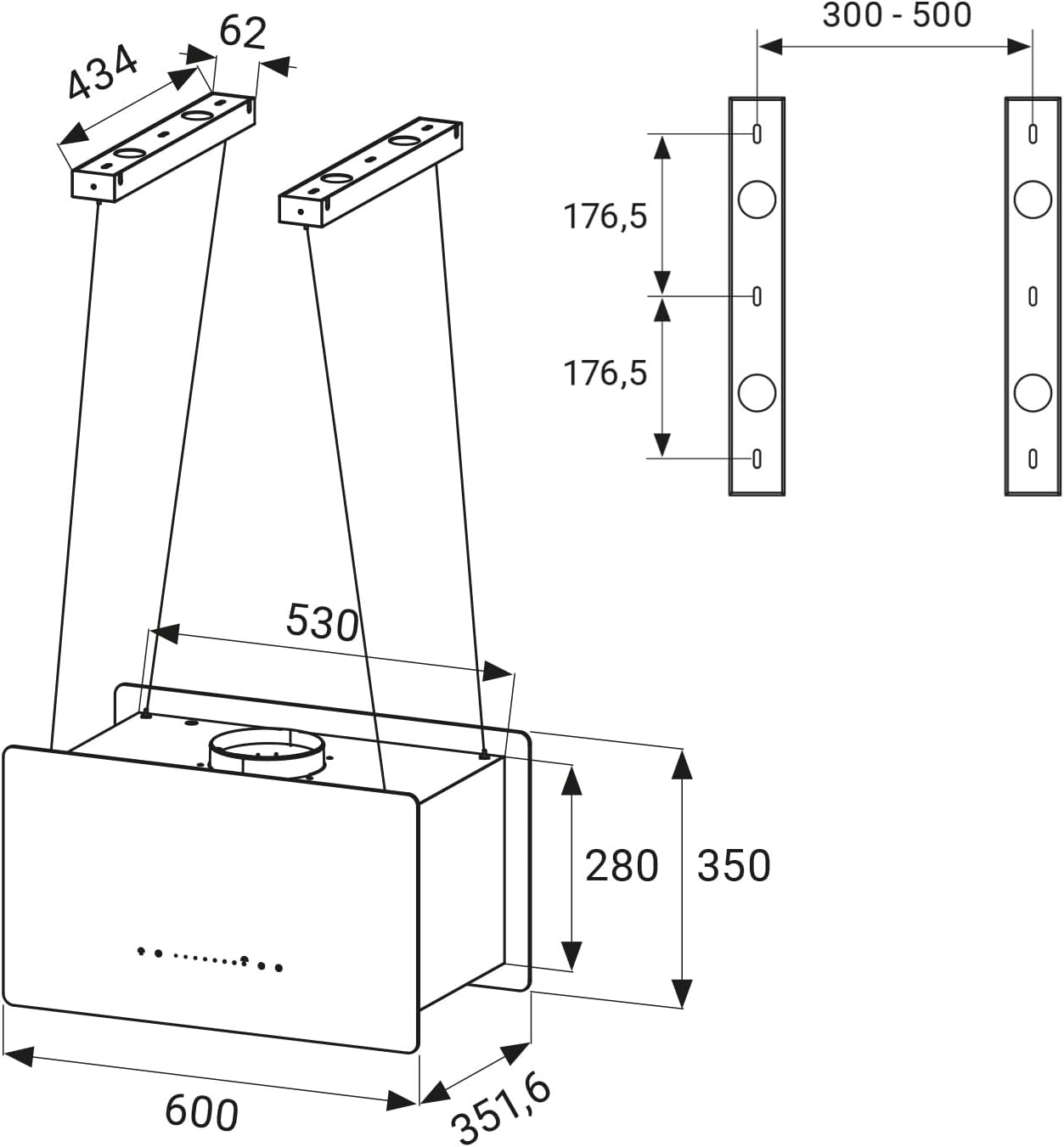
Figure 1: Technical drawing showing the dimensions and mounting points for the KKT KOLBE CUBE60FW island hood. Dimensions are in millimeters.
Use the provided mounting kit to securely attach the hood to the ceiling. Follow the detailed instructions in the separate installation guide for precise measurements and procedures.
4.2. Electrical Connection
Connect the hood to a 240 Volt power supply. Ensure all electrical connections comply with local regulations and are performed by a qualified electrician.
4.3. Recirculation Mode Setup
The hood is suitable for recirculation mode and includes a carbon filter. Install the carbon filter as per the instructions provided with the filter. This mode purifies the air and returns it to the kitchen, eliminating the need for an external duct.

Figure 2: The KKT KOLBE CUBE60FW island hood effectively removing steam and odors in recirculation mode, with a carbon filter icon indicating its function.
5. Operating Instructions
5.1. Control Panel Overview
The hood features a TouchSelect sensor control panel with an LED display for intuitive operation.

Figure 3: A hand interacting with the illuminated TouchSelect sensor buttons on the KKT KOLBE CUBE60FW control panel, showing power, fan speed, and light controls.
5.2. Basic Operation
- Power On/Off: Press the power button on the control panel to turn the hood on or off.
- Fan Speed Adjustment: Select from 9 power levels (including a booster function) using the sensor buttons to adjust the extraction power according to your cooking needs.
- LED Lighting: Press the light button to turn the LED hob lighting on or off.
- Automatic Recirculation: The hood features an automatic recirculation function to ensure continuous air purification after cooking.
5.3. Smart WiFi App Control (KKT.Control App)
The KKT KOLBE CUBE60FW can be controlled via the KKT.Control app (compatible with Tuya Smart / Smart Life). This allows convenient control of the hood from your smartphone.

Figure 4: A smartphone screen showing the KKT.Control app interface, with options for fan speed, lighting, and other settings for the island hood. The app is available on App Store and Google Play.
For detailed instructions on downloading, installing, and pairing the app with your hood, please refer to the following video. While the video demonstrates a CIARRA product, the app pairing and control procedures are generally similar for Tuya Smart / Smart Life compatible devices like the KKT KOLBE CUBE60FW.
Video 1: A guide on how to download, install, and pair the Smart Life app with a cooker hood. This video demonstrates the general process for smart app control, which is applicable to the KKT KOLBE CUBE60FW.
An optional window contact switch can be integrated, allowing the hood to activate only when a window is open. This is particularly useful for kitchens with fireplaces to prevent negative pressure.
6. Maintenance and Cleaning
Regular maintenance ensures optimal performance and extends the lifespan of your hood.
6.1. Cleaning the Metal Grease Filter
The metal grease filter is washable and can be cleaned in a dishwasher. Regular cleaning (approximately every 2-4 weeks, depending on usage) is crucial to maintain extraction efficiency and prevent fire hazards.
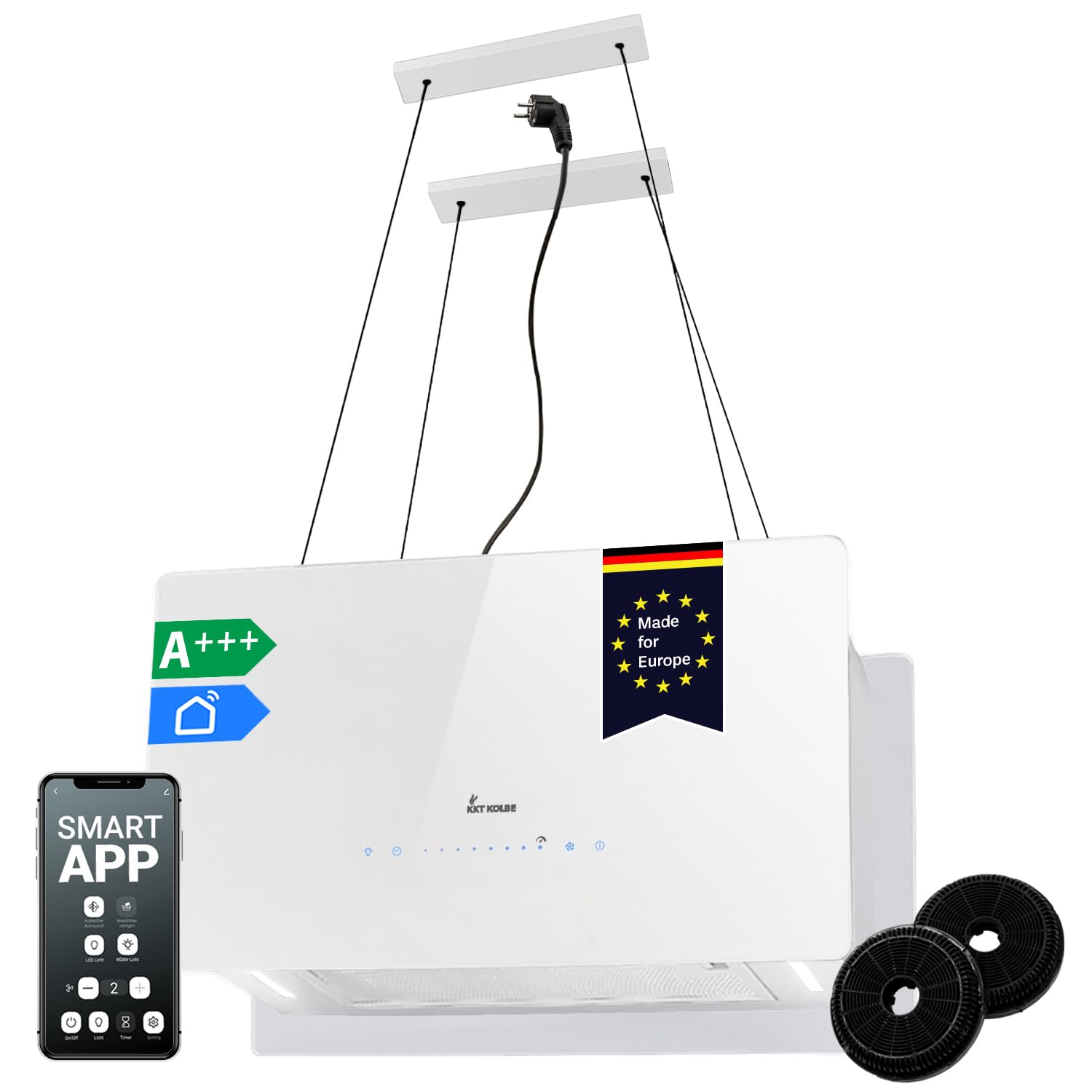
Figure 5: The KKT KOLBE CUBE60FW island hood installed in a kitchen, showcasing its sleek design and integrated lighting. Regular cleaning of the filters is essential for maintaining its appearance and functionality.
6.2. Replacing the Carbon Filter
If using the hood in recirculation mode, the carbon filter needs to be replaced periodically (typically every 3-6 months, depending on usage) as it cannot be washed. Refer to the filter's specific instructions for replacement.
6.3. Cleaning the Exterior
Clean the white glass front and white structure with a soft cloth and a mild, non-abrasive cleaning agent. Avoid harsh chemicals or abrasive materials that could damage the surface.
7. Troubleshooting
Before contacting customer service, please check the following common issues:
| Problem | Possible Cause | Solution |
|---|---|---|
| Hood does not turn on. | No power supply; power cable disconnected; fuse blown. | Check power connection; ensure cable is securely plugged in; check household fuse box. |
| Low extraction power. | Grease filters are dirty; carbon filter is saturated (recirculation mode); incorrect fan speed setting. | Clean or replace grease filters; replace carbon filter; increase fan speed. |
| Excessive noise. | Loose parts; improper installation; foreign objects in the fan. | Check for loose screws or components; ensure correct installation; inspect fan for obstructions. |
| LED lights not working. | Light bulb faulty; electrical connection issue. | Replace LED bulb (if replaceable); check electrical connections. |
| Smart App connection issues. | Incorrect WiFi password; 5GHz WiFi network (hood requires 2.4GHz); app not paired correctly. | Verify WiFi password; ensure 2.4GHz network is used; re-pair the device following app instructions. |

Figure 6: Noise level comparison diagram, showing the KKT KOLBE CUBE60FW operating at 62 dB, indicating its quiet performance compared to other kitchen sounds.
8. Technical Specifications
| Feature | Specification |
|---|---|
| Brand | KKT KOLBE |
| Model Number | CUBE60FW |
| Product Dimensions (DxWxH) | 35.2P x 60l x 35H cm |
| Color | Full White Cube |
| Airflow Capacity | 764 Cubic meters per hour |
| Noise Level | 62 Decibels |
| Mounting Type | Ceiling Mount |
| Control Type | Touch |
| Voltage | 240 Volt |
| Number of Speeds | 9 (8 + Booster) |
| Light Source | LED |
| Electrical Power | 126 watts |
| Filter Type | Activated Carbon Filter, Metal Grease Filter |
| Ventilation Type | Air Recirculation |
| Item Weight | 14.7 Kilograms |
| Material | Stainless Steel, Glass |
| Special Features | 9 power levels (8 + Booster), Automatic start, Recirculation hood with carbon filters, Smart App control, Illuminated sensor button panel |
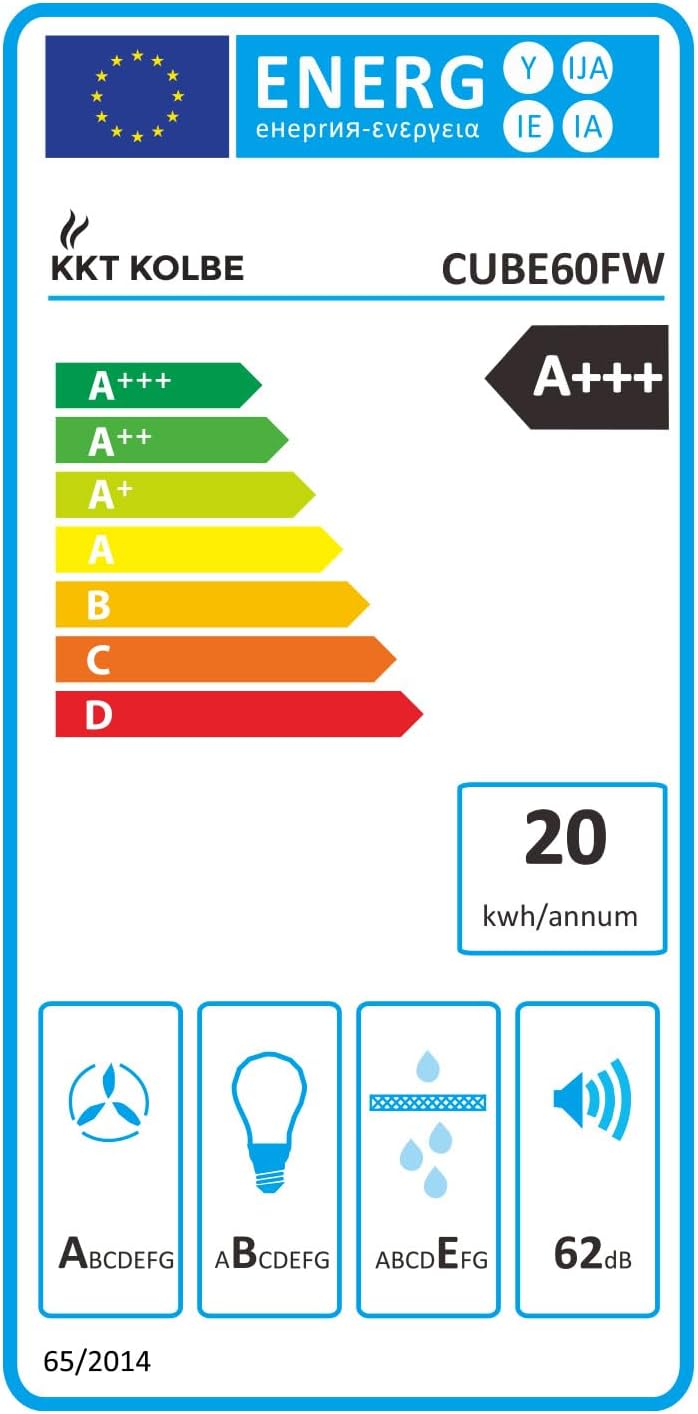
Figure 7: The energy label for the KKT KOLBE CUBE60FW, indicating its A+++ energy efficiency class, annual energy consumption of 20 kWh/annum, and noise level of 62 dB.
9. Warranty and Support
For warranty information and customer support, please refer to the documentation included with your product or visit the official KKT KOLBE website. Ensure you retain your proof of purchase for warranty claims.
For additional support or to explore other KKT KOLBE products, visit the KKT KOLBE Store on Amazon.