1. Introduction
Thank you for choosing the Wodeer 43" Grey Makeup Vanity Desk. This manual provides essential information for the safe assembly, operation, and maintenance of your new vanity desk. Please read these instructions thoroughly before beginning assembly and retain them for future reference.

Image 1.1: The Wodeer 43-inch Grey Makeup Vanity Desk, showcasing its overall design with the illuminated mirror and various storage compartments.
2. Safety Information
To ensure safe use and prevent damage, please observe the following safety guidelines:
- Always assemble the product on a soft, clean surface to prevent scratches.
- Ensure all screws and fasteners are securely tightened before use. Periodically check and re-tighten as necessary.
- Do not overload drawers or shelves. Distribute weight evenly.
- Keep electrical components (LED lights, power outlet) away from water or excessive moisture.
- Use the built-in power outlet only for devices within its specified voltage and current limits.
- Keep small parts and packaging materials away from children to prevent choking hazards.
- Do not stand or climb on the vanity desk.
3. Package Contents
Before assembly, verify that all components listed in the included assembly instructions are present and undamaged. The package typically includes:
- Vanity Desk Frame (Engineered Wood)
- Mirror with Integrated LED Lights
- 3 Drawers with Hardware
- 2 Glass Cabinets with Doors and Shelves
- Glass Tabletop Insert
- Built-in Power Outlet (2 AC, 2 USB ports)
- Assembly Hardware (screws, dowels, cam locks, etc.)
- Assembly Instructions Manual
4. Setup and Assembly
Assembly of the Wodeer Vanity Desk requires careful attention to detail. It is recommended to have two people for assembly. Please refer to the detailed step-by-step instructions provided in the separate assembly manual included with your product. Ensure you have a Phillips head screwdriver and any other recommended tools.
Key assembly steps generally involve:
- Unpacking and identifying all parts and hardware.
- Assembling the main desk frame.
- Installing the drawers and their slides.
- Attaching the glass cabinets and their doors.
- Mounting the mirror unit to the desk.
- Inserting the glass tabletop and jewelry storage dividers.
- Connecting the LED lights and power outlet to a power source.
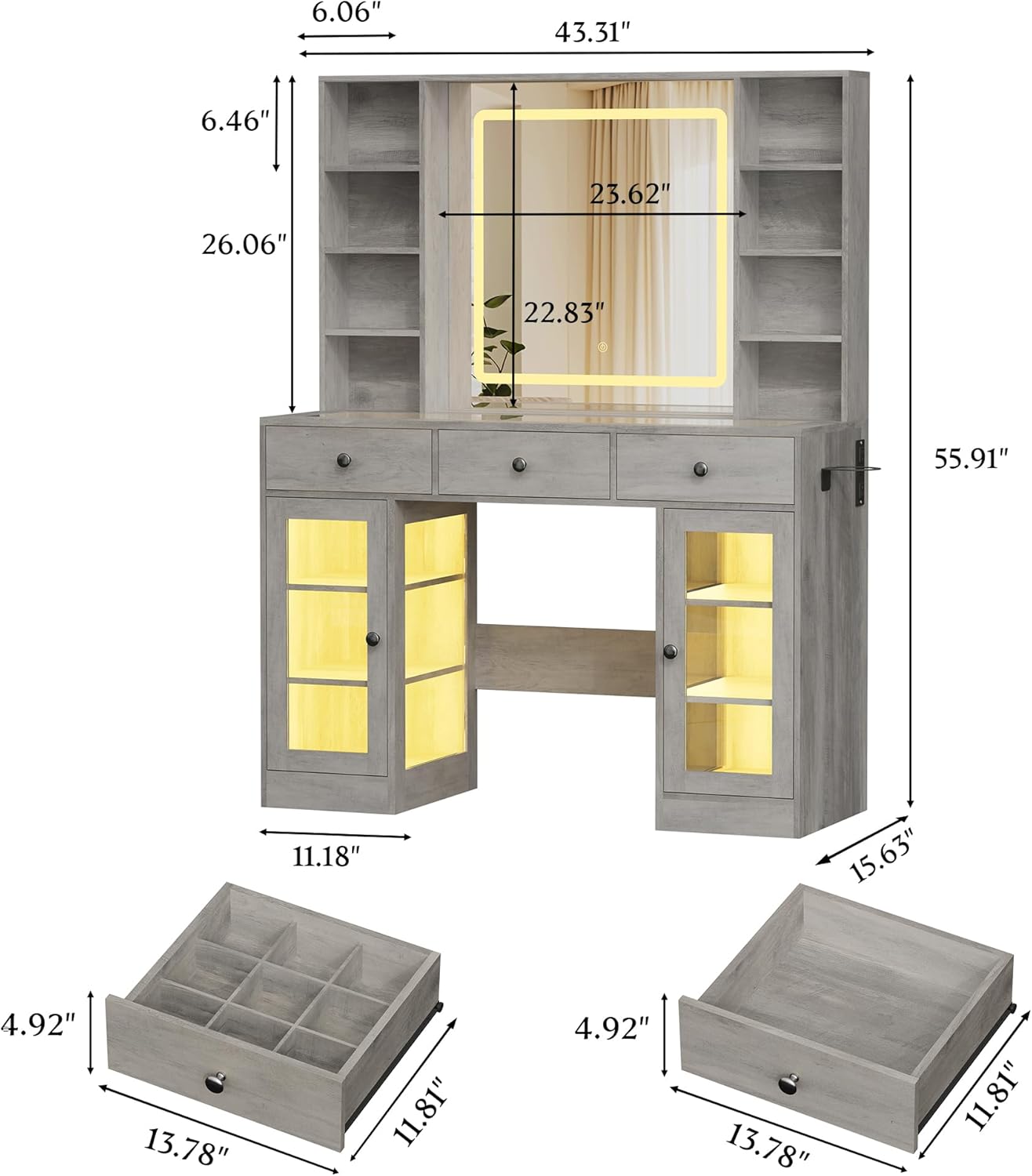
Image 4.1: Detailed dimensions of the Wodeer 43-inch Grey Makeup Vanity Desk, including height, width, and depth measurements for the main unit and individual storage components.
5. Operating Instructions
5.1. LED Mirror Lights
The mirror features integrated LED lights with adjustable brightness and color temperature settings. To operate:
- Power On/Off: Touch the power icon on the mirror surface to turn the lights on or off.
- Adjust Brightness: Press and hold the power icon to cycle through brightness levels. Release when the desired brightness is reached.
- Change Color Temperature: Touch the 'M' icon (mode) on the mirror surface to switch between different light temperatures (e.g., cool white, warm white, warm yellow).

Image 5.1: The vanity mirror demonstrating its adjustable LED lighting, offering options for cold white, warm white, and warm yellow illumination to suit various makeup and grooming needs.
5.2. RGB Ambient Lighting
The vanity desk may include RGB ambient lighting for customizable atmospheric effects. This feature is typically controlled via a dedicated app or remote control (if included). Refer to the separate instructions for the RGB lighting system for detailed operation.
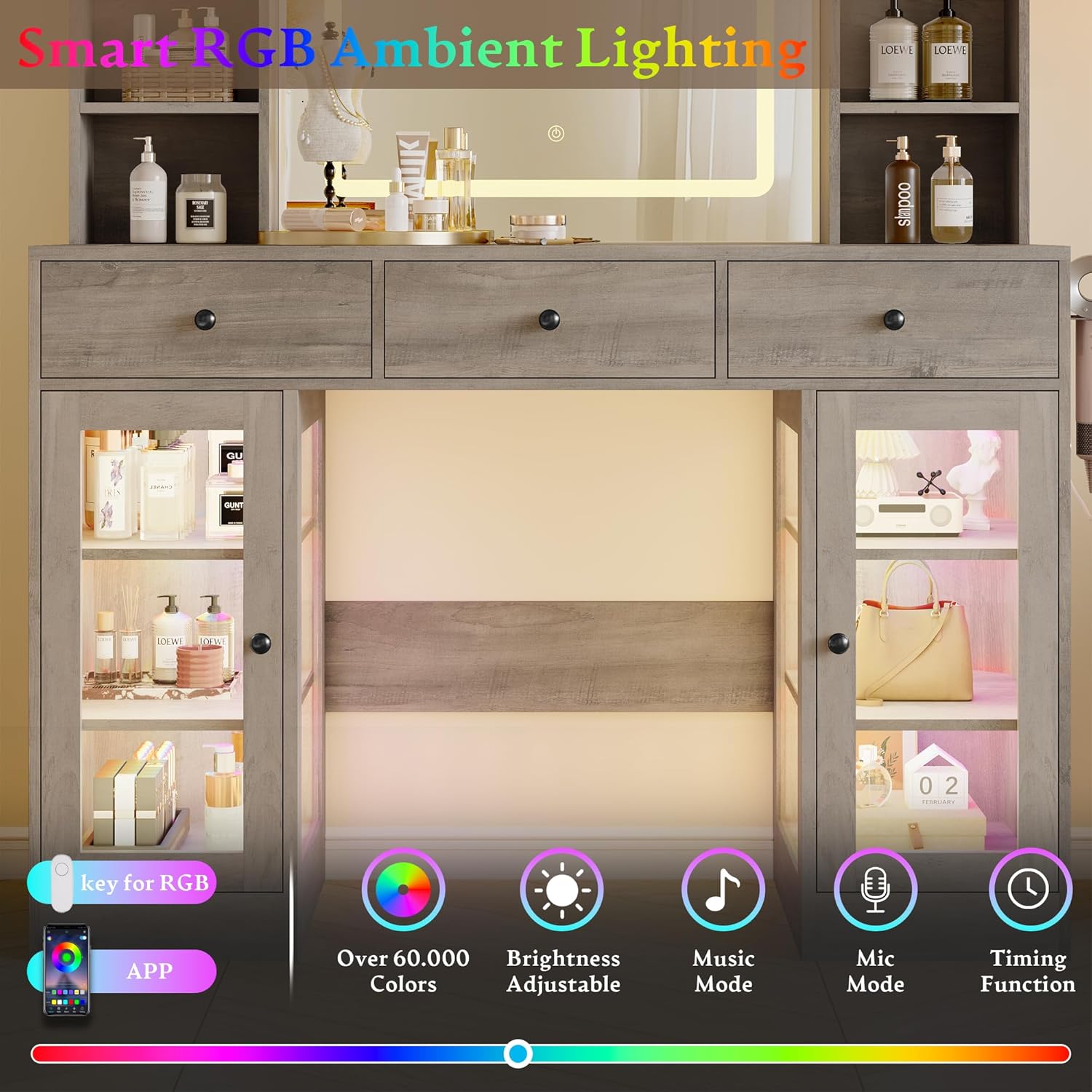
Image 5.2: The vanity desk featuring smart RGB ambient lighting, highlighting its ability to display over 60,000 colors, adjustable brightness, music mode, mic mode, and a timing function, all controllable via an app.
5.3. Power Outlet
A built-in power outlet is located on the side of the desk for convenient access to power for your electronic devices.
- It includes 2 standard AC outlets (125V/12A) and 2 USB ports (5V/2A).
- Plug in hair tools, phone chargers, or other small electronics as needed.
- Ensure devices are compatible with the provided power specifications.

Image 5.3: A close-up view of the integrated power outlet on the vanity desk, illustrating its two AC outlets and two USB ports, designed for convenient charging and powering of beauty tools and electronic devices.
5.4. Storage Features
The vanity desk offers various storage options to keep your items organized:
- Drawers: Three spacious drawers provide concealed storage for makeup, tools, and accessories.
- Glass Cabinets: Two glass-front cabinets with shelves allow for display and easy access to frequently used items or decorative pieces.
- Jewelry Storage: The glass top section includes dedicated compartments for organizing jewelry and smaller accessories.
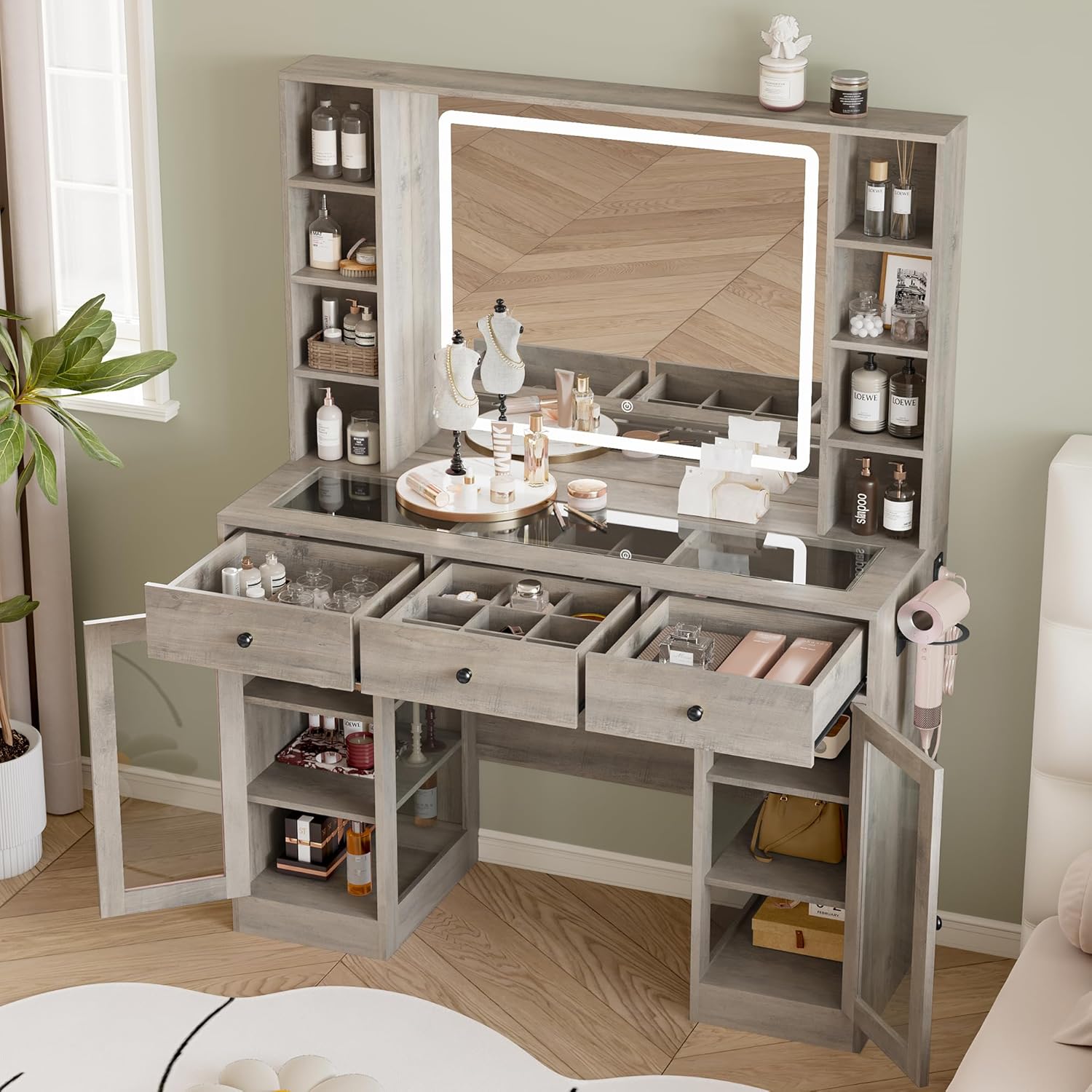
Image 5.4: The vanity desk with its drawers and glass cabinets open, demonstrating the extensive storage capacity available for organizing cosmetics, skincare products, and other personal items.

Image 5.5: A detailed view of the vanity desk's glass top, showcasing the organized compartments beneath for jewelry and small accessory storage.
6. Maintenance
Proper care will extend the life and appearance of your vanity desk:
- Cleaning: Wipe surfaces with a soft, damp cloth. Avoid harsh chemicals or abrasive cleaners that could damage the finish.
- Mirror Care: Clean the mirror with a glass cleaner and a lint-free cloth. Do not spray cleaner directly onto the mirror to avoid liquid seeping into the electrical components.
- Spills: Immediately wipe up any spills to prevent staining or damage to the engineered wood.
- Hardware: Periodically check and tighten all screws and fasteners to maintain stability.
7. Troubleshooting
If you encounter any issues with your vanity desk, refer to the following common solutions:
| Problem | Possible Cause | Solution |
|---|---|---|
| LED mirror lights not working | Power cable disconnected; faulty power outlet; mirror sensor issue. | Check power cable connection. Ensure the wall outlet is functional. Gently clean the touch sensor area on the mirror. |
| Power outlet not providing power | Vanity not plugged in; circuit breaker tripped; faulty outlet. | Verify the vanity's main power cord is securely plugged into a working wall outlet. Check your home's circuit breaker. |
| Drawers are stiff or not closing smoothly | Improperly installed slides; obstruction; loose hardware. | Ensure drawer slides are correctly aligned and lubricated. Check for any objects blocking the drawer path. Tighten all drawer hardware. |
| Vanity feels unstable | Loose assembly hardware; uneven floor. | Re-tighten all assembly screws and fasteners. Use furniture levelers if the floor is uneven. |
If these steps do not resolve the issue, please contact Wodeer customer support for further assistance.
8. Specifications
| Feature | Detail |
|---|---|
| Brand | Wodeer |
| Model Number | WD-HLG094 |
| Color | Grey |
| Material | Engineered Wood |
| Product Dimensions (D x W x H) | 15.6" x 43.3" x 55.9" |
| Item Weight | 103 pounds |
| Assembly Required | Yes |
| Power Outlet | 2 AC Outlets (125V/12A), 2 USB Ports (5V/2A) |
| Mirror Lighting | Adjustable LED (brightness & color temperature) |
| Storage | 3 Drawers, 2 Glass Cabinets, Glass Top with Jewelry Storage |
9. Warranty and Support
Wodeer products are designed for quality and durability. For specific warranty details, please refer to the warranty card included with your purchase or visit the official Wodeer website. If you have any questions, require replacement parts, or need technical support, please contact Wodeer customer service. Contact information can typically be found on the product packaging or the brand's official website.