
MONSIATUG Universal Replacement Remote Control User Manual
Model: 799473834372
Introduction
This manual provides comprehensive instructions for the setup, operation, and maintenance of your MONSIATUG Universal Replacement Remote Control. Please read this manual carefully to ensure proper use and to maximize the functionality of your device.
Compatibility
This replacement remote control is compatible with a wide range of set-top boxes, including:
- Super Box S1, S2, S2Pro, S3, S4, S5, S6
- All Superbox models
- Octastream Q1
- Monsterbox X1
- Elite II, MAX IV, Elite Max
- MagaBox
Setup
1. Battery Installation
The remote control requires two (2) AAA batteries (not included). Follow these steps to install the batteries:
- Locate the battery compartment on the back of the remote control.
- Slide the battery compartment cover downwards to open it.
- Insert two AAA batteries, ensuring the positive (+) and negative (-) terminals align correctly with the markings inside the compartment.
- Slide the battery compartment cover back into place until it clicks securely.
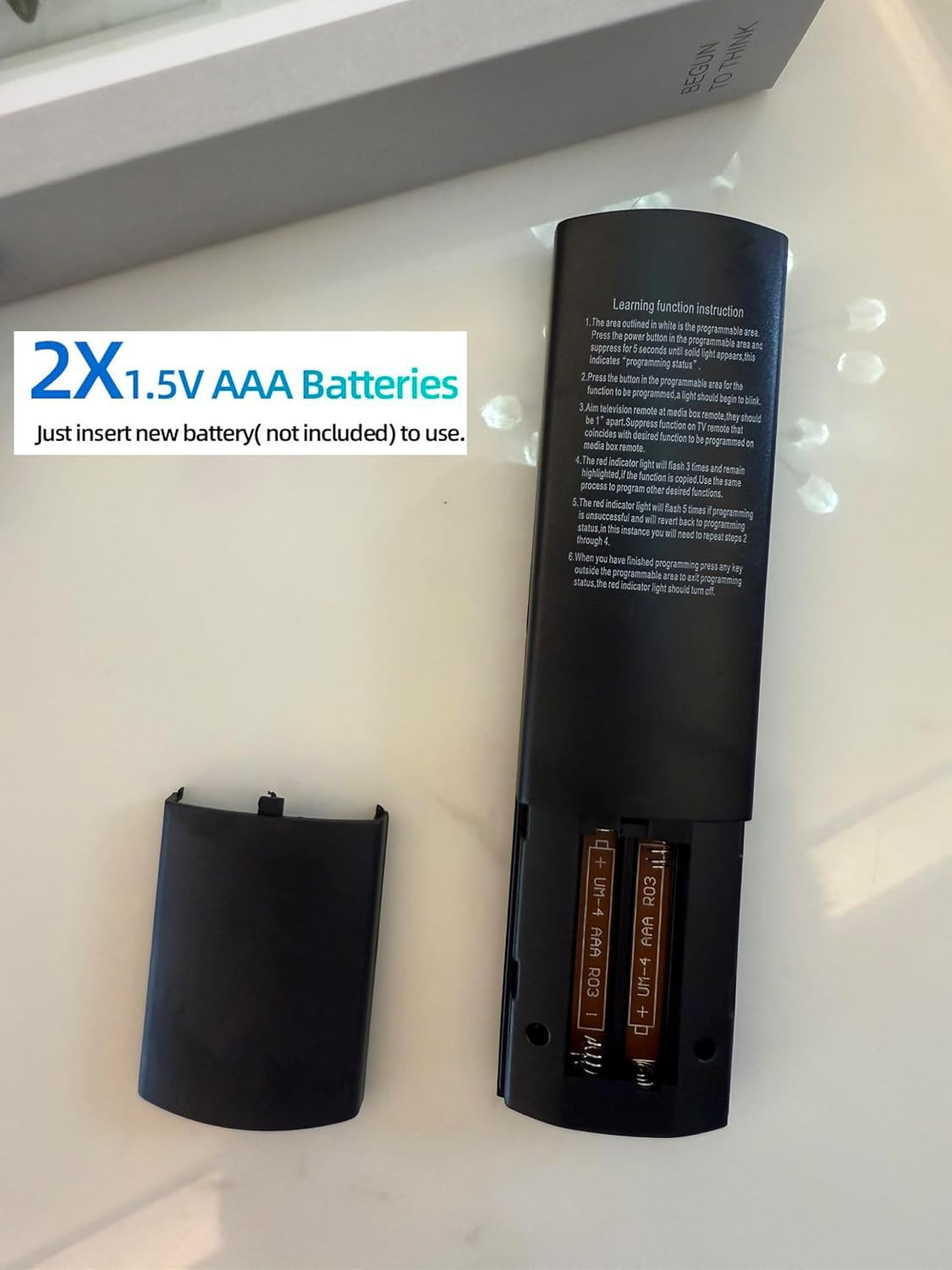
Image: Back of the remote control with the battery compartment open, indicating where to insert two AAA batteries. The learning function instructions are also visible on the back panel.
2. Initial Use (No Programming Required)
This MONSIATUG replacement remote control is pre-programmed for immediate use with compatible devices. Once batteries are installed, it is ready to operate your set-top box without any additional programming steps.
Operating Instructions
The remote control features a standard layout designed for intuitive navigation and control of your compatible set-top box. Below is a general overview of key functions:
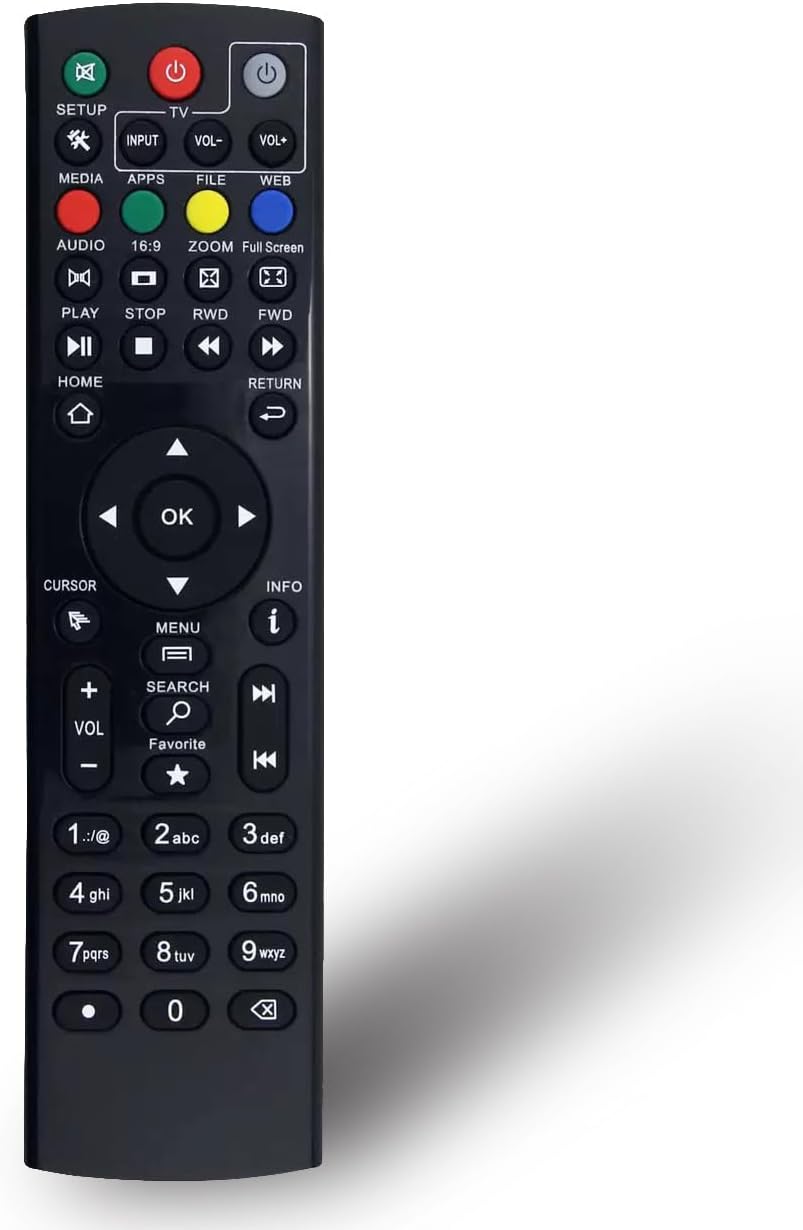
Image: Front view of the MONSIATUG remote control, displaying all buttons including power, navigation, volume, channel, media playback, and numeric keys.
- Power Button (⏻): Turns the device on or off.
- Navigation Pad (▲ ▼ ◄ ►): Used to navigate menus and select options. The OK button confirms selections.
- Volume Up/Down (VOL+/-): Adjusts the audio volume.
- Channel Up/Down (CH+/-): Changes channels.
- Media Playback Controls (Play, Pause, Stop, FWD, RWD): Controls media playback functions.
- Home Button (⌂): Returns to the main home screen.
- Return Button (↵): Goes back to the previous screen or menu.
- Numeric Keypad (0-9): For direct channel input or other numerical entries.
- Setup Button: For advanced configuration or learning functions (refer to the learning function instructions on the back of the remote if applicable).
Learning Function Instruction (If Applicable)
Some models of this remote control may feature a learning function, allowing it to mimic commands from another remote. Refer to the instructions printed on the back of your remote control for detailed steps on how to use this feature. Generally, the process involves:
- Pressing and holding the designated setup button until an indicator light activates.
- Aligning the learning remote with the original remote.
- Pressing the button to be programmed on the learning remote, then the corresponding button on the original remote.
- Repeating for other buttons and exiting the learning mode.
Note: Not all buttons are programmable. The red indicator light will guide you through the process.
Maintenance
Battery Replacement
Replace batteries when the remote's response becomes sluggish or stops working. Always replace both batteries simultaneously with new AAA batteries. Do not mix old and new batteries, or different types of batteries.
Cleaning
To clean the remote control, gently wipe it with a soft, dry cloth. For stubborn dirt, slightly dampen the cloth with water. Avoid using harsh chemicals, abrasive cleaners, or excessive moisture, as these can damage the remote's surface or internal components.
Troubleshooting
- Remote not responding:
- Check if the batteries are inserted correctly with the correct polarity.
- Replace old batteries with new ones.
- Ensure there are no obstructions between the remote and the device's IR receiver.
- Confirm the remote is pointed directly at the device.
- Certain buttons not working:
- If the remote has a learning function, ensure the buttons were programmed correctly. Refer to the "Learning Function Instruction" section.
- Clean the remote's surface, as dirt or debris might be obstructing button presses.
- Intermittent operation:
- This often indicates low battery power. Replace the batteries.
- Ensure the remote is within the effective operating range of the device.
Specifications
| Brand | MONSIATUG |
| Model Number | 799473834372 |
| Color | Black |
| Package Dimensions | 7.87 x 5.12 x 0.79 inches |
| Item Weight | 8.8 ounces |
| Max Number of Supported Devices | 1 (Specific to the device it controls) |
| Compatible Devices | Set Top Box (as listed in Compatibility section) |
| Special Feature | No Programming Required (for initial use) |
| Battery Type | 2 x AAA (not included) |
Warranty
This MONSIATUG Universal Replacement Remote Control comes with a 120-day warranty from the date of purchase. This warranty covers manufacturing defects and ensures the product functions as intended under normal use. Please retain your proof of purchase for warranty claims.
Support
For further assistance, troubleshooting not covered in this manual, or warranty inquiries, please contact the retailer or manufacturer directly. Provide your product model number (799473834372) and purchase details when seeking support.


