1. Introduction
This manual provides detailed instructions for the proper installation, operation, and maintenance of your ZK-HT21-3G Bluetooth 5.0 Subwoofer Amplifier. Please read this manual thoroughly before using the product to ensure optimal performance and safety. Keep this manual for future reference.
2. Product Overview
The ZK-HT21-3G is a 2.1 channel audio amplifier designed to deliver high-quality stereo sound and powerful subwoofer output. Featuring Bluetooth 5.0 connectivity, it allows for wireless audio streaming from compatible devices. It also includes an AUX input for wired connections. The amplifier is built with the TDA7498E chip, providing stable and efficient power delivery for an enhanced audio experience.
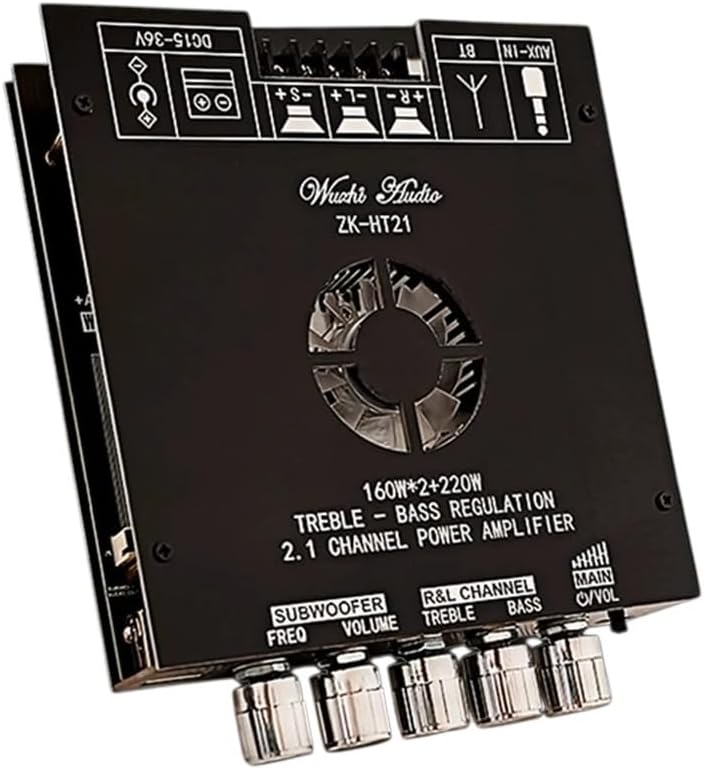
Image 1: Front view of the ZK-HT21-3G Bluetooth 5.0 Subwoofer Amplifier, showing control knobs and input/output ports.
3. Features
- Bluetooth 5.0 Connectivity: For stable and high-fidelity wireless audio streaming.
- 2.1 Channel Output: Dedicated channels for stereo speakers (left/right) and a subwoofer.
- High Power Output: 160W x 2 for stereo channels and 220W for the subwoofer.
- TDA7498E Amplifier Chip: Ensures efficient and powerful audio amplification.
- Adjustable Controls: Independent controls for subwoofer frequency, subwoofer volume, R&L channel treble, bass, and main volume.
- AUX Input: For wired audio connections.
- Wide Voltage Range: Operates on DC 15-36V.
4. Specifications
| Parameter | Value |
|---|---|
| Model | ZK-HT21-3G |
| Bluetooth Version | 5.0 |
| Channels | 2.1 (Stereo + Subwoofer) |
| Stereo Output Power | 160W x 2 |
| Subwoofer Output Power | 220W |
| Amplifier Chip | TDA7498E |
| Power Supply | DC 15-36V |
| Material | Electronic components, Metal |
5. Safety Instructions
- Ensure the power supply voltage is within the specified DC 15-36V range. Using an incorrect voltage can damage the device.
- Do not expose the amplifier to water, moisture, or extreme temperatures.
- Avoid placing the amplifier in direct sunlight or near heat sources.
- Ensure adequate ventilation around the amplifier to prevent overheating.
- Do not open the casing or attempt to repair the device yourself. Refer all servicing to qualified personnel.
- Keep out of reach of children.
6. Setup
6.1 Unpacking
Carefully remove the amplifier from its packaging. Inspect the device for any signs of damage. If any damage is found, do not proceed with installation and contact customer support.
6.2 Connections
- Power Connection: Connect a DC 15-36V power adapter (not included) to the DC IN port on the amplifier. Ensure the polarity is correct.
- Speaker Connections: Connect your stereo speakers to the R+ / R- and S+ / S- terminals. Connect your subwoofer to the + / - terminals. Ensure correct polarity for all speaker connections.
- Audio Input:
- Bluetooth: No physical connection needed for Bluetooth.
- AUX Input: Connect your audio source (e.g., smartphone, PC) to the AUX IN port using a 3.5mm audio cable.
Note: Always ensure the amplifier is powered off before making or changing any connections.
7. Operating Instructions
7.1 Powering On/Off
After all connections are made, connect the power adapter to a wall outlet. The amplifier will power on. To power off, disconnect the power adapter from the wall outlet.
7.2 Bluetooth Pairing
- Ensure the amplifier is powered on.
- On your audio source device (e.g., smartphone), enable Bluetooth and search for available devices.
- Select "ZK-HT21-3G" from the list of devices to pair.
- Once paired, audio from your device will be streamed to the amplifier.
7.3 AUX Input Usage
When an audio cable is connected to the AUX IN port, the amplifier will automatically switch to AUX input mode. Disconnect the AUX cable to revert to Bluetooth mode (if a Bluetooth device is paired).
7.4 Adjusting Controls
- MAIN VOL: Adjusts the overall volume level of all channels.
- R&L CHANNEL TREBLE: Adjusts the high-frequency response of the stereo channels.
- BASS: Adjusts the low-frequency response of the stereo channels.
- SUBWOOFER VOLUME: Adjusts the volume level of the subwoofer output independently.
- SUBWOOFER FREQ: Adjusts the crossover frequency for the subwoofer, determining which low frequencies are sent to the subwoofer.
8. Maintenance
- Cleaning: Use a soft, dry cloth to clean the exterior of the amplifier. Do not use liquid cleaners or solvents.
- Storage: When not in use for extended periods, store the amplifier in a cool, dry place away from direct sunlight and dust.
- Ventilation: Ensure the ventilation openings are not blocked to prevent overheating.
9. Troubleshooting
| Problem | Possible Cause | Solution |
|---|---|---|
| No power | Power adapter not connected or faulty; incorrect voltage. | Check power adapter connection and ensure it's plugged into a working outlet. Verify power adapter specifications (DC 15-36V). |
| No sound | Speaker wires loose or incorrectly connected; volume too low; incorrect input mode; audio source issue. | Check all speaker connections for correct polarity and secure fit. Increase MAIN VOL. Ensure Bluetooth is paired or AUX cable is properly connected. Test audio source with another device. |
| Bluetooth not connecting | Amplifier not in pairing mode; device too far; interference. | Ensure amplifier is powered on. Move audio source closer to the amplifier. Turn off other Bluetooth devices to reduce interference. Try re-pairing. |
| Distorted sound | Volume too high; poor audio source quality; speaker impedance mismatch. | Reduce MAIN VOL. Use a high-quality audio source. Ensure speakers are compatible with the amplifier's output. |
10. Warranty and Support
This product comes with a money-back guarantee, reflecting our commitment to quality and customer satisfaction. For any questions, concerns, or technical assistance, please contact our customer support team. We recommend confirming compatibility before placing your order if you have specific setup requirements.
11. Disposal Information
This product contains electronic components and should not be disposed of with household waste. Please dispose of it according to local regulations for electronic waste recycling. Proper disposal helps prevent potential negative consequences for the environment and human health.


