
Introduction
This manual provides essential information for the safe and efficient use of your HQ Screen HQ-210FV/RDFL 210 Liter Vertical Freezer and Refrigerator. This versatile 2-in-1 appliance offers 210 liters of usable capacity, functioning as either a freezer for long-term storage or a refrigerator for daily use. It features an A+++ energy efficiency rating, ensuring reduced power consumption.
Please read this manual thoroughly before installation and operation, and retain it for future reference.
Safety Information
WARNING: To reduce the risk of fire, electric shock, or injury, observe the following basic precautions:
- Mandatory grounding: Ensure the appliance is properly grounded.
- Use in an indoor, dry, and well-ventilated environment only.
- Always unplug the appliance from the power outlet before cleaning or performing any maintenance.
- Do not use mechanical devices or other means to accelerate the defrosting process, other than those recommended by the manufacturer.
- Do not damage the refrigerant circuit.
- Do not use electrical appliances inside the food storage compartments of the appliance, unless they are of the type recommended by the manufacturer.
- Keep ventilation openings, in the appliance enclosure or in the built-in structure, clear of obstruction.
- This appliance is not intended for use by persons (including children) with reduced physical, sensory or mental capabilities, or lack of experience and knowledge, unless they have been given supervision or instruction concerning use of the appliance by a person responsible for their safety.
- Children should be supervised to ensure that they do not play with the appliance.
Setup
Unpacking and Placement
Carefully remove all packaging materials. Ensure no parts are missing or damaged. This is a freestanding product and should be placed on a flat, stable surface away from direct sunlight and heat sources.

Image: Front view of the HQ Screen HQ-210FV/RDFL vertical freezer and refrigerator. The appliance is silver/inox with a black top panel, featuring the 'HQ' logo on the door.

Image: Angled view of the HQ Screen HQ-210FV/RDFL vertical freezer and refrigerator, showing the silver/inox front door and black side panel.
Electrical Connection
For safe installation, use a dedicated, grounded electrical outlet with a 15 A fuse or circuit breaker. Avoid using extension cords or adapters, as these can pose a fire hazard or cause electrical shock.
Reversible Door Installation
The appliance features a reversible door, allowing you to adjust the opening direction to suit your space. Refer to the detailed, illustrated step-by-step instructions in the full manual for proper door reversal. This process typically involves:
- Gathering necessary tools (screwdriver, wrench).
- Removing the top hinge cover and screws.
- Lifting the door off the bottom hinge.
- Relocating the bottom hinge and door stopper to the opposite side.
- Reattaching the door and securing the top hinge.
Operating Instructions
2-in-1 Functionality: Freezer or Refrigerator
Your HQ-210FV/RDFL offers flexible storage options. You can easily switch between freezer and refrigerator modes using the mechanical temperature selector located inside the unit. This allows you to adapt the appliance to your current storage needs.
- Freezer Mode: For long-term storage of frozen foods like meats, prepared meals, and desserts. Typical operating range: -12 °C to -18 °C.
- Refrigerator Mode: Ideal for chilling beverages, dairy products, fresh produce, and daily meal preparations. Typical operating range: 0 °C to 10 °C.

Image: Interior view of the HQ Screen HQ-210FV/RDFL with the door open, showing multiple glass shelves and a bottom drawer for organized storage.

Image: Interior of the HQ Screen HQ-210FV/RDFL filled with various food items on glass shelves and in the bottom drawer, demonstrating its internal organization capabilities.
Temperature Control and FAST FREEZER Function
The mechanical temperature selector allows for simple and intuitive operation. Rotate the dial to select your desired temperature setting or mode (Freezer/Refrigerator).
The FAST FREEZER function is designed for temporary super-freezing. Activate this feature to rapidly lower the internal temperature, which is particularly useful after restocking the appliance with a large quantity of new items. This helps to quickly restore optimal storage conditions and preserve food quality.
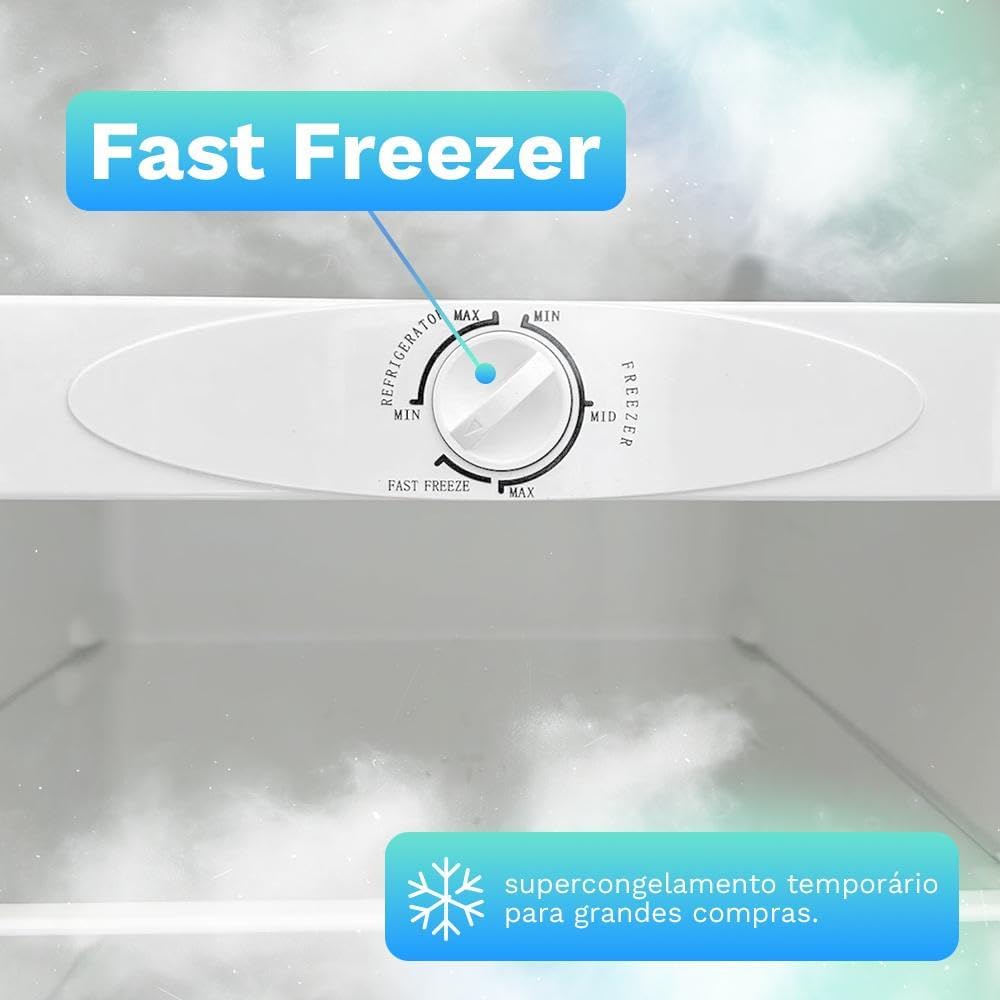
Image: Close-up of the mechanical temperature control dial inside the HQ Screen HQ-210FV/RDFL. The dial shows settings for 'Refrigerator' (Min-Max) and 'Freezer' (Min-Max), along with a 'FAST FREEZE' option for rapid cooling.
Internal Organization
The interior is designed for efficient organization, featuring:
- Multiple glass shelves (fixed and adjustable)
- A half shelf
- A bottom drawer
These components allow for flexible arrangement of items, maximizing storage capacity and accessibility.
Maintenance
Manual Defrost
This appliance features manual defrost. Regular defrosting is necessary to maintain optimal performance and energy efficiency. Follow these guidelines for manual defrosting:
- Always unplug the appliance before starting the defrost process.
- Remove all food items and store them in a cooler or another freezer.
- Never use sharp objects or metal tools to remove ice, as this can damage the cooling system.
- To speed up defrosting, place a bowl of hot water inside the compartment and keep the door closed.
- Once the ice has melted, wipe the interior dry with a soft cloth.
- Plug the appliance back in and allow it to reach the desired temperature before returning food items.
Cleaning
Regular cleaning helps maintain hygiene and extends the life of your appliance.
- Unplug the appliance before cleaning.
- Clean the interior with a solution of mild detergent and warm water. Avoid abrasive cleaners or solvents.
- Wipe down the exterior with a soft, damp cloth.
- Ensure all surfaces are dry before plugging the appliance back in.
- Clean the condenser coils at the back of the unit periodically (e.g., every 6-12 months) to ensure efficient operation. Use a soft brush or vacuum cleaner.
Troubleshooting
Before contacting customer service, please check the following common issues:
- Appliance not operating:
- Check if the power cord is securely plugged into a grounded outlet.
- Verify if the circuit breaker or fuse has tripped.
- Ensure the temperature control is not set to "OFF" or a very warm setting.
- Temperature is not cold enough:
- Check if the door is fully closed and sealed.
- Ensure the temperature control is set correctly for the desired mode (freezer or refrigerator).
- Avoid placing hot food directly into the appliance.
- Do not overload the appliance, as this can restrict airflow.
- Check if the appliance is located near a heat source or in direct sunlight.
- Excessive noise:
- Ensure the appliance is level and stable on the floor.
- Check if any objects are vibrating against the appliance.
- Normal operating noises include compressor hum, refrigerant flow sounds, and fan operation.
- Ice buildup (in freezer mode):
- This is normal for manual defrost units. Refer to the "Manual Defrost" section for instructions.
- Ensure the door seal is intact and the door is not left open frequently.
If the problem persists after checking these points, please contact HQ Screen customer support.
Specifications
| Brand | HQ Screen |
| Model | HQ-210FVRDFL |
| Total Capacity | 210 Liters |
| Voltage | 127 V (Not bivolt) |
| Frequency | 60 Hz |
| Defrost Type | Manual |
| Refrigerant | R600a |
| Insulant | Cyclopentane |
| Temperature Control | Mechanical |
| Operating Range (Refrigerator) | 0 °C to 10 °C |
| Operating Range (Freezer) | -12 °C to -18 °C |
| Energy Consumption | 22.41 kWh/month |
| Noise Level | 38 dB |
| Energy Efficiency | A+++ (ENCE Label) |
| Product Dimensions (H x W x D) | 142 cm x 54.5 cm x 59 cm |
| Product Weight | 40 kg |

Image: Diagram illustrating the dimensions of the HQ Screen HQ-210FV/RDFL vertical freezer and refrigerator. Height is 142 cm, width is 54.5 cm, and depth is 59 cm. The image also highlights the 210L capacity and 1-year warranty.
Warranty and Support
Warranty Information
Your HQ Screen HQ-210FV/RDFL appliance comes with a 1-year warranty. This warranty includes:
- 3 months of legal warranty.
- An additional 9 months of warranty for manufacturing defects.
Please retain your proof of purchase for warranty claims. The warranty covers defects in materials and workmanship under normal use.
Customer Support
For technical assistance, warranty claims, or any questions regarding your HQ Screen appliance, please contact HQ Screen customer support. Refer to the contact information provided on the product packaging or the official HQ Screen website.
When contacting support, please have your model number (HQ-210FVRDFL) and purchase date ready.