
1. Introduction
This manual provides essential instructions for the safe and efficient use of your Happiest Minds Techno COBA CB-802 rechargeable flashlight. Please read this manual thoroughly before operating the device and retain it for future reference.
2. Safety Information
- Do not look directly into the light beam. The high intensity light can cause temporary vision impairment or eye damage.
- Keep out of reach of children.
- Do not disassemble the flashlight. This may void the warranty and cause damage.
- Use only the specified battery type and charging method. Incorrect use can lead to battery damage, overheating, or explosion.
- Avoid exposing the flashlight to extreme temperatures or direct sunlight for prolonged periods.
- Ensure the charging port cover is securely closed when not charging to maintain water resistance.
3. Package Contents
Verify that all items are present in the package:
- Happiest Minds Techno COBA CB-802 Flashlight
- Rechargeable Battery (pre-installed or separate)
- USB-C Charging Cable
- Tail Rope
- User Manual (this document)
4. Product Overview
The COBA CB-802 is a versatile rechargeable flashlight designed for various applications, including outdoor activities, security, emergencies, and general home use. It features a white laser light source, multiple beam modes, and a durable aluminum alloy construction.
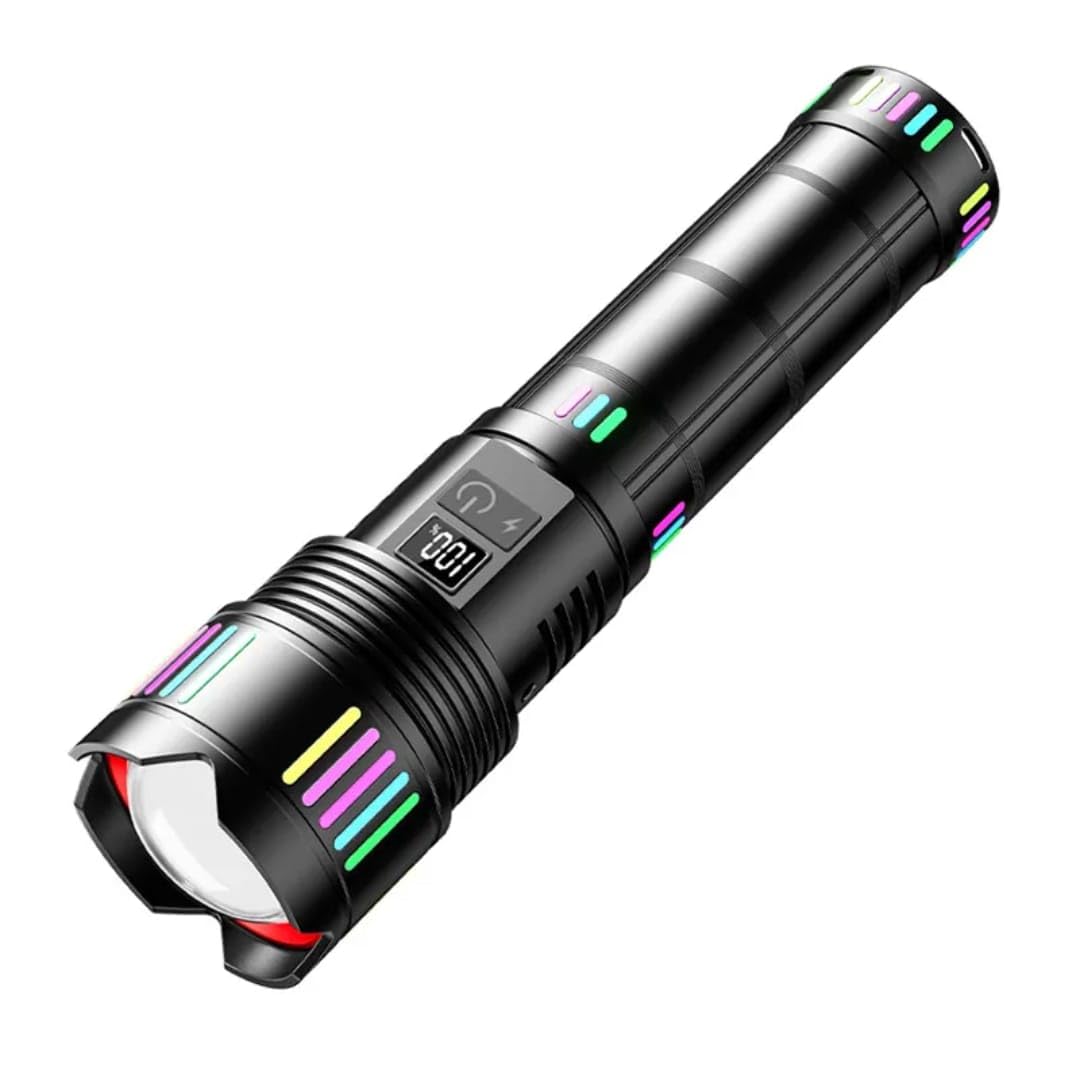
Figure 4.1: Overview of the Happiest Minds Techno COBA CB-802 Rechargeable Flashlight. This image displays the flashlight's overall design, including its white laser zoom capability and strong light output.
Key Features:
- Light Source: White Laser
- Material: Aerospace-grade Aluminum Alloy
- Beam Modes: High, Medium, Low, Strobe, SOS
- Charging: USB-C fast charging
- Battery: Built-in high-capacity Lithium-ion battery
- Durability: Water-resistant (IP65 rating) and shockproof
- Design: Non-slip grip, night fluorescent strip, digital battery level display

Figure 4.2: Illustration of the flashlight's adjustable beam. The image shows how to switch between a focused spotlight mode (small aperture area) and a wide floodlight mode (large aperture area) by adjusting the flashlight head.
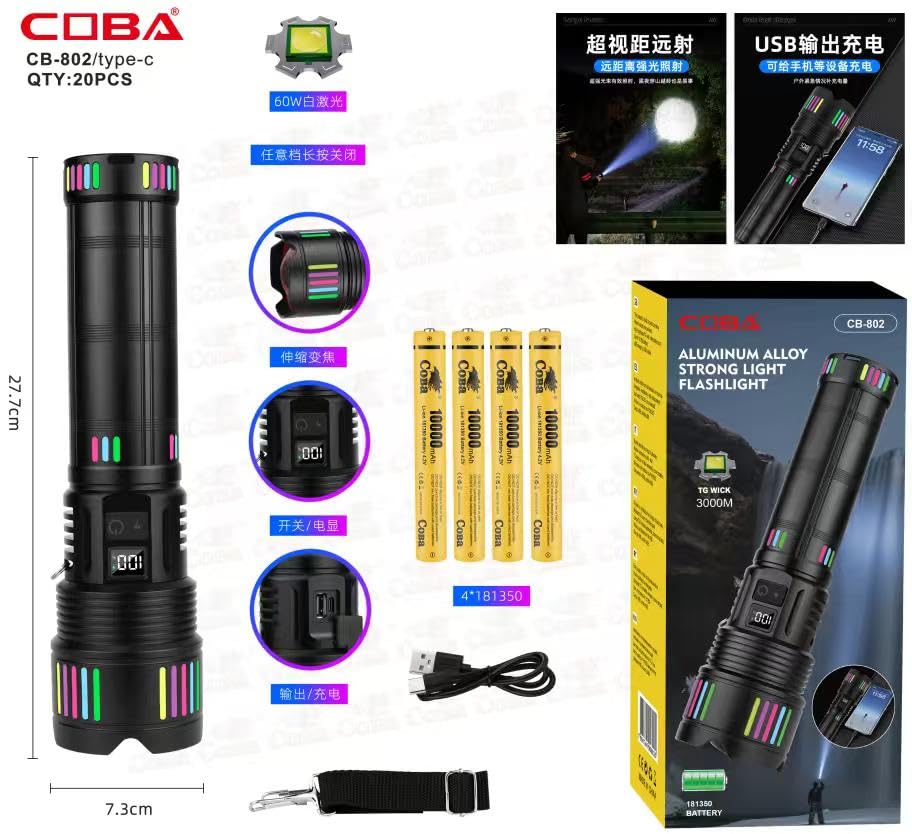
Figure 4.3: Detailed view of the COBA CB-802 flashlight, highlighting its dimensions (27.7cm length, 7.3cm head diameter), internal components, battery compartment, power switch, and USB-C charging port. The image also shows the included batteries and packaging.
5. Setup
5.1 Battery Installation
The COBA CB-802 flashlight uses a built-in rechargeable lithium-ion battery. If the battery is not pre-installed or needs replacement:
- Unscrew the tail cap of the flashlight by turning it counter-clockwise.
- Insert the rechargeable battery with the positive (+) terminal facing towards the flashlight head.
- Screw the tail cap back on clockwise until it is securely tightened.
5.2 Initial Charge
For optimal performance, fully charge the flashlight before first use. Refer to the "6. Charging" section for detailed instructions.
6. Operating Instructions
6.1 Power On/Off
- To turn the flashlight ON, press the power button located on the body of the flashlight.
- To turn the flashlight OFF, press and hold the power button for approximately 1-2 seconds.
6.2 Changing Light Modes
With the flashlight turned ON, short press the power button to cycle through the different light modes:
- High Brightness
- Medium Brightness
- Low Brightness
- Strobe Mode (rapid flashing)
- SOS Mode (Morse code for distress)
6.3 Adjusting Beam Focus (Zoom)
The COBA CB-802 features an adjustable zoom function to switch between spotlight and floodlight modes:
- To achieve a focused spotlight beam, extend the flashlight head forward.
- To achieve a wide floodlight beam, retract the flashlight head backward.

Figure 6.1: The flashlight demonstrating its white laser zoom capability, allowing users to adjust the beam from a wide flood to a focused spot.
7. Charging
The COBA CB-802 flashlight is equipped with a USB-C charging port for convenient recharging.
- Locate the USB-C charging port on the flashlight body. It is typically covered by a rubber flap to protect against water and dust.
- Open the rubber flap.
- Connect the provided USB-C cable to the flashlight's charging port.
- Connect the other end of the USB-C cable to a compatible USB power source (e.g., wall adapter, power bank, computer USB port).
- The digital display on the flashlight will indicate the charging status and battery level.
- Once fully charged, disconnect the charging cable and securely close the rubber flap over the USB-C port.
The flashlight can also function as an emergency power bank to charge other devices via its USB output port.

Figure 7.1: Demonstrates the Type-C charging capability of the COBA CB-802 flashlight, showing connections to various power sources like a laptop, power bank, and wall adapter.
8. Maintenance
8.1 Cleaning
- Wipe the flashlight body with a soft, damp cloth. Do not use abrasive cleaners or solvents.
- Clean the lens gently with a lens cleaning cloth to avoid scratches.
8.2 Storage
- Store the flashlight in a cool, dry place away from direct sunlight.
- If storing for an extended period, charge the battery every 3-6 months to maintain battery health.
8.3 Water Resistance
The flashlight has an IP65 water-resistant rating, meaning it is protected against dust and low-pressure water jets from any direction. It is not designed for submersion. Ensure all port covers are sealed to maintain water resistance.

Figure 8.1: The flashlight demonstrating its waterproof design, shown with water droplets on its surface, indicating resistance to splashes and rain.

Figure 8.2: Another view of the flashlight's water-resistant construction, showing it being splashed with water, highlighting its ability to withstand wet weather conditions.
9. Troubleshooting
| Problem | Possible Cause | Solution |
|---|---|---|
| Flashlight does not turn on. | Battery is depleted or incorrectly installed. | Charge the battery. Ensure the battery is inserted with the correct polarity. Check if the tail cap is fully tightened. |
| Light output is dim. | Low battery level. | Recharge the battery. |
| Flashlight does not charge. | Faulty charging cable or power source. Charging port is dirty. | Try a different USB-C cable and power adapter. Clean the charging port gently with a dry cotton swab. |
| Beam focus (zoom) is stiff. | Dirt or debris in the mechanism. | Gently clean the movable parts. Do not force the mechanism. |
10. Specifications
| Feature | Detail |
|---|---|
| Model Number | CB-802 |
| Light Source Type | White Laser |
| Material | Aluminium |
| Colour | BLACK |
| Power Source | Battery Powered |
| Battery Type | Lithium Ion |
| Number of Batteries | 1 (9V batteries required, likely refers to internal pack) |
| Runtime | Up to 10 hours |
| Water Resistance Level | Water Resistant (IP65) |
| Item Weight | 622 Grams |
| Item Dimensions (L x W x H) | 16L x 9W x 31H Centimeters (Note: This appears to be packaging dimensions; actual product length is approximately 27.7cm) |
| Manufacturer | HAPPIEST MINDS TECHNO |
| Country of Origin | India |
11. Warranty and Support
11.1 Warranty Information
This product is eligible for a 10-day replacement policy from the date of purchase, subject to the terms and conditions of the retailer. Please retain your proof of purchase for any warranty claims.
11.2 Customer Support
For any questions, technical assistance, or support regarding your Happiest Minds Techno COBA CB-802 flashlight, please contact the manufacturer:
Manufacturer: HAPPIEST MINDS TECHNO
Refer to your purchase documentation or retailer's website for specific contact details.