
Introduction
This manual provides detailed instructions for the installation, operation, and maintenance of your HOMIQ LIFE W9 Window Security Camera. Please read this manual thoroughly before using the product to ensure proper functionality and safety. The W9 camera is designed for indoor use, providing outdoor surveillance through window placement, featuring 3MP 2K resolution, ColorVue AI color night vision, and smart detection capabilities.
Key Features
- 3MP Ultra-HD Clarity with ColorVue AI Night Vision: Experience clear 2K resolution footage day and night. The advanced ColorVue AI technology provides vibrant, full-color video even in complete darkness.
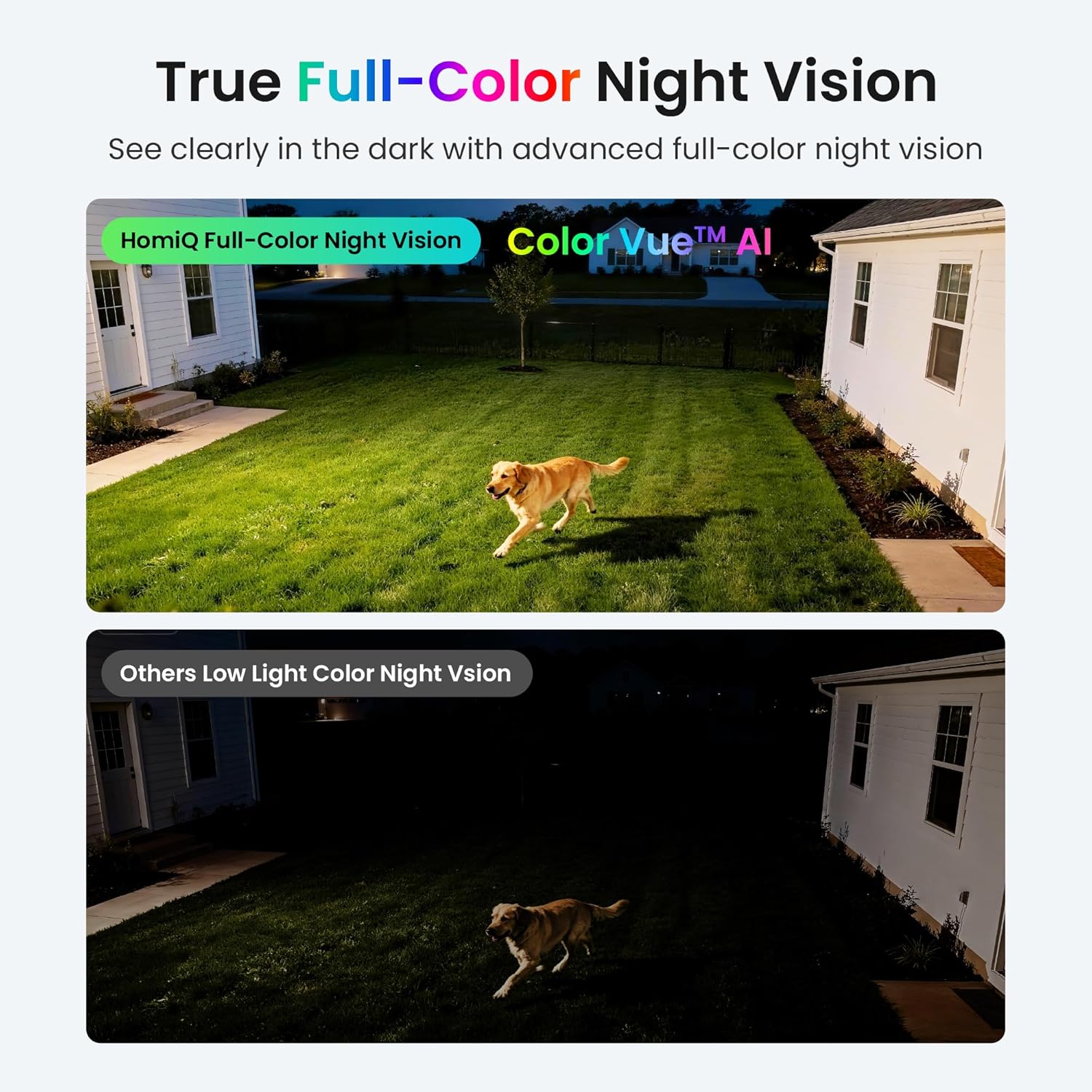
The camera's advanced lens system and ColorVue AI technology ensure clear, full-color imaging in various lighting conditions.

ColorVue AI restores vivid images and color details like daytime, even in extra dark nights.
- 2K Clarity with 6x Digital Zoom: Zoom in to view crucial details such as faces or license plates with stunning clarity, without significant loss of pixel quality.

Comparison of 1x and 6x digital zoom, highlighting the detail retained at higher magnification.

Zoom in to see crucial details like faces or license plates with stunning clarity, without losing a single pixel.
- Smart Motion and Person Detection with Instant Alerts: Receive real-time notifications on your phone for detected motion or human presence, enhancing security awareness.

The camera sends instant alerts to your phone upon detecting motion or a person.
- Anti-Glare & Anti-Reflection: Designed to ensure a clear view day and night by minimizing window glare and reflections, crucial for window-mounted cameras.

The HomiQ W9 camera provides a clear image by eliminating window glare and reflections, unlike traditional cameras.
- Dual-Band WiFi (2.4GHz/5GHz): Supports both 2.4GHz for wider coverage and 5GHz for faster, smoother streaming, ensuring reliable connectivity.

The camera utilizes dual-band WiFi for optimal connection stability and speed.

2.4/5 GHz dual-band WiFi adapts to your home network—2.4GHz for wider coverage, 5GHz for clearer streams. Live views stay steady and setup goes smoothly.
- 24/7 Recording with Secure Storage Options: Record continuously with options for local storage on a MicroSD card (up to 256GB) or encrypted U.S.-based cloud storage.

Choose US cloud storage for easy access (secure US Local Cloud Storage), or go with SD card storage (Up to 256GB) to keep your data local and avoid monthly fees. Note: SD Card is not included.
- App Control & Easy Sharing: Monitor your home anytime, anywhere using the HomiQ Life app, which supports up to four camera feeds and allows sharing access with up to five users.

The camera offers versatile placement options for comprehensive protection.

The HomiQ Life app supports multi-device viewing and sharing with multiple users.
- 2-Way Audio: Communicate through the camera with built-in microphone and speaker.
- Smart Home Compatibility: Works with Amazon Alexa and Google Home for voice control and integration into your smart home ecosystem.
Setup Guide
The HOMIQ LIFE W9 camera features a hassle-free, peel-and-stick installation process and Bluetooth pairing for quick setup.
- Clean Window: Clean both the inside and outside surfaces of the window where the camera will be mounted. Ensure the surface is dry and free of dust or debris.

Step 1: Clean the window thoroughly.
- Peel Off Mounting Sticker: Carefully peel the backing off the provided mounting sticker.

Step 2: Prepare the mounting sticker.
- Install Sticker: Firmly press the sticker onto the clean window surface from the inside. Ensure it is securely attached.
Step 3: Install the sticker onto the window.
- Mount Camera: Attach the camera firmly onto the mounting sticker. The magnetic design will secure it in place. Connect the power cable.
Step 4: Mount the camera onto the sticker.
- Bluetooth Pairing: Follow the instructions in the HomiQ Life app to pair your camera via Bluetooth for initial setup and Wi-Fi configuration.
Operating Instructions
Using the HomiQ Life App
Download the HomiQ Life app from your device's app store (iOS/Android). After installation and pairing, you can:
- Live View: Access real-time video feeds from your camera.
- Playback: Review recorded footage stored on your MicroSD card or cloud service.
- Two-Way Audio: Use the microphone and speaker icons in the app to communicate through the camera.
- Settings: Adjust motion detection sensitivity, notification preferences, night vision modes, and other camera settings.
- Sharing: Share camera access with family members or trusted individuals through the app's sharing features.
Smart Detection
Configure motion and person detection settings within the HomiQ Life app. You can:
- Enable/disable specific detection types.
- Adjust sensitivity levels to minimize false alerts.
- Set up activity zones to focus detection on specific areas.
Smart Home Integration
To connect with Amazon Alexa or Google Home:
- Open the Alexa or Google Home app on your smartphone.
- Search for the 'HomiQ Life' skill or service.
- Enable the skill/service and link your HomiQ Life account.
- Follow the on-screen prompts to discover your camera and assign it to a room.
- You can now use voice commands to view your camera feed on compatible smart displays.
Maintenance
- Cleaning: Gently wipe the camera lens and body with a soft, dry cloth. Avoid using harsh chemicals or abrasive materials.
- Firmware Updates: Regularly check the HomiQ Life app for available firmware updates to ensure optimal performance and security.
- Connection Check: Periodically verify that the camera's power cable is securely connected and that your Wi-Fi network is stable.
Troubleshooting
| Issue | Possible Solution |
|---|---|
| Camera not connecting to Wi-Fi | Ensure your Wi-Fi password is correct. Check if the camera is within range of your router. Try restarting your router and the camera. Verify your router supports 2.4GHz or 5GHz bands. |
| No notifications received | Check app notification settings on your phone and within the HomiQ Life app. Ensure motion/person detection is enabled and sensitivity is set appropriately. |
| Poor video quality | Ensure the camera lens is clean. Check your Wi-Fi signal strength; a weak signal can affect streaming quality. Adjust video quality settings in the app if available. |
| 2-Way Audio not working | Check microphone and speaker permissions for the HomiQ Life app on your phone. Ensure the camera's microphone and speaker are not obstructed. |
| Camera is offline | Verify the camera is powered on and the power adapter is securely connected. Check your internet connection. Try restarting the camera. |
Technical Specifications
| Feature | Specification |
|---|---|
| Model | W9 |
| Resolution | 3MP (2K Ultra-HD) |
| Night Vision | ColorVue AI Color Night Vision |
| Connectivity | Dual-Band Wireless (2.4GHz/5GHz) |
| Power Source | Corded Electric |
| Special Features | 2-Way Audio, Smart Motion & Person Detection, Anti-Glare & Anti-Reflection |
| Smart Home Compatibility | Amazon Alexa, Google Home |
| Storage Options | MicroSD Card (up to 256GB), Cloud Storage |
| Compatible Devices | iOS / Android |
| Item Weight | 6.4 ounces |
| Package Dimensions | 4.45 x 3.58 x 1.65 inches |
| UPC | 694685420583 |
Warranty and Support
For warranty information and technical support, please refer to the official HOMIQ LIFE website or contact their customer service directly. Keep your purchase receipt for warranty claims.
Customer Support: For further assistance, please visit the HOMIQ LIFE support page or contact their customer service team through the contact information provided on their official website.