
1. Introduction
Thank you for choosing the JUSTHERO EMH01 Electric Wheelchair. This manual provides essential information for the safe and efficient operation, maintenance, and care of your new electric wheelchair. Please read this manual thoroughly before first use and keep it for future reference.
2. Safety Information
Always prioritize safety when operating the electric wheelchair. Ensure you understand all controls and features before use. Consult a healthcare professional for guidance on proper usage if you have any medical conditions.
- Always wear the seatbelt provided.
- Do not exceed the maximum weight capacity of 350 lbs.
- Avoid operating the wheelchair on excessively steep slopes or uneven terrain beyond its specified capabilities.
- Ensure the auto-brake system is engaged when parked.
- Keep hands and clothing clear of moving parts.
3. Setup and Assembly
Your JUSTHERO EMH01 electric wheelchair comes largely pre-assembled. Follow these steps for final setup.
3.1. Unboxing and Unfolding
Carefully remove the wheelchair from its packaging. Unfold the electric wheelchair, ensuring all locking mechanisms are securely engaged before use.
Video: Electric Wheelchair Assembly
This video demonstrates the initial unboxing and unfolding process of the electric wheelchair, ensuring it is properly set up for use.
3.2. Controller Installation
The controller can be mounted on either the left or right armrest to suit user preference. Remove the pre-installed fixing knob from the armrest, mount the controller, and then connect the controller cable to the main cable, ensuring the positioning stopper is correctly aligned.
Video: Controller Left/Right Installation
This video illustrates how to install the joystick controller on either the left or right armrest and connect it to the wheelchair's main system.
3.3. Battery Installation
Install the battery onto the designated bracket located under the seat. Ensure it is securely in place and then plug the power cable into the battery's charging port.
Video: Electric Wheelchair Assembly (Battery Installation segment)
This video demonstrates the process of installing the battery into its compartment under the seat and connecting the power cable.
3.4. Stabilizer Wheels Adjustment
Adjust the stabilizer wheels as needed for optimal balance and safety. Pull the lock pin out, adjust the wheel position, and ensure the pin slides back into the hole to secure it.
Video: Adjustment of Stabilizer Wheels
This video shows how to properly adjust and secure the stabilizer wheels for enhanced stability.
4. Operating Instructions
Familiarize yourself with the controls and features for smooth operation.
4.1. Power On/Off and Auto-Brake
Press the power button on the controller to turn the wheelchair on or off. When powered on, the auto-brake is engaged, preventing manual movement. When powered off, the auto-brake is released, allowing manual pushing.
Video: Manual/Auto Brake Switching
This video demonstrates how to switch between manual and automatic brake modes using the power button on the controller.
4.2. Driving and Speed Adjustment
Use the 360-degree joystick for precise control over movement. The controller features multiple function buttons and 5 levels of speed adjustment. Adjust the speed according to your environment and comfort level.

Image: Joystick Controller Overview
This image highlights the various functions of the joystick controller, including speed and battery displays, power, alarm, and charging ports.
4.3. Charging the Battery
The wheelchair battery can be charged in two ways:
- Directly through the controller: Plug the charger into the charging port on the controller.
- By removing the battery: Remove the battery from under the seat and plug the charger directly into the battery's charging port.
The charger light will turn red when charging and green when fully charged. A full charge typically takes 3-4 hours.
Video: Two Charging Ways Instruction
This video demonstrates both methods of charging the wheelchair battery: directly via the controller and by removing the battery for external charging.
4.4. LED Light and Charging Ports
The controller is equipped with an LED light to illuminate the path. It also includes a USB port and a Type-C port, allowing you to charge mobile devices while on the go.

Image: Controller with LED and Charging Ports
This image details the LED light and integrated USB/Type-C charging ports on the joystick controller.
5. Key Features
The JUSTHERO EMH01 electric wheelchair is designed with several features to enhance user experience and safety.
- Powerful Brushless Motors: Equipped with two 250W brushless motors, providing a total of 500W power for a maximum 12° climbing capability. These motors operate smoothly, quietly, and require minimal maintenance.
- Intelligent Brake System: Features an automatic braking system that engages when the controller is released, preventing rollback on slopes and enhancing safety.
- Lightweight & One-Click Foldable: Weighing only 36 lbs, the wheelchair is easy to lift and transport. Its one-step folding design allows for convenient storage in vehicle trunks, ships, and planes, making it ideal for travel.
- High-Performance Battery: The 12Ah lithium battery weighs only 4.8 lbs, fully charges in 3-4 hours, and provides a travel range of up to 15 miles.
- Humanized Design: Includes flip-up armrests for easy seating and closer access to tables, a handbrake, seatbelt, and anti-tip wheels for added safety.
- Puncture-Resistant Tires: Features honeycomb structure puncture-proof PU solid tires for long-lasting use and adaptability to various road conditions without needing inflation.
- Suspension System: Equipped with 6 springs to enhance shock absorption, providing a smoother and more comfortable ride.
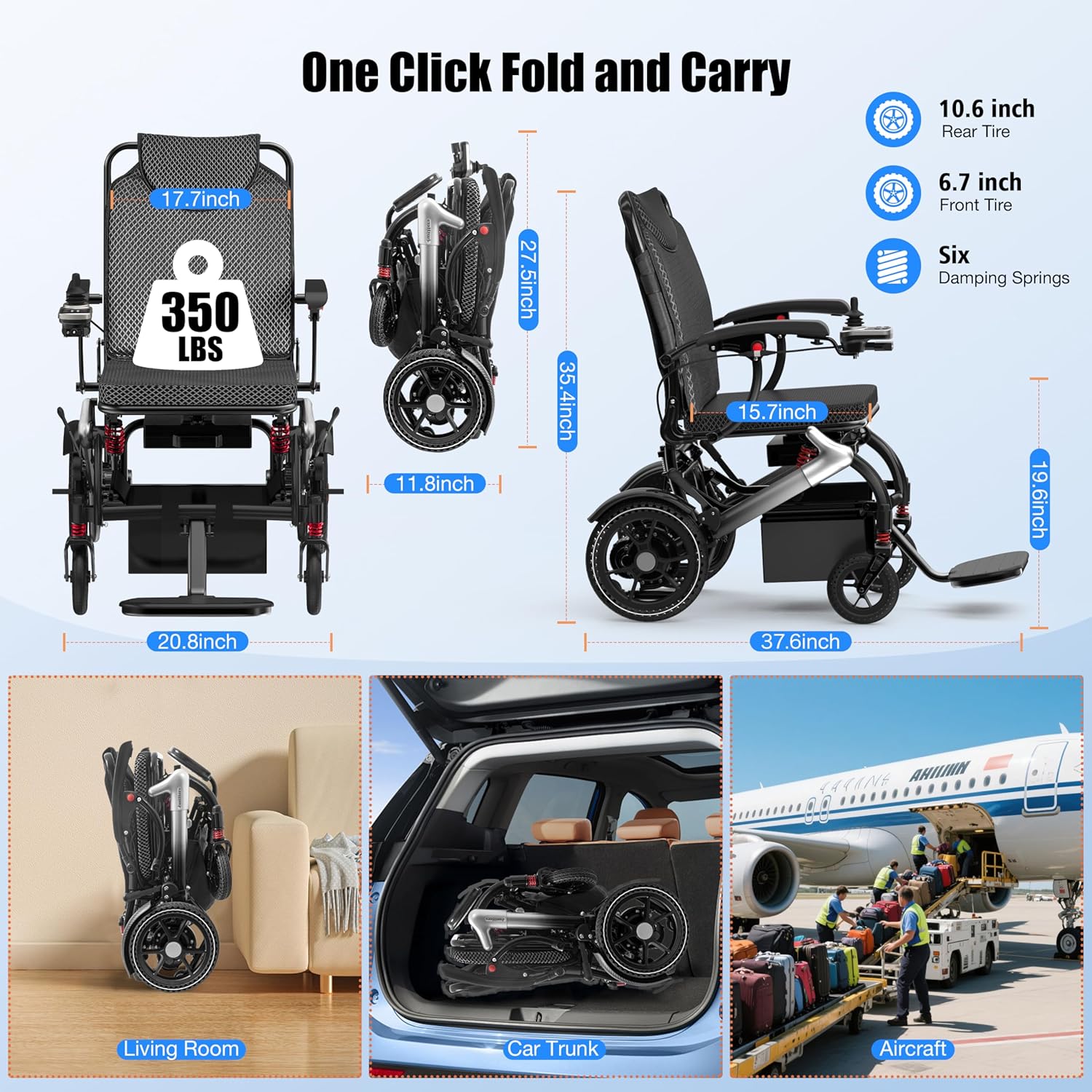
Image: Folded Dimensions and Storage Options
This image illustrates the compact dimensions of the wheelchair when folded, demonstrating its suitability for various storage and transport scenarios.

Image: Intelligent Brake System and Climbing Capability
This image demonstrates the wheelchair's intelligent brake system and its ability to handle inclines up to 12 degrees, featuring anti-tip wheels and double-handed brakes.

Image: Battery Specifications
This image provides details on the 12Ah lithium battery, including its weight, charging time, and travel range.
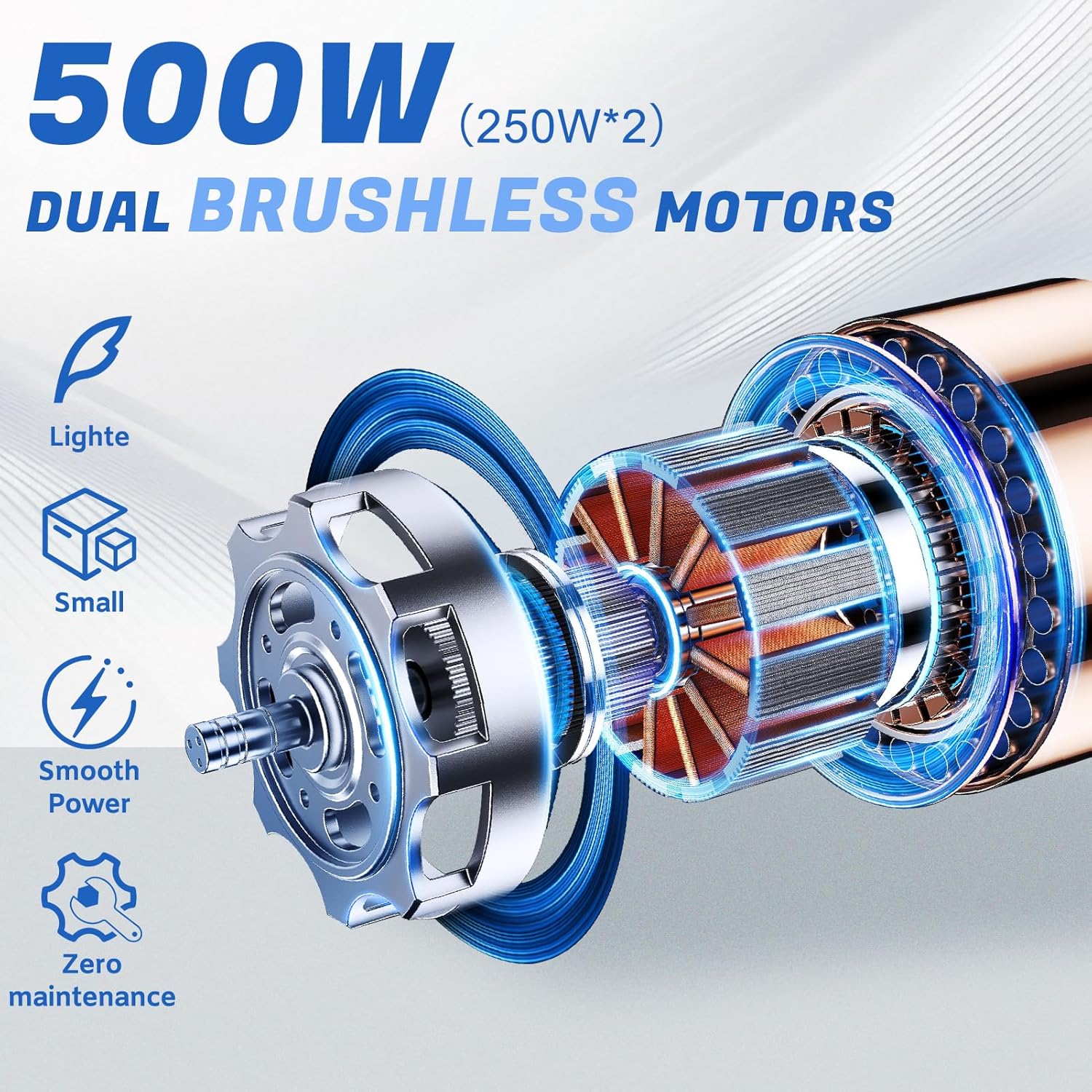
Image: Dual Brushless Motors
This image visually explains the benefits of the 500W dual brushless motors, emphasizing their efficiency and low maintenance.

Image: Puncture-Resistant Honeycomb Tires
This image showcases the durable, puncture-resistant honeycomb tires, designed for various road conditions and long service life without inflation.

Image: Suspension Design
This image highlights the wheelchair's suspension system, featuring 6 springs for improved shock absorption and a smoother ride.
6. Maintenance
Regular maintenance ensures the longevity and optimal performance of your electric wheelchair.
- Cleaning: Wipe down the frame and seat with a damp cloth. Avoid using abrasive cleaners or excessive water.
- Battery Care: Always fully charge the battery after each use. Store the battery in a cool, dry place if not in use for extended periods, and charge it at least once a month to maintain its health.
- Tire Inspection: Regularly check the tires for any signs of wear or damage. Although puncture-resistant, ensure no debris is lodged in the tread.
- Component Check: Periodically inspect all bolts, nuts, and connections to ensure they are tight and secure.
7. Troubleshooting
If you encounter any issues with your wheelchair, refer to the following common troubleshooting tips:
- Wheelchair not powering on: Ensure the battery is fully charged and correctly installed. Check all cable connections, especially the one to the controller.
- Wheelchair not moving: Verify the power is on and the auto-brake is disengaged (if attempting manual push). Check the joystick for any obstructions or damage.
- Braking issues: Ensure the auto-brake system is functioning correctly. If the wheelchair rolls when parked, contact support.
- Unusual noises: Stop using the wheelchair immediately and inspect for loose parts or obstructions. Contact support if the noise persists.
For issues not covered here, please contact customer support.
8. Specifications
| Feature | Detail |
|---|---|
| Model | EMH01 |
| Weight | 36 lbs (wheelchair), 4.8 lbs (battery) |
| Max Support Weight | 350 lbs |
| Motors | 2 x 250W Brushless Motors (500W total) |
| Climbing Capability | Max 12° |
| Battery | 12Ah Lithium Battery |
| Charging Time | 3-4 hours |
| Travel Range | Up to 15 miles |
| Tires | Puncture-proof Honeycomb PU Solid Tires |
| Controller | 360-degree joystick, 5-speed adjustment, LED light, USB/Type-C charging ports |
| Material Type | Plastic, Polyurethane |
9. Warranty and Support
JUSTHERO offers the following warranty for your electric wheelchair:
- 1-Year Warranty: Covers the controller, power unit, and battery against non-human damage.
- 2-Year Warranty: Covers the electric wheelchair frame.
Each package includes 1 pre-assembled electric wheelchair, 1 user manual, 1 toolkit, 1 charger, and 1 LED light. If you require any assistance or have questions, please contact JUSTHERO customer support. Your satisfaction is our priority.