
1. Introduction
The Panther Vision POWERPAW 501 Rechargeable Hand Warmer is designed to provide portable and reusable warmth for various outdoor activities and cold environments. This device features a 5000mAh rechargeable battery, multiple heat levels, and a compact design for ease of use.
Key features include:
- Long-Lasting Warmth: Equipped with a 5000mAh rechargeable battery, providing extended heat duration.
- Adjustable Heat Levels: Offers 3 adjustable heat settings, reaching up to 126°F (52°C), for personalized comfort.
- Compact and Portable: Slim, lightweight design fits easily into pockets, gloves, or bags.
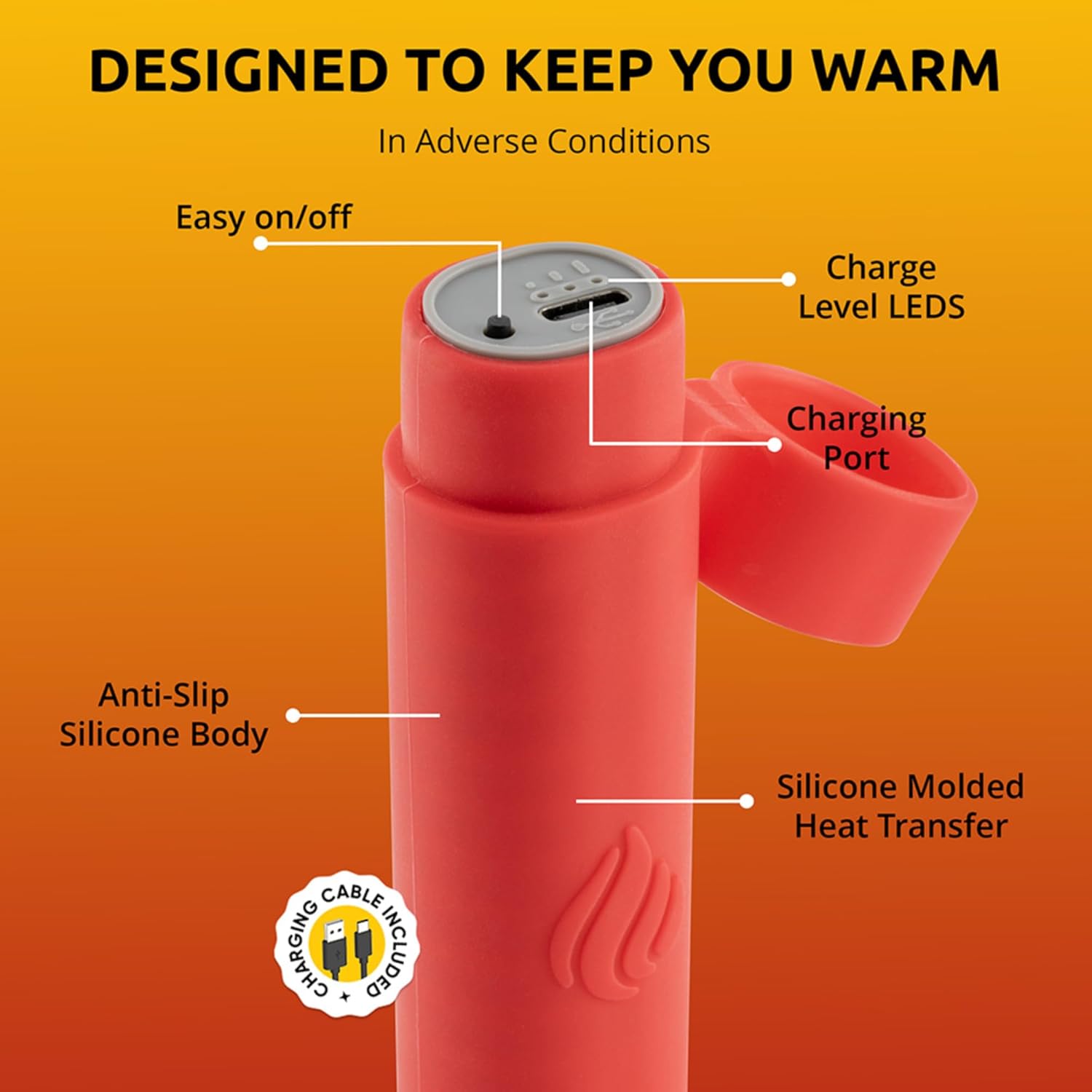
- Durable Construction: Features an anti-slip silicone body and IPX7 waterproof rating for reliable use in adverse conditions.
- Eco-Friendly: A reusable alternative to disposable hand warmers, reducing waste.

This manual provides detailed instructions for the safe and effective use of your POWERPAW 501 hand warmer.

Product Overview Video
Video 1.1: This video demonstrates the POWERPAW hand warmer's heating capability compared to a chemical warmer, its ability to charge a phone, and its portability. Note: The video title refers to 'POWERPAW 602', but the product is the POWERPAW 501.
2. Setup
2.1 Unpacking
Carefully remove the hand warmer and included charging cable from its packaging. Inspect the device for any visible damage.
2.2 Initial Charge
Before first use, fully charge the POWERPAW hand warmer. The device is powered by a 5000mAh (2500mAh per unit in a 2-pack) Lithium-Ion battery.
- Locate the charging port on the hand warmer. It is typically covered by a silicone flap to maintain its waterproof rating.
- Open the silicone flap and connect the provided USB-C charging cable to the hand warmer's charging port.
- Connect the other end of the USB-C cable to a compatible USB power source (e.g., wall adapter, computer USB port, power bank).
- The charge level LEDs will illuminate to indicate charging status. A full charge typically takes approximately 6 hours.
- Once fully charged, disconnect the cable and securely close the silicone flap over the charging port to ensure waterproofing.

3. Operating Instructions
3.1 Powering On/Off
To turn on the hand warmer, press and hold the power button for a few seconds until the heat indicator lights illuminate. To turn off the device, press and hold the power button again until the lights turn off.
3.2 Adjusting Heat Levels
The POWERPAW 501 features 3 adjustable heat levels. Once the device is on, short press the power button to cycle through the heat settings. The indicator lights will change to reflect the selected heat level:
- Low: Provides gentle warmth.
- Medium: Offers moderate heat.
- High: Delivers maximum warmth, up to 126°F (52°C).
Select the heat level that best suits your comfort and environmental conditions.
3.3 Usage Scenarios
The POWERPAW 501 is suitable for various activities where warmth is needed:
- Outdoor work
- Hunting and fishing
- Camping and hiking
- Skiing and snowboarding
- Daily commutes in cold weather
Product Features and Usage Video
Video 3.1: This video highlights the POWERPAW hand warmer's waterproof design, battery life, and suitability for various cold-weather activities. Note: The video title refers to 'POWERPAW 602', but the product is the POWERPAW 501.
4. Maintenance
4.1 Cleaning
To clean the hand warmer, wipe the exterior with a soft, damp cloth. Do not use abrasive cleaners or immerse the device in water unless specifically designed for such use (the POWERPAW 501 is IPX7 waterproof, meaning it can withstand immersion in 1 meter of water for up to 30 minutes, but avoid prolonged submersion or high-pressure water jets).
4.2 Storage
When not in use, store the hand warmer in a cool, dry place away from direct sunlight and extreme temperatures. For long-term storage, it is recommended to charge the battery to approximately 50% to prolong its lifespan.
5. Troubleshooting
5.1 Device Not Turning On
- Ensure the battery is charged. Connect the device to a power source and check the charge level LEDs.
- Press and hold the power button for at least 3-5 seconds to ensure it registers the command.
5.2 Device Not Heating
- Verify the device is turned on and a heat level is selected. Cycle through the heat settings by short-pressing the power button.
- Ensure the battery has sufficient charge.
5.3 Short Battery Life
- Battery life varies depending on the selected heat level and ambient temperature. Higher heat settings consume more power.
- Ensure the device is fully charged before use.
- Extreme cold can temporarily reduce battery performance.
5.4 Charging Issues
- Check that the charging cable is securely connected to both the hand warmer and the power source.
- Try using a different USB-C cable or power adapter to rule out faulty accessories.
- Ensure the charging port is free of debris.
6. Specifications
| Model Name | POWERPAW 501 |
| Brand | Panther Vision |
| Material | Silicone |
| Battery Type | Lithium-Ion |
| Battery Capacity | 5000mAh (2500mAh per unit for 2-pack) |
| Charging Time | Approximately 6 hours |
| Heat Levels | 3 (up to 126°F / 52°C) |
| Waterproof Rating | IPX7 (submersible in 1 meter of water for up to 30 minutes) |
| Item Weight | 6.4 Ounces (per unit) |
| Item Dimensions (LxWxH) | 1 x 1.5 x 4 inches (per unit) |

7. Warranty and Support
7.1 Warranty Information
The Panther Vision POWERPAW 501 Rechargeable Hand Warmer comes with a Limited Lifetime Warranty. Please refer to the official Panther Vision website or contact customer support for full details regarding warranty coverage and terms.
7.2 Customer Support
For technical assistance, troubleshooting, or warranty claims, please contact Panther Vision customer support through their official website or the contact information provided with your product packaging.