
1. Important Safety Instructions
Before operating your Frigidaire EMW788RETRO microwave oven, please read and understand all safety instructions. Failure to follow these instructions may result in electric shock, fire, or injury.
- Do not attempt to operate this oven with the door open as this can result in harmful exposure to microwave energy.
- Do not place any object between the oven front face and the door or allow soil or cleaner residue to accumulate on sealing surfaces.
- Do not operate the oven if it is damaged. It is particularly important that the oven door closes properly and that there is no damage to the: (1) door (bent), (2) hinges and latches (broken or loosened), (3) door seals and sealing surfaces.
- The oven should not be adjusted or repaired by anyone except properly qualified service personnel.
2. Setup and Installation
Unpacking
- Remove all packaging materials from inside the oven cavity.
- Remove any protective film found on the microwave oven cabinet surface.
- Check the oven for any damage, such as a misaligned or bent door, damaged door seals and sealing surface, broken or loose door hinges and latches, or dents inside the cavity or on the door. If there is any damage, do not operate the oven and contact qualified service personnel.
Placement
- Place the microwave oven on a stable, level surface that is strong enough to hold the oven and the heaviest food item likely to be cooked in it.
- Ensure adequate ventilation. Leave a minimum of 3.0 inches (7.5 cm) of clear space on both sides, 12.0 inches (30 cm) on top, and 3.0 inches (7.5 cm) at the rear of the oven for proper airflow. Do not block any ventilation openings.
- Do not place the oven near heat sources such as a range or oven.
Electrical Connection
Ensure the microwave is plugged into a properly grounded 120V, 60Hz AC outlet. Do not use extension cords or adapters.
Turntable Assembly
Place the roller ring in the depression on the oven bottom. Place the glass turntable on top of the roller ring, ensuring it is seated securely.

Image: Inside view of the Frigidaire EMW788RETRO microwave, highlighting the glass turntable and the easy-clean interior.
3. Operating Instructions
Control Panel Overview

Image: A detailed view of the Frigidaire EMW788RETRO microwave's user-friendly control panel, indicating the LED display, cooking power levels, express cooking button, auto cook menus, and auto defrost function.
The microwave features a user-friendly panel with an easy-to-read LED display and a retro-themed oversized knob for setting time and selecting menus.
Setting the Clock
- Press the 'Defrost/Clock' button once.
- Turn the 'Time/Weight' knob to set the hour.
- Press the 'Defrost/Clock' button again.
- Turn the 'Time/Weight' knob to set the minutes.
- Press the 'Defrost/Clock' button one last time to confirm the setting.
Microwave Cooking
To cook with microwave power, follow these steps:
- Place food in the oven and close the door.
- Press the 'Micro Power' button.
- Turn the 'Time/Weight' knob to select the desired power level (10 levels available).
- Turn the 'Time/Weight' knob to set the cooking time.
- Press the 'Start' button to begin cooking.
Express Cooking

Image: A hand interacting with the control panel, specifically pressing the 'Express' button for quick start cooking.
For quick heating, simply press the 'Express' button. Each press adds 30 seconds of cooking time at 100% power. You can press it multiple times for longer durations.
Auto Cook Menus

Image: A collage illustrating the six automatic menu options available on the microwave: Popcorn, Potato, Pizza, Beverage, Frozen Dinner, and Reheat.
The microwave features 6 pre-programmed settings for common food items:
- Popcorn: For quick and easy popcorn.
- Potato: Ideal for baking potatoes.
- Pizza: Reheat or cook pizza slices.
- Beverage: Heat drinks to the perfect temperature.
- Frozen Dinner: Conveniently cook frozen meals.
- Reheat: Warm up leftovers efficiently.
To use an auto cook menu:
- Press the 'Auto Cooking' button.
- Turn the 'Time/Weight' knob to select the desired menu (A1-A6).
- Press the 'Start' button to begin.
Defrost Functions
The microwave offers both Speed Defrost and Weight Defrost options:
- Speed Defrost: For quick defrosting based on time.
- Weight Defrost: For defrosting based on the weight of the food item.
To use defrost:
- Press the 'Defrost/Clock' button.
- Turn the 'Time/Weight' knob to select either Speed Defrost or Weight Defrost.
- Adjust time or weight as prompted by the display.
- Press the 'Start' button.
Child Safety Lock
To prevent unintended operation, activate the Child Safety Lock:
- To activate: Press and hold the 'Stop/Clear' button for 3 seconds until a lock icon appears on the display.
- To deactivate: Press and hold the 'Stop/Clear' button for 3 seconds until the lock icon disappears.
4. Maintenance and Cleaning
Regular cleaning and maintenance will ensure the longevity and optimal performance of your microwave oven.
- Oven Interior: Clean the oven cavity after each use with a damp cloth and mild detergent. For stubborn stains, a microwave-safe cleaner can be used.
- Glass Turntable: The glass turntable is removable and dishwasher safe for easy cleaning.
- Exterior: Wipe the exterior surfaces with a soft, damp cloth. Avoid abrasive cleaners or harsh chemicals that may damage the finish.
- Door Seals: Keep the door seals clean to ensure proper closure and efficient operation.
5. Troubleshooting
If you encounter any issues with your microwave oven, refer to the following common troubleshooting tips:
- Oven will not start: Check if the power cord is securely plugged into the outlet. Ensure the door is closed properly. Verify that a cooking time has been set.
- Food not heating: Confirm that the power level is set correctly. Ensure the door is fully closed. Check if the turntable is rotating.
- Turntable not rotating: Make sure the turntable is correctly placed on the roller ring. Check for any obstructions beneath the turntable.
- Unusual noise during operation: This may be normal during certain cooking cycles. If the noise is excessive or persistent, ensure the turntable and roller ring are correctly positioned.
For further assistance, please contact customer support.
6. Specifications
| Model Number | EMW788RETRO |
| Capacity | 0.7 Cubic Feet |
| Wattage | 700 Watts |
| Voltage | 120 Volts |
| Product Dimensions (D x W x H) | 13.27 x 18.9 x 11.52 inches |
| Item Weight | 14.5 pounds |
| Material | Painted Metal |
| Special Features | Child Safety Lock, Digital Kitchen Timer, Express Cook, One-Touch Cooking Menus |
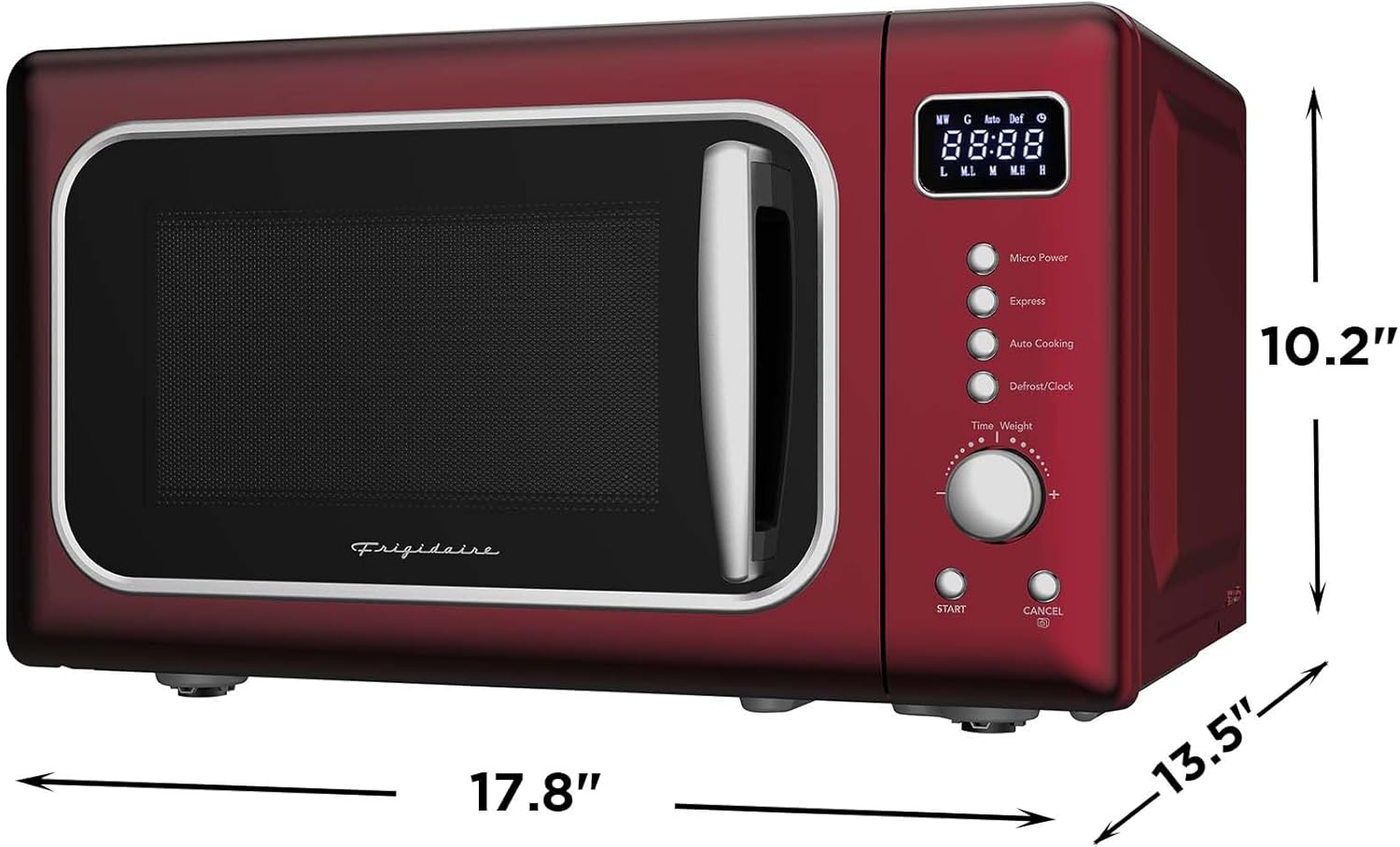
Image: Front-facing view of the Frigidaire EMW788RETRO microwave, clearly showing its external dimensions.
7. Warranty and Support
This Frigidaire microwave oven comes with a standard manufacturer's warranty. Please refer to the warranty card included with your product for specific terms and conditions.
For additional assistance, product information, or to register your product, please contact Frigidaire Customer Assistance at:
866-646-4332
Before operating this product, read, understand, and follow the instructions. If additional assistance is needed, please contact customer assistance at the number provided.
