
1. Product Overview
The YITAHOME Lift Top Coffee Table is a versatile furniture piece designed for modern living spaces. It features a convertible tabletop, ample storage, and an integrated charging station. This manual provides essential information for assembly, operation, and maintenance to ensure safe and efficient use of your coffee table.
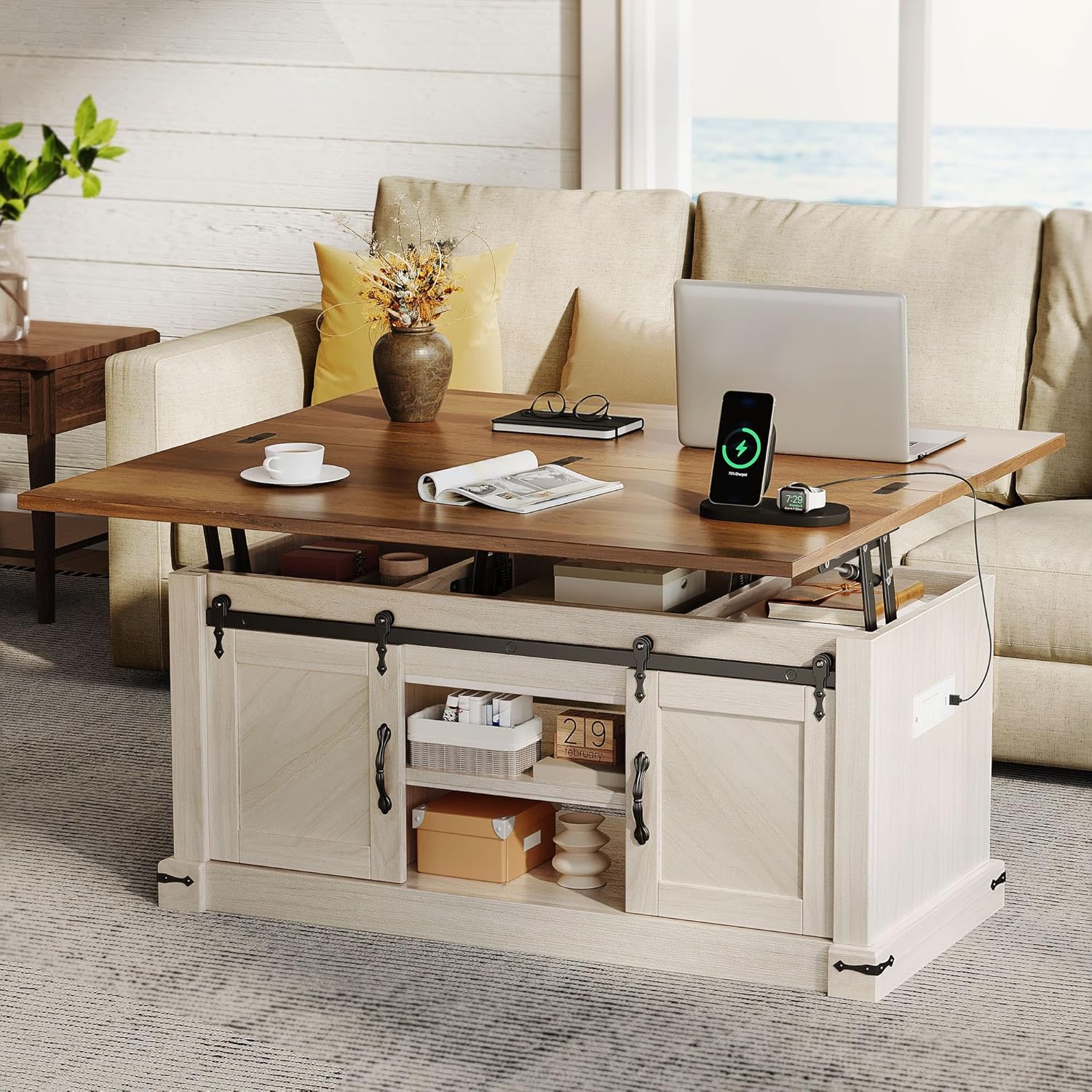
Image 1.1: YITAHOME Lift Top Coffee Table in a living room, showcasing its multi-functional design with a laptop and charging station.
Key Features:
- 4-in-1 Convertible Design: Features air-pressure lifting for the large desktop and spring-lifting frames for the smaller one, allowing transformation from a coffee table to a workspace or dining table.
- Large Hidden Storage: Includes 3 hidden compartments beneath the tabletop and 2 sliding barn-door cabinets with an adjustable middle shelf.
- Integrated Charging Station: Equipped with 2 AC outlets (120V/12A), 2 USB ports (5V/2A), and a 6.7 ft power cord.
- Durable Construction: Crafted from engineered wood for lasting performance.
2. Safety Information
Please read and understand all safety instructions before assembling or using the coffee table. Failure to follow these instructions may result in injury or product damage.
- Assembly Safety:
- Keep all small parts and packaging materials away from children and pets to prevent choking hazards.
- Assemble the table on a soft, clean surface to prevent scratches.
- Ensure all screws and fasteners are securely tightened before use. Periodically check and re-tighten as necessary.
- Two people are recommended for assembly due to the weight and size of the components.
- Lift-Top Mechanism:
- Keep hands and fingers clear of the lifting mechanism when raising or lowering the tabletop to prevent pinching.
- Do not place excessive weight on the lifted tabletop (maximum weight recommendation: 180 lbs).
- Avoid sudden movements when operating the lift-top.
- Electrical Safety (Charging Station):
- Only plug the table into a grounded electrical outlet.
- Do not overload the outlets. Refer to the specifications for maximum load.
- Keep liquids away from the charging station to prevent electrical shock or damage.
- If the power cord or charging station is damaged, discontinue use immediately and contact customer support.
- General Use:
- Do not stand or sit on the coffee table.
- Distribute weight evenly on the tabletop and shelves.
- Avoid dragging the table; lift it when moving to prevent damage to the legs or floor.
3. Setup and Assembly
This section outlines the general steps for assembling your YITAHOME Lift Top Coffee Table. An assembly guide is included with your product for detailed, step-by-step instructions and diagrams. Please refer to that guide for specific part identification and fastening procedures.
Before You Begin:
- Unpack: Carefully unpack all components and hardware. Place them on a soft, clean surface to prevent damage.
- Verify Parts: Compare the contents with the parts list provided in your assembly guide to ensure all pieces are present.
- Tools Required: Typically, a Phillips head screwdriver and possibly a hammer are needed. A power drill with appropriate bits can expedite the process but use caution to avoid overtightening.
General Assembly Steps:
- Base Assembly: Begin by assembling the main frame and base of the coffee table according to the instructions.
- Cabinet Installation: Attach the side panels and internal shelves for the sliding barn-door cabinets. Install the sliding door tracks.
- Lift-Top Mechanism: Assemble the lift-top mechanism separately. Important: Some users find it easier to fully assemble the lift-top mechanism before attaching it to the table base. This can simplify the process of securing screws in tight spaces.
- Tabletop Attachment: Carefully attach the tabletop panels to the assembled lift mechanism. Ensure proper alignment.
- Sliding Doors: Install the barn-style sliding doors onto their tracks.
- Charging Station: Secure the charging station unit into its designated slot and route the power cord as instructed.
- Final Check: Once assembled, gently test the lift-top mechanism and ensure all doors slide smoothly. Verify all fasteners are tight.

Image 3.1: Product dimensions and configurations for assembly reference.
4. Operating Instructions
4.1 Lift-Top Operation
The coffee table features a dual lift-top mechanism, allowing for adjustable height and extended surface area.
- To Lift the Large Desktop: Gently pull the larger tabletop section upwards. The air-pressure lifting mechanism will assist in raising it smoothly.
- To Lift the Smaller Desktop: For the smaller, secondary desktop, gently pull it upwards. The spring-lifting frame will engage.
- To Lower: Apply gentle downward pressure to the tabletop sections until they return to their original position. Ensure hands are clear of the mechanism.

Image 4.1: The large tabletop lifted for use as a workspace.

Image 4.2: Dual lifting workspaces in action, providing flexible surface options.
4.2 Storage Access
The table offers multiple storage options:
- Hidden Compartments: Lift the tabletop sections to access the three hidden compartments underneath.
- Sliding Barn-Door Cabinets: Slide the barn-style doors left or right to reveal the internal storage shelves. The middle shelf within these cabinets is adjustable.

Image 4.3: Hidden storage compartments beneath the lifted tabletop.

Image 4.4: Sliding cabinet door and adjustable shelf feature.
4.3 Charging Station Usage
The integrated charging station provides convenient power access.
- Connect Power: Plug the table's main power cord into a standard 120V AC wall outlet.
- Charge Devices: Use the 2 AC outlets for larger electronics or the 2 USB ports (5V/2A) for charging smartphones, tablets, and other USB-powered devices.

Image 4.5: Integrated charging station with AC and USB ports.
5. Maintenance and Care
Proper care will extend the life and appearance of your coffee table.
- Cleaning: Wipe the table surfaces with a soft, damp cloth. Avoid harsh chemicals or abrasive cleaners that could damage the finish.
- Spills: Promptly wipe up any spills to prevent staining or damage to the engineered wood.
- Heat and Moisture: Avoid placing hot items directly on the surface. Use coasters for drinks. Protect from excessive moisture.
- Fasteners: Periodically check all screws and bolts to ensure they remain tight. Re-tighten as needed.
- Lift Mechanism: Keep the lift mechanism free of debris. Do not apply lubricants unless specifically recommended by the manufacturer.

Image 5.1: Cleaning the table surface with a soft cloth.
6. Troubleshooting
This section addresses common issues you might encounter with your coffee table.
| Problem | Possible Cause | Solution |
|---|---|---|
| Lift-top mechanism is stiff or difficult to operate. | New mechanism, uneven weight distribution, debris in mechanism. | Operate the lift-top several times to break it in. Ensure items on the table are centered. Check for any obstructions. Do not force the mechanism. |
| Charging station not working. | Not plugged in, power outage, faulty outlet, overloaded circuit. | Ensure the table's power cord is securely plugged into a working wall outlet. Check your home's circuit breaker. Reduce the number of devices plugged into the station. |
| Sliding doors are not smooth. | Debris in tracks, misaligned doors, loose fasteners. | Clean the tracks of any dust or debris. Check that the doors are properly seated on the tracks. Verify all assembly fasteners for the doors and tracks are tight. |
| Table feels wobbly. | Loose assembly fasteners, uneven floor. | Check and re-tighten all screws and bolts. If the floor is uneven, consider placing furniture pads or shims under the legs. |
If you encounter issues not listed here or if the suggested solutions do not resolve the problem, please contact YITAHOME customer support.
7. Specifications
| Feature | Detail |
|---|---|
| Brand | YITAHOME |
| Model Number | MAYIHDST64 |
| Product Dimensions (D x W x H) | 19.69"D x 39.37"W x 19.69"H |
| Item Weight | 81.68 Pounds |
| Maximum Weight Recommendation (Lift-Top) | 180 Pounds |
| Material Type | Engineered Wood |
| Color | Brown Top |
| Charging Station | 2 AC Outlets (120V/12A), 2 USB Ports (5V/2A) |
| Power Cord Length | 6.7 ft (6.56 feet) |
| Included Components | Assembly Guide |
| Indoor/Outdoor Usage | Indoor |
8. Warranty and Support
YITAHOME products are designed for quality and durability. For specific warranty information, please refer to the documentation included with your purchase or visit the official YITAHOME website. If you require assistance with assembly, parts, or have any questions regarding your product, please contact YITAHOME customer support.
You can typically find support contact information on the manufacturer's website or through the retailer where the product was purchased.
For additional information and product offerings, visit the YITAHOME Store on Amazon.