
1. Introduction
This manual provides essential information for the safe and efficient operation of your Kalorik AFT2100 Air Fryer. Please read all instructions carefully before first use and retain this manual for future reference. The Kalorik AFT2100 is a versatile kitchen appliance designed for air frying, baking, grilling, and dehydrating, offering a healthier alternative to traditional frying methods.
2. Important Safety Instructions
When using electrical appliances, basic safety precautions should always be followed to reduce the risk of fire, electric shock, and injury.
- Read all instructions before operating the appliance.
- Do not touch hot surfaces. Use handles or knobs.
- To protect against electric shock, do not immerse the cord, plugs, or the appliance housing in water or other liquid.
- Close supervision is necessary when any appliance is used by or near children.
- Unplug from outlet when not in use and before cleaning. Allow to cool before putting on or taking off parts.
- Do not operate any appliance with a damaged cord or plug, or after the appliance malfunctions or has been damaged in any manner.
- The use of accessory attachments not recommended by the appliance manufacturer may cause injuries.
- Do not use outdoors.
- Do not let the cord hang over the edge of a table or counter, or touch hot surfaces.
- Do not place on or near a hot gas or electric burner, or in a heated oven.
- Extreme caution must be used when moving an appliance containing hot oil or other hot liquids.
- Always attach plug to appliance first, then plug cord into the wall outlet. To disconnect, turn any control to 'off', then remove plug from wall outlet.
- Do not use the appliance for other than intended use.
- Ensure the appliance is placed on a stable, heat-resistant surface, away from walls or other appliances to allow adequate air circulation.
3. Product Overview
The Kalorik AFT2100 Air Fryer features a compact design with advanced cooking capabilities. Key components include the main unit, a removable cooking basket, and a digital touch control panel.
Key Features:
- Dual Heating Elements: Upper and lower heating elements for uniform cooking, selectable independently or combined.
- Digital Touch Control Panel: Intuitive LED display for precise temperature and time settings.
- 13 Automatic Programs: Pre-set cooking modes for various dishes like fries, chicken, fish, steak, and more.
- Special Functions: Dedicated programs for drying (dehydration), defrosting, and reheating.
- Preheating Function: Ensures optimal cooking results by preheating the cooking chamber.
- Delay Start: Program the fryer to start cooking at a later time (0-24 hours).
- 6-Liter Capacity: Generous cooking space for family-sized meals.
- Included Accessories: Grill rack and skewers for expanded cooking options.

This image highlights the various pre-set program icons and the digital display for temperature and time settings.
4. Setup
4.1 Unpacking
- Carefully remove the air fryer and all accessories from the packaging.
- Remove any stickers or labels from the appliance.
- Keep packaging materials out of reach of children.
4.2 First Use Cleaning
- Wipe the exterior of the appliance with a damp cloth.
- Wash the cooking basket, grill rack, and skewers with hot water, dish soap, and a non-abrasive sponge.
- Rinse thoroughly and dry all parts completely before use.
- Do not immerse the main unit in water.
4.3 Placement
- Place the air fryer on a stable, level, and heat-resistant surface.
- Ensure there is at least 10 cm (4 inches) of clear space around the back and sides of the appliance to allow for proper ventilation.
- Do not place the appliance directly under wall cabinets or near flammable materials.
5. Operating Instructions
5.1 Basic Operation
- Plug the power cord into a grounded wall outlet. The display will illuminate.
- Pull out the cooking basket. Place ingredients inside the basket. Do not overfill.
- Slide the cooking basket back into the appliance until it clicks into place.
- Press the Power button to turn on the appliance.
- Manual Mode: Press the 'TIME/TEMP' button to adjust temperature (40-200°C) and time (0-12 hours) using the '+' and '-' buttons.
- Press the Power button again to start cooking.
5.2 Pre-set Programs
The AFT2100 offers 13 pre-set programs for common dishes. To use a pre-set program:
- After turning on the appliance, press the 'Menu' button repeatedly to cycle through the available programs.
- The selected program icon will flash. The display will show the default temperature and time for that program.
- You can adjust the temperature and time of a pre-set program using the 'TIME/TEMP' button and '+' / '-' buttons if desired.
- Press the Power button to start the program.
Available Programs: Fries, Chicken Wing, Steak, Pizza, Chicken, Fruit, Fish, Shrimp, Bread, Cake, Cookies, Potato, Defrost, Preheat.
5.3 Special Functions
The appliance includes unique functions for enhanced versatility.
- Drying (Dehydration): Set temperature to 40°C and time up to 12 hours for dehydrating fruits, vegetables, or herbs. The removable protective grid for heating elements is useful for drying small items.
- Defrost: Gently thaws frozen foods without compromising quality.
- Reheat: Warms up cooked food, maintaining its freshness, flavor, and texture.

Image 1 shows dried apple slices in the basket, demonstrating the drying function at 40°C. Image 2 shows frozen chicken pieces, illustrating the defrost function at 80°C.
5.4 Dual Heating Elements
The AFT2100 features both upper and lower heating elements. You can select to use only the upper, only the lower, or both simultaneously for precise cooking control. This allows for crispy bases (like pizza) or even browning on all sides.
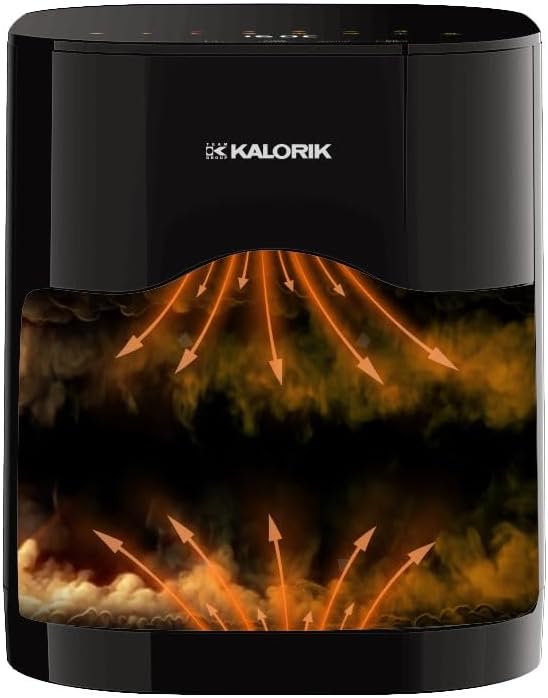
This diagram shows the dual heating elements and the path of hot air for even cooking.
5.5 Preheating Function
The preheating function ensures that food enters an already heated cooking chamber, leading to better and more consistent results, similar to a conventional oven. Select the 'Preheat' program or manually set the desired temperature and allow the fryer to preheat before adding food.
5.6 Delay Start
To program a delayed start:
- Set your desired cooking program (manual or pre-set) and adjust temperature/time.
- Press the 'Delay Start' button.
- Use the '+' and '-' buttons to set the delay time (0-24 hours).
- Press the Power button to confirm. The fryer will start cooking after the set delay time.
5.7 Using Accessories
- Grill Rack: Use the included grill rack for cooking steaks, grilled vegetables, or fish. Place it inside the cooking basket.
- Skewers: The special skewers are ideal for preparing kebabs, spiral potatoes, or fruit skewers. Insert them into the designated slots on the grill rack.

The included grill rack, suitable for steaks, grilled vegetables, or fish.
6. Maintenance and Cleaning
Regular cleaning ensures optimal performance and extends the lifespan of your air fryer.
6.1 General Cleaning
- Always unplug the appliance and allow it to cool completely before cleaning.
- Wipe the exterior of the air fryer with a damp cloth. Do not use abrasive cleaners.
6.2 Cleaning the Cooking Basket and Accessories
- Remove the cooking basket and any accessories (grill rack, skewers).
- Wash them in hot water with dish soap and a non-abrasive sponge. For stubborn food residues, soak them in hot water for about 10 minutes.
- Rinse thoroughly and dry completely.
- The cooking basket and accessories are generally dishwasher safe, but hand washing is recommended to prolong their lifespan.
6.3 Cleaning the Heating Elements
The AFT2100 features a removable protective grid over the heating elements for easier cleaning. Carefully remove this grid and clean any food residue with a soft brush. Do not use metal scouring pads or abrasive materials.
7. Troubleshooting
If you encounter issues with your air fryer, refer to the following common problems and solutions:
| Problem | Possible Cause | Solution |
|---|---|---|
| Appliance does not turn on. | Not plugged in; power outlet malfunction. | Ensure the power cord is securely plugged into a working outlet. Check the circuit breaker. |
| Food is not cooked evenly. | Basket overloaded; insufficient shaking/turning; incorrect temperature/time. | Do not overfill the basket. Shake or turn food halfway through cooking. Adjust temperature and time as needed. Utilize dual heating elements. |
| White smoke coming from the appliance. | Grease residue from previous use; fatty ingredients. | Clean the basket and heating elements thoroughly after each use. For very fatty foods, drain excess fat during cooking. |
| Food is not crispy. | Too much moisture; not enough oil (if desired); basket overloaded. | Pat food dry before cooking. Lightly coat with oil for extra crispiness. Ensure basket is not overloaded. |
If the problem persists after trying these solutions, please contact customer support.
8. Specifications
| Feature | Specification |
|---|---|
| Model Number | AFT2100 |
| Brand | KALORIK |
| Capacity | 6 Liters |
| Power | 2000 W |
| Voltage | 230 Volts |
| Temperature Range | 40°C – 200°C |
| Heating Elements | 2 (Upper and Lower, selectable) |
| Automatic Programs | 13 + Manual Mode |
| Special Programs | Drying, Defrost, Reheat |
| Timer | 0 – 12 hours |
| Delay Start | 0 – 24 hours |
| Dimensions (with handle) | 308 × 260 × 360 mm |
| Material | Plastic |
| Accessories Included | Grill rack, Skewers |

The image displays the air fryer unit with its height, width, and depth measurements.
9. Warranty and Support
For warranty information and customer support, please refer to the warranty card included with your product or contact Kalorik customer service directly. Keep your proof of purchase for any warranty claims.


