
1. Introduction
This manual provides essential instructions for the safe and proper assembly, operation, and maintenance of your Marcree Electronic 8-12 Gun Safe. Please read this manual thoroughly before using the product and retain it for future reference. This gun safe is designed to securely store firearms and other valuables, featuring an electronic lock with dual alarm capabilities and a customizable interior.

Image 1: The Marcree Electronic 8-12 Gun Safe, showing its exterior when closed and its interior when open, revealing storage for rifles, handguns, and ammunition.
2. Safety Information
- Always store firearms unloaded and locked within the safe.
- Keep all keys and passwords in a secure location, inaccessible to unauthorized individuals, especially children.
- Do not store the emergency keys inside the safe.
- Ensure the safe is securely mounted to prevent tipping or unauthorized removal.
- Regularly check the battery level of the electronic lock to ensure proper function.
- Familiarize yourself with the alarm system features to respond appropriately in case of an alert.
3. Package Contents
Verify that all components listed below are present in your package:
- 1 x Rifle Safe (unassembled panels)
- 2 x Spare Keys
- 4 x Expansion Bolts
- 1 x Emergency Charging Cable
- 1 x Instruction Manual
- 1 x Screw Kit (various screws for assembly)
- Internal accessories: Removable shelf, adjustable gun rack components, pistol bags, ammo pouches.

Image 2: Included accessories for the Marcree gun safe, showing emergency keys, expansion bolts, a screwdriver, and an emergency charging cable.
4. Assembly Instructions
The Marcree Electronic 8-12 Gun Safe requires assembly. Follow the steps carefully to ensure proper construction and security. It is recommended that 1-2 people assemble the safe.
4.1. Video Guide for Assembly
For a visual guide, please refer to the official installation video:
Video 1: Official installation guide for the Marcree Large Gun Cabinet, demonstrating step-by-step assembly of the safe's panels and internal components.
4.2. Step-by-Step Assembly
- Unpack Components: Carefully remove all panels and accessories from the packaging. Identify the bottom (C), back (A), and side (B) panels as shown in the video.
- Assemble Base: Attach the back panel (A) to the bottom panel (C) using the provided screws. Ensure the edges align correctly.
- Attach Side Panels: Connect the side panels (B) to the assembled back and bottom panels. Secure with screws.
- Install Top Panel: Place the top panel (G) onto the assembled structure and secure it with screws.
- Insert Internal Supports: Install the internal support bars (D, E) and the gun rack components (M, N, I, J) into their designated slots. The foam padding should face upwards for the gun racks.
- Attach Door: Carefully align the door (O) with the hinges on the main body and insert the hinge pins (P).
- Secure Mounting: Use the expansion bolts (Q) to securely mount the safe to a wall or floor, if desired, for added security.
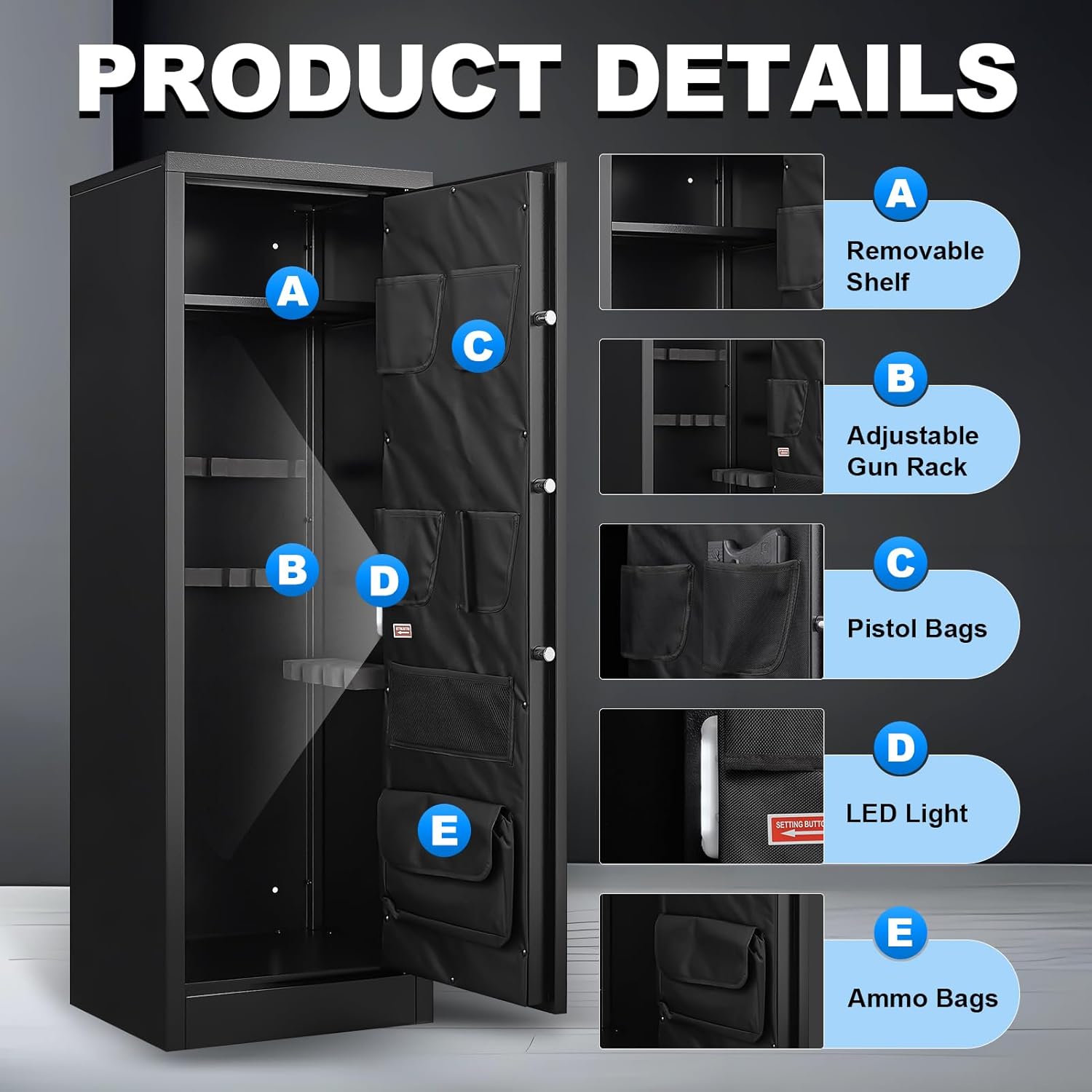
Image 3: Detailed view of the safe's interior, highlighting the removable shelf, adjustable gun rack, pistol bags, LED light, and ammo bags for organized storage.
5. Operating Instructions
Your Marcree gun safe offers multiple methods for access and enhanced security features.
5.1. Video Guide for Operation
For a visual guide on operating the safe, including first-time opening, password setting, and alarm functions, please refer to the official operation video:
Video 2: Official operation guide for the Marcree 8-10 Gun Safe, demonstrating how to open the safe for the first time, set a password, activate the mute function, and trigger the alarm system.
5.2. First-Time Opening
To open the safe for the first time:
- Locate the silver cover on the electronic panel. Slide it open to reveal the emergency key slot.
- Insert one of the provided emergency keys into the slot and turn it counter-clockwise.
- While the key is turned, rotate the round electronic panel clockwise to unlock and open the safe door.
5.3. Password Setting
To set your personal password (3-8 digits):
- With the safe door open, locate and press the red 'Setting Button' on the inside of the door. The left and right lights on the electronic panel will flash alternately.
- On the electronic panel, enter your desired 3-8 digit password, then press the '#' key to confirm.
- After a short beep, re-enter the same password, followed by the '#' key to confirm. A long beep indicates successful password setting.
5.4. Mute Function
To operate the mute function:
- Activate Mute: Long press the number key '1' for more than three seconds. The left light on the panel will illuminate, indicating the mute function is active.
- Deactivate Mute: Long press the number key '1' again for more than three seconds. A long beep will sound, and the mute function will be canceled.
5.5. Alarm System
The safe is equipped with a dual alarm system:
- Incorrect Password Alarm: If an incorrect password is entered three consecutive times, the alarm will sound for 60 seconds.
- Vibration Alarm: To activate the vibration alarm, long press the number key '9' for more than three seconds. A long beep will confirm activation. If the safe is violently hit or shaken while this function is active, the alarm will sound.

Image 4: Close-up of the safe's digital keypad, illustrating the two unlocking methods: backup key and password lock.
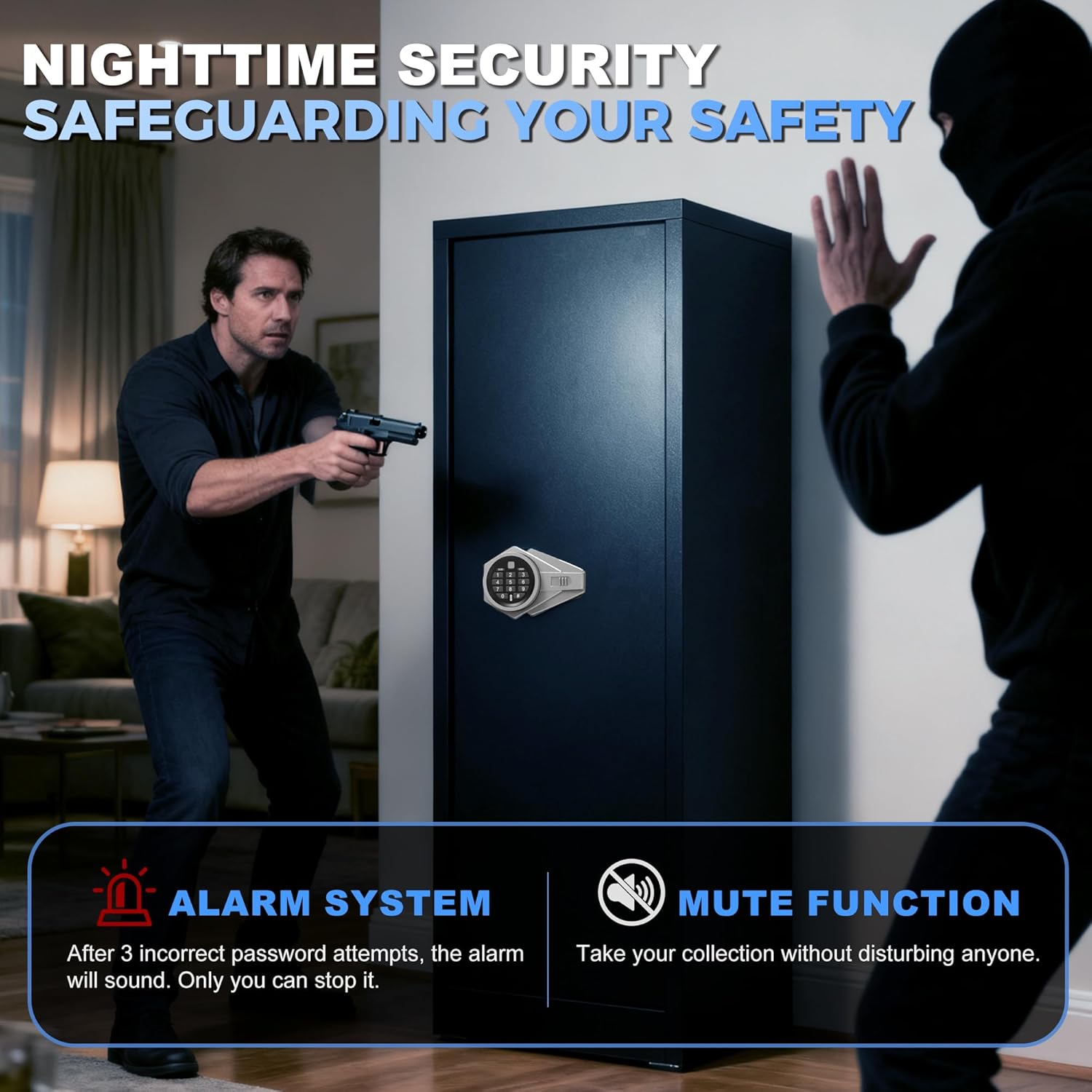
Image 5: Visual representation of the safe's nighttime security features, including the alarm system for incorrect password attempts and the mute function for silent access.
6. Maintenance
- Cleaning: Wipe the safe's exterior with a soft, damp cloth. Avoid abrasive cleaners or solvents that could damage the finish.
- Battery Replacement: The electronic lock is powered by batteries (not specified in product data, assuming standard AA/AAA). Replace batteries when the low battery indicator appears on the keypad. If batteries die, use the emergency charging cable or emergency keys for access.
- Lock Mechanism: Periodically check the locking bolts and hinges for smooth operation. Do not lubricate the electronic lock mechanism.
7. Troubleshooting
| Problem | Possible Cause | Solution |
|---|---|---|
| Safe does not open with password. | Incorrect password entered; low batteries. | Verify password and re-enter. Replace batteries or use emergency charging cable/keys. |
| Alarm sounds unexpectedly. | Incorrect password attempts; vibration alarm activated. | Enter correct password to stop alarm. If vibration alarm is active, ensure safe is not disturbed. Deactivate vibration alarm if not needed. |
| Electronic panel is unresponsive. | Dead batteries. | Use the emergency charging cable to power the keypad or use the emergency keys to open the safe. Replace batteries immediately. |
| Door does not close properly. | Obstruction in the door frame; misaligned hinges. | Check for any obstructions. Ensure the safe is on a level surface. If hinges are misaligned, contact customer support. |
8. Specifications
| Feature | Detail |
|---|---|
| Brand | Marcree |
| Model Number | b-8 |
| Product Dimensions | 14.96"D x 17.71"W x 51.96"H |
| Internal Height (with/without shelf) | 43.31" / 51.18" |
| Capacity | 8-10 Rifles/Shotguns |
| Lock Type | Electronic Combination Lock, Key |
| Material | Alloy Steel, Metal |
| Color | Black |
| Item Weight | 66 pounds |
| Special Features | Alarm System, Anti-Theft, Combination Lock, Removable Shelf |
| Mounting Type | Floor Mount |
9. Warranty and Support
For warranty information, technical support, or any questions regarding your Marcree Electronic 8-12 Gun Safe, please refer to the contact information provided with your purchase or visit the official Marcree website. Our professional customer service team is available to provide satisfactory solutions.