
1. Introduction
This manual provides detailed instructions for the safe and effective use of your WADEO Heating Mat with Thermostat, Model HG0429. This product is designed to provide a stable and controlled heat source for various applications, including plant germination, terrariums for reptiles, and other indoor heating needs. Please read this manual thoroughly before operation and retain it for future reference.
2. Safety Information
WARNING: Failure to follow these safety instructions may result in fire, electric shock, injury, or damage to the product.
- DO NOT immerse the heating mat or thermostat in water. The mat is waterproof (IP67 rated) for spills, but not for submersion.
- DO NOT use the heating mat on rough, abrasive, or sharp surfaces that could damage the mat.
- DO NOT use this product to heat humans or animals directly. It is intended for environmental temperature control.
- Ensure the power plug is fully inserted into a properly grounded AC outlet.
- The mat features double protection and high voltage insulation for continuous safe use.
- Always unplug the device from the power outlet when not in use or before cleaning.
3. Product Features
- Automatic Resume After Power Outage: The device automatically restarts and restores previous settings after a power interruption, ensuring continuous operation without manual adjustment.
- Integrated Temperature Control: Equipped with a digital thermostat and temperature probe, allowing precise temperature regulation from 5°C to 45°C (41°F-113°F). The digital display supports both Fahrenheit and Celsius units.
- Increased Germination Success: Heats the root area 10-20°F (5-15°C) above ambient temperature, significantly improving seed germination and cutting propagation rates.
- Safe and Durable Design: Features double protection, high voltage insulation, and a waterproof (IP67) and wear-resistant PVC surface for enhanced safety and longevity.
- Multifunctional Use: Ideal for plant germination, terrariums for reptiles, indoor greenhouses, brewing, and sourdough proofing.
- Easy to Clean: The waterproof PVC material allows for simple cleaning with a damp cloth.
4. Setup
- Prepare the Surface: Lay the WADEO Heating Mat on a flat, dry, and stable surface. Ensure there are no rough, abrasive, or sharp objects underneath that could damage the mat.
- Position Items: Place your seedling trays, pots, or terrarium directly on top of the heated mat.
- Connect Power: Plug the power cord of the heating mat into a well-grounded AC outlet.
- Place Temperature Probe: Insert the temperature probe into the soil of your plant tray or the substrate of your terrarium to accurately monitor the temperature of the desired area.
- Initial Power On: Turn on the thermostat and adjust to your desired temperature setting (refer to Section 5 for operating instructions).
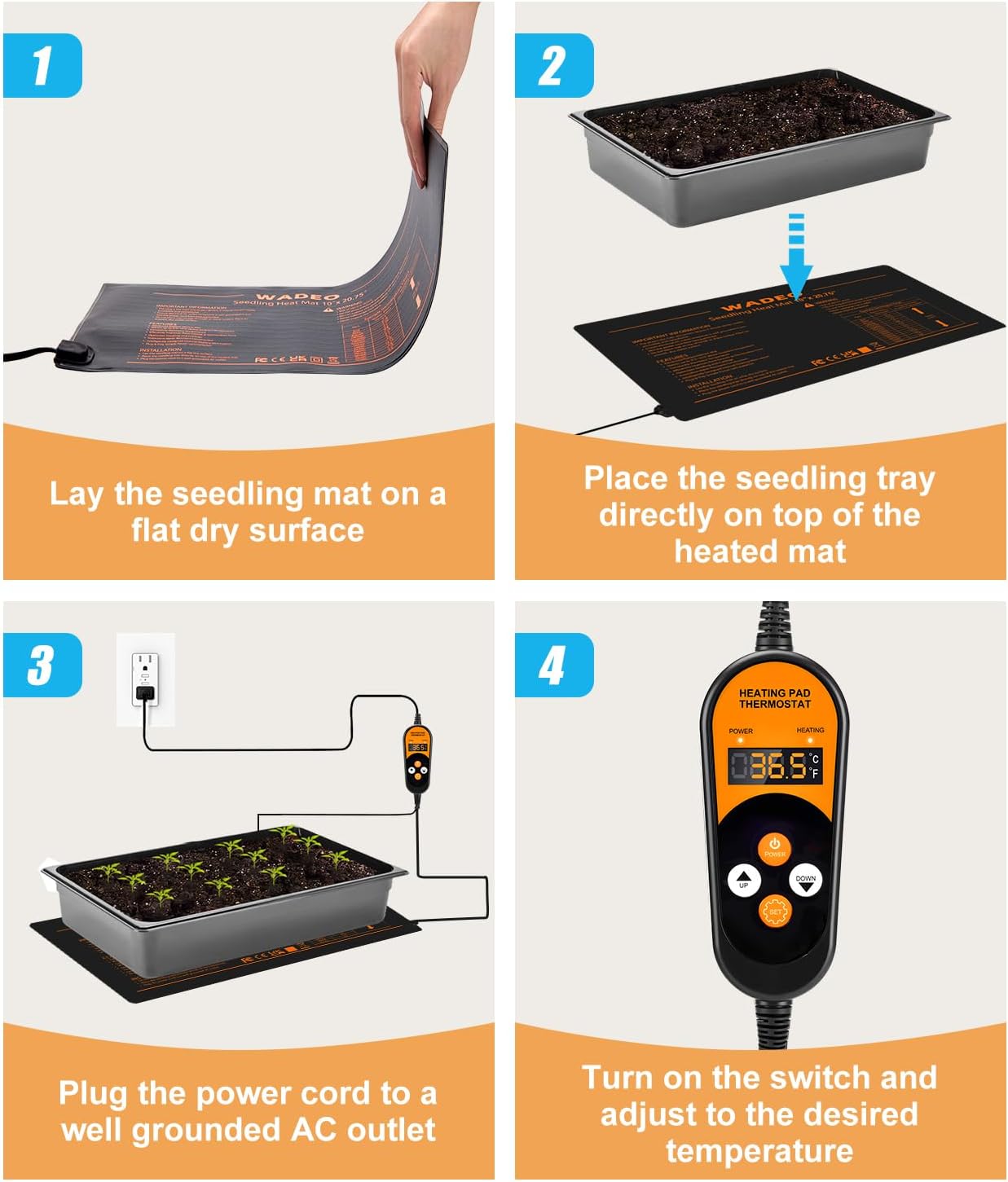
Figure 1: Step-by-step installation guide for the WADEO Heating Mat.
5. Operating Instructions
The WADEO Heating Mat comes with an integrated digital thermostat for precise temperature control. Follow these steps to operate the device:
- Power ON/OFF: Press the POWER button to turn the device on or off.
- Temperature Setting: Use the UP and DOWN buttons to adjust the desired temperature. Press once for a single degree change, or press and hold for quick adjustment.
- Automatic Save: After setting the temperature, if no operation occurs for 3 seconds, the new setting will be automatically saved.
- Switch Temperature Units: Press the SET button to switch the display between Celsius (°C) and Fahrenheit (°F).
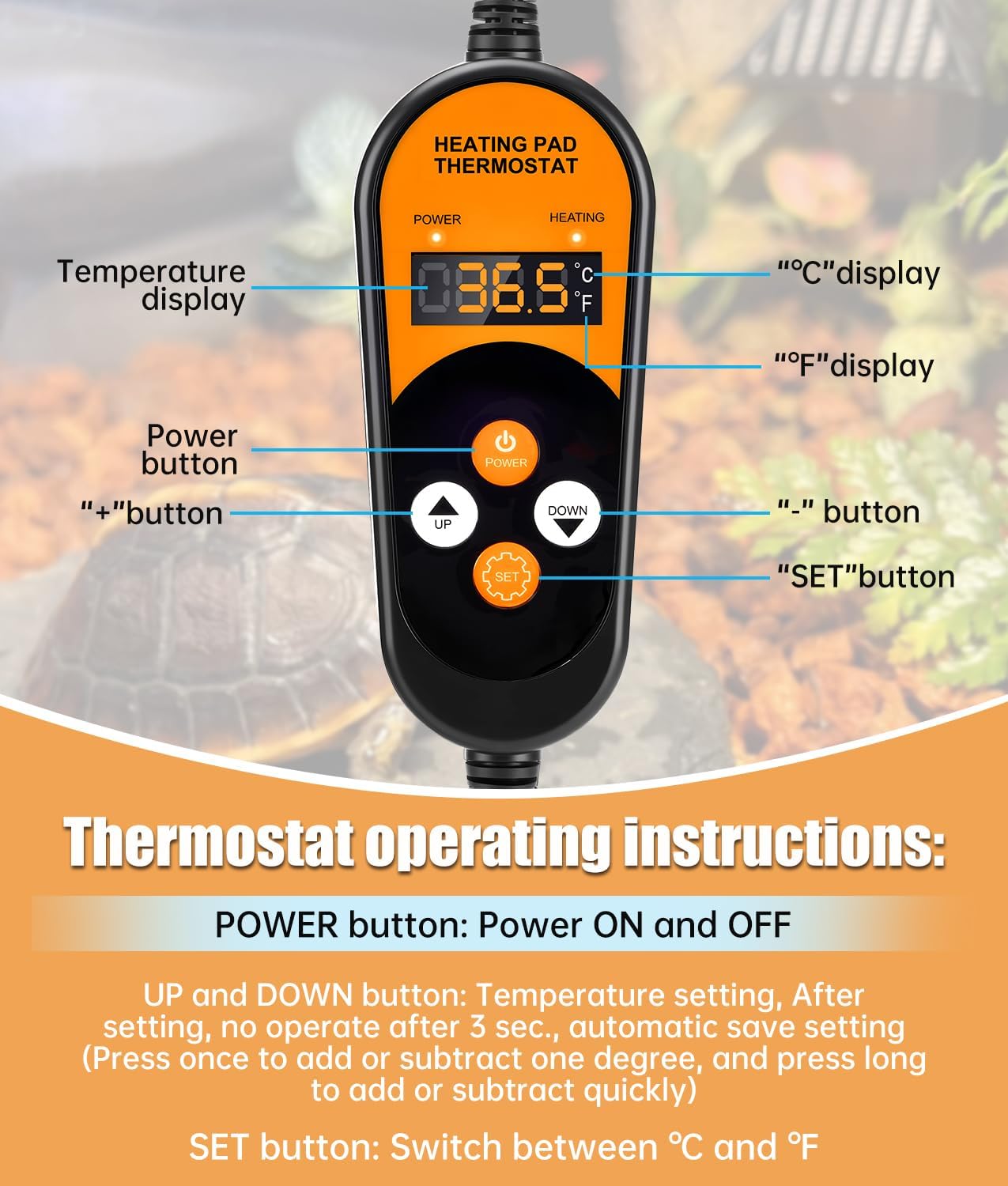
Figure 2: Detailed view of the thermostat buttons and their functions.
6. Maintenance
To ensure the longevity and optimal performance of your WADEO Heating Mat, follow these simple maintenance guidelines:
- Cleaning: The mat's waterproof PVC surface can be easily cleaned. Disconnect the power, then wipe the mat with a damp cloth. Do not use abrasive cleaners or immerse the mat in water.
- Storage: When not in use, ensure the mat is clean and dry. It can be rolled up for convenient storage.
- Inspection: Periodically inspect the mat and power cord for any signs of damage, such as cuts, fraying, or discoloration. If any damage is found, discontinue use immediately and contact customer support.
7. Troubleshooting
If you encounter any issues with your WADEO Heating Mat, please refer to the following common troubleshooting tips:
- Mat Not Heating: Ensure the power cord is securely plugged into a functional, grounded outlet. Check the thermostat settings to confirm the desired temperature is set above the current ambient temperature. Verify the power button is in the ON position.
- Inaccurate Temperature Reading: Ensure the temperature probe is properly inserted into the soil or substrate and is not exposed to direct air currents. Calibrate the thermostat if necessary (refer to the thermostat's specific instructions if available, or contact customer support).
- Power Interruption: The mat features an automatic resume function. If power is interrupted, it should restart with previous settings once power is restored. If it does not, manually power cycle the device.
- Uneven Heating: Ensure the mat is laid on a flat, even surface. Avoid placing heavy or uneven objects that could impede heat distribution.
If these steps do not resolve the issue, please contact WADEO customer support for further assistance.
8. Specifications
- Brand: WADEO
- Model Number: HG0429
- Product Dimensions: 52 x 25 x 2 cm (20.75 x 10 x 0.79 inches)
- Weight: 510 grams
- Power: 50W
- Power Source Type: AC/DC
- Temperature Control Range: 5°C - 45°C (41°F - 113°F)
- Waterproof Rating: IP67
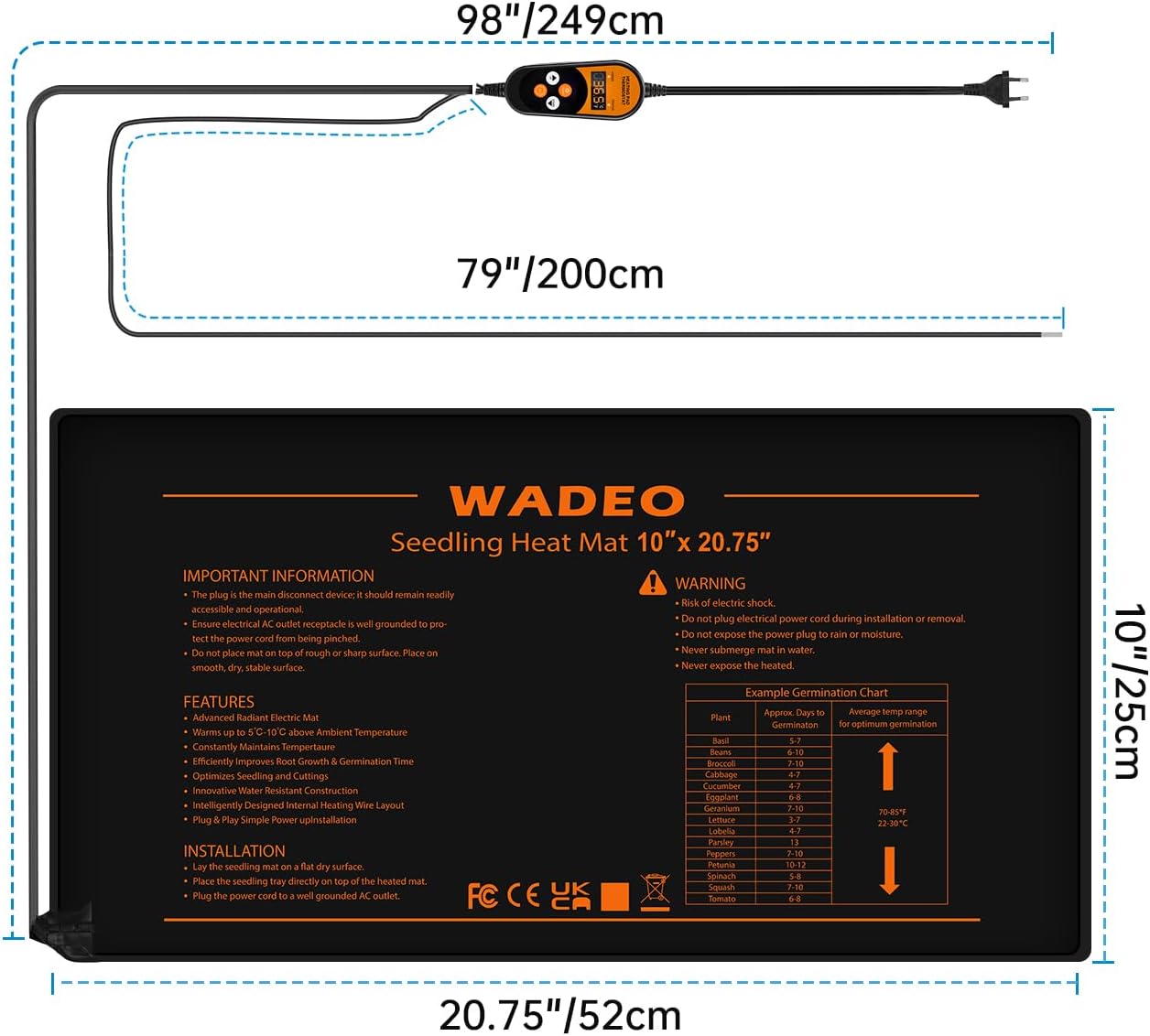
Figure 3: Dimensions of the WADEO Heating Mat (52x25cm).
9. Warranty and Support
WADEO products are manufactured to high-quality standards. For warranty information, technical support, or any questions regarding your WADEO Heating Mat, please contact our customer service team. Keep your purchase receipt as proof of purchase for warranty claims.
10. Product Images

Figure 4: WADEO Heating Mat with Thermostat and accessories.

Figure 5: Heat distribution from the WADEO Heating Mat promoting plant growth.

Figure 6: Digital thermostat for the WADEO Heating Mat, showing temperature control range.

Figure 7: Key features: waterproof design, rollable for storage, LCD screen, and high voltage insulation.

Figure 8: Versatile applications of the WADEO Heating Mat for various needs.
11. Related Product Videos
The following videos demonstrate the use of similar heating mats and thermostats, providing additional visual guidance.
Video 1: Demonstration of Inkbird ITC-308 Digital Thermoregulator for fermentation, showing how a thermostat controls a heating mat.
Video 2: Luxbird Heating Mat with Thermostat, illustrating general use and features of a similar product.
Video 3: Seedling Heat Mat demonstration, showing how to use a heat mat for plant propagation.
Video 4: Reptile Heating Mat, demonstrating its application for providing warmth in terrariums.