
1. Introduction
This manual provides comprehensive instructions for the Aituzero MR25GA Magic Remote. This remote is designed to enhance your experience with compatible 2025 LG Smart TVs, offering intuitive control through AI voice commands, a motion pointer, and dedicated shortcut buttons.
1.1 Compatibility
The MR25GA Magic Remote is compatible with the following 2025 LG Smart TV models:
- OLED Series: OLED42C5PUA, OLED48C5PUA, OLED50A5AUA, OLED50B5AUA, OLED50C5AUA, OLED50C5PUA, OLED50M5PUA, OLED55A5AUA, OLED55B53LA, OLED55B56LA, OLED55B59LA, OLED55B5AUA, OLED55B5PUA, OLED55C5AUA, OLED55C5PUA, OLED55G5PUA, OLED55G5WUA, OLED55M5PUA, OLED65A5AUA, OLED65B53LA, OLED65B56LA, OLED65B59LA, OLED65B5AUA, OLED65B5PUA, OLED65C5AUA, OLED65C5PUA, OLED65G5PUA, OLED65G5WUA, OLED65M5, OLED65M5PUA, OLED75A5AUA, OLED75B5AUA, OLED75C5AUA, OLED75C5PUA, OLED75M5PUA, OLED77B53LA, OLED77B56LA, OLED77B59LA, OLED77C5AUA, OLED77C5PUA, OLED77G5PUA, OLED77G5WUA, OLED77M5, OLED77M5PUA, OLED80B53LA, OLED80B56LA, OLED80B59LA, OLED83B53LA, OLED83B56LA, OLED83B59LA, OLED83C5AUA, OLED83C5PUA, OLED83G5PUA, OLED83G5WUA, OLED83M5, OLED86A5AUA, OLED86B5AUA, OLED86C5AUA, OLED86C5PUA, OLED86M5PUA, OLED97G2CUA, OLED97G5WUA, OLED97M5
- QNED Series: 43QNED82AAA, 43QNED82AUA, 43QNED85AAA, 43QNED85AU, 43QNED85AUA, 43QNED91AAA, 43QNED91AUA, 43QNED92AUA, 43QNED9MAAUA, 48QNED82AAA, 48QNED82AUA, 48QNED85AAA, 48QNED85AU, 48QNED92AUA, 48QNED9MAAUA, 50QNED82AAA, 50QNED82AUA, 50QNED85AAA, 50QNED85AU, 50QNED85AUA, 50QNED91AAA, 50QNED91AUA, 50QNED92AUA, 50QNED9MAAUA, 55QNED82AAA, 55QNED82AUA, 55QNED85AAA, 55QNED85AU, 55QNED85AUA, 55QNED91AAA, 55QNED91AUA, 55QNED92AUA, 55QNED9MAAUA, 65QNED82AAA, 65QNED82AUA, 65QNED85AAA, 65QNED85AU, 65QNED85AUA, 65QNED91AAA, 65QNED91AUA, 65QNED92AUA, 65QNED9MAAUA, 75QNED82AAA, 75QNED82AUA, 75QNED85AAA, 75QNED85AU, 75QNED85AUA, 75QNED91AAA, 75QNED91AUA, 75QNED92AUA, 75QNED9MAAUA, 86QNED82AAA, 86QNED82AUA, 86QNED85AAA, 86QNED85AU, 86QNED85AUA, 86QNED91AAA, 86QNED91AUA, 86QNED92AUA, 86QNED9MAAUA, 100QNED82AAA, 100QNED82AUA, 100QNED85AAA, 100QNED85AU, 100QNED92AUA, 100QNED9MAAUA
- UA77 Series: 43UA7700AAUA, 43UA7700AUA, 43UA7700PUA, 43UA7700PUB, 48UA7700AUA, 48UA7700PUA, 50UA7700AAUA, 50UA7700AUA, 50UA7700PUA, 50UA7700PUB, 55UA7700AAUA, 55UA7700AUA, 55UA7700PUA, 55UA7700PUB, 65UA7700AAUA, 65UA7700AUA, 65UA7700PUA, 65UA7700PUB, 75UA7700AAUA, 75UA7700AUA, 75UA7700PUA, 75UA7700PUB, 86UA7700AAUA, 86UA7700AUA, 86UA7700PUA, 86UA7700PUB, 100UA7700AUA, 100UA7700PUA
2. Product Overview
2.1 Remote Layout
The Aituzero MR25GA Magic Remote features a user-friendly design with clearly labeled buttons for various functions. Below is an illustration of the remote's front and back, highlighting key areas.

Image: Front and back view of the Aituzero MR25GA Magic Remote, showing the button layout on the front and the battery compartment and model information on the back.
2.2 Key Features
- AI Voice Control: Utilize built-in AI voice commands for hands-free operation. Connects with Alexa for quick access to streaming apps, TV settings, and smart home devices.
- Precise Motion Pointer: Navigate menus, applications, and games with an intuitive, mouse-like pointer.
- Wheel Navigation: The central wheel acts as a select button and allows for smooth scrolling through content.
- Dedicated Shortcut Buttons: Instant access to popular streaming platforms like Netflix, Prime Video, Disney+, Rakuten TV, LG Channels, and Alexa.
- Enhanced Performance: Features an upgraded smart chip for over 40 ft range and ultra-fast 0.2s IR response.

Image: A hand holding the MR25GA Magic Remote, pointing at an LG OLED TV, illustrating the "Point & Scroll," "AI Voice Button," "Easy Viewing Guide," "Home Hub Control," and "Quick App Access" features.

Image: A diagram showcasing the capabilities of LG AI TV, including AI ChatBot, AI Search, AI Concierge, AI Picture Wizard, and AI Sound Wizard, and how the remote interacts with these features.
3. Setup
3.1 Battery Installation
The MR25GA Magic Remote requires two (2) AA batteries (not included) for operation. Follow these steps to install them:
- Locate the battery compartment on the back of the remote control.
- Slide open the battery cover.
- Insert two AA batteries, ensuring the positive (+) and negative (-) terminals align correctly with the markings inside the compartment.
- Close the battery cover securely.
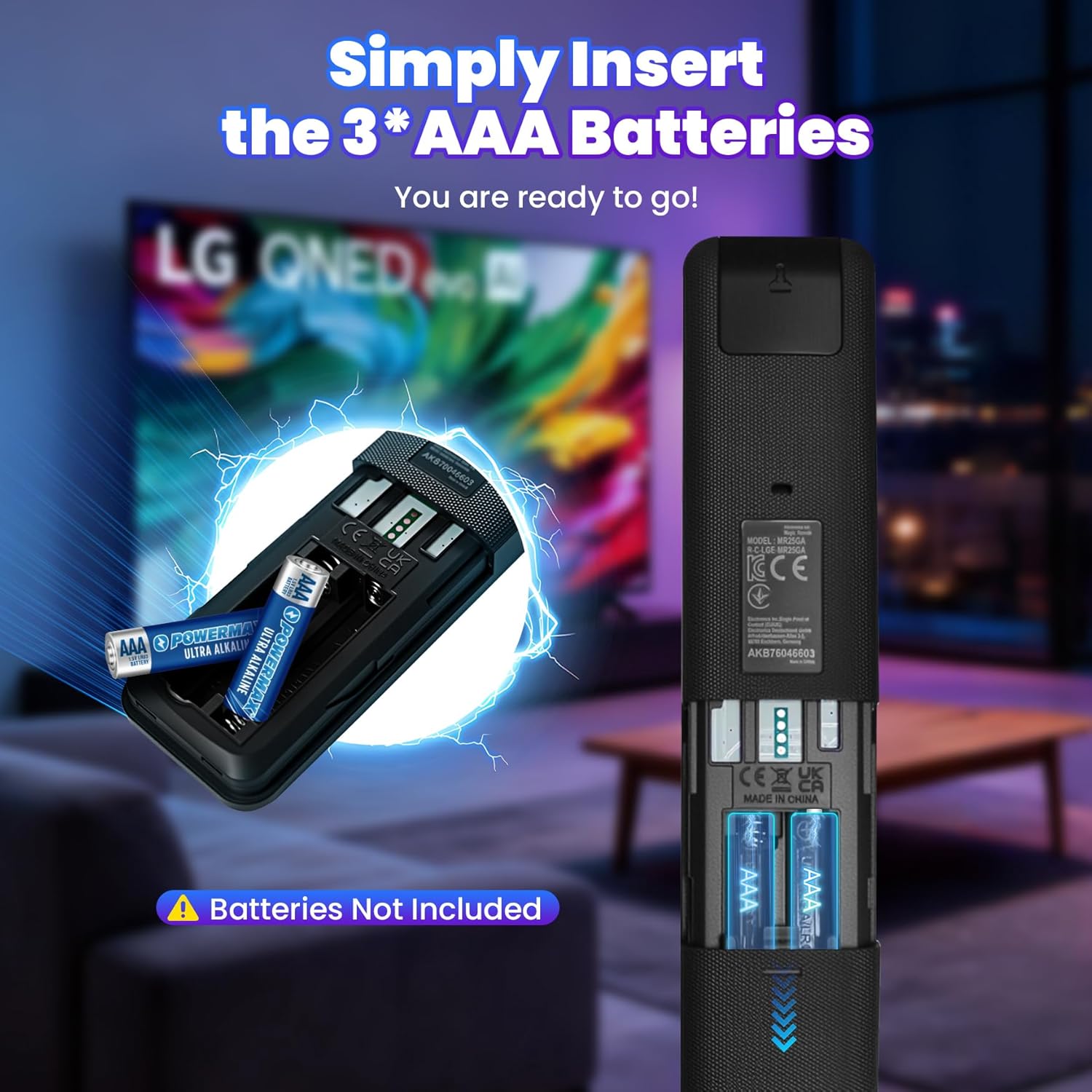
Image: A visual guide demonstrating how to open the battery compartment and insert two AAA batteries into the MR25GA Magic Remote. Please use AA batteries as per product description.
3.2 Pairing the Remote
To use the full functionality of your Magic Remote, it must be paired with your LG Smart TV. Follow these two steps:
- Insert 2 AA batteries (not included) and turn on your TV.
- Point the remote at the TV and press the Wheel (OK) button to complete pairing.
If the TV fails to register the remote, try turning the TV off and back on, then repeat the pairing steps.

Image: A visual guide showing the steps to pair the Magic Remote by pressing the Wheel (OK) button, and instructions for unpairing by holding the Home and Back buttons.
4. Operating Instructions
4.1 AI Voice Control
The MR25GA Magic Remote integrates AI voice recognition, allowing you to control your TV and access features using your voice. A network connection is required for this functionality.
- Press the dedicated AI (Microphone) button on the remote.
- Speak clearly into the remote to issue commands or ask questions.
- Examples: "What should I watch tonight?", "Show me today's headlines", "Turn on kids mode", "Play relaxing background music", "Play the latest action movie".
- The remote supports integration with Alexa for hands-free operation and control of smart home devices.

Image: A family interacting with an LG AI TV using voice commands, demonstrating the AI Voice ID feature for personalized content and settings.

Image: A diagram illustrating the "Smart Seamless" features of LG AI TV, including Auto Login, Hands-Free Control, Personalized Home Layout, Unique Voice Profiles, and Convenience, with the remote shown in context.
4.2 Motion Pointer and Wheel
The motion pointer allows for intuitive navigation by simply moving the remote in the air. The central wheel provides scrolling and selection capabilities.
- Pointing: Move the remote to control an on-screen cursor, similar to a computer mouse.
- Clicking: Press the Wheel (OK) button to select items.
- Scrolling: Rotate the Wheel to scroll through lists, web pages, or menus.

Image: A visual representation of the Magic Remote's pointing and wheel functions, showing how to use it as an air mouse to navigate on-screen content.
4.3 Shortcut Buttons
The remote includes dedicated buttons for quick access to popular streaming services and features:
- Netflix: Launches the Netflix application.
- Prime Video: Launches the Amazon Prime Video application.
- Disney+: Launches the Disney+ application.
- Rakuten TV: Launches the Rakuten TV application.
- LG Channels: Accesses LG's free streaming channels.
- Alexa: Activates Alexa voice assistant.
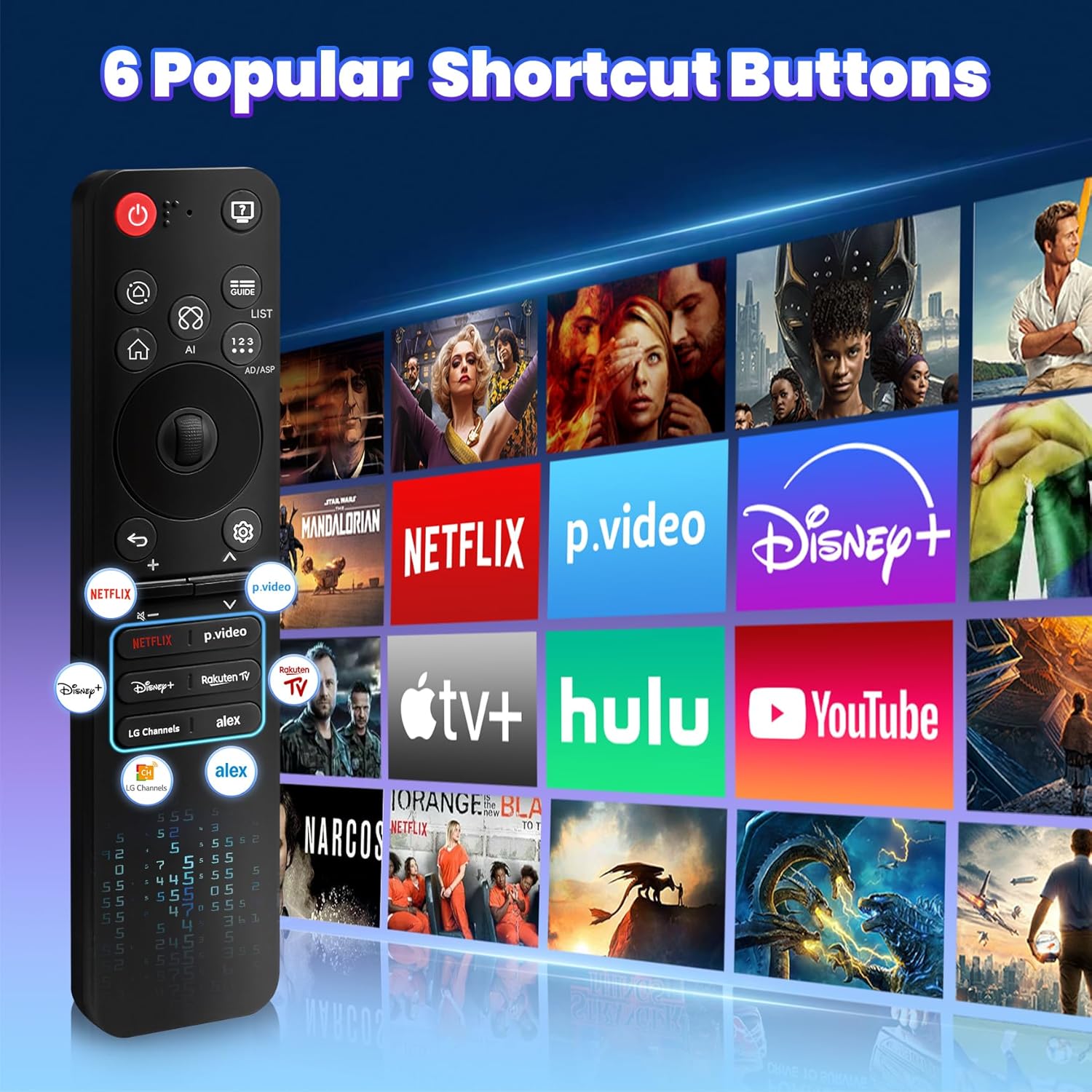
Image: The MR25GA Magic Remote displayed with an array of streaming service logos, highlighting the six popular shortcut buttons for direct access to Netflix, Prime Video, Disney+, Rakuten TV, LG Channels, and Alexa.

Image: The Magic Remote positioned against a background of various streaming application icons, emphasizing the convenience of dedicated shortcut buttons for instant access to popular platforms.
5. Troubleshooting
5.1 Pairing and Pointer Issues
- If the remote does not pair: Ensure batteries are correctly installed and charged. Turn your TV off and then back on, then attempt the pairing process again by pointing the remote at the TV and pressing the Wheel (OK) button.
- If the pointer is not working or is erratic: Hold the GUIDE button on the remote for 5+ seconds. This action will reset and re-register the motion sensor.
- To unpair the remote: Press and hold the HOME button and the BACK button simultaneously for five seconds. This will disconnect the remote from your TV.
5.2 General Issues
- Remote unresponsive: Check battery levels and replace if necessary. Ensure there are no obstructions between the remote and the TV's IR receiver.
- Voice commands not recognized: Ensure your TV has an active internet connection. Speak clearly and directly into the remote's microphone.
6. Specifications
| Model Number | MR25GA |
| Brand | Aituzero |
| Compatible Devices | 2025 LG Smart TVs (OLED G5, C5, B5, QNED 92A, 85A, 80A, UA77 Series) |
| Special Feature | AI Voice Search, Motion Pointer |
| Color | Black |
| Max Number of Supported Devices | 1 |
| Item Weight | 2.88 ounces |
| Package Dimensions | 7.08 x 1.77 x 0.66 inches |
| Power Source | 2 x AA Batteries (not included) |
| Response Time | 0.2 seconds (IR) |
| Control Range | Over 40 ft (10m) |
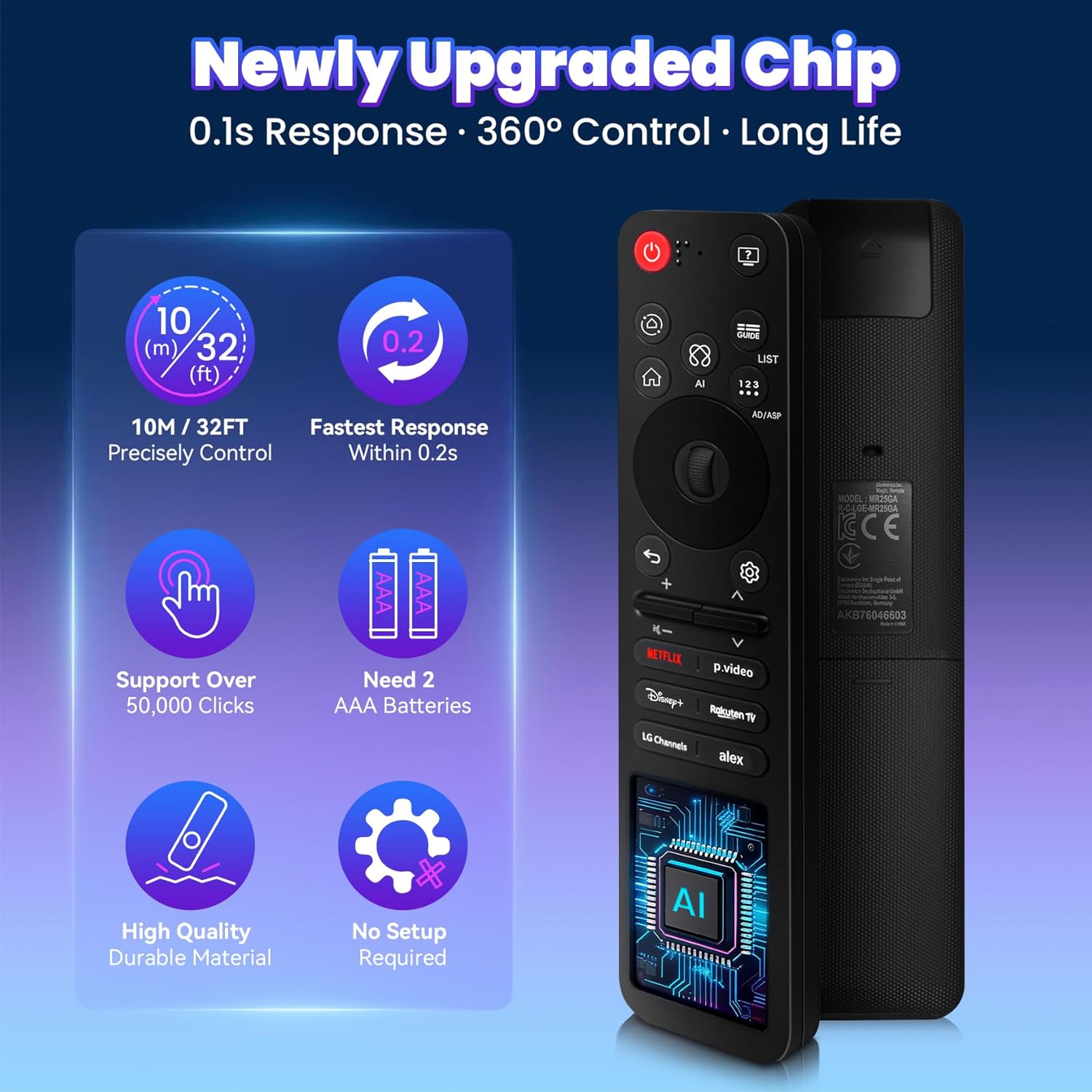
Image: A diagram illustrating the benefits of the newly upgraded chip in the Magic Remote, including 10m/32ft precise control, 0.2s fast response, support for over 50,000 clicks, and the requirement for 2 AAA batteries. Please use AA batteries as per product description.

Image: The Magic Remote highlighting its excellent response speed (0.2s) and long control distance (within 30ft), along with compatibility information for 2025 LG Smart TVs.
7. Warranty and Support
This Aituzero MR25GA Magic Remote comes with a 5-Year Free Replacement policy. For any issues or to claim a replacement, please contact Aituzero customer support through the retailer where the product was purchased.
For further assistance or technical support, refer to the support section of the Aituzero website or contact their customer service directly.