
1. Introduction
Thank you for choosing the IKT A7 Wireless Earbuds. This manual provides detailed instructions for setting up, operating, and maintaining your new Bluetooth 5.3 headphones. Please read this manual carefully before use to ensure optimal performance and longevity of your device.
Package Contents
- IKT A7 Wireless Earbuds (L/R)
- Charging Case
- USB Charging Cable
- Eartips (various sizes)
- User Manual
2. Product Overview
Familiarize yourself with the components of your IKT A7 Wireless Earbuds and charging case.
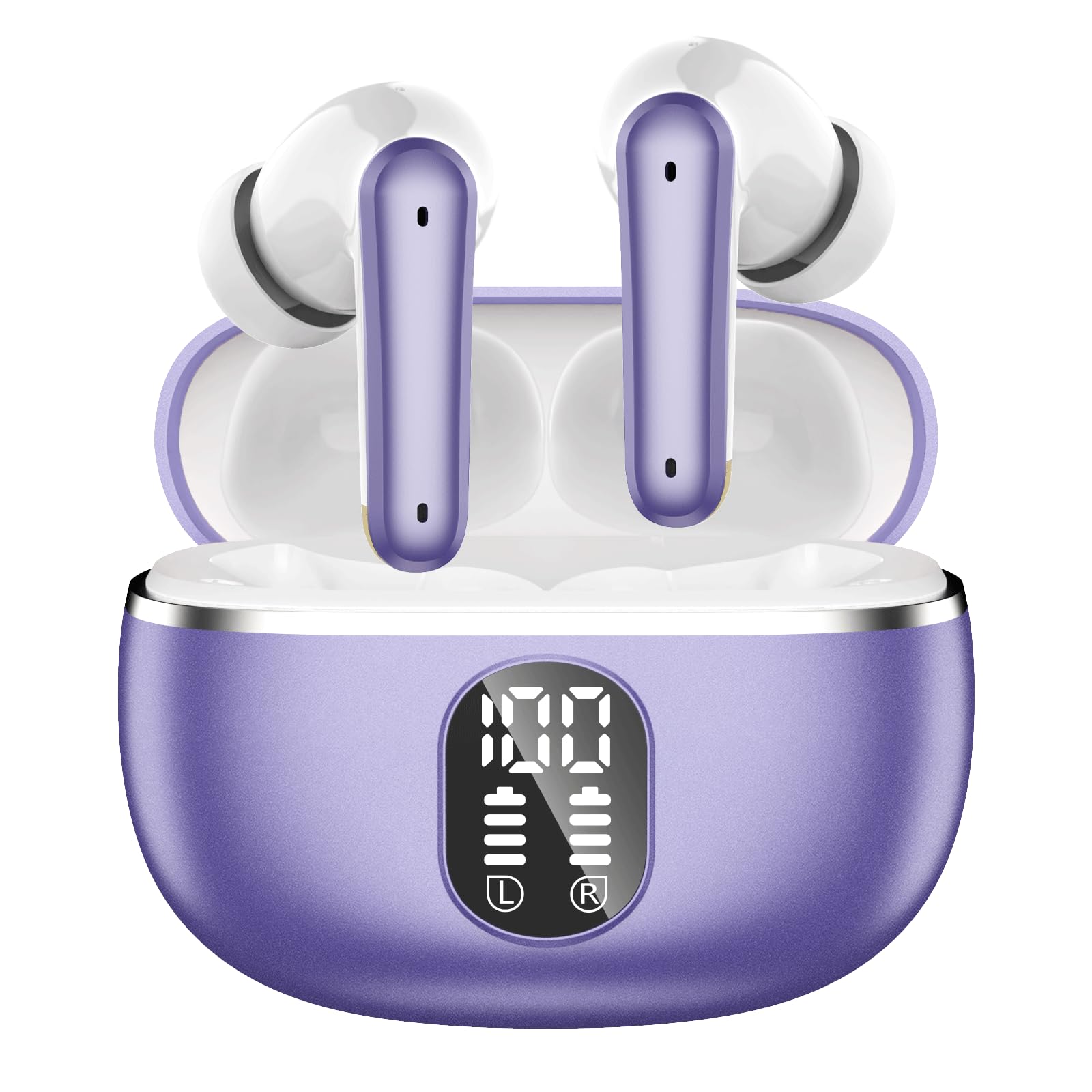
Image: The IKT A7 Wireless Earbuds, shown with their charging case. The earbuds are visible inside the open case, highlighting their compact design and the case's LED display.
Earbud Components
- Touch Control Area: For managing music playback, calls, and voice assistant.
- Microphone: Built-in 4 ENC microphones for clear calls.
- Charging Contacts: For charging inside the case.
- LED Indicator: Shows connection status and battery level.
Charging Case Components
- Earbud Charging Slots: Securely holds and charges the earbuds.
- USB-C Charging Port: For charging the case.
- Dual LED Digital Display: Shows the battery percentage of the charging case and the individual earbuds.
3. Setup
3.1 Charging the Earbuds and Case
Before first use, fully charge both the earbuds and the charging case.
- Place the earbuds into the charging case. Ensure the charging contacts align.
- Connect the USB charging cable to the USB-C port on the charging case and to a power source (e.g., wall adapter, computer USB port).
- The dual LED digital display on the charging case will show the current battery level. The earbuds' indicators will light up during charging and turn off when fully charged.
- A full charge for the case takes approximately 2 hours.
3.2 Bluetooth Pairing
Pair your IKT A7 earbuds with your device for wireless audio.
- First-time Pairing: Open the charging case. The earbuds will automatically power on and enter pairing mode. The LED indicator on the earbuds will flash, indicating they are ready to pair.
- On your device (smartphone, tablet, laptop), enable Bluetooth.
- Search for available Bluetooth devices and select "IKT A7" from the list.
- Once connected, the earbud LED indicators will turn off or flash slowly, and you will hear a confirmation tone.
- Automatic Reconnection: After the first successful connection, the earbuds will automatically connect to the last paired device when removed from the charging case, provided Bluetooth is enabled on the device.
4. Operating Instructions
4.1 Wearing the Earbuds
For optimal sound quality and comfort, choose the correct eartip size and wear the earbuds properly.
- Select the eartips that provide a snug and comfortable fit in your ear canal.
- Insert the earbuds into your ears and gently rotate them until they are securely in place.
4.2 Touch Controls
The IKT A7 earbuds feature intuitive touch controls on each earbud.
| Function | Action |
|---|---|
| Play/Pause Music | Single tap on either earbud |
| Next Track | Double tap on the right earbud |
| Previous Track | Double tap on the left earbud |
| Volume Up | Triple tap on the right earbud |
| Volume Down | Triple tap on the left earbud |
| Answer/End Call | Single tap on either earbud |
| Reject Call | Press and hold either earbud for 2 seconds |
| Activate Voice Assistant | Press and hold either earbud for 3 seconds |
5. Maintenance
5.1 Cleaning
Regular cleaning helps maintain sound quality and hygiene.
- Use a soft, dry, lint-free cloth to wipe the earbuds and charging case.
- For stubborn dirt, slightly dampen the cloth with water. Avoid using harsh chemicals or abrasive materials.
- Gently clean the eartips and charging contacts to prevent debris buildup.
5.2 Storage
When not in use, store the earbuds in their charging case to protect them and keep them charged.
- Store in a cool, dry place, away from extreme temperatures and direct sunlight.
5.3 Water Resistance
The IKT A7 earbuds are IPX7 rated, meaning they are protected against immersion in water up to 1 meter for up to 30 minutes. This makes them suitable for workouts and light rain.
- Do not submerge the charging case in water.
- Ensure earbuds are completely dry before placing them back into the charging case to prevent damage.
6. Troubleshooting
If you encounter any issues, refer to the following common problems and solutions.
6.1 Earbuds Not Charging
- Ensure the earbuds are correctly seated in the charging case and the charging contacts are clean.
- Check if the charging case itself has sufficient battery or is connected to a power source.
- Verify the charging cable is not damaged and is properly connected.
6.2 Earbuds Not Pairing
- Make sure Bluetooth is enabled on your device.
- Ensure the earbuds are out of the charging case and in pairing mode (LED flashing).
- Forget/delete "IKT A7" from your device's Bluetooth list and try pairing again.
- Restart your device and the earbuds (by placing them back in the case and taking them out).
6.3 No Sound or Intermittent Sound
- Check the volume level on both your device and the earbuds.
- Ensure the earbuds are within the Bluetooth range of your device (typically 10 meters/33 feet) and there are no significant obstacles.
- Try reconnecting the earbuds to your device.
- Ensure the earbuds have sufficient battery charge.
7. Specifications
Detailed technical specifications for the IKT A7 Wireless Earbuds.
| Feature | Specification |
|---|---|
| Model Number | A7 |
| Bluetooth Version | 5.3 |
| Earbud Playtime | Up to 10 hours per charge |
| Total Playtime (with case) | Up to 80 hours |
| Charging Case Charge Time | Approximately 2 hours |
| Speaker Driver Size | 14.5mm |
| Microphones | 4 ENC Microphones |
| Water Resistance Rating | IPX7 |
| Connectivity | Wireless (Bluetooth) |
| Control Type | Button Control (Touch) |
| Charging Port | USB-C |
| Item Weight | 80 Grams |
| Impedance | 32 Ohms |
| Sensitivity | 103 dB |
| Frequency Response | 2000 Hz |
8. Warranty and Support
8.1 Warranty Information
The IKT A7 Wireless Earbuds come with a 1-year warranty from the date of purchase. This warranty covers manufacturing defects and workmanship under normal use. It does not cover damage caused by misuse, accidents, unauthorized modifications, or normal wear and tear.
8.2 Customer Support
If you have any questions, require technical assistance, or need to claim warranty service, please contact IKT customer support through the retailer where you purchased the product or visit the official IKT website for contact information.