
Introduction
The Vortex Triumph HD 850 Laser Rangefinder is designed to provide accurate distance measurements for various outdoor activities, particularly hunting. This manual provides instructions for the proper setup, operation, and maintenance of your device to ensure optimal performance and longevity.

Image: The Vortex Triumph HD 850 Laser Rangefinder, showcasing its compact design and objective lens.
What's in the Box
Upon unboxing your Vortex Triumph HD 850 Laser Rangefinder, verify that all the following components are included:
- Triumph HD 850 Laser Rangefinder
- Soft Carry Case
- Wrist Lanyard
- Lens Cloth
- CR2 Battery
- Product Manual (this document)
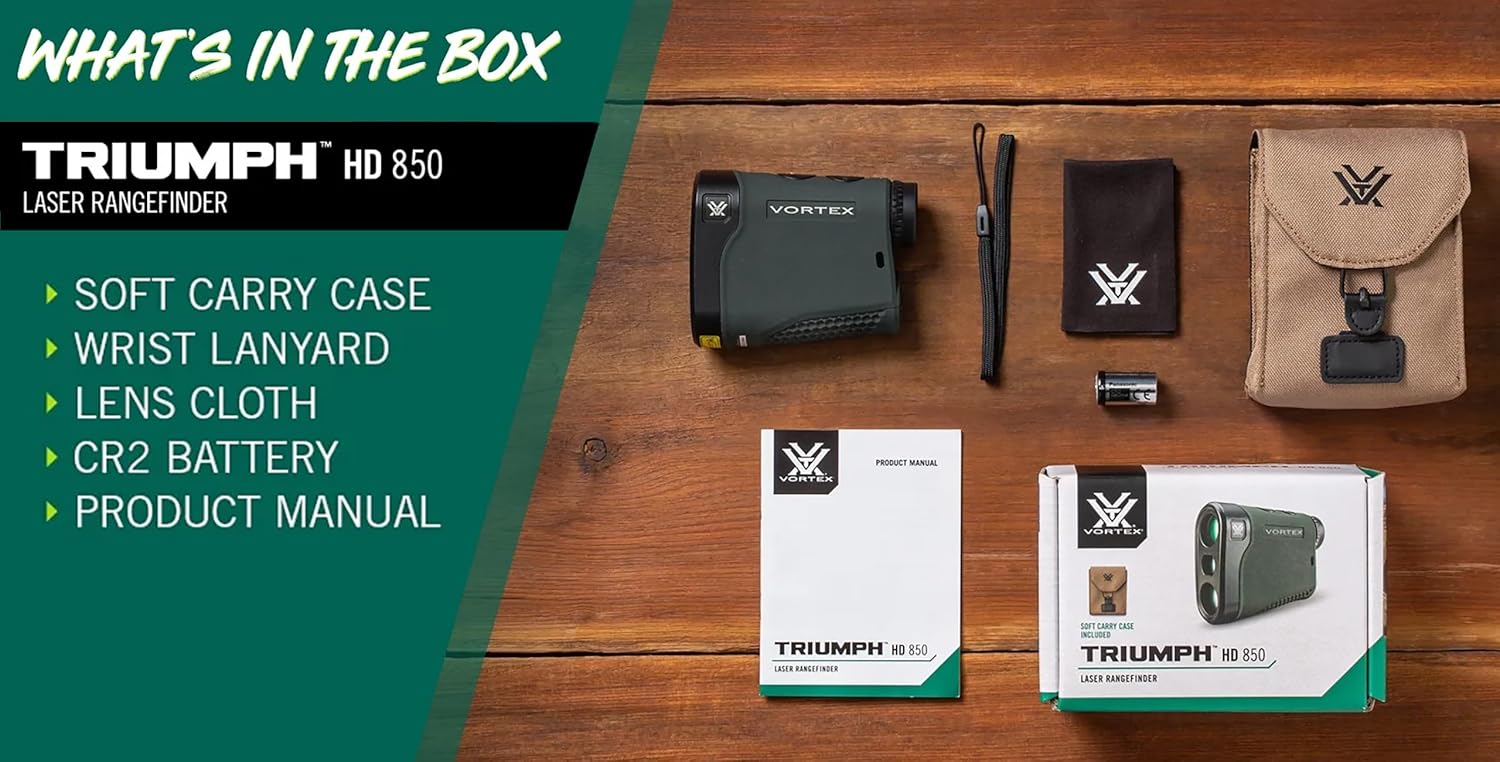
Image: All items included with the Vortex Triumph HD 850 Laser Rangefinder, neatly arranged.
Product Overview
Familiarize yourself with the key components of your rangefinder:

Image: A detailed diagram highlighting the Objective Lens, Menu Button, Measure Button, Diopter Focus, Ocular Lens, Wrist Lanyard Attachment, and Battery Compartment.
- Objective Lens: The front lens through which light enters the rangefinder.
- Menu Button: Used to access and navigate the rangefinder's settings.
- Measure Button: Activates the laser to take a distance measurement.
- Diopter Focus: Adjusts the focus of the reticle for individual eye relief.
- Ocular Lens: The eyepiece through which you view the target.
- Wrist Lanyard Attachment: Point for securing the included wrist lanyard.
- Battery Compartment: Houses the CR2 battery.
Setup
1. Battery Installation
- Locate the battery compartment cap on the underside of the rangefinder.
- Unscrew the cap counter-clockwise.
- Insert the included CR2 battery with the positive (+) terminal facing inward.
- Replace the cap and screw it clockwise until secure. Do not overtighten.
2. Diopter Adjustment
For a clear view of the display and reticle, adjust the diopter:
- Look through the ocular lens without pressing any buttons.
- Rotate the diopter focus ring (located near the ocular lens) until the display text and reticle appear sharp and clear.
Operating Instructions
1. Power On/Off
- To Power On: Press the Measure button once. The display will illuminate.
- To Power Off: The unit will automatically power off after 10 seconds of inactivity to conserve battery life.
2. Taking a Measurement
- Power on the rangefinder by pressing the Measure button.
- Aim the reticle at your desired target.
- Press and release the Measure button. The distance to the target will be displayed.

Image: A user demonstrating the proper way to hold and aim the rangefinder for accurate measurements.
3. Ranging Modes
The Triumph HD 850 offers three ranging modes:
- LOS (Line of Sight): Provides the actual linear distance to the target.
- HCD (Horizontal Component Distance): Provides angle-compensated distance, ideal for uphill or downhill shots.
- Scan: Allows for continuous ranging as you pan across multiple targets or a moving target. To activate, press and hold the Measure button for approximately 3 seconds.
4. Target Modes
The rangefinder also features three target modes to optimize performance in different scenarios:
- Normal: Standard mode for most ranging situations.
- First: Prioritizes the closest target in a group, useful for ranging small objects in front of larger ones.
- Last: Prioritizes the furthest target, useful for ranging through brush or obstacles to a distant object.
To switch between ranging and target modes, press the Menu button to cycle through options. Refer to the on-screen indicators for the currently selected mode.
Maintenance
Cleaning
- Lenses: Use the provided lens cloth or a soft, clean microfiber cloth. Breathe lightly on the lens to create moisture, then gently wipe away dust or smudges. Avoid using harsh chemicals or abrasive materials.
- Body: Wipe the exterior with a soft, damp cloth.
Storage
- Store the rangefinder in its soft carry case when not in use to protect it from dust and impacts.
- If storing for extended periods, remove the battery to prevent leakage.
- Keep the device in a cool, dry place, away from direct sunlight and extreme temperatures.
Troubleshooting
- Display is dim or hard to read:
- Check battery level and replace if necessary.
- Adjust the diopter focus for your vision.
- In low light conditions (early morning, dusk), the black LCD display may be less visible. This is a characteristic of the display type.
- No measurement displayed:
- Ensure the battery is correctly installed and has sufficient charge.
- Confirm the target is within the effective ranging distance (6 to 850 yards).
- Ensure there are no obstructions between the rangefinder and the target.
- The target surface may be non-reflective. Try ranging a different target or a more reflective part of the target.
- Inaccurate readings:
- Ensure the rangefinder is held steady during measurement.
- Verify the correct ranging mode (LOS or HCD) is selected for your application.
- Environmental factors like heavy rain, fog, or snow can affect accuracy.
Specifications
The following table details the technical specifications of the Vortex Triumph HD 850 Laser Rangefinder:

Image: Official specifications chart for the Triumph HD 850 Laser Rangefinder.
| Feature | Specification |
|---|---|
| SKU | LRF-TRI850 |
| Magnification | 5x |
| Objective Lens Diameter | 21mm |
| Max Reflective Range | 850 yards |
| Tree Range | 500 yards |
| Deer Range | 350 yards |
| Minimum Range | 6 yards |
| Accuracy (@100 yards) | +/- 0.5 yards |
| Linear Field of View (@1000 yards) | 335 feet |
| Angular Field of View | 6.4 degrees |
| Eye Relief | 13mm |
| Length | 3.8 inches |
| Width | 1.4 inches |
| Height | 3.1 inches |
| Weight | 4.6 ounces |
| Battery Type | CR2 |
| Waterproof | Yes |
| Shockproof | Yes |
Warranty & Support
Vortex VIP Warranty
The Vortex Triumph HD 850 Laser Rangefinder is backed by the Vortex VIP Warranty. This is an unlimited, unconditional, lifetime warranty. Vortex will repair or replace your product if it becomes damaged or defective. This warranty is fully transferable and does not require a receipt.
Please Note: The VIP Warranty does not cover loss, theft, deliberate damage, or cosmetic damage that does not hinder the performance of the product.
Customer Support
For warranty claims, technical assistance, or any questions regarding your Vortex Triumph HD 850, please contact Vortex customer service directly. Refer to the official Vortex website for the most current contact information.


