
Osusuent ZQ02823
Osusuent 380W LED Beam Moving Head Stage Light User Manual
Model: ZQ02823
1. Introduction
This manual provides detailed instructions for the safe operation, installation, and maintenance of your Osusuent 380W LED Beam Moving Head Stage Light. Please read this manual thoroughly before use to ensure proper functionality and to prevent damage to the unit or injury to personnel. Keep this manual for future reference.
2. Safety Instructions
- Electrical Safety: Always connect the unit to a grounded power outlet. Ensure the power supply voltage matches the unit's requirements. Disconnect power before any service or maintenance.
- Installation: Install the fixture in a well-ventilated area, away from heat sources. Ensure secure mounting to prevent falling. Do not block ventilation openings.
- Operation: Avoid direct eye exposure to the light beam. Do not operate the unit if the housing is damaged. Keep away from flammable materials.
- Maintenance: Refer all servicing to qualified personnel. Do not attempt to repair the unit yourself.
- Environment: This product is designed for indoor use only. Avoid exposure to rain, moisture, or extreme temperatures.
3. Product Overview
The Osusuent 380W LED Beam Moving Head Stage Light is a professional lighting fixture designed for various events, including DJ performances, discos, bars, and theaters. It features a powerful HID lamp, RGB LED halo, multiple color and gobo wheels, and advanced control options.

Image: Four Osusuent 380W LED Beam Moving Head Stage Lights, showcasing the product's design and quantity in a typical package.

Image: A single Osusuent 380W HID Beam Moving Head Light with icons highlighting its features: 15 Colors, 14 Gobos, 8/18-Facet Prism, RGB Halo Effect, Rainbow Atomization, and Electronic Focus.

Image: Detailed view of the moving head light, illustrating the 130mm HD Optical Lens, Efficient Cooling System, and Pan/Tilt Mechanism for X-Axis 540° and Y-Axis 270° rotation.
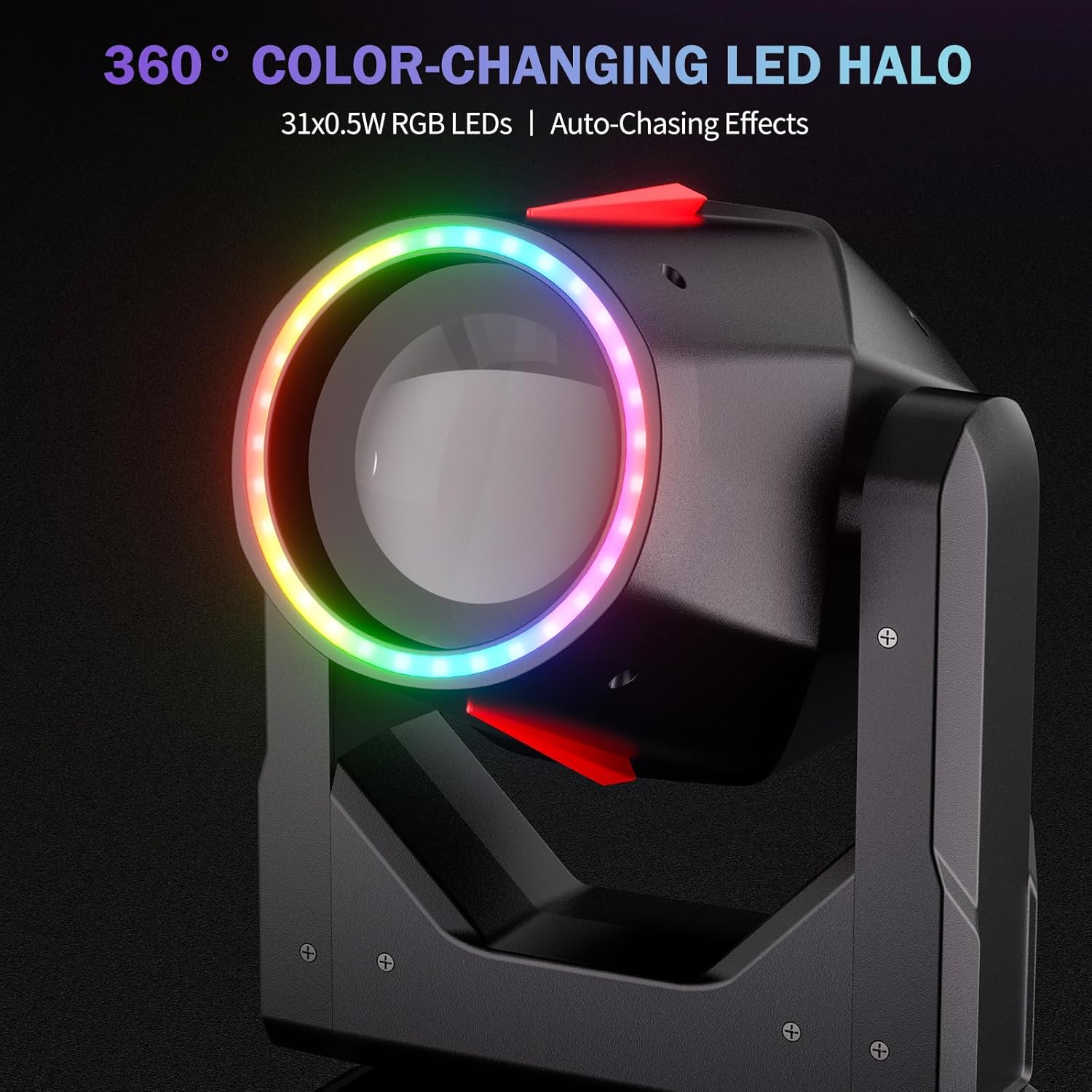
Image: Close-up of the 360° Color-Changing LED Halo, powered by 31x0.5W RGB LEDs, demonstrating auto-chasing effects around the main lens.

Image: Visual representation of the 14+1 Color Wheel and 13+1 Fixed Gobo Wheel, along with dual water flow, 8/18-Prism 360° spin, and switchable rainbow/mist effects.
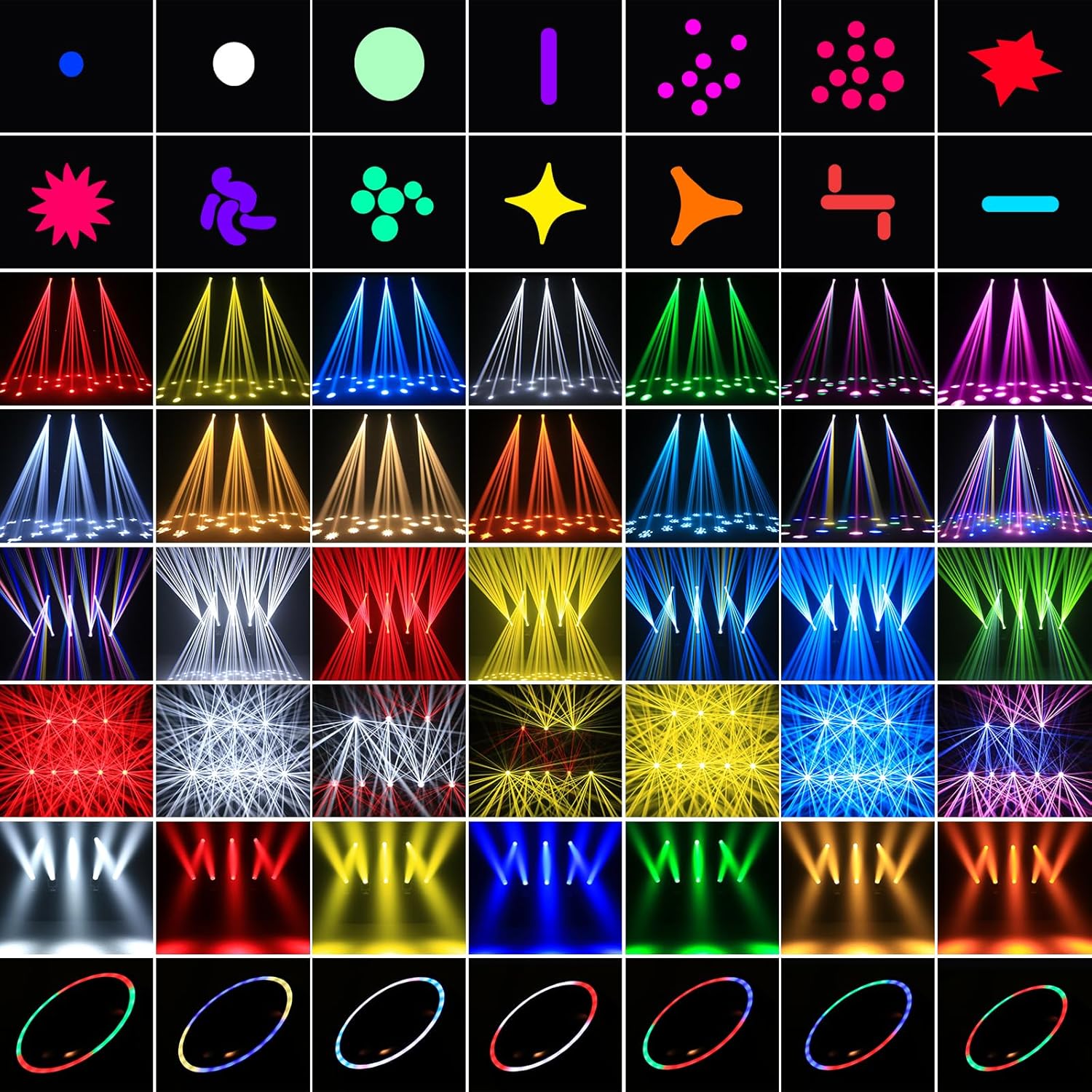
Image: A grid displaying a wide array of gobo patterns and dynamic lighting effects achievable with the fixture, including dots, lines, stars, and various beam shapes.

Image: Diagram illustrating the Zoom Effect (2°-4° angle, optimal projection 3-10 meters) and Beam Effect (4° angle, CCT 10000K, CRI Ra≥80, Illuminance 630000Lux@5M).
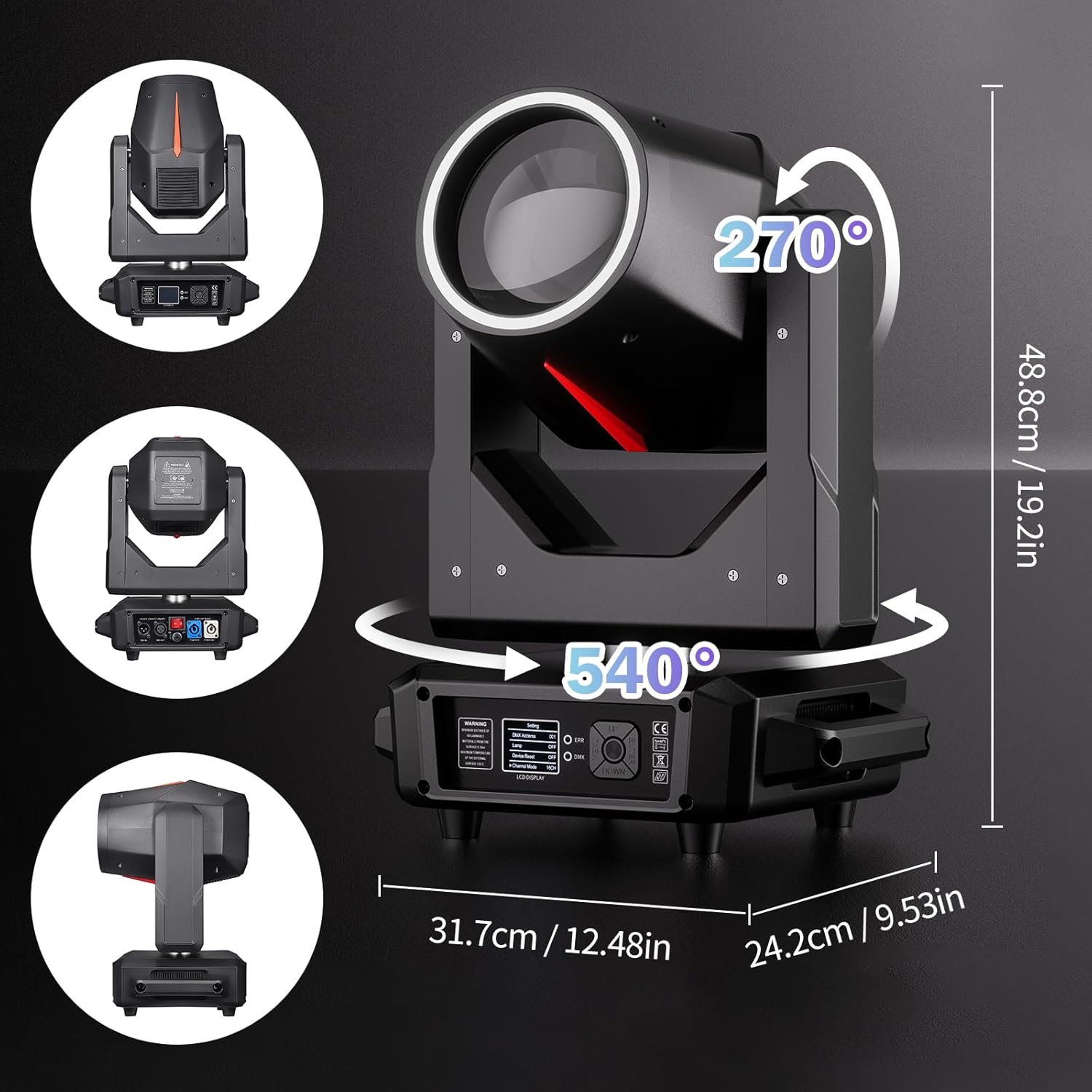
Image: Technical drawing showing the dimensions (48.8cm height, 31.7cm width, 24.2cm depth) and rotation capabilities (540° Pan, 270° Tilt) of the moving head light.

Image: Collage of different event settings where the stage light is used, including concerts, weddings, DJ performances, and club environments, demonstrating its versatility.
4. Setup
4.1 Unpacking
Carefully unpack the fixture and check for any damage during transit. Retain the packaging materials for future transport. Verify that all components listed in the packing list are present:
- Moving Head Light *1
- Power Cord *1
- Signal Cable *1 (DMX cable)
- Light Hook Bracket *2
- Instruction Manual *1

Image: Visual representation of the product's packing list, including the moving head light, power cord, signal cable, two light hook brackets, and the instruction manual.
4.2 Mounting
The fixture can be installed on the floor, ceiling, or truss structures. Always use appropriate mounting hardware and safety cables. Ensure the mounting surface or structure can support the weight of the fixture.
4.3 Electrical Connection
Connect the power cord to the unit's power input and then to a suitable grounded power outlet. For DMX control, connect a DMX cable from your DMX controller to the DMX IN port of the first fixture. Use the DMX OUT port to daisy-chain to subsequent fixtures.
5. Operating Instructions
The Osusuent 380W LED Beam Moving Head Stage Light supports multiple control modes:
5.1 Control Panel
The unit features an LCD display and buttons (MENU, UP, DOWN, ENTER) for navigation and setting adjustments.

Image: Detailed view of the control panel with LCD display, DMX IN/OUT ports, power IN/OUT, fuse, and ON/OFF switch. Also shows the 540° Pan and 270° Tilt rotation capabilities.
5.2 DMX Control (16/22 Channels)
Connect a DMX controller to the fixture. Use the control panel to set the DMX address and select the desired channel mode (16 or 22 channels). Refer to the DMX channel chart (not provided in this manual, typically found in a separate DMX protocol sheet) for specific function assignments.
5.3 Automatic Mode
In Automatic mode, the fixture runs through pre-programmed sequences. Select 'Auto' from the control panel menu. You may be able to select different auto programs or adjust speed.
5.4 Sound-Activated Mode
In Sound-Activated mode, the fixture reacts to ambient sound. Select 'Sound' from the control panel menu. The built-in microphone detects sound, triggering light changes and movements.
5.5 Master/Slave Mode
To synchronize multiple fixtures without a DMX controller, set one unit as 'Master' and others as 'Slave'. Connect the DMX OUT of the Master unit to the DMX IN of the first Slave unit, and continue daisy-chaining. The Slave units will mimic the Master's movements and effects.
5.6 Electronic Focus and Dimming
The fixture supports electronic focus for adjusting beam sharpness from 3 to 10 meters. It also features 0-100% smooth dimming for precise intensity control.

Image: Visual demonstration of the 0-100% smooth dimming capability, showing light beams at 30%, 50%, and 100% intensity.
6. Maintenance
Regular maintenance ensures optimal performance and extends the lifespan of your fixture.
- Cleaning: Periodically clean the lenses and housing with a soft, lint-free cloth. Do not use abrasive cleaners. Ensure the unit is powered off and cooled down before cleaning.
- Inspection: Regularly check power cables, DMX cables, and mounting hardware for signs of wear or damage. Replace any damaged components immediately.
- Storage: When not in use, store the fixture in its original packaging or a protective case in a dry, dust-free environment.
7. Troubleshooting
| Problem | Possible Cause | Solution |
|---|---|---|
| Fixture does not power on | No power supply; Blown fuse; Damaged power cable | Check power connection; Replace fuse; Replace power cable |
| No DMX control | Incorrect DMX address; Faulty DMX cable; DMX controller issue | Verify DMX address and mode; Check/replace DMX cable; Test DMX controller |
| Fixture not responding in Master/Slave | Incorrect Master/Slave setting; Faulty DMX cable connection | Ensure one Master and others Slave; Check DMX daisy-chain connection |
| Light beam is dim or flickering | Lamp nearing end of life; Power supply issue; Internal fault | Contact service for lamp replacement; Check power stability; Seek professional repair |
| Moving head not moving | Motor fault; Control signal issue; Obstruction | Check for obstructions; Verify control signal; Contact service for motor inspection |
8. Specifications
| Feature | Detail |
|---|---|
| Model Number | ZQ02823 |
| Light Source | 380W HID Lamp + 31x0.5W RGB LEDs (Halo) |
| Beam Angle | 4° (Beam Effect), 2°-4° (Zoom Effect) |
| Color Temperature | 10000K |
| CRI Index | Ra≥80 |
| Illuminance | 630000Lux@5M |
| Color Wheel | 14 Colors + Open |
| Gobo Wheel | 13 Fixed Gobos + Open |
| Prism | 8+18 Facet Prism (360° rotation) |
| Pan/Tilt Movement | Pan: 540°, Tilt: 270° |
| Control Modes | DMX512 (16/22 channels), Auto, Sound-Activated, Master/Slave, RDM |
| Dimming | 0-100% Smooth Electronic Dimming |
| Focus | Electronic Focus (3-10m) |
| Dimensions | Approx. 31.7cm (W) x 24.2cm (D) x 48.8cm (H) |
| Manufacturer | Osusuent |
9. Warranty and Support
This product comes with a standard manufacturer's warranty. For specific warranty terms, please refer to the documentation included with your purchase or contact Osusuent customer support. For technical assistance or service inquiries, please reach out to your retailer or the manufacturer directly.
Related Documents - ZQ02823
 |
Mini 380W Beam Moving Head Light User Manual User manual for the YOUBAIXIA Mini 380W Beam Moving Head Light, detailing installation, operation, DMX control, maintenance, and technical specifications for professional stage lighting. |
 |
BRIGHTSUNPRO 18R 380W Beam Moving Head Light User Manual User manual for the BRIGHTSUNPRO 18R 380W Beam Moving Head Light, covering installation, panel operation, DMX control, and channel descriptions. Includes technical specifications and safety precautions. |
 |
Moving Head Beam User Manual - UKING Comprehensive user manual for the UKING Moving Head Beam stage light, covering installation, operation, safety, and DMX channel functions. |
 |
Waterproof 380W Beam Light User Manual User manual for the Waterproof 380W Moving Head Beam Light, detailing control instructions, interface descriptions, DMX channel functions, and settings for professional lighting applications. |
 |
ZZipper Aries 380W Beam Moving Head User Manual User manual for the ZZipper Aries 380W Beam Moving Head light fixture, covering installation, maintenance, product features, control panel operation, DMX channels, error messages, and factory settings. |
 |
380W Mini BEAM Moving Head Light User Manual This user manual provides detailed instructions for the 380W Mini BEAM Moving Head Light with Halo Effect, covering installation, operation, DMX control, technical specifications, cleaning, maintenance, and troubleshooting for professional use. |
Ask a question about this manual
Ask about setup, troubleshooting, compatibility, parts, safety, or missing instructions. Manuals+ will review the question and use this page’s manual context to help answer it.