
1. Introduction
This manual provides essential information for the safe and efficient operation of your LIBODD SMG-II-6.2K-48V-Wifi Hybrid Solar Inverter. Please read this manual thoroughly before installation and use, and retain it for future reference.
1.1 Product Overview
The LIBODD SMG-II-6.2K-48V-Wifi is a high-performance 6.2KW/4.2KW hybrid solar inverter designed for both on-grid and off-grid applications. It features a pure sine wave output, a built-in MPPT 120A solar charger, and supports 24V/48V battery systems with a 230V dual output. This inverter is engineered for reliability, flexibility, and energy efficiency.
1.2 Key Features
- Lithium battery activation function via PV or Utility.
- Pure sine wave output for sensitive electronics.
- Power factor 1.0.
- Wide PV input voltage range: 60Vdc-500Vdc.
- Integrated MPPT 120A solar charger.
- Detachable dust cover for enhanced durability in harsh environments.
- Optional WiFi remote monitoring capability.
- Supports multiple output priority settings: Utility (UTL), Solar (SOL), Solar-Battery-Utility (SBU), Solar-Utility-Battery (SUB).
- Equalization (EQ) function to optimize battery performance and extend lifespan.
2. Safety Instructions
WARNING: Installation and maintenance of this inverter must be performed by qualified personnel only. Incorrect installation or operation can result in electric shock, fire, or severe injury.
- Read all instructions and cautionary markings on the unit and in this manual before operation.
- Do not disassemble the inverter. Refer servicing to qualified service personnel.
- Ensure all wiring is correctly sized and properly connected to prevent overheating and damage.
- Always disconnect all power sources (PV, battery, utility) before performing any wiring or maintenance.
- Install the inverter in a well-ventilated area, away from flammable materials and corrosive gases.
- Ensure proper grounding of the inverter.
- This inverter is designed for indoor use. Protect it from direct sunlight, rain, and moisture.
- Important Note on Battery Connection: While some product descriptions may indicate the ability to work without a battery, a critical warning within the product's operational diagrams states: "This inverter must work with battery, please make sure that it is connected to battery, before you connect solar panels." For safe and correct operation, it is strongly recommended to connect a battery system as instructed by this warning. Please consult the manufacturer for clarification if you intend to operate without a battery.
3. Product Description and Components
3.1 Inverter Overview

Image: Front view of the LIBODD SMG-II-6.2K-48V-Wifi Hybrid Solar Inverter, showing the display panel and ventilation.
3.2 Key Specifications and Features Visual
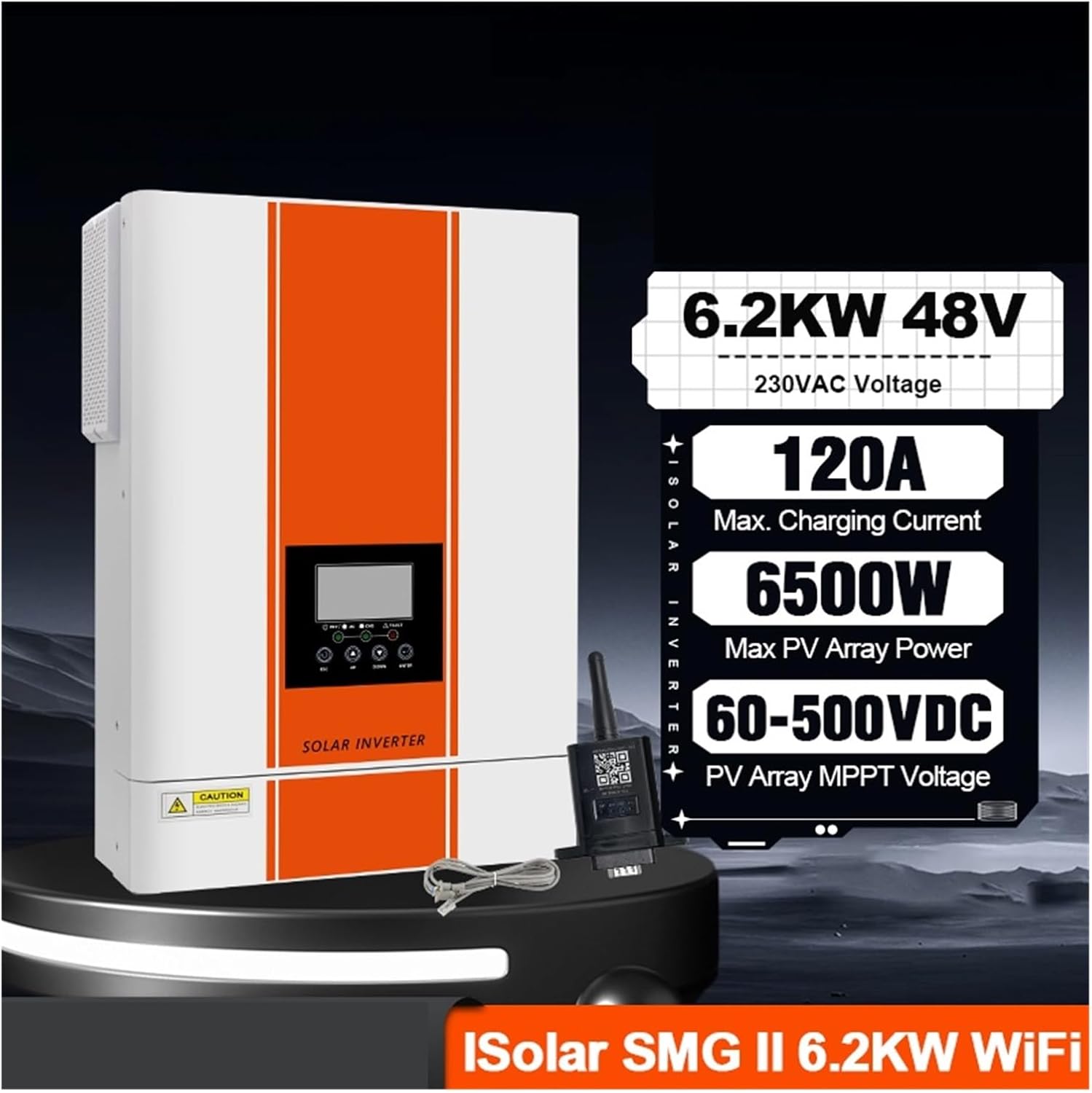
Image: The inverter alongside a graphic highlighting key specifications: 6.2KW 48V, 230VAC Voltage, 120A Max. Charging Current, 6500W Max PV Array Power, and 60-500VDC PV Array MPPT Voltage.
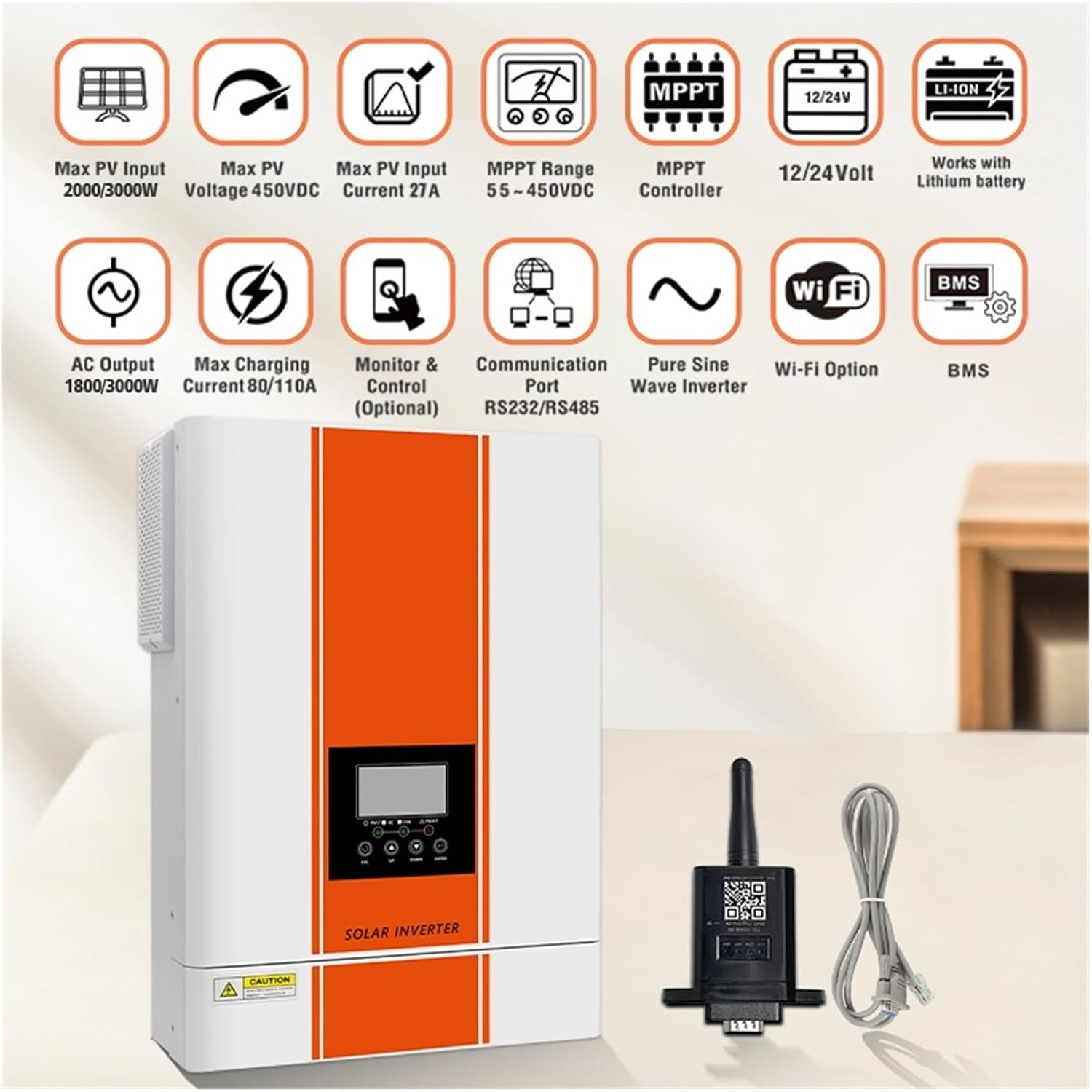
Image: The inverter with a series of icons illustrating its features, including Max PV Input, Max PV Voltage, Max PV Input Current, MPPT Range, MPPT Controller, 12/24 Volt compatibility, Lithium battery support, AC Output, Max Charging Current, Optional Monitor & Control, Communication Port (RS232/RS485), Pure Sine Wave Inverter, Wi-Fi Option, and BMS.
3.3 Rear Panel Connections

Image: Rear view of the inverter showing connection terminals and switches. Visible connections include RS485, RS232 ports, an ON/OFF switch, AC IN (L, N), AC OUT (L, N), PV IN (+, -), and BATTERY POS+ NEG- terminals.
4. Installation and Setup
Proper installation is crucial for the safe and efficient operation of your inverter. Always ensure all local electrical codes are followed.
4.1 Mounting the Inverter
- Choose a suitable location that is dry, well-ventilated, and protected from direct sunlight and moisture.
- Ensure sufficient clearance around the inverter for proper airflow and heat dissipation.
- Mount the inverter securely to a vertical surface using appropriate fasteners.
4.2 Wiring Connections
CAUTION: Before making any connections, ensure the inverter's ON/OFF switch is in the OFF position and all external power sources (PV, battery, utility) are disconnected.
- Battery Connection: Connect the battery cables to the BATTERY POS+ and NEG- terminals on the rear panel. Ensure correct polarity. As per the critical warning, a battery connection is required before connecting solar panels.
- PV Input Connection: Connect the solar panel array cables to the PV IN (+, -) terminals. Verify correct polarity and ensure the PV input voltage is within the specified range (60Vdc-500Vdc).
- AC Input Connection (Utility/Grid): Connect the utility grid power to the AC IN (L, N) terminals.
- AC Output Connection (Loads): Connect your AC loads to the AC OUT (L, N) terminals.
- Grounding: Connect the inverter to an earth ground using the designated grounding terminal.
- Communication Ports (Optional): If using, connect WiFi module or other communication devices to the RS232/RS485 ports.
4.3 Operational Diagram
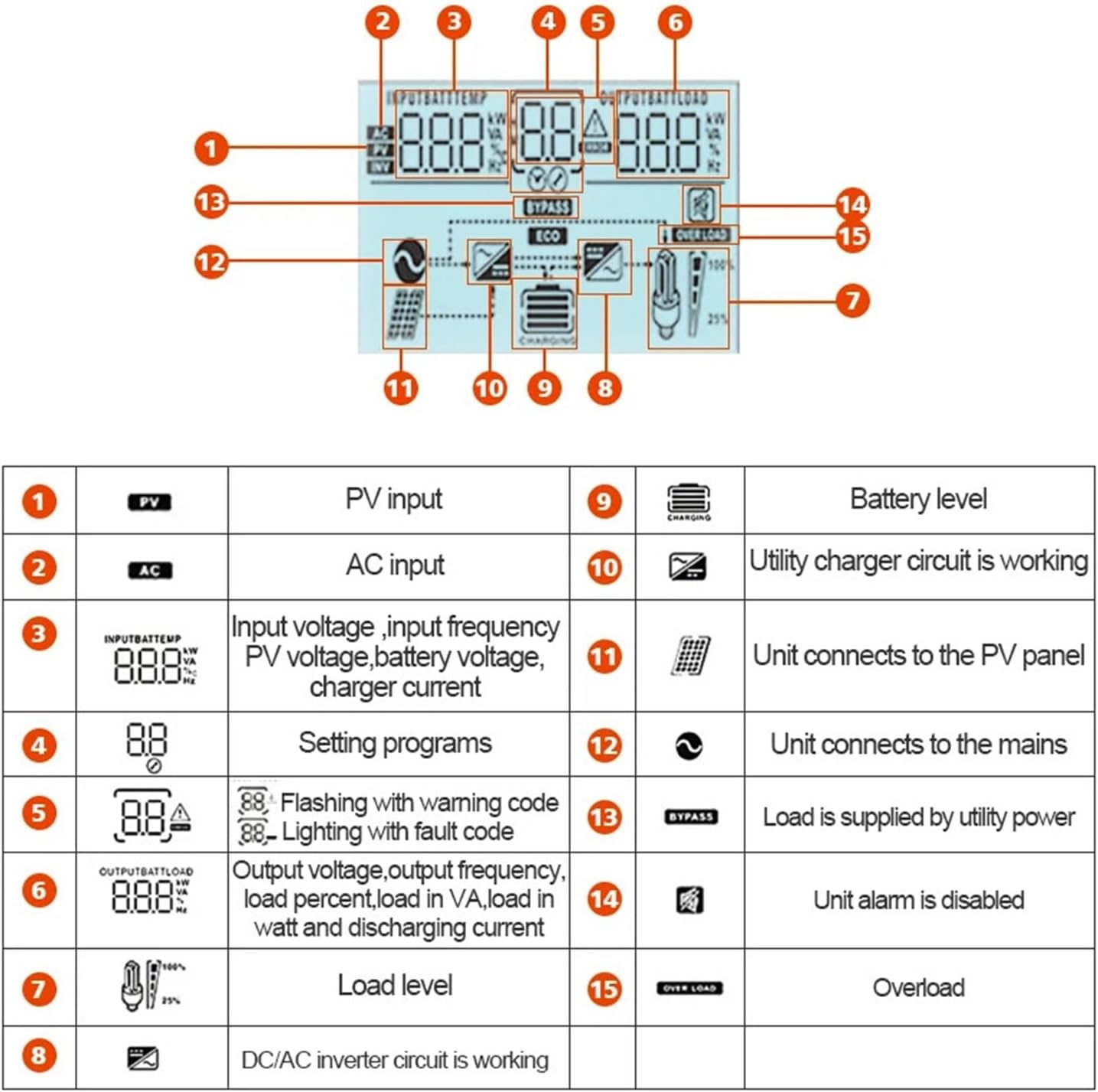
Image: A diagram illustrating the hybrid inverter's operation, showing connections to solar power, generator/utility, external battery packs, and home appliances. A prominent red warning box states: "This inverter must work with battery, please make sure that it is connected to battery, before you connect solar panels."
5. Operation
5.1 Powering On/Off
- Power On: After all connections are secure, switch on the battery breaker (if applicable), then the PV array breaker (if applicable), and finally the inverter's ON/OFF switch. The inverter will perform a self-test.
- Power Off: First, switch off the inverter's ON/OFF switch. Then, disconnect the AC input (utility) and PV input. Finally, disconnect the battery.
5.2 Output Priority Settings
The inverter supports various output priority modes, which can typically be configured via the display panel or optional monitoring software:
- UTL (Utility First): Prioritizes utility power for loads. Solar power charges the battery.
- SOL (Solar First): Prioritizes solar power for loads and battery charging. Utility is used as a backup.
- SBU (Solar-Battery-Utility): Prioritizes solar power, then battery power. Utility is used only when solar and battery are insufficient.
- SUB (Solar-Utility-Battery): Prioritizes solar power, then utility power. Battery is used only when solar and utility are insufficient.
5.3 WiFi Remote Monitoring (Optional)
If equipped with the optional WiFi module, follow the instructions provided with the module to connect it to your local network and configure remote monitoring via the dedicated application.
6. Display and Indicators
The inverter features an LCD display and LED indicators to provide real-time operational status and fault information.

Image: A detailed diagram of the inverter's display panel, showing various icons and their corresponding numerical explanations.
| No. | Icon | Description |
|---|---|---|
| 1 | PV | PV input |
| 2 | AC | AC input |
| 3 | INPUT/BATT/TEMP | Input voltage, input frequency, PV voltage, battery voltage, charger current |
| 4 | 88 | Setting programs |
| 5 | 88.4 | Flashing with warning code, Lighting with fault code |
| 6 | OUTPUT/BATT/LOAD | Output voltage, output frequency, load percentage, load in VA, load in watt, and discharging current |
| 7 | Load Level | Load level indicator |
| 8 | DC/AC Inverter | DC/AC inverter circuit is working |
| 9 | Battery Level | Battery level indicator |
| 10 | Charging | Utility charger circuit is working |
| 11 | PV Panel | Unit connects to the PV panel |
| 12 | Mains | Unit connects to the mains (utility) |
| 13 | BYPASS | Load is supplied by utility power (Bypass mode) |
| 14 | Alarm Disabled | Unit alarm is disabled |
| 15 | OVERLOAD | Overload condition |
7. Troubleshooting
This section provides guidance for common issues. Refer to the display codes (Section 6) for specific warnings or faults.
7.1 Common Issues and Solutions
- No Power/Display Off:
- Check if the inverter's ON/OFF switch is in the 'ON' position.
- Verify battery connections and ensure battery voltage is within the operating range.
- Check all circuit breakers and fuses.
- No AC Output:
- Check for overload conditions (icon 15). Reduce load if necessary.
- Ensure AC output wiring is correct and secure.
- Check for any fault codes on the display (icon 5).
- Battery Not Charging:
- Verify PV input connections and ensure solar panels are receiving sufficient sunlight.
- Check PV input voltage and current on the display.
- Ensure utility power is present if charging from the grid.
- Check battery health and connections.
- Warning/Fault Codes Displayed:
- Refer to the specific code displayed (icon 5) and consult the full troubleshooting guide in the manufacturer's detailed manual or contact technical support.
If problems persist after attempting these solutions, please contact LIBODD customer support or a qualified technician.
8. Specifications
| Feature | Specification |
|---|---|
| Model | SMG-II-6.2K-48V-Wifi |
| Rated Power | 6.2KW (4.2KW also mentioned, refer to product labeling for specific model output) |
| Battery Voltage | 48V (24V variant available) |
| AC Output Voltage | 230V |
| Inverter Type | Hybrid Solar Inverter, Pure Sine Wave |
| Max PV Array Power | 6500W |
| PV Input Voltage Range | 60Vdc - 500Vdc |
| MPPT Voltage Range | 60Vdc - 500Vdc (also 55-450Vdc mentioned, refer to product label) |
| Max PV Input Current | 27A |
| Max MPPT Charging Current | 120A (also 80/110A mentioned, refer to product label) |
| Communication | RS232, RS485, WiFi (Optional) |
| Dimensions (Package) | 0.39 x 0.39 x 0.39 inches (Note: This appears to be a placeholder or incorrect value. Refer to actual product packaging for accurate dimensions.) |
| Item Weight | 0.353 ounces (Note: This appears to be a placeholder or incorrect value. Refer to actual product for accurate weight.) |
| Manufacturer | LIBODD |
| Item Model Number | 1005007089357227 |
Note: Specifications are subject to change without prior notice. Always refer to the product label or the latest official documentation for the most accurate information.
9. Maintenance
Regular maintenance helps ensure the longevity and optimal performance of your inverter.
- Cleaning: Periodically clean the exterior of the inverter with a soft, dry cloth. Ensure ventilation openings are free from dust and debris. Do not use liquid cleaners or solvents.
- Connection Checks: Annually, or more frequently in dusty environments, inspect all electrical connections (PV, battery, AC input/output) to ensure they are tight and free from corrosion.
- Environmental Check: Ensure the installation environment remains within specified temperature and humidity ranges.
- Battery Maintenance: Follow the battery manufacturer's recommendations for maintenance, especially for lead-acid batteries requiring water level checks.
WARNING: Always disconnect all power sources before performing any maintenance or cleaning.
10. Warranty and Support
For warranty information, technical support, or service inquiries, please refer to the warranty card included with your product or contact LIBODD customer service directly. Ensure you have your product model number (SMG-II-6.2K-48V-Wifi) and serial number (if applicable) ready when contacting support.
You can typically find contact information on the manufacturer's official website or through your point of purchase.