
1. Introduction
Thank you for choosing the Isili Single Watch Winder. This device is designed to keep your automatic watches wound and ready to wear, preserving their accuracy and extending their lifespan. This manual provides essential information for the proper setup, operation, and maintenance of your watch winder.
2. Product Features
- Watch Compatibility: Equipped with a memory foam watch cushion, accommodating bracelets up to 20 cm long, 30 mm wide, and dials up to 60 mm in size. Compatible with most men's and women's automatic watches.
- Quiet and Durable Motor: Features a high-quality, low-noise motor (approx. 5 dB) for quiet operation, suitable for bedrooms and offices.
- Automatic Start-Stop Technology: The winder automatically starts or stops based on ambient light detection. It stops rotating in darkness to ensure quiet operation at night.
- Two Rotation Modes: Offers two distinct rotation modes (clockwise and counter-clockwise) to suit various watch winding requirements.
- Elegant Design: Constructed from high-quality solid wood with a black walnut finish, featuring integrated blue LED lighting and a scratch-resistant acrylic inner ring.
3. Included Components
Please verify that all the following items are included in your package:
- Isili Single Watch Winder Unit
- Watch Pillows (Elastic Memory Foam)
- AC Adapter
- USB Power Cord
- User Manual (this document)
- Wiping Glass Cloth

This image displays the Isili Single Watch Winder alongside all items included in the package: the winder unit, a USB power cord, an AC adapter, the user manual, two watch pillows, and a wiping cloth.
4. Setup Instructions
- Unpack the Winder: Carefully remove the watch winder and all accessories from its packaging.
- Place the Winder: Position the winder on a stable, flat surface away from direct sunlight or extreme temperatures.
- Connect Power: Connect the provided AC adapter to the power input port on the back of the winder. Plug the adapter into a standard electrical outlet. Alternatively, you can use the USB power cord with a compatible USB power source.
- Insert Watch: Gently place your automatic watch onto the elastic memory foam watch pillow. Ensure the watch is securely fitted but not overly tight.
- Place Pillow in Winder: Insert the watch pillow with the watch into the rotating compartment of the winder.
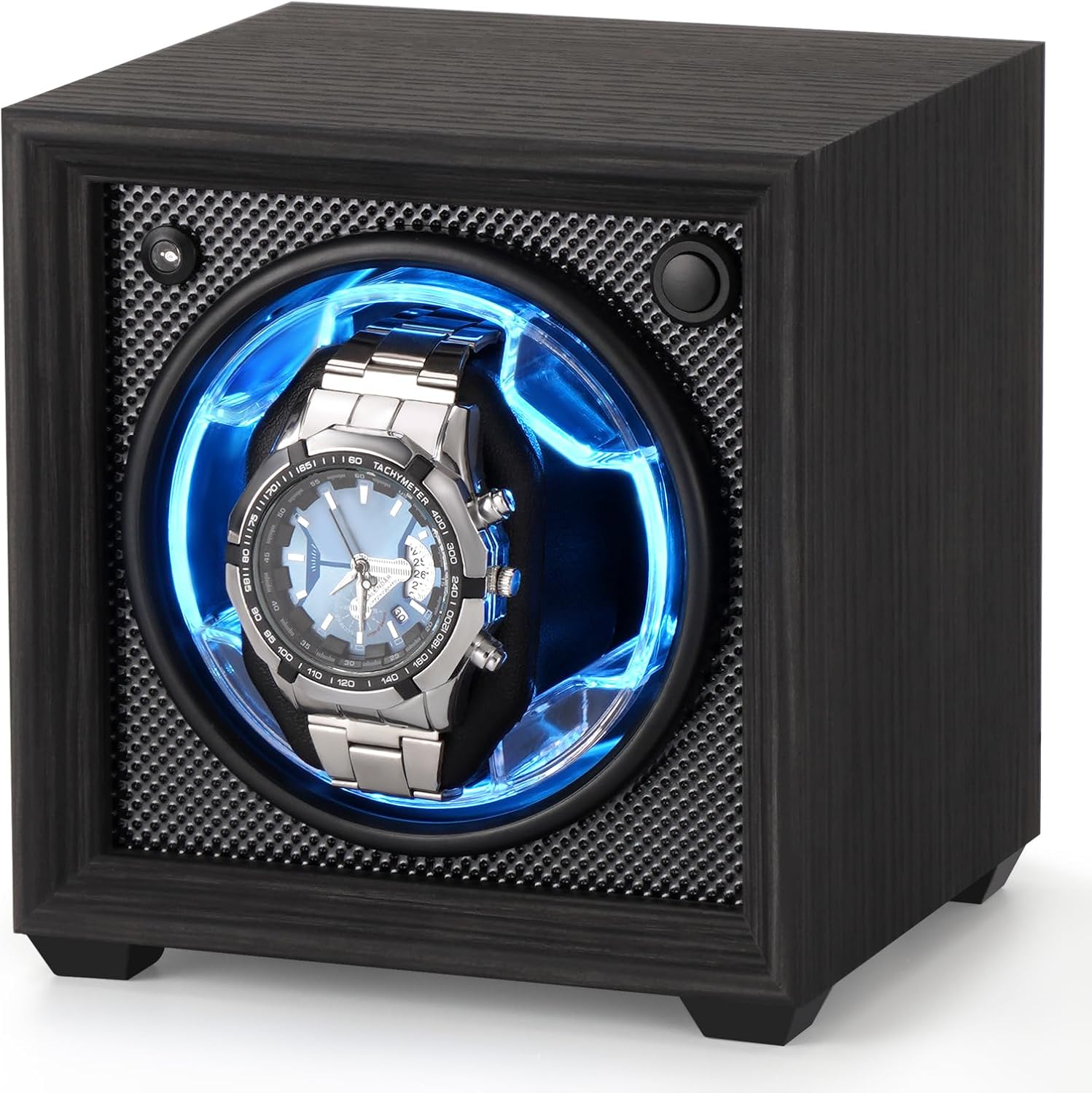
Front view of the Isili Single Watch Winder, showcasing its compact design and the internal blue LED illumination with an automatic watch placed on the pillow.
5. Operating Instructions
5.1. Control Panel Overview
The control panel is located on the back of the winder. It includes:
- Photosensitive Receiver: Detects ambient light for the automatic start-stop function.
- Light Switch: Controls the internal blue LED illumination.
- Gear Switch: Selects the rotation mode.
- Power Input: For connecting the AC adapter or USB power cord.
- Light Sensitive/Standard Mode Switch: Toggles between automatic light-sensitive operation and continuous standard operation.

Detailed view of the winder's rear panel, highlighting the power input, gear switch for rotation modes, and the light sensitive/standard mode switch. A diagram illustrates Mode 1 (forward rotation) and Mode 2 (reverse rotation) cycles.
5.2. Rotation Modes
Use the Gear Switch to select one of the two available rotation modes:
- Mode 1 (Clockwise): Rotates forward for 2 minutes, then stops for 6 minutes, and repeats the cycle.
- Mode 2 (Counter-Clockwise): Rotates in reverse for 2 minutes, then stops for 6 minutes, and repeats the cycle.
Consult your watch manufacturer's recommendations for the appropriate winding direction (clockwise, counter-clockwise, or bi-directional) and Turns Per Day (TPD) for your specific automatic watch model.
5.3. Automatic Start-Stop Technology
The Isili watch winder features an innovative light-sensitive function:
- When the Light Sensitive/Standard Mode Switch is set to light-sensitive mode, the winder will automatically stop rotating if no light source is detected (e.g., in a dark room). This ensures silent operation during nighttime.
- When light is detected again, the winder will resume its selected rotation mode.
- To disable this feature and have the winder operate continuously regardless of light conditions, set the Light Sensitive/Standard Mode Switch to standard mode.

The winder is shown in a dimly lit bedroom environment, demonstrating its automatic stop feature when no light is detected, ensuring quiet operation during sleep.
6. Watch Compatibility
The elastic memory foam watch cushion is designed for broad compatibility. It can accommodate watches with:
- Bracelet length up to 20 cm
- Bracelet width up to 30 mm
- Dial size up to 60 mm
This design ensures a secure fit for most men's and women's automatic watches.

The elastic watch pillow is designed to accommodate various watch sizes. This image shows the winder with an empty pillow and two different watches placed on separate pillows, illustrating the pillow's adaptability.
7. Maintenance
- Cleaning: Use the provided wiping glass cloth or a soft, dry cloth to clean the exterior of the winder. For the acrylic window, use a soft, lint-free cloth to avoid scratches. Do not use abrasive cleaners or solvents.
- Dust Protection: Keep the winder in a clean environment to prevent dust accumulation, which can affect its operation and appearance.
- Handling: Handle the winder with care. Avoid dropping it or subjecting it to strong impacts.
8. Troubleshooting
- Winder Not Rotating:
- Ensure the power adapter is securely connected to both the winder and a working electrical outlet.
- If using the light-sensitive mode, check if the room is too dark. The winder will stop in darkness. Try switching to standard mode or ensuring adequate light.
- Verify the Gear Switch is set to Mode 1 or Mode 2, not off.
- Excessive Noise:
- Ensure the winder is placed on a flat, stable surface. Uneven surfaces can cause vibrations.
- Check that the watch is properly seated on the pillow and not touching the winder's interior walls.
- The motor is designed for quiet operation (approx. 5 dB). If noise is significantly louder, contact customer support.
- Watch Not Winding:
- Confirm the correct rotation mode (clockwise or counter-clockwise) for your specific watch model. Refer to your watch's manual.
- Ensure the watch is fully wound manually before placing it in the winder, especially if it has been stopped for a long time.
9. Specifications
| Feature | Detail |
|---|---|
| Model Number | ISL015 |
| Brand | Isili |
| Color | Black sandalwood |
| Material | Acrylic, Wood |
| Inner Material | Foam, Acrylic |
| Power Source | AC Adapter |
| Item Weight | 2.14 pounds |
| Package Dimensions | 7.99 x 7.36 x 6.77 inches |
| UPC | 754147620385 |
10. Warranty Information
The Isili Single Watch Winder comes with a Limited Warranty. Please refer to the warranty card included in your package or contact Isili customer support for specific terms and conditions regarding warranty coverage and service.
11. Customer Support
For any questions, technical assistance, or warranty claims, please contact Isili customer support through the retailer where the product was purchased or visit the official Isili brand store online.
Thank you for choosing Isili.