
1. Introduction
Thank you for choosing the DEFENTAC DF-51 HD1080P Camera and 500 Lumens Flashlight Combo. This device integrates a high-definition camera, a powerful flashlight, and a Class IIIa laser into a compact unit, designed for various applications including recording and illumination. This manual provides essential information for the safe and effective use of your device.
2. Safety Information
- Laser Safety: This product contains a Class IIIa laser with a power output of less than 5mW. Avoid direct eye exposure to the laser beam. Do not aim the laser at aircraft or vehicles.
- Heat Warning: The flashlight can generate heat during prolonged use. Avoid touching the flashlight head directly after extended operation.
- Battery Safety: Do not attempt to disassemble or replace the internal battery. Use only the provided charging cable.
- Water Resistance: The device is rated IPX4 water-resistant, meaning it is protected against splashing water from any direction. It is not designed for submersion.
- Storage: Store the device in a cool, dry place away from direct sunlight and extreme temperatures.
3. Package Contents
Verify that all items are present in your package:
- DEFENTAC DF-51 Device
- Magnetic Charging Cable (USB)
- Adjustment Tools (Hex Key)
- Spare Screws
- User Manual (this document)

Figure 3.1: Contents of the DEFENTAC DF-51 package.
4. Product Overview
Familiarize yourself with the various components and controls of your DEFENTAC DF-51 device.

Figure 4.1: Labeled components of the DEFENTAC DF-51.
- Flashlight Switch: Controls the flashlight modes (On, Strobe, Off).
- Charging/Data Port: Magnetic port for charging the device and connecting to a computer for data transfer.
- Power Indicator: LED light indicating charging status and power.
- Mounting Bolt: For securing the device to compatible rails.
- Camera On/Off/Pause Switch (DV ON/OFF): Controls the camera's recording functions.
- Camera Working Indicator (Blue LED): Indicates camera status (booting, recording, paused).
- Camera Reset Button (DV RESET): Used to reset the camera.
- Microphone (MIC): Records audio during video capture.
5. Setup
5.1. Charging the Device
- Connect the magnetic charging cable to the Charging/Data Port on the device.
- Plug the USB end of the cable into a standard USB power adapter (not included) or a computer USB port.
- The Power Indicator will show the charging status. Ensure the device is fully charged before first use.
5.2. Mounting the Device
The DEFENTAC DF-51 is designed to be mounted on compatible rails. Use the provided mounting bolt and adjustment tools to secure the device firmly.
- Align the device's mounting interface with the rail.
- Insert the mounting bolt and tighten it using the adjustment tool until the device is securely attached. Do not overtighten.
6. Operating Instructions
6.1. Camera Operation
- On/Off: Press and hold the Camera On/Off/Pause Switch (DV ON/OFF) for 3 seconds. The camera will begin a 5-second booting process, indicated by a solid blue light from the Camera Working Indicator. Once the blue indicator starts flashing, video recording is in progress.
- Pause/Resume Recording: While recording, click the Camera On/Off/Pause Switch (DV ON/OFF) once to pause recording. The blue indicator will remain solid. Click the switch again to resume recording; the blue indicator will flash.
- Activation Time: The total activation time from pressing the switch to active recording is approximately 8 seconds (3 seconds switch press + 5 seconds booting).
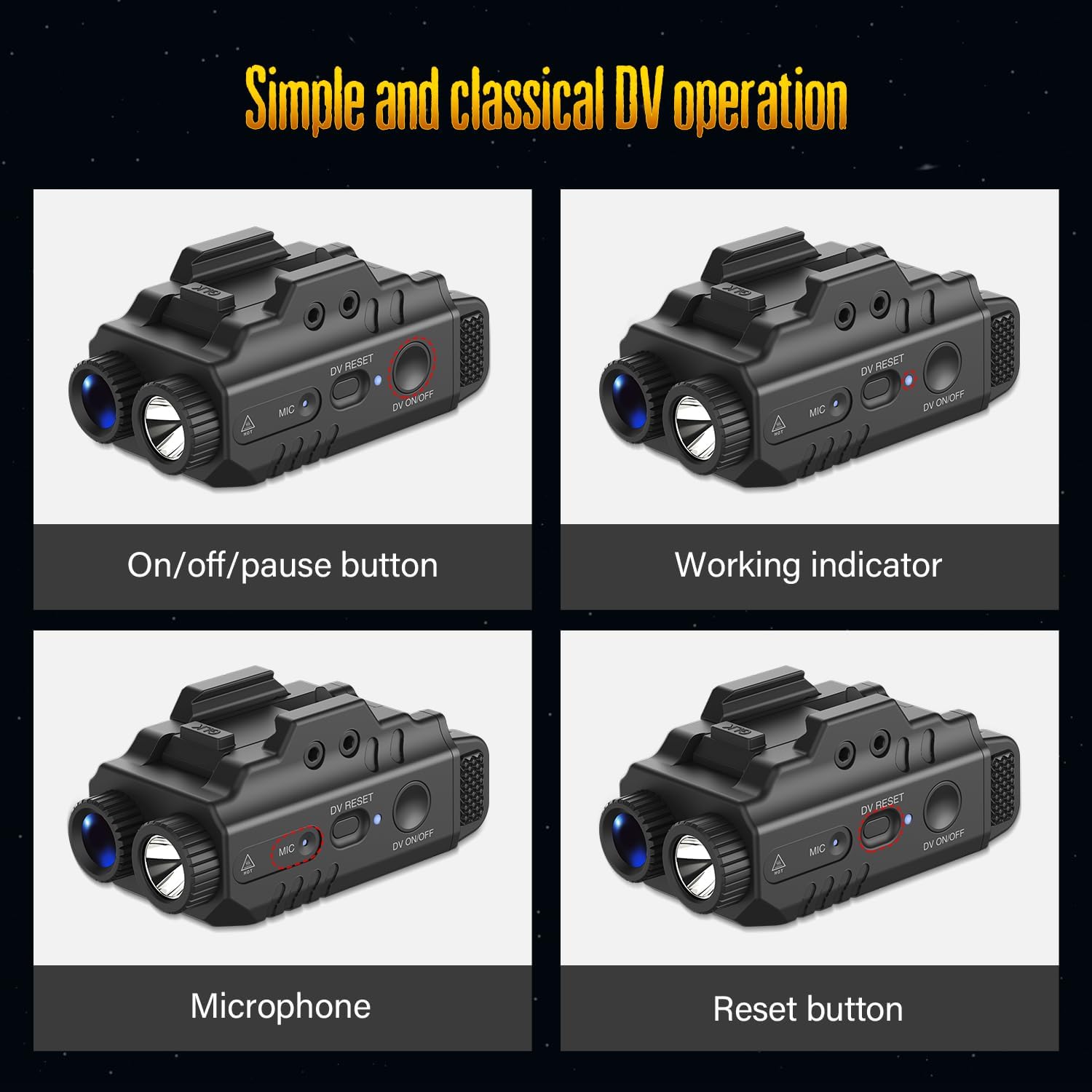
Figure 6.1: Camera control buttons and indicators.
6.2. Flashlight and Laser Operation
Use the Flashlight Switch to cycle through the available modes:
- Constant Light: Press the Flashlight Switch once for continuous illumination.
- Strobe Light: Press the Flashlight Switch again to activate the strobe mode.
- Laser: The laser can be activated independently or in conjunction with the flashlight. Refer to the specific controls for laser activation (often a separate button or a combination press).
- Off: Press the Flashlight Switch a third time to turn off the flashlight and laser.
6.3. Combined Operation
The DEFENTAC DF-51 supports various combinations of camera, flashlight, and laser operation:
- Light and Video: Activate both the flashlight and camera simultaneously for illuminated recording.
- Light Only (Constant/Strobe): Use the flashlight independently without camera recording.
- Only Video: Record video without activating the flashlight or laser.

Figure 6.2: Operational modes of the DEFENTAC DF-51.
6.4. Data Transfer
To access recorded videos and images:
- Ensure the device is powered off.
- Connect the magnetic charging cable to the Charging/Data Port on the device and the USB end to a computer.
- The device will appear as a removable storage drive on your computer.
- You can then easily read and download your files.
7. Maintenance
- Cleaning: Use a soft, dry cloth to clean the exterior of the device. Do not use abrasive cleaners or solvents. For the camera lens, use a specialized lens cleaning cloth.
- Storage: When not in use for extended periods, store the device in a protective case in a cool, dry environment. Ensure the battery is partially charged (around 50%) before long-term storage.
- Battery Care: Avoid fully discharging the battery frequently. Recharge the device regularly, even if not in use, to maintain battery health.
8. Troubleshooting
- Device Not Turning On: Ensure the device is fully charged. If the issue persists, try performing a reset using the Camera Reset Button.
- Camera Not Recording: Check if the blue indicator is flashing. If it's solid, recording is paused. If no indicator, ensure the device is on and charged.
- Flashlight Not Working: Ensure the device is powered on and the Flashlight Switch is pressed correctly.
- Cannot Transfer Files to Computer: Ensure the device is connected correctly via the USB cable and is powered off. Try a different USB port or cable.
- Poor Video Quality: Ensure the camera lens is clean and free from obstructions. Record in well-lit conditions for optimal results.
9. Specifications

Figure 9.1: Key specifications and dimensions of the DEFENTAC DF-51.
| Feature | Specification |
|---|---|
| Brand | DEFENTAC |
| Model | DF-51 |
| Camera Resolution | HD1080P |
| Flashlight Brightness | 500 Lumens (max) |
| Flashlight Beam Distance | 200 meters |
| Flashlight Run Time | 1 hour |
| Laser Class | IIIa |
| Laser Power Output | < 5mW |
| Laser Beam Distance | 200-2000 meters |
| Material | Nylon reinforced fiber (Polymer) |
| Waterproof Rating | IPX4 |
| Dimensions (Approx.) | 1.1 in (W) x 1.7 in (H) x 2.5 in (L) |
10. Warranty Information
Specific warranty details for the DEFENTAC DF-51 are not provided in this manual. Please refer to the product packaging, the retailer's return policy, or the official DEFENTAC website for comprehensive warranty information.
11. Customer Support
For technical assistance, troubleshooting, or product inquiries, please contact DEFENTAC customer support through their official website or the retailer from whom you purchased the product. Keep your purchase receipt and product model number (DF-51) handy when contacting support.