
1. Introduction
Thank you for choosing the POGOLAB US BR-A88 88 Keys Roll Up Keyboard Piano. This portable and versatile instrument is designed for beginners and experienced musicians alike, offering a full range of features in a compact, flexible design. Please read this manual carefully to ensure proper use and to maximize your musical experience.
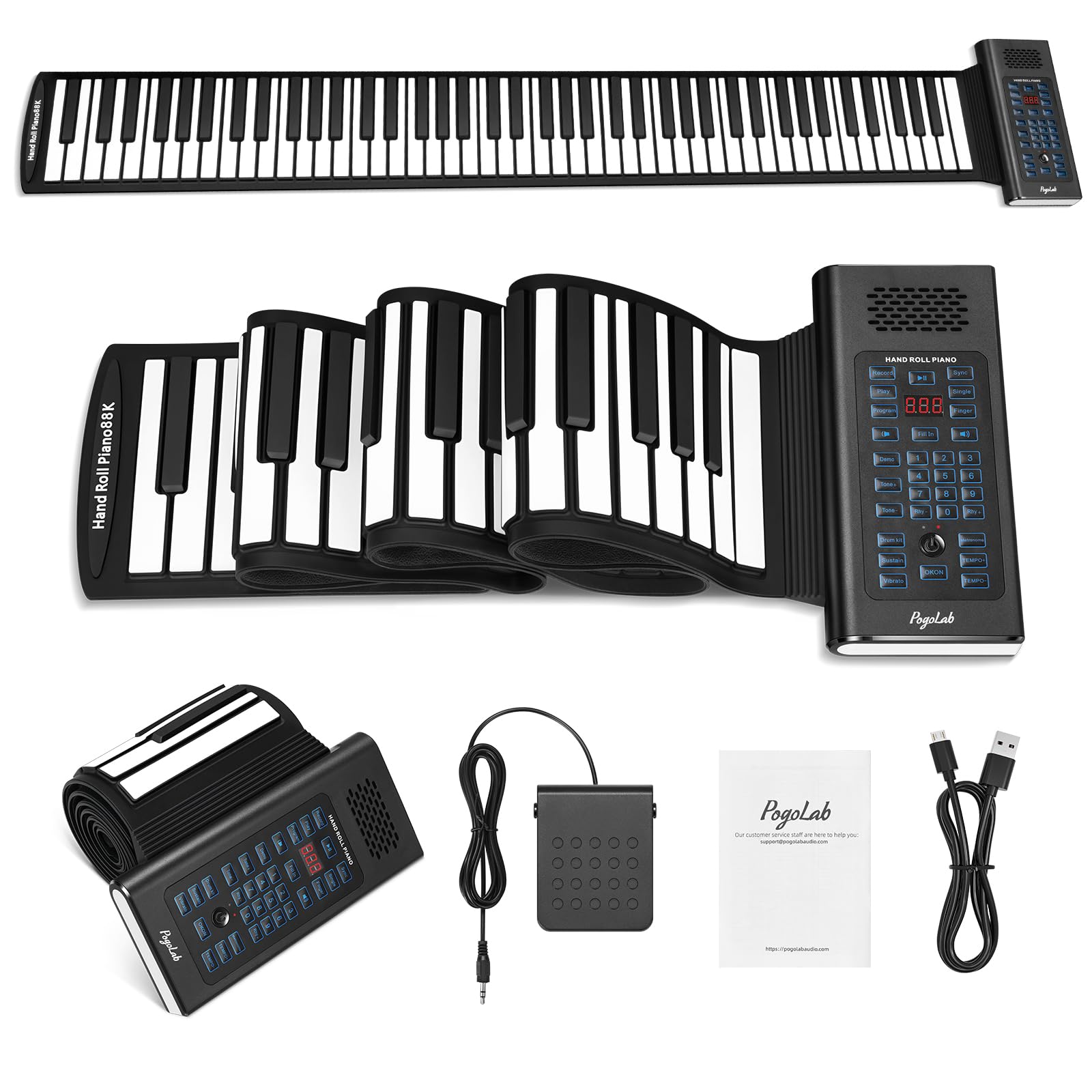
Image 1.1: The POGOLAB 88 Keys Roll Up Keyboard Piano in use, showcasing its flexible design and connectivity options.
2. What's in the Box
Upon unboxing, please verify that all the following items are included:
- 1 x POGOLAB US BR-A88 Roll Up Keyboard Piano
- 1 x Sustain Pedal
- 1 x USB Charging Cable
- 1 x User Manual

Image 2.1: The complete set of items included with your POGOLAB Roll Up Piano.
3. Product Features
The POGOLAB US BR-A88 Roll Up Keyboard Piano offers a range of features designed for convenience and musical exploration:
- 88 Keys Standard Keyboard: Provides a full range for diverse musical pieces.
- Portable & Foldable Design: Made with soft silicone keys, it can be easily rolled up for storage and transport, weighing only 2.91 lbs. Ideal for travel and practice anywhere.
- Multifunctional Control Panel: Features 20 demo songs, 128 tones, and 128 rhythms. Includes metronome, volume control, sustain, vibrato, chords, and recording functions.
- Wireless BT Function: Connects to piano game apps for interactive learning and practice.
- LED Display: For easy viewing of operational data and settings.
- Rechargeable Battery: Built-in Lithium Polymer battery provides 4-5 hours of playtime on a full charge via USB.
- Multiple Device Compatibility: Equipped with interfaces for headphones (3.5mm), audio input, microphone, and USB (for charging and MIDI OUT).

Image 3.1: The full 88-key layout of the POGOLAB Roll Up Piano.

Image 3.2: Overview of the piano's multifunctional capabilities.

Image 3.3: Product dimensions and weight, emphasizing its compact and portable nature.
4. Setup
Follow these steps to set up your POGOLAB Roll Up Keyboard Piano:
- Unroll the Piano: Gently unroll the silicone keyboard on a flat, stable surface. Ensure the control panel is positioned conveniently.
- Charge the Battery: Before first use, fully charge the piano using the provided USB cable. Connect the USB cable to the piano's USB port and a compatible USB power adapter (not included). The LED display will indicate charging status. A full charge typically provides 4-5 hours of playtime.
- Connect Sustain Pedal: Insert the sustain pedal's jack into the 'SUS' port on the control panel.
- Power On: Press the power button on the control panel to turn on the piano.

Image 4.1: Charging the POGOLAB Roll Up Piano via USB. The indicator light turns green when charging and off when fully charged.
5. Operating Instructions
Familiarize yourself with the control panel and various functions:
5.1 Control Panel Overview
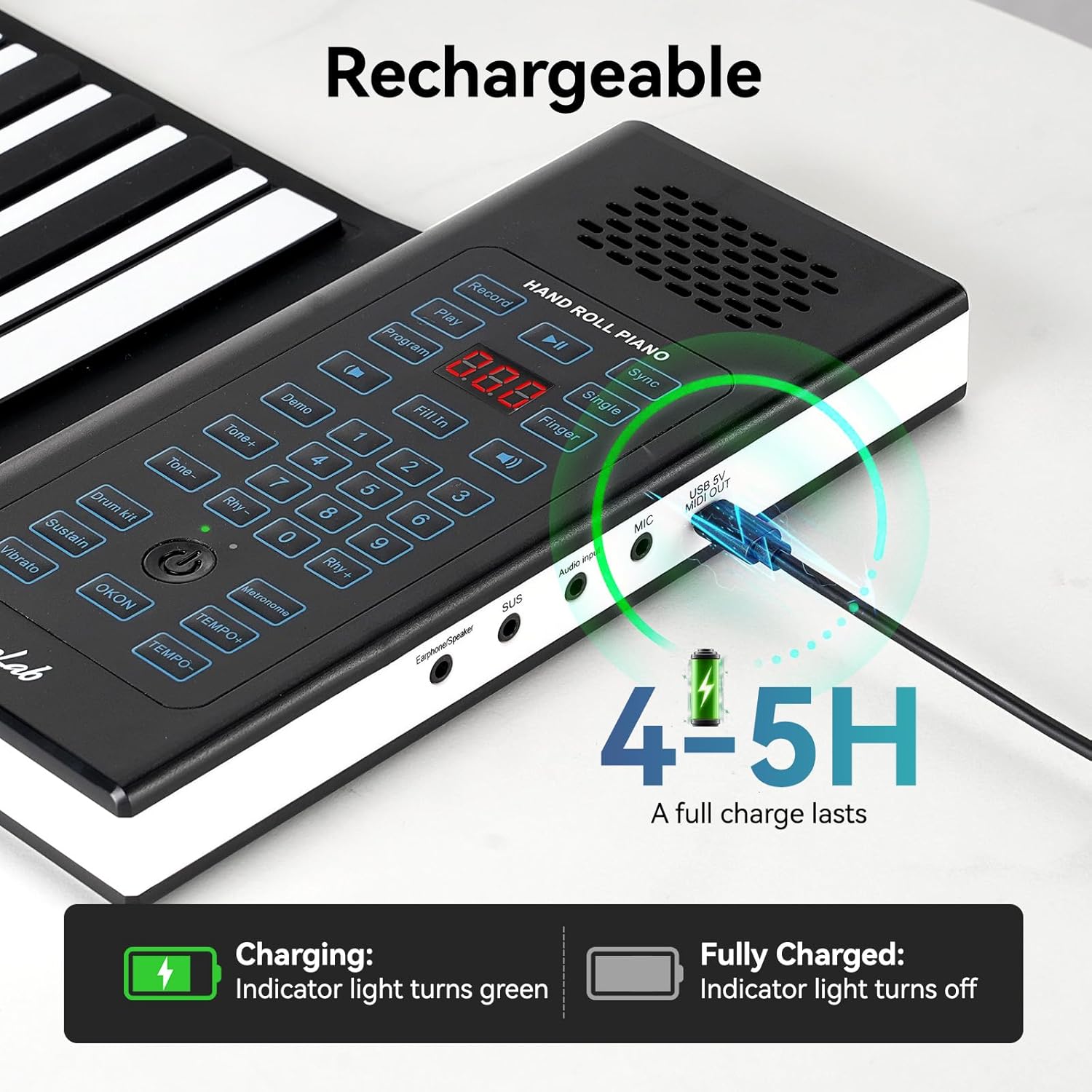
Image 5.1: The control panel with various function buttons and LED display.
- Record/Play: Press to record your playing; press again to play back.
- Program: Use to enter programming mode for custom sequences.
- Sync: Synchronizes accompaniment with your playing.
- Single/Finger: Toggles between single-finger chord and multi-finger chord modes.
- Fill In: Inserts a 1-2 syllable fill-in during rhythm playback.
- Demo: Plays one of the 20 built-in demo songs.
- Tone+/-: Adjusts the instrument tone (128 available).
- Rhythm+/-: Adjusts the rhythm style (128 available).
- Metronome: Provides 4 beat options for timing practice.
- Volume: Adjusts the overall volume.
- Sustain: Toggles the sustain effect on/off.
- Vibrato: Toggles the vibrato effect on/off.
- Transpose: Adjusts the pitch up or down.
- Drum Kit: Activates drum sounds on the keys.
5.2 Connectivity
The piano offers various connection options:
- Headphones (3.5mm Jack): Connect headphones for private practice.
- Audio Input: Connect external audio sources.
- Microphone Input: Connect a microphone for vocal accompaniment.
- USB 5V / MIDI OUT: Use the USB port for charging and MIDI output to connect to computers or other MIDI-compatible devices.
- Wireless BT Function: To connect to a piano game app (e.g., POP Piano App), enable Bluetooth on your device and pair with 'MIDI Piano'. This allows for interactive learning and practice.

Image 5.2: Various input/output ports on the control panel.

Image 5.3: Connecting the piano to a game app via Bluetooth for interactive practice.
Video 5.1: Demonstration of the POGOLAB 88 Keys Roll Up Keyboard Piano's features and sound.
6. Maintenance & Care
To ensure the longevity and optimal performance of your roll-up piano, follow these care instructions:
- Cleaning: The keys are made of soft silicone material. Wipe them gently with a damp cloth to remove dust or spills. Avoid using harsh chemicals or abrasive cleaners.
- Storage: When not in use, roll up the piano and store it in a dry, cool place away from direct sunlight and extreme temperatures.
- Handling: Avoid sharp objects that could puncture or damage the silicone keys. Do not pull or stretch the keyboard excessively.

Image 6.1: Cleaning the silicone keys of the piano.
7. Troubleshooting
If you encounter any issues with your POGOLAB Roll Up Keyboard Piano, refer to the following common problems and solutions:
| Problem | Possible Cause | Solution |
|---|---|---|
| No sound or low volume | Low battery; Volume too low; Headphones not properly connected. | Charge the piano; Increase volume using the control panel; Ensure headphones are fully plugged in. |
| Keys not responding | Piano not powered on; Keyboard not laid flat; Damaged keys. | Turn on the piano; Ensure the keyboard is on a flat, even surface; Contact customer support if keys are damaged. |
| Bluetooth connection issues | Bluetooth not enabled on device; Incorrect pairing; Interference. | Ensure Bluetooth is on and visible; Pair with 'MIDI Piano'; Move closer to the device or away from other wireless devices. |
| MIDI function not working | Incorrect cable; Software incompatibility; Driver issues. | Ensure you are using the correct USB cable for MIDI OUT; Check software requirements and drivers for your computer/device. Note: Some users have reported issues with MIDI functionality; please ensure your setup is compatible. |
8. Specifications
| Feature | Detail |
|---|---|
| Model Number | US BR-A88 |
| Number of Keys | 88 |
| Material Type | Plastic (Flexible Silicone Keys) |
| Item Weight | 3.65 pounds (approx. 1.66 kg) |
| Package Dimensions | 10.67 x 9.06 x 3.9 inches |
| Power Source | Battery Powered (1 Lithium Polymer battery included) |
| Connectivity Technology | USB, Wireless BT |
| Connector Type | USB, 3.5mm Jack (Headphones, Audio In, Mic) |
| Special Features | Digital Display, Roll Up Design, Sustain Pedal Support |
| Tones | 128 |
| Rhythms | 128 |
| Demo Songs | 20 |
| Supported Software | Piano game apps |
| Skill Level | Beginner |
9. Warranty and Support
POGOLAB products are manufactured to high-quality standards. For warranty information, technical support, or any product-related inquiries, please refer to the contact information provided with your purchase or visit the official POGOLAB website. Keep your purchase receipt as proof of purchase for warranty claims.