
Introduction
Thank you for choosing the LIORQUE Wireless Weather Station YGH6208. This device provides accurate indoor and outdoor temperature and humidity readings, weather forecasts, and features a DCF radio-controlled clock with alarm functions. This manual will guide you through the setup, operation, and maintenance of your weather station.
Package Contents
- 1 x LIORQUE Wireless Weather Station (Main Unit)
- 1 x Outdoor Sensor
- 3 x AAA Batteries (for Main Unit)
- 2 x AAA Batteries (for Outdoor Sensor)
- 1 x User Manual (this document)
Product Overview
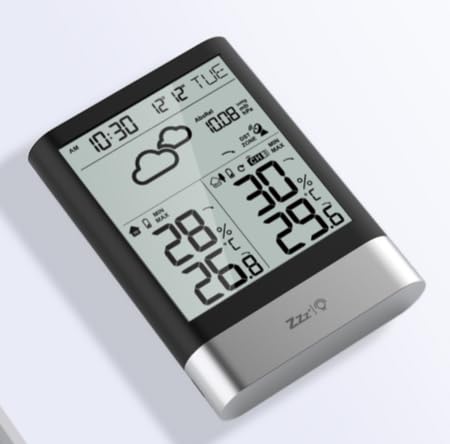
Image 1: LIORQUE Wireless Weather Station Main Unit. This image shows the front view of the main display unit, highlighting its LCD screen and compact design.
Main Unit Features:
- 4.3-inch LCD screen with backlight
- Indoor temperature and humidity display
- Outdoor temperature and humidity display
- Weather forecast icons
- DCF radio-controlled clock with manual setting option
- Double alarm clock with snooze function
- Calendar and day of the week display (7 languages)
- Max/Min temperature and humidity records
- Air pressure display and weather trend
- 12/24 hour time display
Outdoor Sensor Features:
- Wireless transmission up to 100m (open area)
- Temperature and humidity measurement
- Supports hanging or standing placement
- Data updated every 30 seconds
- Supports up to 3 sensors (one included)
Setup
1. Battery Installation
- Outdoor Sensor: Open the battery compartment cover on the back of the outdoor sensor. Insert 2 x AAA batteries, ensuring correct polarity (+/-). Close the cover.
- Main Unit: Open the battery compartment cover on the back of the main unit. Insert 3 x AAA batteries, ensuring correct polarity (+/-). Close the cover.
- The main unit will power on and display indoor readings.
2. Sensor Pairing
After installing batteries in both units, the main unit will automatically search for the outdoor sensor. The outdoor temperature and humidity should appear on the main unit's display within a few minutes. If the outdoor readings do not appear:
- Ensure both units are within range (up to 100m in open air).
- Press the "TX" button inside the outdoor sensor's battery compartment to manually send a signal.
- On the main unit, press and hold the "CHANNEL" button to initiate a manual search for the sensor.
3. Initial Settings (Time, Date, Units)
The weather station will attempt to synchronize with the DCF radio signal for automatic time setting. This may take several hours, especially in areas with weak signals. You can manually set the time and date if needed.
- Manual Time Setting: Press and hold the "MODE" button to enter time setting mode. Use the "UP" and "DOWN" buttons to adjust values and "MODE" to confirm and move to the next setting (e.g., 12/24 hour format, hour, minute, year, month, day, language for day of week).
- Temperature Units: Press the "°C/°F" button to switch between Celsius and Fahrenheit.
- Air Pressure Units: Press the "BARO" button to cycle through air pressure units (e.g., hPa, inHg).
Operating Instructions
Display Information
The 4.3-inch LCD screen displays various information:
- Time and Date: Current time, date, and day of the week.
- Indoor Readings: Current indoor temperature and humidity.
- Outdoor Readings: Current outdoor temperature and humidity from the connected sensor.
- Weather Forecast: Icons indicating predicted weather conditions (e.g., sunny, cloudy, rainy).
- Air Pressure: Current atmospheric pressure and trend.
- Backlight: The screen backlight activates with a light touch and returns to normal brightness after 10 seconds to conserve battery.
Alarm Clock Function
The weather station features a double alarm clock with snooze.
- Setting Alarms: Press the "ALARM" button to view Alarm 1. Press "ALARM" again to view Alarm 2. Hold "ALARM" to enter alarm setting mode. Use "UP" and "DOWN" to adjust the hour and minute, and "ALARM" to confirm.
- Activating/Deactivating Alarms: While viewing an alarm, press "UP" to toggle it on or off. An alarm icon will appear when active.
- Snooze Function: When an alarm sounds, press any button (except "ALARM OFF") to activate snooze. The alarm will sound again after a set interval. Press "ALARM OFF" to stop the alarm completely.
Maximum and Minimum Records
The weather station records the maximum and minimum indoor/outdoor temperature and humidity values.
- Press the "MAX/MIN" button once to display maximum recorded values.
- Press "MAX/MIN" again to display minimum recorded values.
- Press "MAX/MIN" a third time to return to current readings.
- To clear records, hold the "MAX/MIN" button while viewing the records.
Maintenance
- Battery Replacement: Replace batteries in both the main unit and outdoor sensor when the low battery indicator appears on the display. Always replace all batteries at the same time.
- Cleaning: Clean the display and unit surfaces with a soft, damp cloth. Do not use abrasive cleaners or solvents.
- Outdoor Sensor Placement: For optimal performance and longevity, install the outdoor sensor in a shaded area, protected from direct sunlight and rain. Ensure it is within the 100m wireless range of the main unit.
Troubleshooting
| Problem | Possible Solution |
|---|---|
| No outdoor temperature/humidity display. |
|
| Incorrect time display. |
|
| Display is dim or blank. |
|
| Weather forecast seems inaccurate. |
|
Specifications
- Model: YGH6208
- Brand: LIORQUE
- Display Type: LCD
- Power Source (Main Unit): 3 x AAA batteries (included)
- Power Source (Outdoor Sensor): 2 x AAA batteries (included)
- Wireless Range: Up to 100m (open area)
- Temperature Accuracy: ±0.5 °C
- Sensor Technology: Funk (Wireless)
- Special Features: DCF Radio Clock, Alarm, Snooze, Weather Forecast, Max/Min Records, Backlight
- Included Components: Weather Station Main Unit, Outdoor Sensor
Warranty and Support
LIORQUE products are designed for reliability and performance. For warranty information or technical support, please refer to the contact details provided with your purchase or visit the official LIORQUE website. Please retain your proof of purchase for warranty claims.

