
1. Introduction
This manual provides comprehensive instructions for the Hodozzy 9-Inch 6G+128G Double Din Car Stereo. It covers installation, operation, and maintenance to ensure optimal performance and user experience. Please read this manual thoroughly before using the device.

Image 1.1: Hodozzy 9-Inch Android Touch Screen Car Stereo Overview.
2. Package Contents
The following items are included in your Hodozzy 9-Inch 6G+128G Double Din Car Stereo package. Please verify all components are present upon unboxing.
- Power Cable
- 4/6Pin USB Cable
- Rear Camera Input Cable
- RCA Cable
- Bracket
- GPS Antenna
- User Manual
- MIC & Camera (Backup camera)

Image 2.1: Included components and device dimensions.
3. Installation Guide
Proper installation is crucial for the functionality and safety of your car stereo. It is recommended that installation be performed by a qualified professional.
3.1 Wiring Diagram
Refer to the following diagram for correct wiring connections. Ensure all connections are secure to prevent malfunctions.

Image 3.1: Detailed wiring connections for the car stereo.
3.2 Reversing Camera Installation
Follow these steps to install the reversing camera:
- Connect the red cable (A) to the positive pole of the car reversing light cable.
- Connect the black cable (B) to the negative pole of the car reversing light cable.
- Connect the reversing trigger wire cable (D, pink color) to the red cable (A). This is an extension of the video input wire.
- Connect the video input wire from the camera to the designated input on the car stereo.

Image 3.2: Reversing camera wiring and connection points.
4. Operating Instructions
This section details the operation of your Hodozzy car stereo's various functions.
4.1 Power On/Off
The unit powers on automatically with the vehicle's ignition. To manually power off or on, press and hold the power button located on the front panel.
4.2 Wireless CarPlay & Android Auto
Connect your smartphone wirelessly via Wi-Fi and Bluetooth to access navigation, music, and messaging apps directly on the car stereo display.
- Ensure Bluetooth and Wi-Fi are enabled on your smartphone.
- Pair your phone with the car stereo via Bluetooth.
- Follow the on-screen prompts to initiate Wireless CarPlay or Android Auto.

Image 4.1: Wireless CarPlay and Android Auto connectivity.
4.3 Mirror Link
The Wireless Mirror Link function allows you to display your smartphone's screen directly on the car stereo. This feature supports most applications on your phone.
4.4 Audio Settings (DSP, HIFI, FM/RDS)
The integrated Digital Signal Processor (DSP) and HIFI audio technology allow for precise sound customization. Access the audio settings menu to adjust equalizer presets, balance, fader, and other sound parameters. The FM/RDS radio provides clear reception and displays station information where available.

Image 4.2: Audio control interface including DSP and radio functions.
4.5 Navigation (GPS, Offline Maps)
The unit includes a built-in GPS antenna for navigation. You can download offline maps for use without an internet connection. Access navigation applications through the main menu.
4.6 Personalized Features (Split Screen, UI Themes)
Customize your user experience with various features:
- Split Screen: View two applications simultaneously, such as navigation and music playback.
- Theme UI Library: Select from a range of user interface themes to personalize the display.
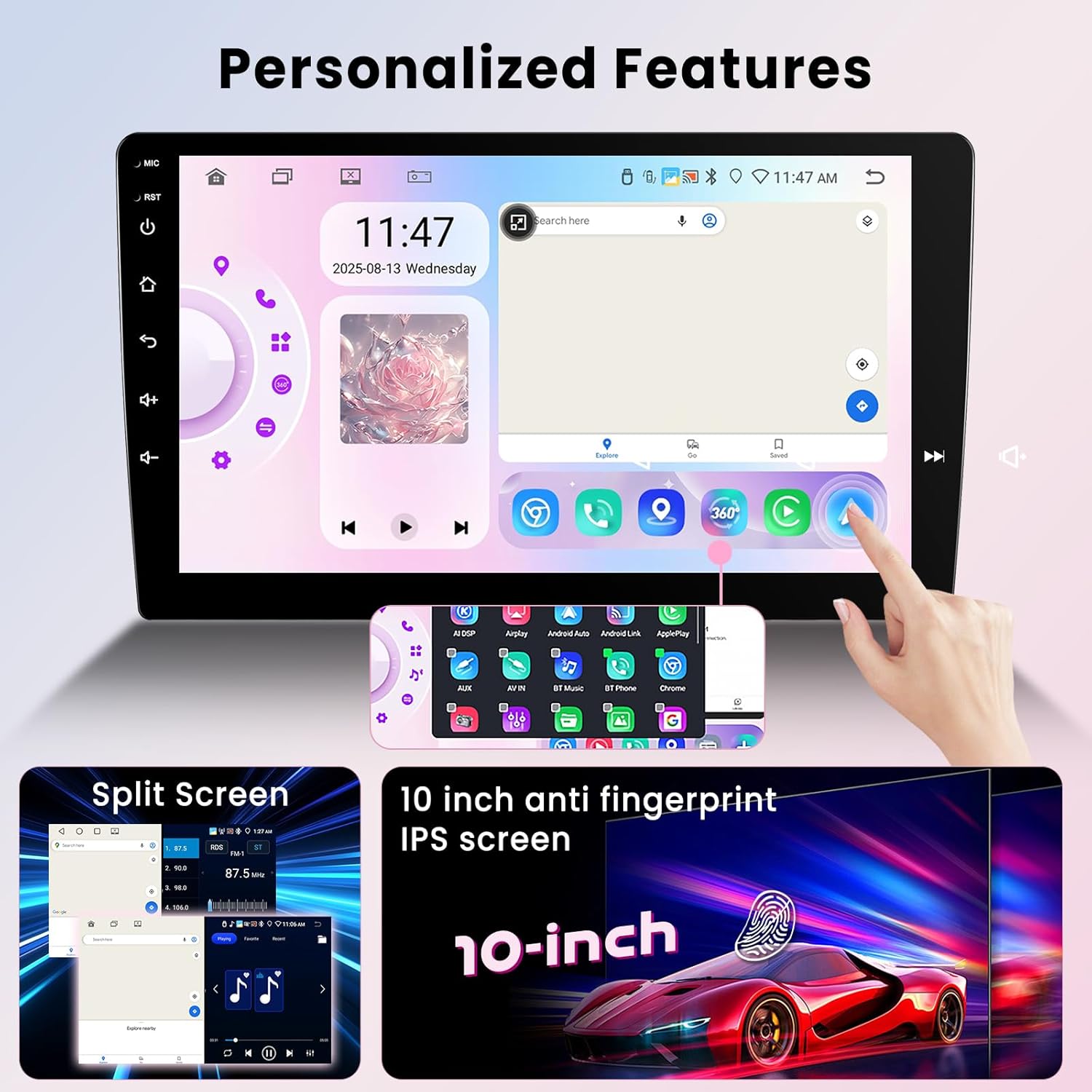
Image 4.3: Split screen mode and customizable interface.
4.7 360° Panoramic View (Optional Camera)
When connected to compatible 360-degree cameras (sold separately), the car stereo can display a panoramic view around your vehicle, assisting with parking and maneuvering by eliminating blind spots.
4.8 Steering Wheel Control (SWC)
The unit supports integration with your vehicle's factory steering wheel controls. This allows you to manage audio, calls, and other functions without taking your hands off the wheel. Configuration may be required in the system settings.

Image 4.4: Reversing camera view and steering wheel control integration.
5. Performance Overview
The Hodozzy car stereo features an 8-core processor, 6GB RAM, and 128GB ROM, running on Android 15. This configuration provides responsive performance for multitasking and running various applications. It includes built-in 5G Wi-Fi for fast internet connectivity.

Image 5.1: Internal hardware specifications for high operational performance.
6. Maintenance
To ensure the longevity and optimal performance of your car stereo, follow these maintenance guidelines:
- Cleaning: Use a soft, dry cloth to clean the screen and exterior. Avoid abrasive cleaners or solvents.
- Temperature: Avoid exposing the unit to extreme temperatures, both hot and cold, for extended periods.
- Software Updates: Periodically check for and install available software updates to ensure system stability and access to new features.
- Connections: Ensure all cables and connections remain secure. Loose connections can lead to intermittent issues.
7. Troubleshooting
If you encounter issues with your Hodozzy car stereo, refer to the following common problems and solutions:
| Problem | Possible Cause | Solution |
|---|---|---|
| Unit does not power on | Incorrect wiring, blown fuse, vehicle power issue | Check power cable connections, inspect vehicle fuses, consult a professional installer. |
| Screen freezes or is unresponsive | Software glitch, temporary system error | Perform a soft reset (refer to device settings for reset option) or disconnect and reconnect power to the unit. |
| Backup camera not displaying image | Loose camera connection, faulty camera, incorrect wiring | Verify all camera wiring connections (refer to Section 3.2), test with a known working camera if possible. |
| GPS signal is weak or unavailable | GPS antenna obstruction, damaged antenna, poor satellite reception | Ensure GPS antenna is placed in an unobstructed location, check antenna connection, replace antenna if damaged. |
| Wireless CarPlay/Android Auto not connecting | Bluetooth/Wi-Fi off on phone, incorrect pairing, software issue | Ensure phone's Bluetooth and Wi-Fi are active, delete previous pairings and re-pair, restart both phone and car stereo. |
8. Specifications
Detailed technical specifications for the Hodozzy 9-Inch 6G+128G Double Din Car Stereo:
- Item Weight: 2.2 pounds
- Package Dimensions: 3.94 x 3.94 x 3.94 inches
- Display Size: 9 Inches
- ASIN: B0FSZ49CMP
- Brand: Hodozzy
- Connectivity Technology: Bluetooth, Wi-Fi
- Special Features: Android Auto, Apple CarPlay, Built-In Bluetooth, GPS, DSP, 360° Panoramic View Support, Split Screen
- Operating System: Android 15
- RAM: 6GB
- ROM: 128GB
- Processor: 8-Core
9. Warranty and Support
Your Hodozzy 9-Inch 6G+128G Double Din Car Stereo is covered by a 2-year warranty. For technical support, troubleshooting assistance, or to inquire about warranty claims, please contact Hodozzy Direct.
To contact support:
- Locate the product listing on Amazon.
- Click on the seller name, "Hodozzy Direct".
- On the seller's page, click the "Ask a question" button to send a message.

Image 9.1: Guide to contacting Hodozzy Direct for support.


