
Introduction
This manual provides detailed instructions for the HOXLRSA P110 Smart Watch. Please read this manual thoroughly before using your device to ensure proper operation and to maximize its features. This smart watch is designed for daily use, fitness tracking, and communication, compatible with both Android and iOS devices.
Package Contents
Verify that all items are present in your package:
- HOXLRSA P110 Smart Watch
- Two Watch Straps (different colors)
- Charging Cable
- Instruction Manual

Image: Overview of the HOXLRSA P110 Smart Watch, its dimensions, and included accessories such as two watch straps, a charging cable, and the instruction manual.
Setup
1. Charging the Smart Watch
Before initial use, fully charge your smart watch. Connect the charging cable to the watch's charging port and plug the USB end into a standard USB power adapter (not included) or a computer's USB port. The watch display will indicate charging status.
2. App Installation
To utilize all features of your HOXLRSA P110 Smart Watch, you must install the FitCloudPro application on your smartphone.
- Turn on the Bluetooth function on your phone.
- Open the Google Play Store (for Android) or App Store (for iOS).
- Search for "FitCloudPro" and download the application. Alternatively, scan the QR code below to download the app.
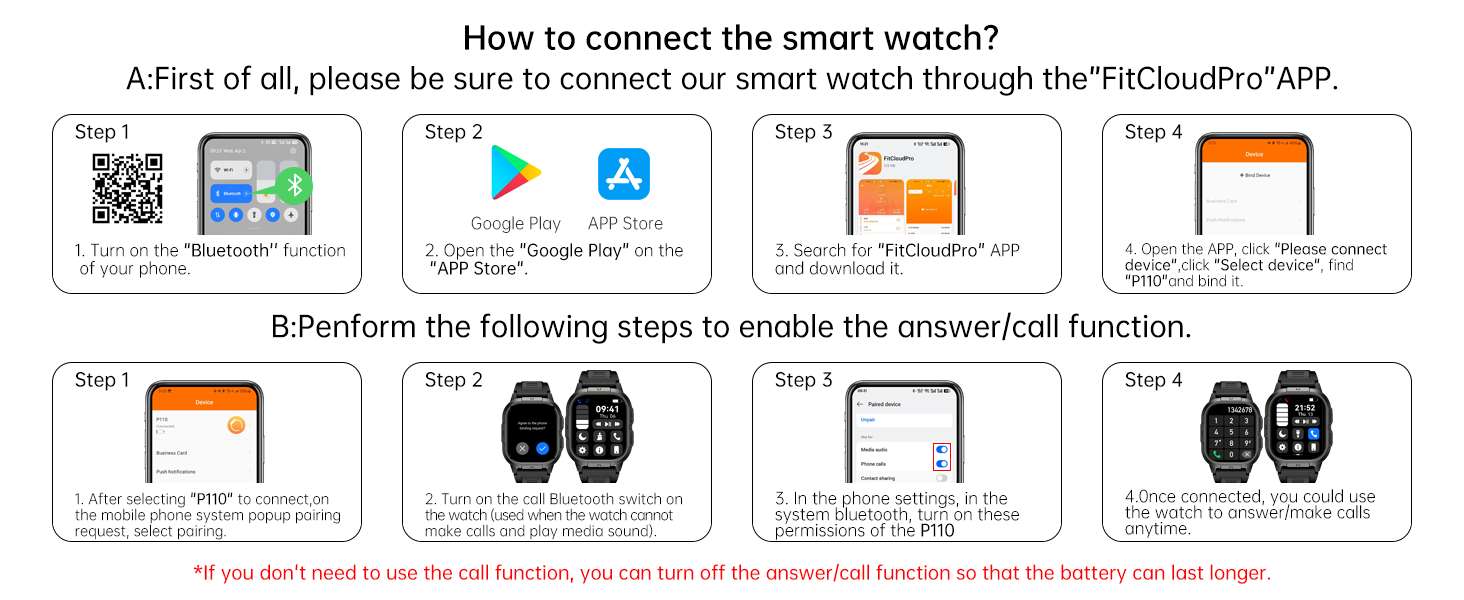
Image: Visual guide demonstrating the steps to connect the smart watch, including turning on Bluetooth, downloading the FitCloudPro app, searching for the device, and binding it.
QR Code for FitCloudPro App: https://qr21.cn/CPE9oML
3. Pairing the Smart Watch
After installing the app, follow these steps to pair your watch:
- Open the FitCloudPro app and click "Please connect device".
- Select "P110" from the list of available devices and bind it.
- After selecting "P110" to connect, respond to the mobile phone system popup pairing request.
4. Enabling Call Function
To use the call/answer function, an additional Bluetooth connection is required:
- Turn on the call Bluetooth switch on the watch. This allows the watch to make calls and play media sound.
- In your phone's Bluetooth settings, turn on the necessary permissions for the P110 device.
- Once connected, you can use the watch to answer/make calls.
Note: If you do not need the call function, you can turn off the answer/call function to conserve battery life.
Operating the Smart Watch
Basic Navigation
The HOXLRSA P110 features a 2.06" AMOLED color screen for touch interaction and physical buttons for navigation. Swipe across the screen to access different functions and menus.

Image: Details of the 2.06-inch AMOLED display, highlighting vivid colors, smooth operation, and options for call settings and wrist-raise-to-wake functionality.
Bluetooth Call and Message Reminder
With the Bluetooth call function enabled, you can make and answer calls directly from your watch. The built-in high-fidelity speaker and noise reduction microphone ensure clear communication. The watch also displays notifications for calls, SMS, and various social media apps (WhatsApp, Facebook, etc.).

Image: A user making a call on the HOXLRSA P110 Smart Watch, with on-screen displays of dial pad, call records, and contact lists. Icons for various social media apps are also shown, indicating message notification capabilities.

Image: A person wearing the HOXLRSA P110 Smart Watch, demonstrating its ability to answer or make calls at any time, with icons for call functions, notification alerts, built-in mic/speaker, and AI voice assistant.

Image: A person wearing the HOXLRSA P110 Smart Watch, receiving smart message notifications from various social media platforms like Instagram, Facebook, and WhatsApp directly on the watch display.
AI Voice Assistant
Activate the AI Voice Assistant to control your phone's smart voice assistant directly from your watch. Use voice commands for tasks like setting alarms, checking the weather, or opening apps.

Image: A person interacting with the HOXLRSA P110 Smart Watch using voice commands for tasks such as setting a countdown, asking about the weather, and opening a music app.
Other Practical Functions
The HOXLRSA P110 Smart Watch includes a variety of useful functions:
- Music Control: Play, pause, skip tracks, and adjust volume for music playing on your phone.
- Camera Control: Remotely trigger your phone's camera shutter.
- Weather Forecast: Get real-time weather updates.
- Alarm Clock, Stopwatch, Timer: Essential time management tools.
- Find Phone/Watch: Locate your paired phone or watch if misplaced.
- Flashlight: Use the watch screen as a light source.
- Sedentary Reminder: Get alerts to move after periods of inactivity.
- Screen Brightness Adjustment: Customize display brightness.

Image: A collage showcasing various practical functions of the HOXLRSA P110 Smart Watch, including music control, remote camera control, weather forecast display, and stopwatch functionality.

Image: A grid displaying additional practical functions of the HOXLRSA P110 Smart Watch, such as alarm clock, world clock, stopwatch, timer, blood pressure monitoring, camera control, weather forecast, music control, find phone, and breathing training.
Customizing Watch Faces
Personalize your watch with over 200 watch faces available through the FitCloudPro app. You can also upload your favorite images to create custom watch faces.
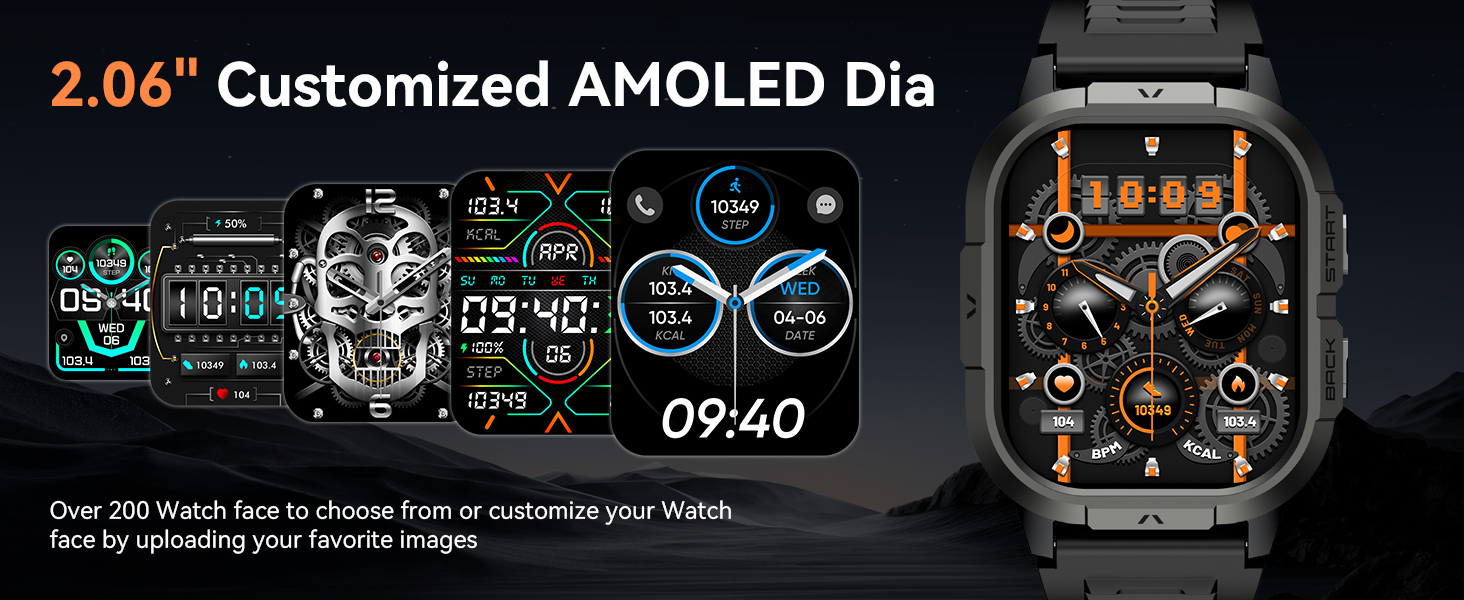
Image: A selection of customized AMOLED watch faces for the HOXLRSA P110 Smart Watch, demonstrating various styles and data displays available to users.
Health Monitoring
The HOXLRSA P110 Smart Watch is equipped with advanced sensors to monitor your health metrics.
Heart Rate Monitor
The watch uses high-performance optical sensors to monitor your dynamic heart rate in real-time, 24/7. View your heart rate data in the FitCloudPro app for detailed analysis.

Image: A man exercising in a gym, with an overlay showing the HOXLRSA P110 Smart Watch's 24-hour heart rate monitoring feature, displaying heart rate data over time.
Blood Oxygen (SpO2) Monitor
Continuously measure your blood oxygen saturation (SpO2) throughout the day. This feature helps you monitor your breathing and overall well-being.

Image: A person hiking in a mountainous landscape, with an overlay showing the HOXLRSA P110 Smart Watch's continuous blood oxygen (SpO2) monitoring, displaying a graph of SpO2 levels.
Sleep Monitor
The watch accurately tracks your personal sleep patterns, detecting blood oxygen saturation and stress levels. The FitCloudPro app provides a detailed sleep quality analysis report (light, deep, and awake sleep stages) to help you adjust your lifestyle for better sleep.
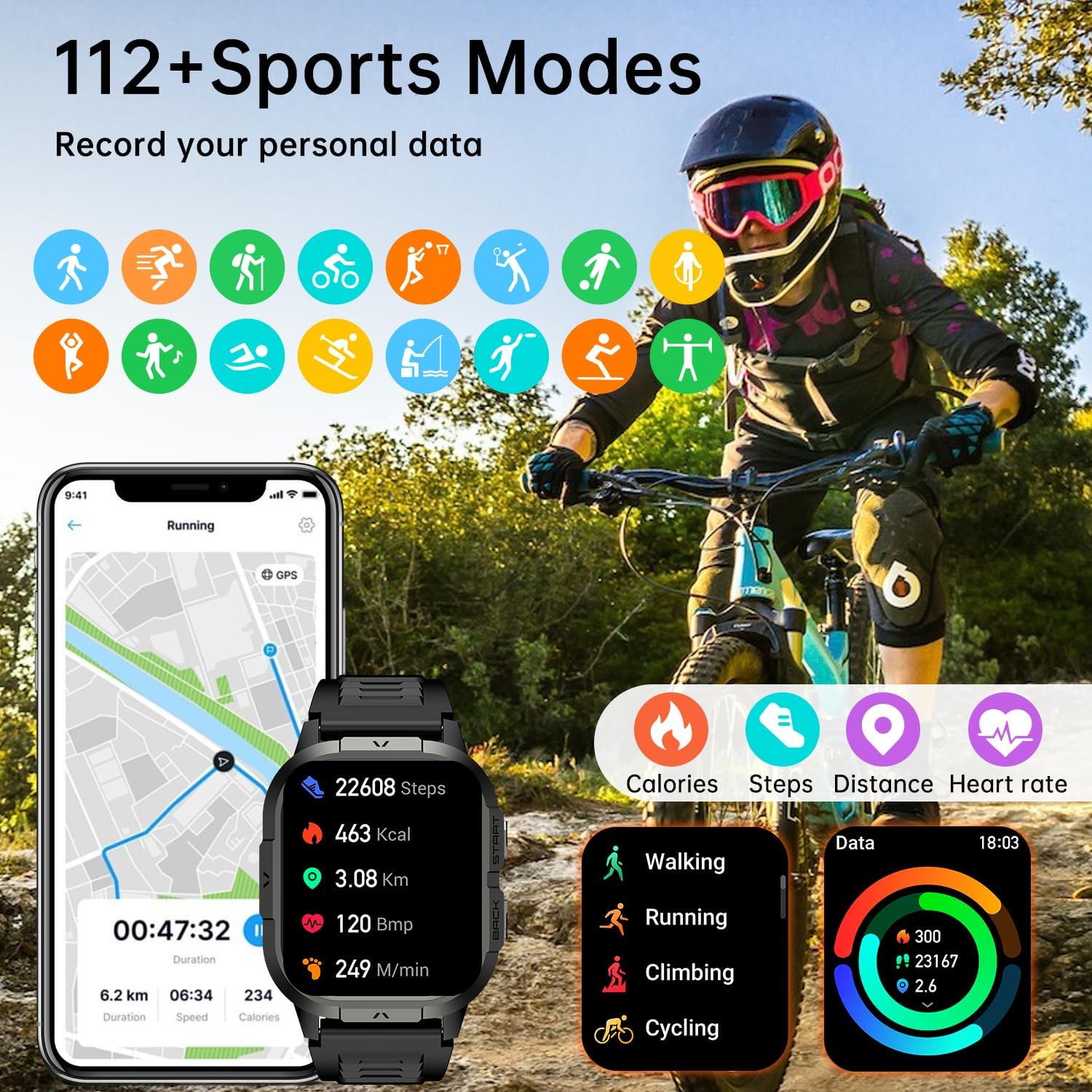
Image: A person sleeping, with the HOXLRSA P110 Smart Watch displaying sleep duration and stages (deep, light, wake up). Below, health monitoring icons for heart rate, blood oxygen, and breath training are shown, with a heart rate reading of 90 BPM.

Image: A person sleeping, with the HOXLRSA P110 Smart Watch displaying sleep data and a graph illustrating light, deep, and awake sleep stages over time.
Breathing Training
Utilize the breathing training function to guide you through exercises that can help reduce stress and improve relaxation.
Sports Modes
The HOXLRSA P110 Smart Watch offers over 100 sports modes to track your physical activity. It records daily data such as steps, time, distance, and calories.
- Supported Activities: Running, cycling, climbing, walking, yoga, skiing, football, and many more.
- GPS Connection: Connects to your phone's GPS to record all your training routes and fitness data within the app.

Image: A person cycling outdoors, with the HOXLRSA P110 Smart Watch displaying various sports tracking data such as steps, calories, distance, and heart rate. Icons representing over 112 sports modes are shown.

Image: A person cycling, with the HOXLRSA P110 Smart Watch displaying exercise data like duration, steps, calories, and distance. The image also shows a phone screen with a list of over 120 sports modes available in the app.
Durability and Water Resistance
The HOXLRSA P110 Smart Watch is built to military standards, offering robust durability for various environments.
- Military Standard Quality: Strong resistance to scratches, drops, and polishing. It has passed tests for temperature, high altitude, low air pressure, dust, salt spray, and liquid contamination.
- IP68 Waterproof: This rating ensures the watch can withstand daily water exposure, such as hand washing, rain, and splashes. It is suitable for swimming but not recommended for hot water activities or deep diving.
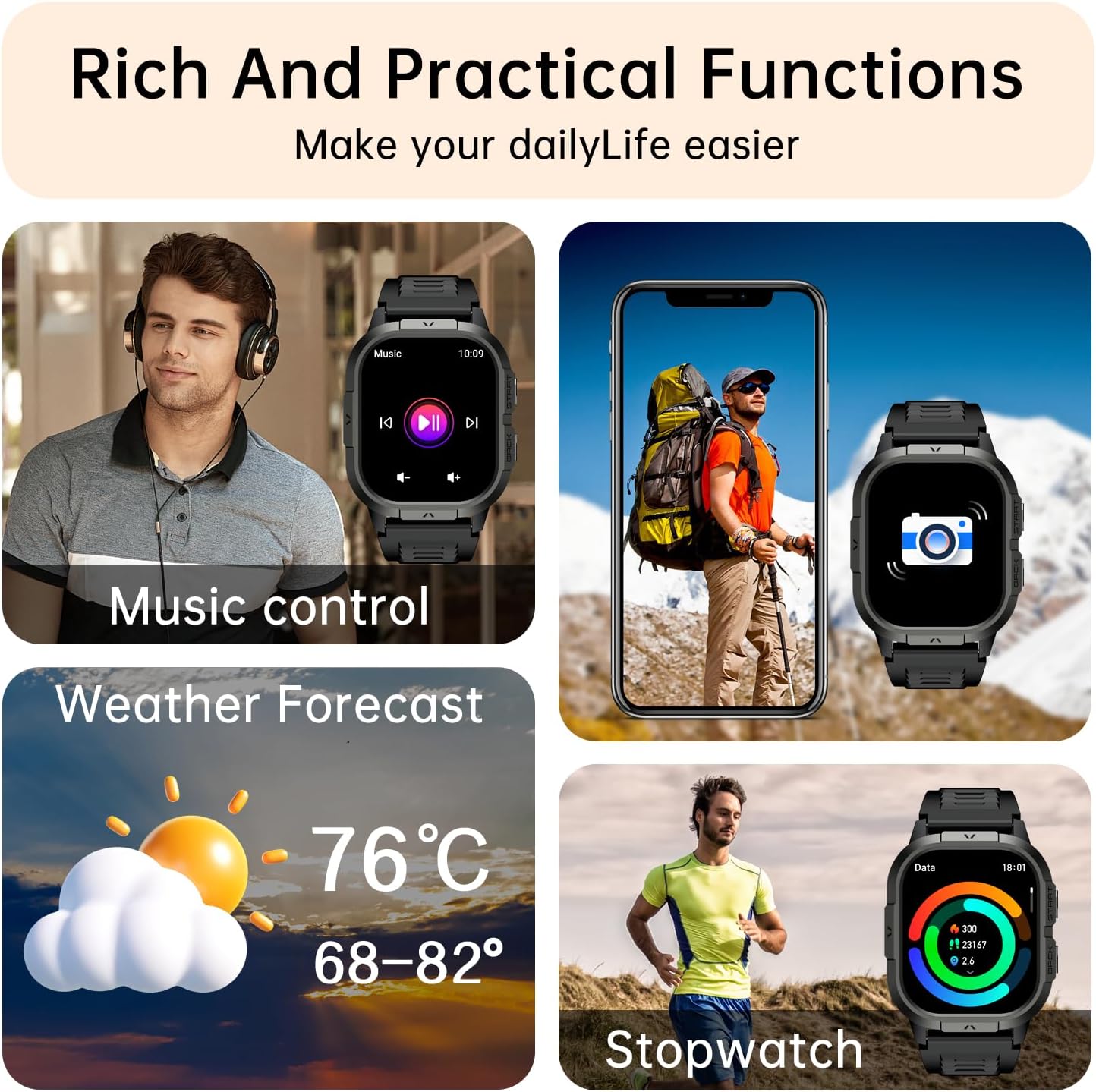
Image: A collage demonstrating the HOXLRSA P110 Smart Watch's military-grade durability, including IP68 waterproof rating, temperature resistance, dust-proof design, and anti-impact capabilities, shown in various rugged environments.

Image: An illustration highlighting the HOXLRSA P110 Smart Watch's "Three-prevention Technology" (anti-scratch, anti-smashing, extremely tough quality) and various tests it has passed, including salt spray, high/low temperature, shock, vibration, rain, sand/dust, and fluid contamination tests.

Image: The HOXLRSA P110 Smart Watch being splashed with water, illustrating its IP68 waterproof rating and ability to meet daily waterproofing needs.
Maintenance
Proper maintenance ensures the longevity and optimal performance of your smart watch.
- Cleaning: Regularly wipe the watch screen and straps with a soft, dry cloth. For stubborn dirt, use a slightly damp cloth and mild soap, then rinse and dry thoroughly. Avoid harsh chemicals.
- Charging: Use only the provided charging cable. Avoid exposing the charging contacts to water or corrosive liquids.
- Storage: Store the watch in a cool, dry place when not in use. Avoid extreme temperatures.
- Water Exposure: While IP68 waterproof, it is advisable to dry the watch thoroughly after exposure to water to prevent skin irritation and ensure proper sensor function.
Troubleshooting
If you encounter issues with your HOXLRSA P110 Smart Watch, refer to the following common solutions:
- Watch not turning on: Ensure the watch is fully charged. Connect it to the charger for at least 30 minutes.
- Unable to pair with phone:
- Ensure Bluetooth is enabled on your phone and the watch.
- Make sure the watch is within range of your phone.
- Restart both your phone and the watch.
- Clear the Bluetooth cache on your phone and try pairing again.
- Ensure the FitCloudPro app has all necessary permissions enabled.
- Call function not working:
- Verify that the call Bluetooth function is enabled on the watch.
- Check your phone's Bluetooth settings to ensure the watch is connected for calls and media audio.
- Grant all required permissions to the FitCloudPro app and the Bluetooth connection for the watch.
- Inaccurate health data:
- Ensure the watch is worn snugly on your wrist, not too tight or too loose.
- Clean the sensor on the back of the watch.
- Avoid excessive movement during measurements.
- Short battery life:
- Reduce screen brightness.
- Disable unnecessary notifications.
- Turn off the call function if not frequently used.
- Limit continuous heart rate or SpO2 monitoring if not required 24/7.
Specifications
| Model Number | P110 |
| Brand | HOXLRSA |
| Display Type | AMOLED |
| Screen Size | 2.06 inches |
| Operating System | Android and iOS compatible (Android 5.0+, iOS 9.0+) |
| Water Resistance Level | IP68 Waterproof |
| Battery Type | Lithium Ion (1 required, included) |
| Item Weight | 5 ounces |
| Package Dimensions | 11.3 x 3.35 x 0.75 inches |
| Special Features | Fitness Tracker, Phone Call, Sleep Monitor, Blood Oxygen (SpO2) Monitor, Heart Rate Monitor, Calorie Tracker, Alarm Clock, Stopwatch, Timer, Pedometer, Camera Control, Music Playback/Control, Sedentary Reminder, Weather, Waterproof, Notifications, AI Voice Assistant |
| UPC | 717839946705 |
Warranty and Support
For warranty information or technical support, please refer to the documentation included with your purchase or contact the manufacturer directly. Keep your purchase receipt as proof of purchase.


