
Introduction
This manual provides comprehensive instructions for the HOXLRSA Smart Watch P110. It covers device setup, operational procedures, health monitoring features, sports tracking, communication functions, and maintenance guidelines. The P110 smart watch is designed with military-standard durability, featuring a 2.06-inch AMOLED color screen and compatibility with both Android (5.0 and above) and iOS (9.0 and above) devices.
1. Setup
1.1 Initial Charging
Before first use, fully charge the smart watch using the provided magnetic charging cable. Connect the magnetic end to the charging contacts on the back of the watch and the USB end to a standard USB power adapter (not included). A full charge typically takes approximately 2 hours.
1.2 App Installation and Device Pairing
- Download the App: Search for and download the "FitCloudPro" application from your smartphone's app store (Google Play Store for Android or Apple App Store for iOS).
- Enable Bluetooth: Ensure Bluetooth is enabled on your smartphone.
- Open App and Pair: Open the FitCloudPro app, register or log in, and follow the on-screen instructions to add your device. The app will scan for available devices. Select "P110" or the corresponding device name to initiate pairing.
- Confirm Pairing: Confirm the pairing request on both your smartphone and the smart watch if prompted.
- Grant Permissions: Grant necessary permissions (e.g., notifications, location, health data) to the app for full functionality.

Image: The 2.06-inch HD touch screen displaying various customizable watch faces available through the FitCloudPro app.
2. Operating Instructions
2.1 Basic Navigation
- Touch Screen: Tap to select items, swipe left/right to navigate between main screens, swipe up/down to access quick settings or notifications.
- Side Button: Press to return to the home screen or wake the device. Long press for power options.
2.2 Bluetooth Call and Message Reminders
The smart watch features a built-in high-fidelity speaker and noise reduction microphone, allowing you to make and answer calls directly from your wrist. It also displays notifications for incoming calls, SMS, and various social media messages (e.g., WhatsApp, Facebook) when connected to your smartphone.
- Answering Calls: When an incoming call notification appears, tap the green phone icon on the watch screen to answer.
- Making Calls: Access the dial pad or contact list on the watch to initiate a call.
- Viewing Messages: Swipe down from the home screen or navigate to the message icon to view recent notifications.
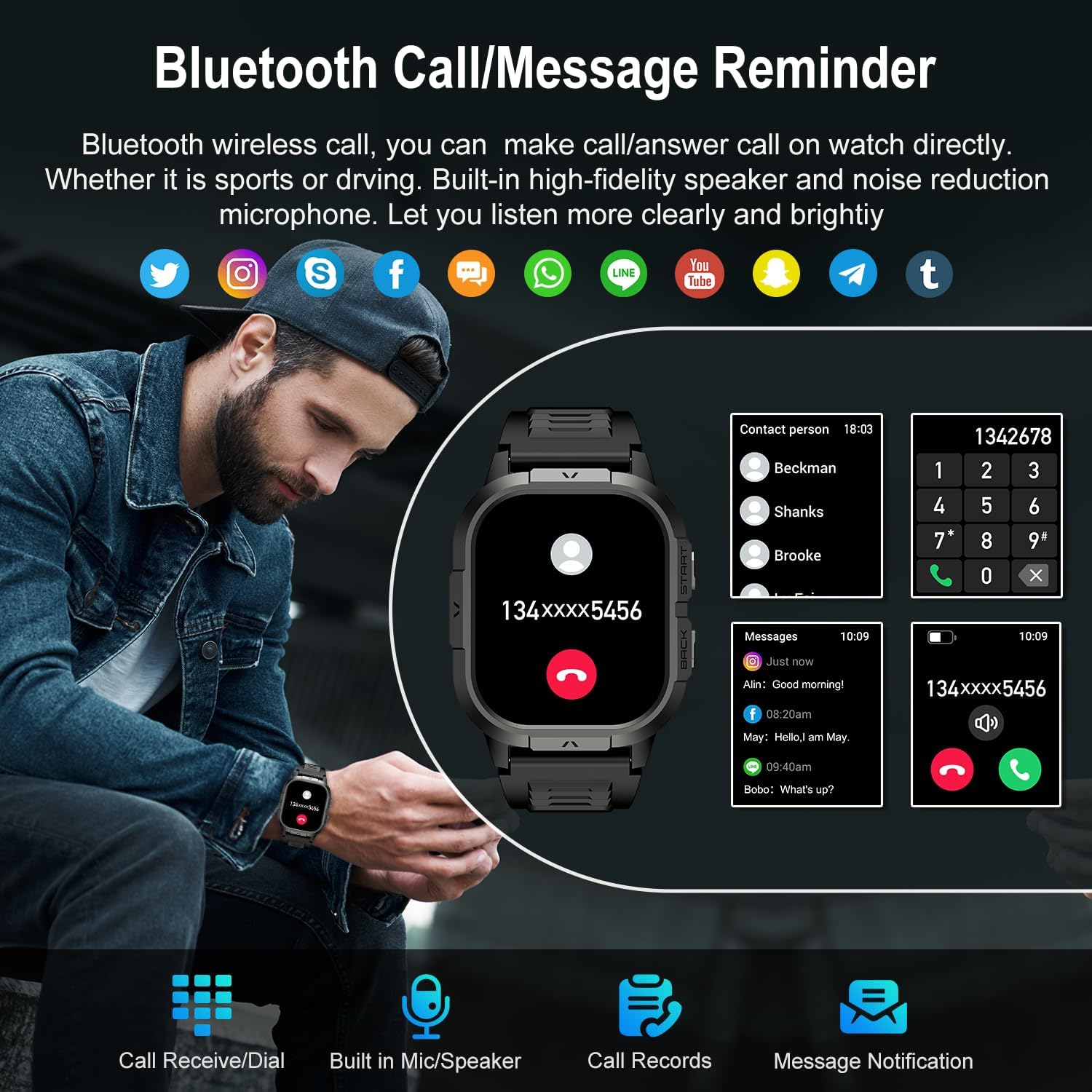
Image: The smart watch interface showing Bluetooth call functionality, including contact lists, dial pad, and message notifications.
2.3 Health Monitoring
The watch utilizes high-performance optical sensors for real-time health data tracking.
- Heart Rate Monitoring: Continuously monitors your dynamic heart rate 24/7. View current and historical data in the app.
- Blood Oxygen (SpO2) Monitoring: Measures blood oxygen saturation levels.
- Sleep Tracking: Automatically tracks your sleep patterns, including light sleep, deep sleep, and awake times. Detailed analysis reports are available in the companion app.
- Stress Level Detection: Monitors stress levels to help you manage your physical condition.
- Breathing Training: Guided breathing exercises to help reduce stress.

Image: The smart watch interface showing sleep monitoring data (deep, light, wake-up times) and real-time heart rate measurement.
2.4 Sports Modes
The watch supports over 100 sports modes to track your physical activity. It records data such as steps, time, distance, and calories. When connected to your phone's GPS, it can also record your training routes.
- Supported Activities: Running, cycling, climbing, walking, yoga, skiing, football, and many more.
- Data Tracking: Monitor real-time metrics like heart rate, calories burned, steps taken, and distance covered during workouts.
- GPS Connectivity: Connects to your smartphone's GPS for accurate route mapping during outdoor activities.

Image: The smart watch interface showing a selection of over 100 sports modes and real-time activity data during a cycling session, including calories, steps, distance, and heart rate.
2.5 Other Functions
The HOXLRSA P110 smart watch includes a variety of additional features to enhance daily use:
- Alarm Clock: Set multiple alarms through the app.
- Weather Forecast: View current weather conditions and forecasts.
- Stopwatch & Timer: For timing activities.
- Music Control: Control music playback on your connected smartphone (play, pause, skip tracks).
- Remote Camera Control: Use the watch as a remote shutter for your phone's camera.
- Flashlight: A simple screen-based flashlight function.
- Sedentary Reminder: Alerts you to move after periods of inactivity.
- Find Watch/Phone: Helps locate your watch or connected phone.
- Screen Brightness Adjustment: Adjust display brightness for optimal viewing.

Image: The smart watch interface demonstrating various practical functions, including music playback control, remote camera shutter, weather display, and stopwatch.
3. Maintenance
3.1 Cleaning
Regularly clean your smart watch and strap to ensure proper function and hygiene. Use a soft, dry, lint-free cloth to wipe the screen and watch body. For the strap, use a slightly damp cloth if necessary, and ensure it is completely dry before wearing.
3.2 Water Resistance
The HOXLRSA P110 smart watch is designed with military-standard quality, offering strong resistance to water. While it is waterproof, prolonged exposure to hot water, steam, or high-pressure water jets should be avoided. Do not operate the watch buttons underwater.
4. Troubleshooting
- Watch not turning on: Ensure the watch is fully charged. Connect it to the charger for at least 30 minutes.
- Cannot pair with phone:
- Ensure Bluetooth is enabled on your phone.
- Make sure the watch is within Bluetooth range of your phone.
- Restart both the watch and your phone.
- Try unpairing and re-pairing the device through the FitCloudPro app.
- Notifications not received:
- Check if notification permissions are granted to the FitCloudPro app on your phone.
- Ensure the app is running in the background.
- Verify that notification settings are enabled within the FitCloudPro app for specific applications.
- Inaccurate health data: Ensure the watch is worn snugly on your wrist, about one finger's width from your wrist bone. Keep the sensor clean.
5. Specifications
| Model Number | P110 |
| Screen Size | 2.06 Inches AMOLED |
| Operating System | Android (5.0+) and iOS (9.0+) |
| Connectivity | Bluetooth, GPS (via Smartphone) |
| Battery Type | Lithium Ion |
| Battery Capacity | 1 Milliamp Hours |
| Memory Storage Capacity | 10 MB |
| Item Weight | 5 ounces |
| Special Features | Fitness Tracker, Phone Call, Sleep Monitor, Blood Oxygen (SpO2) Monitor, Heart Rate Monitor, Calorie Tracker, Alarm Clock, Stopwatch, Timer, Pedometer, Camera Control, Music Playback/Control, Sedentary Reminder, Weather, Waterproof, Notifications. |