1. Important Safety Instructions
Before operating this treadmill, please read all instructions carefully. Keep this manual for future reference.
- Always attach the safety key clip to your clothing before starting the treadmill. In case of an emergency, the safety key will stop the machine.
- Place the treadmill on a flat, stable surface with at least 2 meters (6.5 feet) of clear space behind it and 0.6 meters (2 feet) on each side.
- Do not allow children or pets near the treadmill while it is in operation.
- Consult your physician before starting any exercise program.
- Wear appropriate athletic footwear and clothing.
- Do not use the treadmill if you feel dizzy, faint, or experience any pain. Stop exercising immediately.
- Keep hands clear of all moving parts.
- Unplug the treadmill from the power outlet when not in use or before cleaning and maintenance.
- The maximum user weight capacity for this treadmill is 350 lbs (158 kg).
2. Package Contents
Carefully unpack the box and ensure all items listed below are present and undamaged. If any parts are missing or damaged, contact customer support.
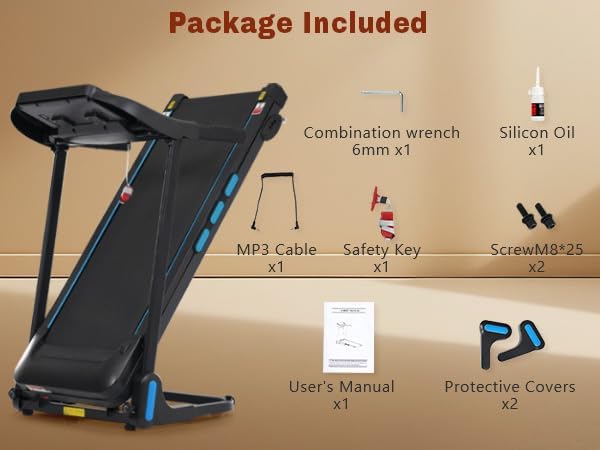
Image: Contents of the treadmill package, showing the main treadmill unit, combination wrench, silicon oil, MP3 cable, safety key, screws, user's manual, and protective covers.
- Treadmill Main Unit (partially assembled)
- Combination Wrench (6mm) x1
- Silicon Oil x1
- MP3 Cable x1
- Safety Key x1
- Screw M8*25 x2
- User's Manual x1
- Protective Covers x2
3. Product Overview
The Generic Foldable Treadmill is designed for home use, offering a robust and quiet workout experience.
3.1 Key Features
- Powerful & Quiet Motor: Equipped with a 3.5HP motor, supporting users up to 350 lbs, with speeds up to 10 MPH and low noise operation.
- Spacious Running Belt: A 41.7" x 15.3" running area with a 7-layer textured belt for cushioning and traction.
- Compact Folding Design: Hydraulic folding system and transport wheels for easy storage.
- Smart LED Console: Three LED displays track time, distance, speed, calories, and heart rate.
- Workout Programs: Includes 12 preset workout programs.
- Multifunctional Features: Bluetooth speaker, USB/Type-C charging ports, bottle holder, and 4-level manual incline.
3.2 Treadmill Components

Image: Detailed view of the treadmill's console, showing three LED displays for pulse, time/distance, and speed. Buttons for volume, speed adjustment, quick speed, program, start/pause, stop, and mode are visible. Also highlights Type-C & USB charge ports, AUX audio, 12 programs, safety key, and 3 modes.
- Console: Displays workout data and controls.
- Running Belt: The surface for walking or running.
- Handrails: For balance and support, includes heart rate sensors and speed controls.
- Safety Key Slot: Where the safety key is inserted to enable operation.
- Incline Adjusters: Manual levers for adjusting the running deck incline.
- Transport Wheels: For moving the folded treadmill.
- Hydraulic Folding System: Assists in folding and unfolding the treadmill.
4. Setup and Assembly
Follow these steps to assemble your treadmill. It is recommended to have two people for assembly.
- Unpack: Remove all components from the packaging and place them on a clear, flat surface.
- Base Assembly: Ensure the main base frame is stable.
- Upright Installation: Carefully raise the uprights and secure them according to the diagrams in the separate assembly guide (if provided).
- Console Attachment: Attach the console to the uprights, ensuring all cables are connected securely.
- Secure All Bolts: Double-check that all bolts and screws are tightened.
- Power Connection: Plug the power cord into a grounded electrical outlet.
4.1 Unfolding the Treadmill

Image: The treadmill shown in both its compact folded state and its fully extended, ready-to-use position, highlighting the hydraulic system for auto-folding and transport wheels.
- Gently push the running deck downwards until the hydraulic system fully extends and the deck locks into place.
- Ensure the treadmill is fully unfolded and stable before use.
4.2 Adjusting Manual Incline
The treadmill features 4 levels of manual incline. To adjust:
- Ensure the treadmill is off and unplugged.
- Lift the rear of the running deck slightly.
- Adjust the incline levers/pins on both sides of the treadmill to the desired level.
- Lower the deck slowly, ensuring both sides are set to the same incline level and securely locked.
5. Operating Instructions
5.1 Starting the Treadmill
- Plug the power cord into a grounded outlet.
- Attach the safety key to the console and clip the other end to your clothing.
- Press the START/PAUSE button on the console or armrest. The treadmill will begin with a 3-second countdown and then start at a low speed.
5.2 Console Functions
The console features three LED displays and various control buttons:
- LED Displays: Show Pulse/Calories, Time/Distance, and Speed.
- PROG (Program) Button: Selects from 12 preset workout programs.
- START/PAUSE Button: Starts or pauses the running belt.
- STOP Button: Stops the running belt and ends the workout.
- MODE Button: Switches between different display modes or workout settings.
- Speed +/- Buttons: Adjusts the running speed incrementally.
- Quick Speed Buttons (3, 6, 9): Instantly sets the speed to 3, 6, or 9 MPH.
- Volume +/- Buttons: Controls the volume of the Bluetooth speaker.
5.3 Using Preset Programs
- From standby mode, press the PROG button to cycle through the 12 preset programs (P1-P12).
- Once a program is selected, press START/PAUSE to begin the workout. The treadmill will automatically adjust speed according to the program profile.
5.4 Bluetooth Speaker and Charging
- Bluetooth: Enable Bluetooth on your mobile device and search for the treadmill's Bluetooth name (e.g., "Treadmill Audio"). Pair to play music through the integrated speakers.
- USB & Type-C Charging: Use the USB or Type-C ports on the console to charge your devices during your workout.
- AUX Audio: Connect an external audio device using the provided MP3 cable to the AUX port.
6. Maintenance
Regular maintenance ensures the longevity and optimal performance of your treadmill.
6.1 Cleaning
- Wipe down the console and other surfaces with a damp cloth after each use. Avoid abrasive cleaners.
- Vacuum underneath the treadmill regularly to prevent dust and debris buildup.
6.2 Running Belt Lubrication
The running belt requires lubrication every 3-6 months, or after approximately 50 hours of use, to reduce friction and extend belt life. Use only 100% silicone lubricant.
- Turn off and unplug the treadmill.
- Loosen the rear roller bolts slightly to lift the running belt.
- Apply a small amount of silicone lubricant evenly under the center of the running belt.
- Tighten the rear roller bolts.
- Run the treadmill at a low speed (e.g., 2 MPH) for 5 minutes to distribute the lubricant.
6.3 Running Belt Adjustment
If the running belt shifts to one side or slips, it may need adjustment.
- Centering the Belt: If the belt drifts to the left, turn the left rear roller bolt clockwise 1/4 turn. If it drifts to the right, turn the right rear roller bolt clockwise 1/4 turn. Run the treadmill for 2 minutes and re-check. Repeat if necessary.
- Tightening the Belt: If the belt slips during use, turn both rear roller bolts clockwise 1/4 turn simultaneously. Run the treadmill for 2 minutes and re-check. Repeat if necessary. Do not overtighten.
7. Troubleshooting
Refer to this section for common issues and their solutions.
| Problem | Possible Cause | Solution |
|---|---|---|
| Treadmill does not start | Power cord unplugged, safety key not inserted, circuit breaker tripped. | Check power connection, ensure safety key is fully inserted, reset circuit breaker. |
| Running belt slips | Belt too loose, belt needs lubrication. | Adjust belt tension (Section 6.3), lubricate belt (Section 6.2). |
| Running belt drifts to one side | Belt alignment issue. | Adjust belt alignment (Section 6.3). |
| Unusual noise during operation | Loose parts, motor issue, belt friction. | Check all bolts, lubricate belt, contact customer support if noise persists. |
| Heart rate monitor inaccurate | Improper hand placement, dry hands. | Ensure firm, even grip on sensors; moisten hands slightly if dry. |
8. Specifications
| Feature | Detail |
|---|---|
| Brand | Generic |
| Model Name | N728P338626B |
| Motor Horsepower | 3.5 HP |
| Maximum Speed | 10 Miles per Hour |
| Maximum Weight Recommendation | 350 Pounds |
| Running Belt Dimensions | 41.7" x 15.3" |
| Product Dimensions (LxWxH) | 48.23" x 19.69" x 41.14" |
| Item Weight | 69.18 Pounds |
| Material | Metal |
| Incline Levels | 4-Level Manual Incline |
| Programs | 12 Preset Programs |
| Special Features | Bluetooth Speaker, USB & Type-C Charging, Hydraulic Folding |
9. Warranty and Support
9.1 Warranty Information
This product comes with a half-month warranty from the date of purchase. The warranty covers manufacturing defects under normal use. It does not cover damage caused by misuse, accident, unauthorized modification, or improper maintenance.
Please retain your proof of purchase for warranty claims.
9.2 Customer Support
For technical assistance, parts replacement, or any questions regarding your Generic Foldable Treadmill, please contact our customer support team.
Contact information (e.g., email, phone number, website) can typically be found on the product packaging or the retailer's website where the product was purchased.