Introduction
This manual provides essential information for the safe and proper operation, assembly, and maintenance of your CANKETEC 12V Electric Wiggle Car. Please read all instructions carefully before use and retain this manual for future reference.
Safety Information
- Age Recommendation: Suitable for children aged 36 months and older.
- Maximum User Weight: The maximum user weight is 150 lbs (68 kg).
- Adult Supervision: Adult supervision is required at all times to reduce the risk of injury.
- Safe Operating Environment: Never use the vehicle in roadways, near motor vehicles, on or near steep inclines or steps, swimming pools, or other bodies of water. Operate on flat, dry surfaces.
- Protective Gear: Always ensure the child wears appropriate protective clothing and shoes.
- Fire Hazard: Keep the vehicle away from fire and extreme heat sources.
- Small Parts: To reduce the risk of injury, ensure all small parts are securely fastened and kept away from young children.
What's in the Box
- Wiggle Car x 1
Assembly Instructions
The CANKETEC 12V Electric Wiggle Car features an easy two-step setup process. Follow the visual guides and instructions provided to ensure correct assembly.
- Attach the Steering Column: Securely attach the steering column to the main body of the car using the provided fasteners.
- Connect the Rear Wheel Assembly: Attach the rear wheel assembly, ensuring all connections are firm.

Figure 1: Main components of the Electric Wiggle Car before assembly.
Video 1: A short demonstration of the assembly process for the Electric Wiggle Car.
Operating Instructions
The Wiggle Car offers two modes of operation: Electric and Manual.
Electric Mode
- Power On: Locate the power switch (usually on the underside of the car) and turn it to the 'ON' position.
- Engage Drive: Press the foot pedal to activate the electric motor and move the car forward. Release the pedal to slow down and stop.
- Steering: Use the steering wheel to control direction. The steering wheel's smooth bearings allow for 360° steering.
Manual Mode
Even without electric power, the car can be operated manually. Turn the steering wheel from side to side or use your feet to propel the car forward, similar to a traditional wiggle car.
Speed Adjustment
The car has a maximum speed of 4 mph. For younger riders or indoor use, the speed can be adjusted to 1.9 mph using a button located on the bottom of the car. Refer to Figure 2 for the button location.
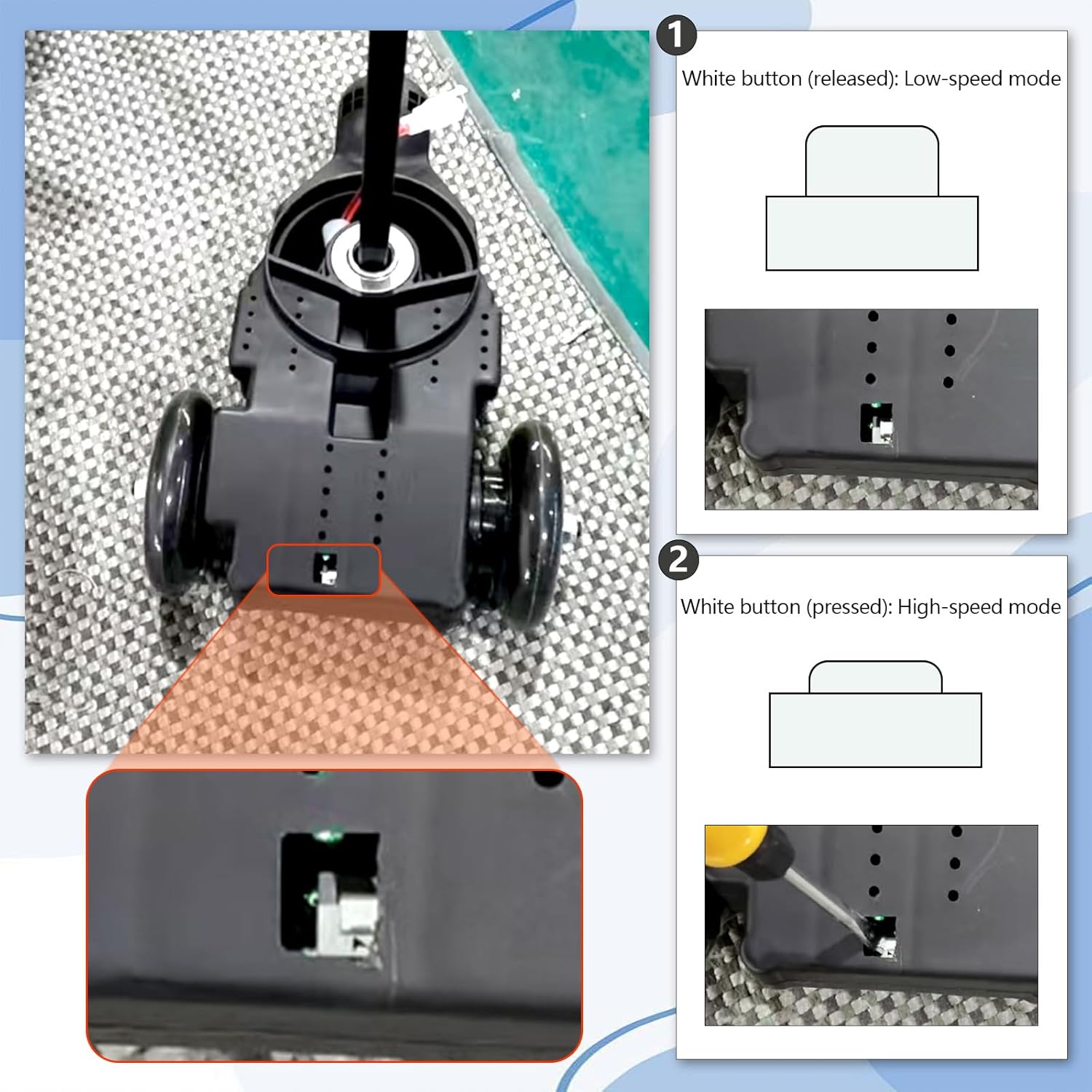
Figure 2: Speed adjustment button for switching between low (1.9 mph) and high (4 mph) speeds.
Special Features
- Lights: The car features a front light and magnetic flashing wheels that light up during motion.
- Turbo Spray: Activate the turbo spray effect for an exciting fog trail.
- Bluetooth Connectivity: Connect your device via Bluetooth to play music through the car's integrated speaker.
Video 2: Instructions on how to connect a device via Bluetooth to the wiggle car.
Charging the Battery
The CANKETEC Electric Wiggle Car is powered by a rechargeable 12V battery.
- Locate Charging Port: The charging port is located on the underside of the car.
- Connect Charger: Plug the provided power charger into the charging port and then into a standard wall outlet.
- Charging Indicator: The charger will typically have an indicator light (e.g., red for charging, green for fully charged).
- First Use: Fully charge the battery for 10-12 hours before the first use. Do not overcharge for more than 16 hours.

Figure 3: Location of the charging port and power switch.
Maintenance
- Cleaning: Wipe the car with a damp cloth to clean. Avoid using harsh chemicals or abrasive cleaners.
- Storage: Store the car in a dry, cool place away from direct sunlight when not in use.
- Battery Care: To prolong battery life, ensure the battery is fully charged before long-term storage and recharge periodically if stored for extended periods.
- Wheel Inspection: Regularly check the wheels for wear and tear. Ensure they are free from debris that could impede movement.
Troubleshooting
- Car Not Moving: Ensure the power switch is 'ON' and the battery is charged. Check if the foot pedal is fully pressed.
- Lights Not Working: Verify the power switch is 'ON'. For flashing wheels, ensure the car is in motion as they are magnetic-activated.
- Bluetooth Connection Issues: Ensure the car's Bluetooth is activated (refer to operating instructions). Check your device's Bluetooth settings and try reconnecting.
- Reduced Speed/Power: The battery may be low and require charging. Ensure the speed setting is not on the lower mode.
Specifications
| Feature | Detail |
|---|---|
| Product Dimensions | 32.5 x 18.5 x 12.8 inches |
| Item Weight | 20 pounds |
| Manufacturer Recommended Age | 3 - 8 years |
| Maximum User Weight | 150 pounds |
| Maximum Speed | 4 mph (adjustable to 1.9 mph) |
| Battery Life | 1-2 hours (approx.) |
| Maximum Cruising Range | 4-6.2 miles (approx.) |
Warranty and Support
For warranty information, technical support, or any inquiries regarding your CANKETEC 12V Electric Wiggle Car, please contact CANKETEC customer service. Refer to your purchase documentation for specific warranty terms and contact details.